
Are you ready to take your Web API live and make it accessible to users around the globe? Hosting your Web API on a server is the crucial step that transforms your development project into a dynamic, interactive service.
This guide is designed to simplify the process for you, breaking down the essential steps to ensure your API is hosted efficiently and securely. Imagine the satisfaction of seeing your application running smoothly, interacting with users, and fulfilling requests without a hitch.
By following the strategies outlined here, you can achieve that seamless experience. Dive into this article to unlock the secrets of successful Web API hosting, and empower your application to reach its full potential. Your journey to a robust and responsive API starts now—let’s get it up and running!
Credit: www.c-sharpcorner.com
Choosing The Right Server
Dedicated hosting means your website is alone on a server. This gives more power and control. Your site runs faster and safer. But it costs more. Shared hosting is cheaper. Many websites share one server. It is good for small sites. Yet, it can be slow when traffic is high. Choose based on your needs and budget.
Cloud hosting uses many servers. Your data is stored online. It is flexible and can handle more traffic. You pay only for what you use. On-premises hosting means your data is on your own server. It is good for sensitive data. But it needs more care and costs more. Decide based on your data safety and budget.
Setting Up The Server Environment
Start by installing the web server software. Common choices are Apache or Nginx. Both are free and work well. You also need a database. MySQL and PostgreSQL are popular. Choose one that fits your needs. Lastly, install a programming language runtime. This could be Node.js, Python, or Java. Pick the one your API uses.
Security is important for your server. First, set up a firewall. This keeps bad traffic out. Next, use SSL certificates. They make data safe when it moves. Also, update all software often. This keeps your server protected. Remember, strong passwords are key. Use them for all accounts.
Deploying The Web Api
First, gather all your API files. Make sure they’re complete. Check your files for errors. Use a secure method to upload them. An FTP client can help. It transfers files to your server. Ensure the files are in the right directory. This helps the server find them easily.
Deployment scripts make things easy. They help manage the API. Create a script with clear steps. Start by stopping the current service. Then replace old files with new ones. Restart the service to apply changes. Ensure your script handles errors. This prevents failures during updates. Test the script in a safe environment first.

Credit: www.dotnetcurry.com
Configuring The Api
API endpoints are like doors. Each door leads to data or a service. Adjusting endpoints is important. This helps in organizing data access. Make sure each endpoint is clear. Use simple names for endpoints. This helps users understand easily. Check each endpoint often. Ensure they work correctly.
API keys are like passwords. They keep data safe. Manage keys carefully. Do not share them with everyone. Each user should have a unique key. This keeps the system secure. Change keys often. Remove keys that are not needed. Always keep track of key usage. This helps in spotting any misuse.
Testing The Hosted Api
Hosting a Web API on a server involves deploying your application to a web server. This process makes your API accessible over the internet. Proper configuration ensures smooth communication between the server and clients, enhancing the API’s usability and reliability.
Running Initial Tests
Begin by checking if the API responds to basic requests. Use tools like Postman or curl. Send simple requests to the API. Check if you receive the expected responses. Look for status codes like 200 for success. If errors appear, investigate the error messages. Fix any issues before moving forward. This step ensures the API is functioning properly.
Monitoring Performance
Performance tracking is crucial. Use monitoring tools to watch the API’s behavior. Check how fast it responds to requests. Identify any slow parts. Track the number of requests over time. Analyze the server’s resource usage. Ensure the API remains stable under load. Regular checks keep the system running smoothly.
Securing The Web Api
HTTPS makes your API secure. It uses encryption to protect data. This stops hackers from stealing information. Every site should use HTTPS. It keeps data safe between server and user. Use a certificate to enable it. The certificate verifies your site’s identity. This builds trust with users.
Authentication checks who is using the API. Authorization decides what they can do. Always use both for security. Require strong passwords for authentication. Use tokens for easy access control. Tokens are like keys. They open only the doors you allow. This keeps unauthorized users out. Protects important data.
Maintaining And Updating
To host a Web API on a server, ensure regular updates and maintenance for optimal performance. Monitor server health and security settings consistently. Use automated tools to streamline updates and minimize downtime.
Regular Backups
Backing up data keeps it safe. Regular backups prevent data loss. Use reliable tools for backup. Schedule backups weekly or daily. Store backups in secure places. Cloud storage is a good option. Test backups often to ensure they work. A good backup plan saves time.
Applying Software Updates
Software updates fix bugs. Updates improve security and performance. Apply updates as soon as they are available. Set automatic updates for ease. Keep track of update logs. This helps identify issues. Check for compatibility before applying updates. Updates can prevent downtime.
Troubleshooting Common Issues
Hosting a Web API on a server involves setup challenges. Ensure the correct server configuration and firewall settings. Address issues like port conflicts and environment variables for smooth deployment.
Debugging Server Errors
Server errors can be tricky to handle. Check the server logs first. Logs often show error codes. Find those codes in documentation. Look for syntax mistakes in your code. Small typos can cause big issues. Use a debugger to step through your code. This helps find where it breaks. Test the API endpoint directly. Make sure it’s working as expected. Sometimes, errors come from another part of the system. Verify server configurations are correct. Wrong settings can block API access.
Resolving Connectivity Problems
Connectivity problems can stop your API from working. First, check network connections. Ensure cables and routers are set correctly. Ping the server to see if it responds. This shows if the server is reachable. Check firewall settings. Firewalls might block API traffic. Verify DNS settings if you use domain names. Incorrect DNS can cause lookup failures. Test the API with different clients. This ensures the issue isn’t client-specific. Review server permissions. Permissions might restrict access to the API.

Credit: stackoverflow.com
Frequently Asked Questions
How Do I Host My Web Api?
To host your Web API, choose a cloud service like AWS, Azure, or Google Cloud. Deploy your API using Docker containers or serverless functions. Ensure security with HTTPS and authentication. Use a CI/CD pipeline for seamless updates. Optimize for scalability and monitor performance regularly.
How To Deploy Api On Server?
Deploy an API by setting up a server environment, installing dependencies, configuring routes, and testing endpoints. Use tools like Docker for containerization, and choose a cloud provider for scalability. Ensure security measures, like authentication and encryption, are in place. Monitor performance regularly for optimal functionality.
How To Deploy Web Api In Iis Server?
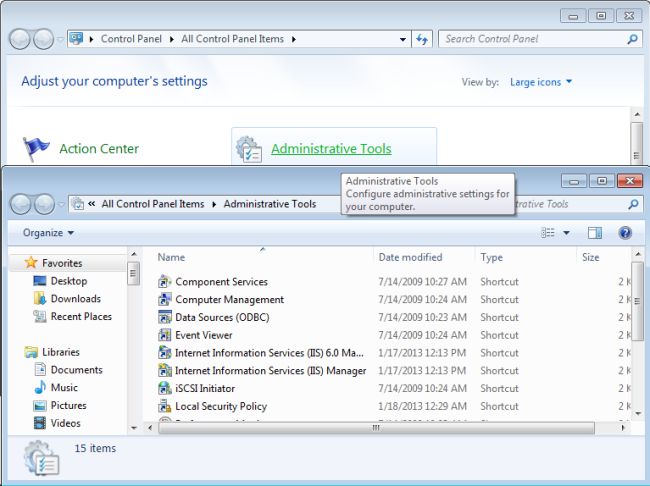
To deploy a Web API on IIS, publish your project in Visual Studio. Transfer the published files to the IIS server. Create a new site in IIS Manager and point it to the deployed folder. Configure application pool settings and ensure the API runs on the desired port.
Can I Host My Api For Free?
Yes, you can host your API for free using platforms like Heroku, Vercel, or Netlify. These services offer free tiers with limited resources suitable for small projects. Make sure to review their terms and limitations before proceeding.
Conclusion
Hosting your Web API on a server is straightforward. Follow the steps, and you’ll be set. Choose the right server. Configure settings carefully. Test your API thoroughly. Ensure security measures are in place. Monitor performance regularly. Troubleshoot issues promptly. These actions help maintain smooth operations.
Remember, practice enhances skills. Over time, you’ll gain confidence. Hosting becomes easier with experience. Keep learning. Explore new tools. Stay updated with trends. This will improve your hosting skills. You’re ready to host your Web API successfully. Dive in, and start hosting today.
Enjoy the journey of API management!


