
Imagine having a web page that loads in the blink of an eye, requires minimal maintenance, and costs you next to nothing to host. Sounds appealing, right?
Hosting a static web page offers all these benefits and more. Whether you’re showcasing your portfolio, running a personal blog, or simply sharing information, static pages can be your digital canvas. You might wonder, how do you set one up without diving into complex coding or investing in expensive hosting services?
That’s exactly what we’re going to explore. This guide will empower you with simple steps to host your static web page effortlessly, ensuring you make a memorable impression online. Get ready to unlock the secrets behind a smooth, seamless web experience that keeps your audience engaged and coming back for more. Dive in, and let’s transform your digital presence together!
Choosing A Hosting Platform
Many platforms offer free hosting for static pages. GitHub Pages is a popular choice. Developers use it for projects and personal websites. Netlify also provides free hosting. It is easy to use and offers many features. Vercel is another option. It is popular with front-end developers.
Paid services offer more features. AWS is a reliable option. It provides high security and scalability. Google Cloud is another choice. It integrates well with other Google services. Azure offers good support. Many businesses trust it for their hosting needs.
| Platform | Free | Paid |
|---|---|---|
| GitHub Pages | Yes | No |
| Netlify | Yes | Yes |
| Vercel | Yes | Yes |
| AWS | No | Yes |
| Google Cloud | No | Yes |
| Azure | No | Yes |

Credit: www.linkedin.com
Setting Up Your Domain
Start by choosing a domain name. It is your website’s address. Make it easy to remember. Use simple words. Avoid numbers and hyphens. Next, find a domain registrar. This is where you buy your domain. Popular registrars are GoDaddy and Namecheap. They help you register the domain. Once registered, it is yours.
After registration, configure your domain. This links your domain to your website. Use the registrar’s control panel. Find the DNS settings. Enter your web host’s nameservers. This points your domain to your web host. Wait for the changes to take effect. This can take up to 48 hours.
Decide between a custom domain and a subdomain. A custom domain looks like “example.com”. It is unique and professional. A subdomain is part of a bigger domain. It looks like “blog.example.com”. It is free with many web hosts. Choose what fits your needs.
Uploading Your Files
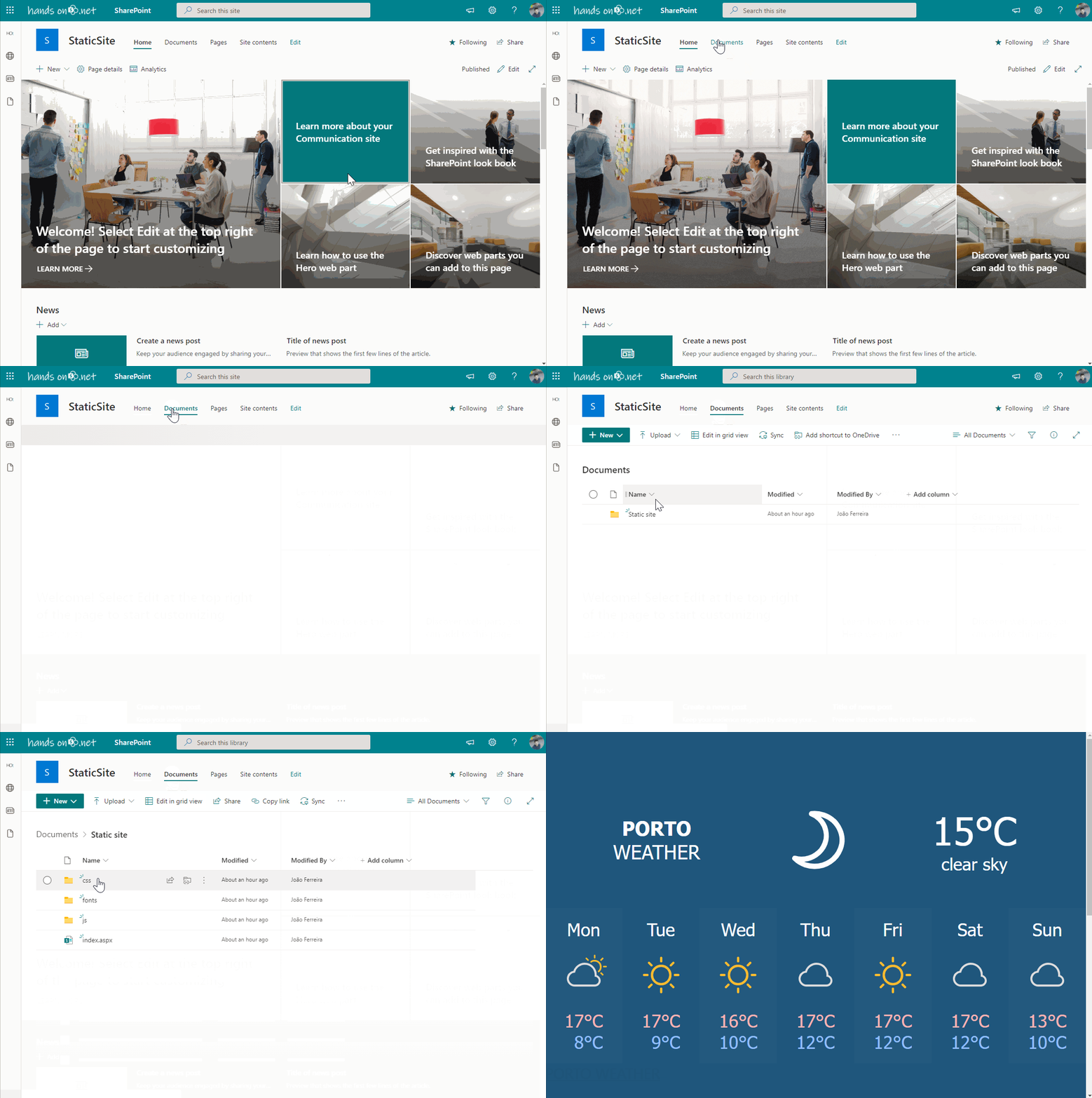
Keep files in a neat and organized manner. Use folders for images, scripts, and styles. This makes it easy to find them. Name files clearly. Avoid spaces and special characters. Use dashes instead. This helps in easy access and management. Follow these steps to ensure a clean structure.
FTP clients help move files from your computer. You need a username and password. Popular clients include FileZilla and Cyberduck. Connect to the server using these details. Drag files from your computer to the server window. It’s like copying files between folders. Easy and quick.
Some hosts offer web-based managers. Access them through your host’s site. No need for extra software. Upload files directly from your browser. It’s simple and works like a file explorer. Click “Upload” and select your files. Wait for the upload to complete. Your files are now online.
Credit: sharepoint.handsontek.net
Configuring Web Server Settings
Start by setting up the server software. Choose from options like Apache or Nginx. Both are good for hosting static pages. Install the software on your server. Next, select a folder for your web files. Place all HTML, CSS, and images here. Make sure the server points to this folder.
HTTPS makes your site safe. It encrypts the data between the user and server. Get a SSL certificate from a trusted authority. Install it on your server. Update the server settings to use HTTPS. This protects user data and gains trust.
Show friendly error pages if something goes wrong. Create a custom 404 error page. This page tells users they are lost. Update the server to use this page for missing files. Also, log errors for fixing later.
Optimizing For Performance
Minifying makes files smaller. This speeds up loading. Remove unused code. Shorten variable names. Use tools like UglifyJS. CSSNano is great for CSS. Smaller files make pages faster.
Browser caching helps speed. Save files on user’s device. Set cache headers. Use `expires` or `cache-control`. Files stored locally load faster. Less server requests needed. Better speed. Less data usage for users.
Images can slow down pages. Optimize them for speed. Reduce file size. Use formats like JPEG or PNG. Compress images without losing quality. Use online tools for compression. Lazy load images. Only load images when needed. Faster page load.
Testing Your Web Page
Web pages should work on all browsers. Different browsers handle pages differently. Test your page on Chrome, Safari, Firefox, and Edge. Look for layout differences or missing elements. Fix any issues to ensure a smooth experience for all users.
Many people use phones to browse. Make sure your web page looks good on small screens. Resize your browser to check how things look. Use tools to test mobile views. Adjust elements that seem too big or small. This helps your site work for everyone, no matter the device.
Fast loading pages keep visitors happy. Slow pages can lose users. Test your page’s load speed. Use tools like Google PageSpeed Insights. Look at images and scripts that take too long. Optimize them for better performance. Quick pages make for a better user experience.
Launching And Monitoring
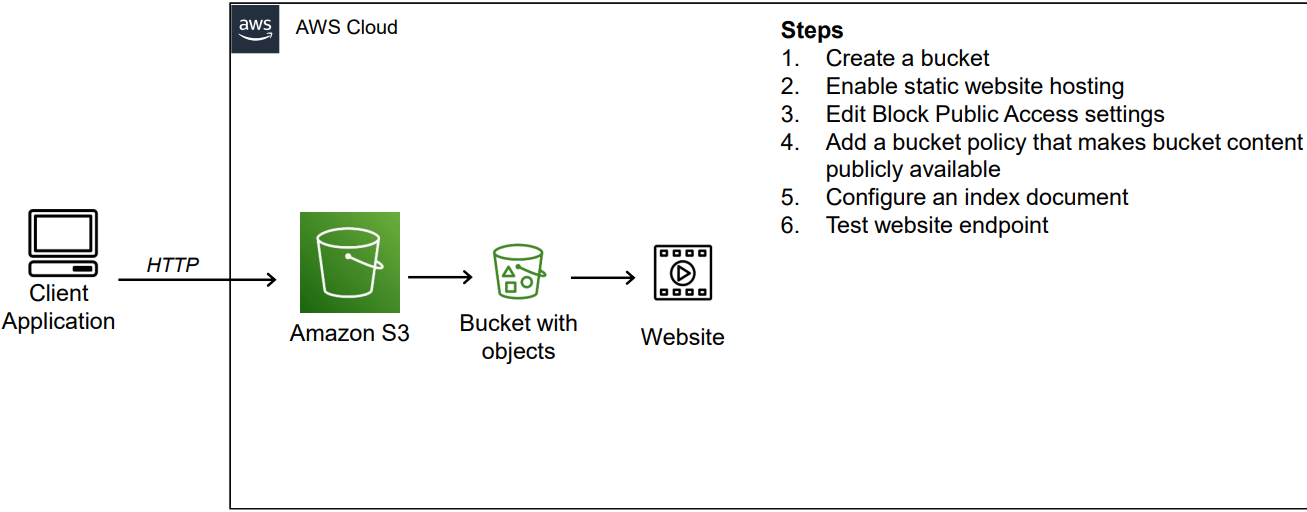
Launching a static web page involves uploading files to a server. Monitoring ensures it runs smoothly and remains accessible. Use tools to track performance and uptime, fixing issues promptly to maintain optimal user experience.
Final Pre-launch Checklist
Check all links to ensure they work. Review your website on different browsers. Make sure it looks the same everywhere. Test the website on both desktop and mobile devices. Ensure all images are optimized for fast loading. Confirm that all texts are readable and clear. Make sure contact forms are working. Check if any buttons are broken. Validate the HTML and CSS code for errors. Backup your website before going live.
Using Analytics Tools
Use tools like Google Analytics to track visitors. See which pages are most popular. Understand where your visitors come from. Track how long they stay on each page. Monitor if they return to the site. Find out which keywords bring them to you. Adjust your content based on these insights. This helps in improving your website performance.
Regular Maintenance Tips
Always update your content. Check for broken links regularly. Keep an eye on your website speed. Make sure it loads fast. Update your security features often. Use strong passwords for safety. Backup your site data weekly. Keep your visitors safe. Check your analytics data monthly. Find new ways to improve. Stay up to date with technology changes.
Credit: medium.com
Frequently Asked Questions
How Do I Host My Static Website?
Choose a reliable hosting service like GitHub Pages, Netlify, or Vercel. Upload your static files there. Configure domain settings if needed. Your site will be live and accessible globally.
How Much Does It Cost To Host A Static Website?
Hosting a static website can cost from free to a few dollars per month. Providers like Netlify and GitHub offer free hosting plans. Paid options, such as AWS and Google Cloud, start at approximately $5 monthly. Prices depend on bandwidth, storage, and additional features.
Does A Static Website Need A Server?
Yes, a static website requires a server to host its files. A server delivers HTML, CSS, and JavaScript files to users’ browsers. Unlike dynamic sites, static websites don’t need server-side scripting. Hosting options include shared hosting, cloud services, or local servers for easy accessibility.
What Is The Easiest Way To Host A Personal Website?
Choose a reliable website builder like Wix or WordPress. They offer easy hosting and customizable templates. Sign up, select a template, and customize your site. Publish with a click, and your personal website goes live. It’s user-friendly and efficient, perfect for beginners without coding skills.
Conclusion
Hosting a static web page is simpler than it seems. Start with choosing a reliable hosting provider. Upload your HTML files to the server. Ensure your files are named correctly. Check your page for errors before publishing. Test your site across different browsers.
Keep your design clean and straightforward for faster loading. Regular updates and backups are essential. Your static page is now ready for visitors. Enjoy sharing your content online. Hosting a static page is an achievable task. A little practice makes it even easier.


