
Are you ready to take your Python web application from your local machine to the world wide web? Hosting your Python app can seem daunting, but it doesn’t have to be.
Imagine the satisfaction of watching your hard work go live, accessible to users around the globe. In this guide, you’ll discover the steps to host your Python web application effectively and efficiently. Whether you’re a seasoned developer or a curious beginner, this article will simplify the process, making it manageable and stress-free.
Unlock the potential of your Python app and let it shine. Dive in, and let’s get started on turning your project into a public masterpiece!
Credit: www.pythonanywhere.com
Choosing The Right Hosting Platform
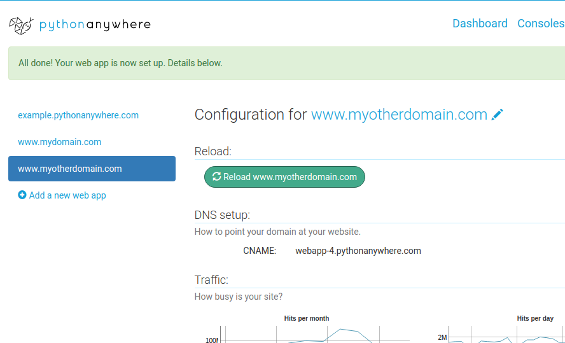
Selecting a hosting platform is crucial for Python web applications. Factors like scalability and security define performance. Platforms such as AWS, Heroku, or PythonAnywhere cater to various needs, ensuring your application runs smoothly and efficiently.
Shared Vs Dedicated Hosting
Shared hosting is cheap. Many websites use one server. It can slow down your site. Dedicated hosting gives you one server. It’s expensive but faster. More control. Better for big sites. Choose based on needs.
Cloud Hosting Options
Cloud hosting is flexible. Pay for what you use. Resources can grow or shrink. Good for changing needs. Many providers offer cloud hosting. Check features and costs. It can be cost-effective.
Platform As A Service (paas)
PaaS simplifies hosting. You focus on coding. The platform handles servers. It offers tools for easy app management. No need for server management. Good for beginners and small teams.
Setting Up A Development Environment
Python is a popular programming language. First, download the Python installer from the official website. Choose the version that suits your computer. Run the installer and follow the instructions. Make sure to check the option to add Python to your path. This helps you use Python from the command line.
A virtual environment keeps projects separate. This avoids conflicts between different Python projects. To create one, open your terminal or command prompt. Type python -m venv myenv. Replace “myenv” with your desired name. Activate it by running myenvScriptsactivate on Windows or source myenv/bin/activate on Mac/Linux.
Packages add extra features to Python. Use pip to install them. While in your virtual environment, type pip install package-name. Replace “package-name” with the name of the package. Common packages include Flask, Django, and Requests. They help build web applications easily.
Preparing Your Python Web Application
Discover the steps to host your Python web application effectively. Choose a reliable hosting provider and set up a virtual environment. Deploy your code securely for seamless web performance.
Project Structure
A clean and organized project structure is key. Make folders for scripts, templates, and static files. Group related files together. Keep your code easy to read. Use naming conventions that make sense. This helps others understand your project quickly.
Configuring Dependencies
Dependencies are the libraries and tools your project needs. Use a file called requirements.txt to list them. This keeps track of all needed packages. Make sure to use the right versions. Use commands to install them easily. This keeps your environment consistent.
Environment Variables
Environment variables store sensitive information like passwords or keys. They keep this data safe from code exposure. Set them in a special file. Load them when your application starts. This is important for security. Always keep these variables hidden.
Choosing A Web Framework
Django is a popular choice. It is easy to use. It comes with many features. This makes building web apps simple. It offers security and scalability. You can build complex sites with Django. It has a large community. This means you get help fast. With Django, you can launch projects quickly.
Flask is lightweight and flexible. It is easy to learn. Flask suits small projects. It offers freedom to design your app. You can add features as needed. It has fewer built-in tools. This can be good for beginners. Flask is great for fast development. Many people love its simplicity.
FastAPI is modern and fast. It is great for APIs. It uses async programming. This makes it very efficient. FastAPI supports automatic docs. This helps developers a lot. It has high performance. It is ideal for data handling. FastAPI is growing quickly in use. It is becoming popular for web apps.
Deploying The Application
To host a Python app, you need a web server. Apache and Nginx are popular choices. They help manage user requests and deliver web pages. Install the server on your machine. Configure it to talk to your app. This step is key for smooth operation.
A WSGI server connects your app with the web server. It makes sure the app runs well. Popular WSGI servers are Gunicorn and uWSGI. They handle multiple requests at once. This keeps your app fast and reliable. Choose a WSGI server that fits your needs.
Your app might need a database. Databases store user data and content. Options include MySQL, PostgreSQL, and SQLite. Install the database on your machine. Set up tables for data storage. Make sure your app can connect to the database.
Credit: medium.com
Securing Your Application
Protect data with SSL/TLS certificates. These create a secure link. They keep user information safe. Hackers find it hard to break in. Websites with SSL show a padlock. Users trust these sites more. Get certificates from trusted sources. Install them correctly. Keep them updated. This prevents breaches.
Firewalls are barriers. They block harmful traffic. Only allow safe connections. Firewalls protect servers from attacks. Set rules for traffic. Monitor activities regularly. Update firewall settings often. Strong firewalls keep data safe. They are essential for security.
Perform security audits often. They check for weaknesses. Audits find security gaps. Fix issues quickly. Regular checks prevent attacks. Use tools for audits. Hire experts if needed. Audits keep systems strong. They ensure ongoing protection.
Monitoring And Maintenance
Good tools keep your app running smoothly. New Relic and Datadog are popular choices. These tools watch your app’s performance closely. They help spot any slowdowns or problems. Real-time alerts notify you quickly. Quick action prevents bigger issues. Choose a tool that fits your needs and budget.
Backups are lifesavers. Automated backups save time and prevent data loss. Tools like AWS Backup or Google Cloud Backup are useful. They store copies of your data safely. Set a regular schedule for backups. It’s like having a safety net for your data. Always check that backups work correctly.
Server downtime can be frustrating. Use load balancers to manage traffic. They help distribute user requests evenly. This reduces the chance of a crash. Failover systems are also important. They switch to a backup server if the main one fails. Always have a plan to fix server issues quickly.

Credit: www.thoughtlytics.com
Scaling Your Application
Load balancing helps in distributing traffic evenly. It ensures your web app runs smoothly. Each server gets a fair share of the load. This prevents any single server from getting overwhelmed. If one server fails, others take over. This keeps your app reliable and fast. Users won’t notice any delay. They get a better experience.
Adding more servers is called horizontal scaling. It makes your app handle more users. Each server does a small part of the job. This method is great for growth. Your app won’t slow down with more users. It’s a smart way to grow your web app.
A good database is key for speed. Optimizing your database makes queries faster. This means data gets to users quickly. Using indexes can help. They speed up data searches. Removing unused data also helps. Keep your database clean and fast. Users will notice the difference.
Frequently Asked Questions
How To Host A Python Web Application Online?
Choose a hosting provider like Heroku, AWS, or PythonAnywhere. Deploy your application using Git or FTP. Ensure dependencies are listed in requirements. txt. Configure environment variables. Set up a virtual environment for Python. Test the application in the hosting environment.
Where Can I Host My Python Website?
Host your Python website on platforms like Heroku, AWS, Google Cloud, or DigitalOcean. These services offer scalable solutions. For beginners, PythonAnywhere provides an easy-to-use interface. Choose based on your technical expertise and budget.
How Do I Host A Python Webserver?
Install Flask or Django. Create your app using Python code. Use `python -m http. server` to start a simple server. Deploy on platforms like Heroku or AWS for public access. Ensure security with HTTPS.
Can Python Be Used For Web Applications?
Yes, Python is ideal for web applications. Its frameworks like Django and Flask simplify web development. Developers appreciate Python’s readability and versatility. It supports integration with databases and other web technologies. Python’s robust libraries enhance functionality, making it a popular choice for dynamic web applications.
Conclusion
Hosting a Python web application is simple with clear steps. Start by choosing a reliable hosting service. Ensure it supports Python and necessary frameworks. Next, upload your project files correctly. Set up your database if needed. Configure your server settings for optimal performance.
Lastly, test your application thoroughly. Fix any issues you find. Regular updates keep your app secure and efficient. Follow these steps to get your Python web app running smoothly. With these basics, your application can serve users effectively.


