
Are you eager to create your own web server using Node.js but unsure where to start? You’re in the right place.
Hosting a Node. js HTTP web server isn’t as complex as it might sound, and this guide will walk you through the process step by step. Imagine the power and flexibility at your fingertips, enabling you to serve web pages and handle requests just like the pros do.
Whether you’re a beginner or have some experience, this article will equip you with the knowledge and confidence to host your own server successfully. Dive in, and let’s make your server dreams a reality!
Credit: www.youtube.com
Setting Up Node.js Environment
Node.js is a tool for making web servers. First, download the Node.js installer from the official website. Choose the version best for your computer. After downloading, run the installer. Follow the steps shown on the screen. Installation is easy and quick. Once done, check if it worked. Open your terminal or command prompt. Type node -v to see the version. This tells you Node.js is ready to use.
NPM helps to manage packages. It comes with Node.js. You can update NPM easily. Just type npm install npm@latest -g in the terminal. This updates NPM to the latest version. NPM helps you install and manage other packages. These packages help to build your web server. Always make sure NPM is up-to-date. It keeps your projects running smoothly.
Creating Basic Http Server
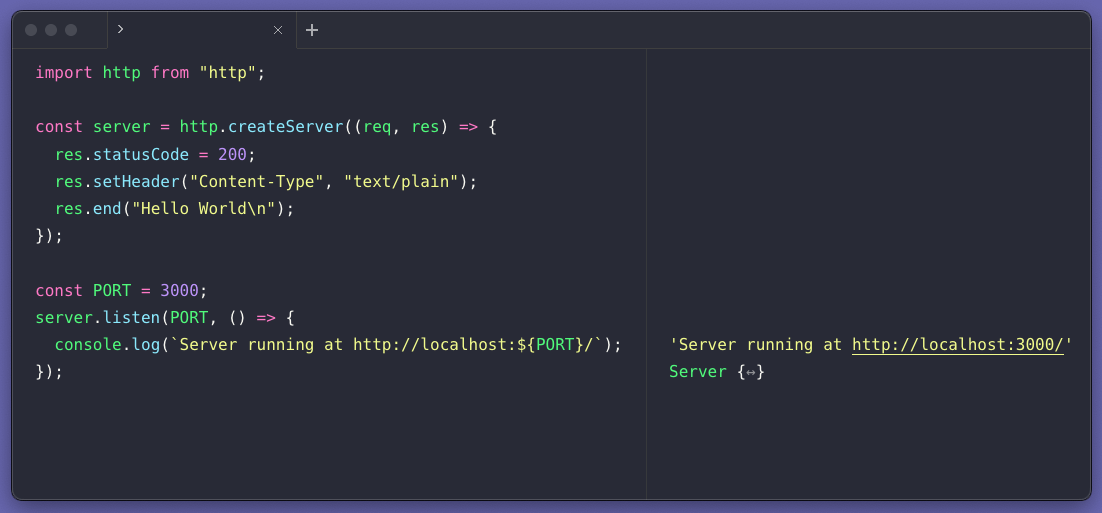
Node.js has a built-in HTTP module. This module helps in creating web servers.
The module is simple to use. First, require the module in your file. Use const http = require('http');
to include it. Now, you can create a server.
A server can listen to requests. Use the http.createServer() function.
This function takes a request and a response object. The request object contains the
request details. The response object is used to send data back. Use res.writeHead()
to set the response header. Use res.end() to end the response.
Routing And Url Handling
Simple routing is key in a Node.js server. It tells the server where to go. The server checks the URL. It matches the URL with a path. Each path leads to a specific function. This function sends a response. Responses can be HTML, JSON, or text. Always define a default route. It handles unknown paths. Simple routing keeps code organized. It makes the server fast.
Dynamic parameters are in URLs. They start with a colon (:). Example: /user/:id. The server reads the URL. It grabs the value after the colon. This value is a parameter. The server uses it in a function. Parameters can be IDs, names, or dates. They make URLs flexible. It’s easy to handle multiple users. Dynamic parameters simplify data retrieval.
Serving Static Files
Node.js can serve static files like HTML, CSS, and JavaScript. These files make your website look good. HTML is the structure. CSS adds style. JavaScript makes things interactive. Place these files in a folder. Name it ‘public’ or any name you like. Then, your server can find them easily. This way, your website will have everything it needs to display well.
Express is a library in Node.js. It helps serve static files quickly. First, install Express. Use the command `npm install express`. Then, write code to tell Express where your static files are. Use the `express.static` function. Give it the path to your ‘public’ folder. Now, Express knows where to find your files. Your website will load fast and smooth!
Managing Middleware
Setting up a Node. js HTTP web server involves installing Node. js and creating a simple server script. This script listens to client requests and sends responses. Middleware functions can be added to handle these requests efficiently, making the server more robust and responsive.
Integrating Middleware Functions
Middleware is like a helper in your server. It processes requests. It can check if users are allowed. It can change data before it goes to the server. You can use Express.js for middleware. It is popular. You add middleware functions using app.use(). Each function has a task. One function checks user data. Another function logs info. Middleware keeps servers fast and safe.
Handling Errors And Logging
Errors happen. They need quick attention. Middleware helps catch errors. It shows friendly messages. This keeps users happy. Logging is important too. It records what happens on the server. Logs help find problems. They show patterns. You can use tools like Morgan. It logs requests easily. Logs are useful for fixing errors. They make servers better.
Credit: www.digitalocean.com
Enhancing Security
HTTPS keeps data safe. It uses a secure connection. First, get an SSL certificate. This proves your site is safe. Use a tool like Let’s Encrypt. It’s free and easy to use. Install the certificate on your server. Your server will now use HTTPS. Visitors will see a lock icon. This means their data is private.
Secure headers protect your site from threats. They tell browsers how to behave. Use a tool like Helmet in Node.js. It helps set these headers. Content Security Policy (CSP) is important. It stops unwanted scripts. X-Content-Type-Options blocks risky files. X-Frame-Options stops clickjacking. Each header adds a layer of security. They work together to keep your site safe.
Deploying Node.js Server
Many cloud platforms help host a Node.js server. Platforms like AWS, Google Cloud, and Azure are popular choices. They offer tools to deploy your server easily. First, sign up for a cloud account. Then, create a new project or service. Upload your Node.js files. Choose the region closest to your users. This will make your server fast. Set up the server with your desired configurations. Most platforms have guides to help you. Follow the steps to connect your code. Your server will be online quickly.
Environment variables store important data. These include database passwords and API keys. They keep your data safe. Create a .env file in your project. Add your variables there. Use the dotenv package in Node.js. It reads the .env file. This keeps your variables secure. Never share your .env file publicly. It’s crucial to protect sensitive data. You can access these variables in your code. Use process.env to call them. Configuring these helps your server run smoothly.
Credit: runjs.app
Monitoring And Maintenance
Hosting a Node. js HTTP web server requires regular monitoring and maintenance. Keeping an eye on server performance ensures smooth operation. Regular updates and checks prevent downtime and enhance security.
Tracking Server Performance
Keep an eye on your server’s health. Use tools to track CPU and memory usage. Watch the server load and response times. Regular checks help avoid downtime. Logs can show error patterns. Find out what causes slowdowns and fix them. Good monitoring keeps your server running smoothly.
Regular Updates And Backups
Update your server software often. Updates fix bugs and improve security. Backup your data regularly. Backups protect your files in case of data loss. Keep backups in a safe place. Test your backup system. Make sure you can restore files quickly. Updating and backing up are important tasks. They help keep your server secure and reliable.
Frequently Asked Questions
Does Nasa Use Nodejs?
Yes, NASA uses NodeJS in some of its projects. NodeJS helps in handling data-intensive tasks efficiently. It offers scalability and speed, which are essential for NASA’s complex applications. NodeJS’s non-blocking architecture is beneficial for NASA’s real-time data processing needs.
Where Can I Host A Nodejs Server?
Host your Node. js server on platforms like Heroku, AWS, DigitalOcean, or Vercel. These services offer flexible solutions for scaling and deploying applications. Choose based on your needs, budget, and ease of use. Ensure reliable performance and support for your project’s requirements.
How To Use Http Server Using Npm?
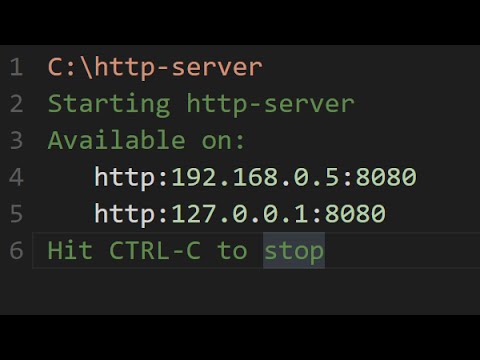
Install the HTTP server by running `npm install -g http-server`. Navigate to your project directory. Start the server using `http-server`. Access your files via `http://localhost:8080` in your browser. Ensure Node. js and npm are installed beforehand. This setup facilitates local development with ease.
How To Create An Http Web Server?
Install a server framework like Node. js. Use the “http” module to create a server. Write a function to handle requests and send responses. Bind the server to a port. Test by accessing the server URL in a browser.
Conclusion
Setting up a Node. js HTTP server is easy and rewarding. First, install Node. js and create a new project. Then, write a simple JavaScript file to handle requests. Use basic commands to start your server. Test it by opening a browser and entering the server’s address.
Congratulations, your server is live! With practice, you can build more complex applications. Keep exploring Node. js for better skills. It opens up new possibilities for web development. Enjoy the process and keep learning. Your journey in coding is just beginning.
Stay curious and happy coding!


