
Imagine having full control over your online presence. Hosting your own web server might sound like a task for tech gurus, but it’s simpler than you think.
You don’t need to be a computer wizard to take charge of your website’s performance and security. You’ll discover straightforward steps to host your web server and unlock a world of possibilities. Picture your website running smoothly, free from third-party interference.
Are you ready to take control? Read on to learn how you can set up your web server and take the first step towards digital independence.
Choosing A Hosting Provider
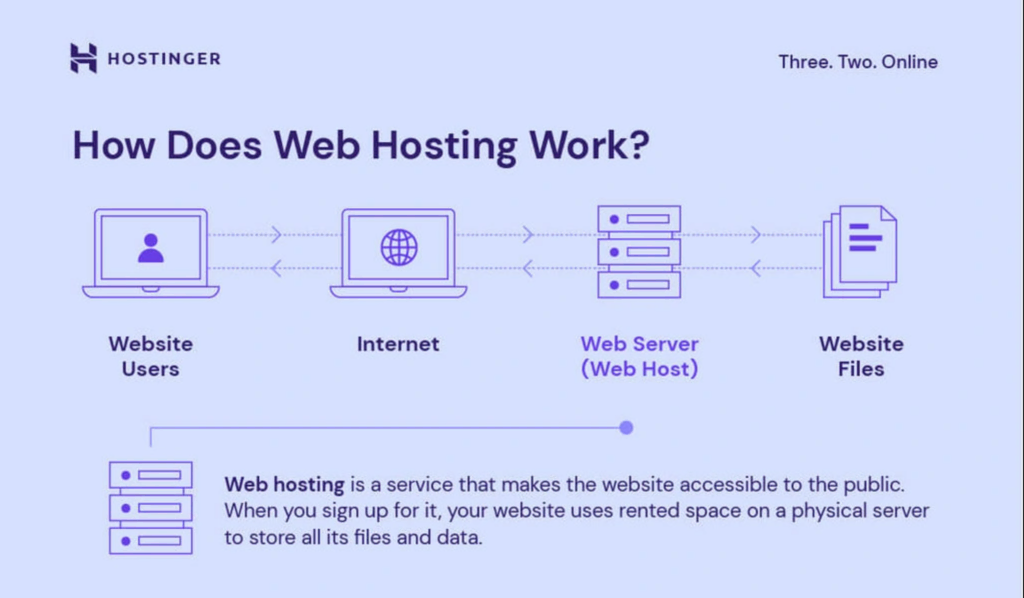
Shared servers host many websites. Cost is usually low. Suitable for small sites. Dedicated servers host one site. Higher price. Offer more power. Great for big sites. Choose based on your site’s needs.
Cloud hosting uses many servers. Your site is always online. Pay for what you use. No need to buy hardware. Easy to scale. Perfect for growing sites. Many companies offer cloud hosting.
Check storage space. More space can host more data. Look at bandwidth. High bandwidth means faster site. Review security features. Keeps data safe. Consider customer support. Helps solve problems quickly. Compare pricing. Find a plan that fits your budget.
Credit: www.hostinger.com
Setting Up Your Domain
First, choose a name for your website. It should be unique and easy to remember. Visit a domain registrar online. These websites help you register your domain. Some popular ones are GoDaddy and Namecheap. Search for your chosen name. If it’s taken, try another name. When you find an available name, register it. Pay a small fee to keep your domain active. Now, the domain is yours!
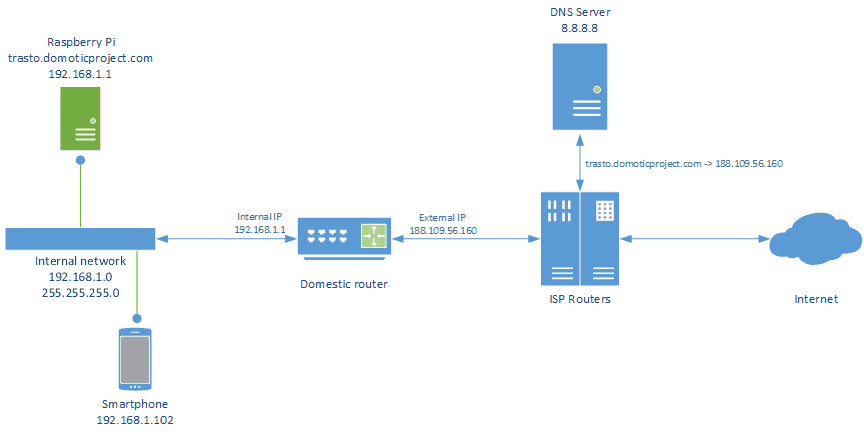
DNS stands for Domain Name System. It helps computers find your website. After registering, log into your domain registrar account. Look for DNS settings. You need to add records here. The most common record is the A record. It points your domain to your web server’s IP address. This way, people can visit your site. Always double-check your settings. Wrong settings can break your site. Save changes and wait a few hours. This is called DNS propagation. It takes time for the changes to spread.
Installing Web Server Software
Many people choose between Apache and Nginx. Both are popular. Apache is easy to set up. It has lots of features. Nginx is fast. It handles many users at once.
Begin by updating your system. Use terminal for this step. Type sudo apt update. Then, install Apache. Type sudo apt install apache2. Wait for the process to finish.
For Nginx, type sudo apt install nginx. Check if it runs. Use sudo systemctl status nginx. Both servers need starting. Use sudo systemctl start commands. Test on a browser. Type localhost in the address bar.
Configuring Security Settings
SSL Certificates keep data safe. They protect user information. Websites need SSL for trust. Without SSL, data can be stolen. Browsers warn users about unsafe sites.
Firewall Setup blocks bad traffic. It stops hackers. Firewalls can be hardware or software. They create a barrier. Only good traffic gets through.
Regular Security Audits find weak spots. They check for problems. Audits help improve safety. Experts should do these checks. Frequent audits keep your server safe.
Deploying Your Website
FTP helps move website files to your server. Use tools like FileZilla. First, connect to your server. Then, select the files you want to upload. Drag and drop them to the server folder. Always check if files uploaded correctly. FTP is fast and easy for file transfers. Remember to keep your login details safe.
Version control keeps track of changes in your website code. Git is a popular choice. Make sure to commit changes often. Branching helps manage different features. Always push changes to your remote repository. This ensures that your team sees updates. Version control prevents code loss. It also makes collaboration easier.
Credit: medium.com
Monitoring And Maintenance
Keep an eye on your server’s health. Performance metrics show how your server works. Look at CPU usage, memory, and disk space. These numbers tell if your server is slow. Use tools that alert you when things go wrong. It helps fix problems fast.
Data can be lost. Make routine backups to save your work. Always have a copy of your files. Store backups in a safe place. They help you restore data if needed. Backups ensure you do not lose important stuff.
Software must be up-to-date. Updates fix bugs and improve security. Always check for new versions. Install updates right away. This keeps your server safe and running smoothly.
Troubleshooting Common Issues
Error logs show problems. Check them when issues arise. Look for common errors. They help in diagnosing server problems. Fixing errors needs patience. Logs can be long. Focus on key messages. Notice patterns in errors. They may repeat. Understanding logs helps fix issues quickly. Regular checks are vital. Analyze logs weekly. It prevents future problems. Good error analysis saves time. Use simple tools to read logs. They make it easier.
Downtime affects users. It frustrates them. Fixing it fast is crucial. Check server status first. Is it online? If not, find out why. Restart may help. Sometimes servers need a reboot. Check network settings next. Are they correct? A wrong setting can cause downtime. Review them carefully. Sometimes a small mistake causes big problems. Ensure software updates are installed. Old versions can be buggy. Updates fix bugs. Keep software current. It prevents downtime.

Credit: community.cloudflare.com
Frequently Asked Questions
Can I Host My Own Website Server?
Yes, you can host your own website server. You’ll need a computer, reliable internet connection, and server software. Consider security and maintenance requirements. Hosting your own server offers control but requires technical skills. Many prefer third-party hosting services for convenience and support.
How Do I Create My Own Web Server?
Install a server software like Apache or Nginx. Configure settings for your needs. Secure it with firewalls. Connect to the internet. Test the server functionality and performance to ensure reliability.
How Much Does It Cost To Host A Website Server?
Hosting costs vary from $3 to $300 monthly, depending on server type and resources. Shared hosting is cheaper, while VPS and dedicated servers are pricier. Consider additional costs for domain, SSL, and maintenance. Compare providers to find the best deal for your needs and budget.
Is Google Web Hosting Free?
Google does not offer free web hosting. Google Cloud provides hosting services with a pay-as-you-go model. Users can access a free tier with limited resources, ideal for small projects. Beyond that, charges apply based on usage and resources consumed.
Conclusion
Hosting your web server offers control and flexibility. It’s a rewarding journey. Begin with choosing the right hardware. Install necessary software. Set up a secure environment. Regular updates are crucial. Back up data frequently. Monitor server performance. Troubleshoot issues promptly.
Learn as you go. Security is vital, so prioritize it. Manage costs wisely. Seek help if needed. Hosting your server builds valuable skills. You gain confidence. It’s empowering. Take small steps. Grow your knowledge over time. Hosting can be simple.
Start today. Enjoy the benefits of owning your server. You’ll find it worthwhile.


