
Imagine having your web application ready to share with the world. It’s the culmination of your hard work and creativity, and now it’s time to make it accessible to users across the globe.
Hosting your web application on the internet might seem like a daunting task, but don’t worry—you’re about to discover how straightforward it can be. By the end of this article, you’ll feel confident in your ability to bring your app online, making it available to anyone, anytime.
Get ready to unlock the potential of your creation, attract users, and watch your app thrive. Let’s dive into the steps you need to take to host your web application effectively and ensure it runs smoothly for everyone who visits.
Credit: x.com
Choosing A Web Hosting Service
Web hosting comes in different types. Shared hosting is cheap. Good for small sites. VPS hosting offers more control. Dedicated servers provide full control. Best for big sites. Cloud hosting scales well. Useful for growing sites.
Check provider reviews. Look at uptime guarantee. Customer support is crucial. Choose hosts with strong security. Compare features like storage and bandwidth. Check if they offer backups. Find out about their control panel. Easy panels save time.
Hosting costs vary. Shared hosting is affordable. VPS costs more. Dedicated servers are expensive. Cloud pricing depends on usage. Consider your site’s needs. Don’t overspend if it’s a small site. Larger sites need more resources. Plan your budget wisely.
Domain Name Registration
A domain name is your web address. It helps people find your site. A good domain is easy to remember. It should be short and simple. It makes your site look professional. This builds trust with visitors. Your domain is your online identity.
Choose a name that fits your website. It should reflect your content. Use common words. Avoid numbers and hyphens. They confuse users. Check if the name is available. This ensures no one else uses it. You want a unique name.
Find a domain registrar. They help you register your domain. Popular registrars include GoDaddy and Namecheap. Create an account on their site. Search for your domain name. If available, add it to your cart. Complete the purchase. Now, the domain is yours!
Setting Up Your Hosting Environment
Choose a server to host your web application. Set the correct server settings for your needs. Ensure that the server has enough storage and memory. You will need these for good performance. Use a user-friendly interface for easy management. This helps in troubleshooting issues quickly.
Install all the software your application needs. This includes the web server, database, and runtime environment. Use the latest versions for better security and features. Ensure compatibility with your web application. Check documentation for any special requirements.
Security is very important for web hosting. Always use strong passwords to protect your server. Enable a firewall to block unwanted access. Regularly update your software to fix security bugs. Use SSL certificates to encrypt data. This keeps user information safe.
Credit: www.reddit.com
Deploying Your Web Application
Make sure all files are ready. Check for errors in your code. Organize files in correct folders. This helps in easy access later. Compress files to save space. Compressed files upload faster. Always keep a backup of original files. Backups prevent data loss.
Choose a reliable server. Use FTP or SFTP for file transfer. FTP is common and simple. SFTP is more secure. Enter server credentials carefully. Wrong credentials can block access. Drag and drop files into the server folder. Wait for upload to finish. Check for any upload errors.
Open your web application on a browser. Check if everything loads well. Look for missing images or broken links. Test different pages to ensure all work. Ask a friend to test too. They might see things you missed. Fix issues as you find them. Testing makes sure users get a smooth experience.
Managing And Maintaining The Application
Hosting a web application requires selecting a reliable platform and ensuring regular updates for security and performance. Monitor server resources to avoid downtime and optimize user experience. Backup data frequently to prevent loss and maintain smooth operations.
Monitoring Performance
Keep an eye on application performance. Check how fast it loads. Look for errors. Use tools to help monitor. This ensures your app runs smoothly.
Regular Backups
Always have backups. Store copies of your data safely. Regular backups protect against data loss. Backup daily or weekly for best results.
Updating And Scaling
Keep your app updated. Install the latest features. Fix any bugs quickly. As your app grows, scale it. Add more resources to handle more users.
Troubleshooting Common Issues
Hosting a web application can be tricky. Common issues include domain configuration errors and server misconfigurations. Checking settings and consulting hosting provider support can resolve most problems.
Identifying Problems
Start by checking the error messages you receive. These messages can help find the issue. Look for any patterns in the errors. This can show where the problem is. Inspect your application’s logs for clues. Logs often contain valuable information about what went wrong. Ensure your network connection is stable. A bad connection can cause errors too.
Fixing Server Errors
Check if your server is running properly. Sometimes, a simple restart can solve the issue. Ensure your software is up to date. Old software can cause problems. Verify your server configuration. Incorrect settings might lead to errors. Make sure your firewall is not blocking important connections. This can prevent your application from running smoothly.
Handling Downtime
Always have a backup plan for downtime. This can save you stress. Inform your users about the downtime. They should know what’s happening. Work to fix the issue quickly. The sooner, the better. Monitor your application once it’s back up. This helps catch any new problems early.
Optimizing For User Experience
Quick load times make users happy. Compress images to reduce their size. Use a Content Delivery Network to speed up access. Minimize JavaScript and CSS files. Use browser caching to store data. This helps load pages faster. Less waiting means more smiles.
Security keeps users safe. SSL certificates protect information. Use strong passwords for accounts. Regular updates fix security holes. Firewalls block dangerous traffic. Monitor for unusual activity. Users trust safe sites more.
Responsive design fits all screens. Use flexible grids for layout. Images should scale with screen size. Test on phones and computers. Make buttons easy to touch. Users like sites that work everywhere.
Credit: medium.com
Frequently Asked Questions
How Do I Deploy My Web Application In The Internet?
Deploy your web application by choosing a hosting provider, uploading your files, and configuring the domain settings. Ensure security protocols are in place, test functionality, and optimize for performance. Use a deployment tool for automation and monitor your application regularly.
How Do I Host My Own Web Application?
Choose a reliable hosting provider. Install necessary software and upload your files. Configure settings and domain. Test thoroughly.
How Do I Host A Website On The Internet?
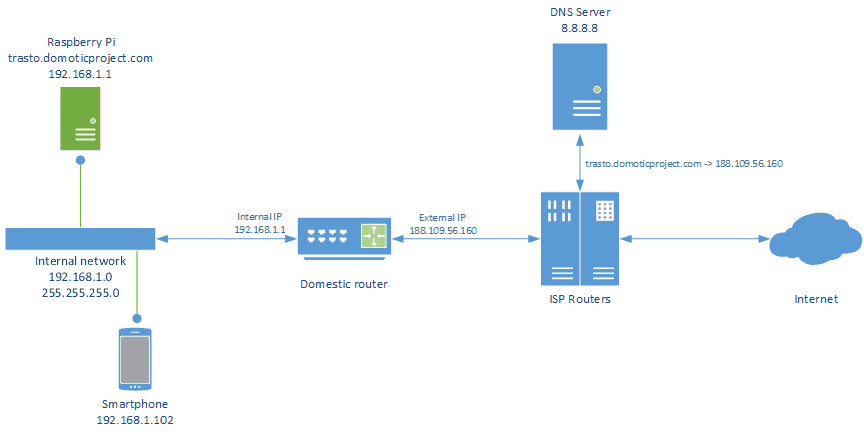
To host a website, choose a domain name and register it. Select a reliable web hosting provider. Upload your website files to the server using an FTP client. Configure DNS settings to link your domain with the server. Regularly update and maintain your website for optimal performance.
Where Can I Host My Web Application?
Host your web application on platforms like AWS, Google Cloud, or Azure. Consider Heroku or DigitalOcean for simplified solutions. Choose based on your budget, scalability needs, and technical expertise. Ensure the platform supports your application’s language and framework requirements for optimal performance.
Conclusion
Hosting your web application is simpler than it seems. Start by selecting a reliable hosting provider. Make sure it fits your needs and budget. Configure your application with care. Don’t forget to secure your web app. Regular updates help maintain security.
Monitor performance consistently. Good hosting enhances user experience. It keeps your application running smoothly. Take your time to explore options. Choose what works best for you. Hosting is the foundation of your web presence. Make it strong. Your application deserves the best support.
Keep learning and adapting. Success comes with patience and persistence.


