
Are you looking to manage several WordPress sites but want to keep each one under a different domain? You’re in the right place.
Hosting multiple WordPress sites with different domains doesn’t have to be complicated or expensive. Imagine saving time and money while keeping your sites organized and easy to manage. You’ll discover simple, step-by-step methods to set up and run multiple WordPress sites seamlessly.
By the end, you’ll have the confidence and tools to grow your online presence like a pro. Ready to take control of your websites? Let’s dive in.
Choosing The Right Hosting Solution
Choosing the right hosting solution is key for running multiple WordPress sites on different domains. The hosting plan affects your site speed, security, and ease of management. Picking the wrong option can cause slow loading times and frequent downtime.
Understanding the types of hosting helps in making a better choice. Each type offers different levels of control, resources, and cost. This section breaks down the main options and what to consider for your multiple sites.
Shared Hosting Vs Vps Vs Dedicated
Shared hosting means many websites share the same server. It is the cheapest option but can be slow if other sites use many resources. VPS (Virtual Private Server) offers a portion of a server just for you. It gives more control and better speed than shared hosting. Dedicated hosting means you rent an entire server. It is the most powerful and secure but also the most expensive.
Managed WordPress Hosting Benefits
Managed WordPress hosting takes care of technical tasks for you. Updates, backups, and security are handled automatically. This type of hosting is faster and more secure for WordPress sites. It saves time, especially if managing several sites. Support teams specialize in WordPress and help solve problems quickly.
Factors To Consider For Multiple Sites
Check how many domains and sites your hosting plan supports. Look at storage space and bandwidth limits. More sites need more resources to run smoothly. Consider the ease of managing multiple sites from one dashboard. Security features like SSL certificates and malware protection matter. Also, think about customer support quality and response time.
Setting Up Your Hosting Environment
Setting up your hosting environment is the first step to run multiple WordPress sites with different domains. It creates the base where all sites will work smoothly. This setup helps manage resources, security, and speed for each site. Proper configuration avoids conflicts between sites and keeps everything organized.
Focus on three main parts: control panel, web server, and database. These tools work together to host your WordPress sites efficiently. Follow the steps below to prepare your hosting environment.
Installing A Control Panel
A control panel simplifies website management. It lets you handle domains, files, and databases in one place. Popular panels include cPanel, Plesk, and Webmin. Choose one that fits your server type and skill level.
Install the control panel on your server following official guides. After installation, access it through your browser. Use it to add new domains and manage email accounts easily. A control panel saves time and reduces errors.
Configuring Apache Or Nginx
Apache and Nginx are common web servers for WordPress. Both serve website files to visitors. Choose one based on your server’s performance and features.
For Apache, enable Virtual Hosts. Virtual Hosts let you serve multiple domains from one server. Create a separate configuration file for each domain. Specify the domain name and root folder for each site.
For Nginx, set up server blocks. Server blocks work like Virtual Hosts in Apache. Define each domain’s server block with its root directory. This setup keeps sites separate and secure.
Setting Up Mysql Databases
WordPress needs a database to store content and settings. Create a separate MySQL database for each WordPress site. This keeps data organized and avoids conflicts.
Access your control panel or use command line tools to create databases. Assign a unique name to each database. Create a new user with a strong password for every database. Grant the user full access only to its database.
Keep database details safe. You will need them during WordPress installation. Proper database setup ensures smooth site operation and easy backups.
Installing WordPress For Multiple Domains
Installing WordPress for multiple domains can be done in two main ways. You can either use one WordPress setup for all sites or install WordPress separately for each domain. Both methods have their own setup steps and benefits. Understanding these methods helps you choose the best option for your needs.
Single WordPress Multisite Setup
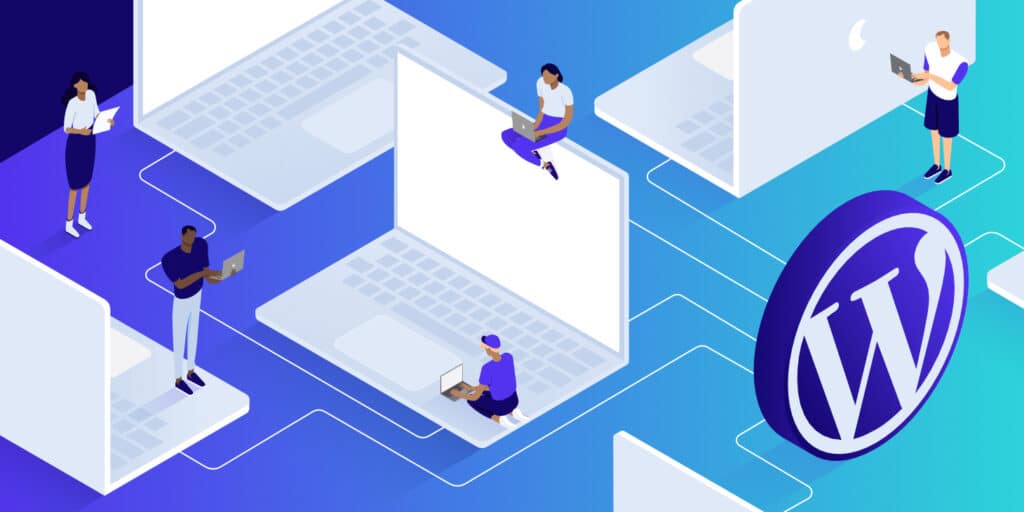
A WordPress Multisite setup allows you to run many websites from one WordPress installation. You enable this feature in your WordPress files and configure the network settings. Each site can have its own domain or subdomain. This way, you manage all sites from one dashboard.
This method saves server space and makes updates easier. You only update WordPress once for all sites. Multisite is good for users who want to control multiple sites with less effort.
Multiple Separate WordPress Installations
In this method, you install WordPress separately on each domain. Each website has its own database and files. You manage each site independently with its own dashboard. This method is common for users who want full control over each site.
Separate installations need more server space. You must update each WordPress site individually. This setup works well for sites with different needs or hosting plans.
Pros And Cons Of Each Method
The Multisite setup uses less server space and is easier to manage. One update applies to all sites. But if one site breaks, it can affect all others. Multisite needs some technical skills to set up.
Separate installations offer more control for each site. Problems in one site do not affect others. Updates must be done site by site. It needs more server resources and more time to manage.
Credit: kinsta.com
Managing Different Domains
Managing different domains for multiple WordPress sites can be simple with the right steps. Each domain needs to be set up correctly to work well with your hosting and WordPress installation. This process ensures visitors reach the correct website when they type in a domain name.
You must handle domain registration, pointing, mapping, and security properly. These tasks keep your sites organized and safe. Clear domain management improves user experience and site performance.
Registering And Pointing Domains
First, buy your domain names from a trusted registrar. Use services like GoDaddy, Namecheap, or Google Domains. After purchase, point each domain to your WordPress hosting server. This process involves changing the domain’s DNS records. Set the A record or nameservers to match your hosting provider’s details. This step connects the domain to your website’s files.
Setting Up Domain Mapping
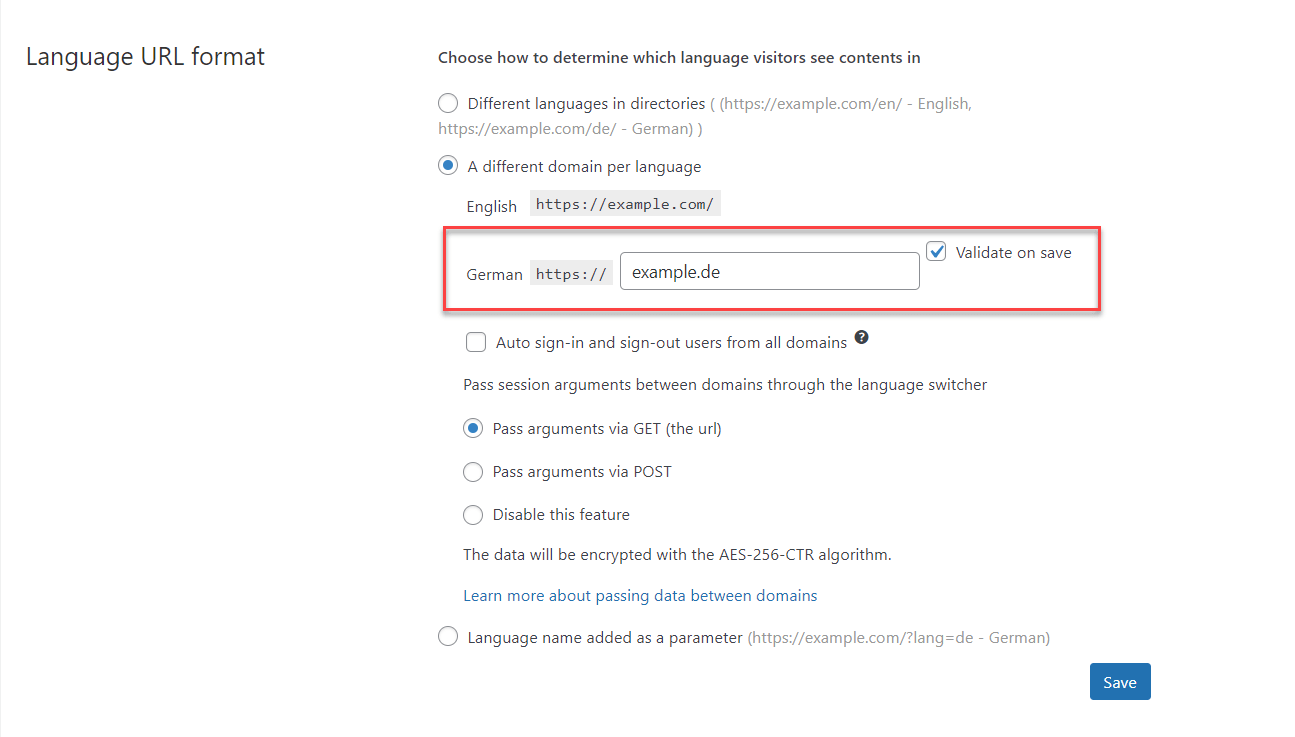
Domain mapping links each domain to its WordPress site. If you run multiple sites on one hosting, use domain mapping tools or plugins. Plugins like WordPress MU Domain Mapping help assign different domains to different sites. This setup lets each site load with its unique domain. It keeps sites separate and easy to manage.
Configuring Ssl For Multiple Domains
SSL certificates secure your sites by encrypting visitor data. Use SSL for every domain you host. Many hosts offer free SSL certificates via Let’s Encrypt. Install a multi-domain SSL certificate or separate certificates for each domain. This protects all sites and boosts visitor trust. SSL also improves SEO rankings on search engines.
Optimizing Performance And Security
Hosting multiple WordPress sites with different domains requires smart steps for speed and safety. Fast sites keep visitors happy and improve search rankings. Secure sites protect your data and users.
Focus on performance and security to run many WordPress sites smoothly. Use the right tools and methods. Keep backups and prevent attacks. This helps maintain trust and reliability.
Caching Strategies
Caching stores copies of your web pages. It reduces server load and speeds up site loading. Use plugins like W3 Total Cache or WP Super Cache. Set caching rules for each domain separately. Clear cache regularly to show fresh content.
Backup Solutions
Backups save your website data. They help restore sites after errors or hacks. Use plugins such as UpdraftPlus or BackupBuddy. Schedule automatic backups for all domains. Store backups in cloud storage or offsite locations. Test backups to ensure they work properly.
Security Best Practices
Keep WordPress, themes, and plugins updated. Use strong passwords and change them often. Limit login attempts to stop brute force attacks. Install security plugins like Wordfence or Sucuri. Use SSL certificates for all domains. Monitor your sites for suspicious activity daily.
Credit: wpml.org
Handling Updates And Maintenance
Managing multiple WordPress sites with different domains needs careful attention. Updates and maintenance keep your sites safe and fast. Neglecting this can lead to security risks and poor performance. Regular care helps your sites run smoothly and avoid downtime.
Updating WordPress Core And Plugins
Keep WordPress core updated to the latest version. Updates fix bugs and close security holes. Update plugins regularly too. Outdated plugins can cause errors or conflicts. Always back up your sites before any update. This prevents data loss if something goes wrong.
Monitoring Site Health
Check your sites often for issues. Use tools to monitor speed and uptime. Watch for broken links and errors. Site health checks help spot problems early. Fix issues quickly to keep visitors happy. Regular monitoring improves site reliability and trust.
Automating Routine Tasks
Use automation to save time on updates and backups. Schedule automatic updates for core and plugins. Set up automatic backups to protect your data. Automation reduces manual work and human error. It keeps your sites secure and up to date without extra effort.
Troubleshooting Common Issues
Troubleshooting is a key step when hosting multiple WordPress sites with different domains. Problems can arise from various sources. These issues can stop your sites from running smoothly.
Understanding common problems helps you fix them faster. This saves time and reduces website downtime. Let’s explore some typical issues and how to solve them.
Resolving Domain Conflicts
Domain conflicts happen if two sites use the same domain name or DNS settings clash. Check your DNS records carefully. Each domain should point to the correct server IP address.
Clear your browser cache after making DNS changes. This ensures the new settings take effect. Avoid using the same domain for multiple sites unless using subdomains.
Use tools like Whois or DNS lookup to verify domain ownership and settings. Fix conflicts by updating DNS records or contacting your domain provider.
Fixing Permission Errors
Permission errors block WordPress from accessing files or folders. This often causes “403 Forbidden” or “Permission Denied” messages. Set correct file permissions using your hosting control panel or FTP.
Folders should usually have 755 permissions, files 644. Avoid setting permissions to 777 as it poses security risks. Also, check ownership of files and folders. It must match your web server user.
Incorrect permissions can stop plugin updates or theme changes. Fix these quickly to keep your sites working properly.
Debugging Plugin And Theme Problems
Plugins and themes can cause conflicts or errors on your sites. To find the issue, disable all plugins and switch to a default theme. If the problem goes away, activate them one by one.
This process helps identify the faulty plugin or theme. Update all plugins and themes regularly to avoid bugs. Use plugins from trusted sources only.
Check error logs for detailed information about failures. Enable WordPress debug mode by adding define('WP_DEBUG', true); to your wp-config.php file.
Credit: kinsta.com
Frequently Asked Questions
What Is Multisite Hosting For WordPress?
Multisite hosting allows you to run multiple WordPress sites under one installation. Each site can have a different domain, making management easier and cost-effective.
How To Map Different Domains To WordPress Sites?
Use domain mapping plugins or hosting control panels to link unique domains to each WordPress site. This ensures visitors see the correct domain for each site.
Can I Use One Hosting Plan For Multiple Domains?
Yes, many hosting providers support hosting multiple domains on one plan. This saves money and simplifies managing multiple WordPress sites.
Is Multisite Suitable For Different WordPress Websites?
Yes, multisite works well for separate WordPress sites with different domains. It lets you manage updates and plugins centrally while keeping sites distinct.
Conclusion
Hosting multiple WordPress sites with different domains is easier than it seems. Choose a good hosting plan that supports multiple domains. Set up each domain correctly to avoid conflicts. Manage your sites carefully to keep them secure and updated. This way, you save money and time by using one hosting account.
Stay organized and your websites will run smoothly. Try these steps and enjoy managing several WordPress sites in one place.


