
Are you juggling multiple applications and wondering how to efficiently host them on a single web server? You’re not alone.
Many people face the challenge of managing several apps without breaking the bank or complicating server management. Imagine the peace of mind you’ll feel knowing everything is running smoothly, all in one place. This guide will walk you through the steps to host multiple applications on a web server seamlessly.
You’ll discover practical tips to streamline your operations, saving you both time and resources. Dive in, and find out how you can optimize your server to handle multiple apps like a pro.
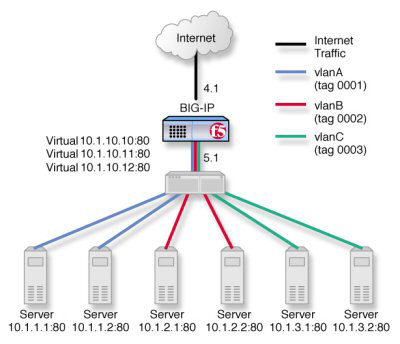
Credit: techdocs.f5.com
Choosing The Right Server
Dedicated hosting gives you your own server. You don’t share with others. This is great for big applications. It costs more but offers more power. Shared hosting means many users share one server. It’s cheaper but slower. Good for small apps and beginners. You share resources with others.
Cloud hosting uses many servers. Your apps can use more resources. This is flexible. Costs can vary. It is good for apps that grow fast. You pay for what you use. Many companies offer cloud hosting. Amazon, Google, and Microsoft are popular choices.
Domain And Subdomain Setup
To host many apps, register many domains. Each domain should be unique. Use a trusted domain registrar for this task. Choose a name that fits your application. Keep it short and easy to spell. This helps users find your site easily. After choosing, check if the domain is available. If yes, proceed with registration.
A subdomain is part of a main domain. It helps organize content. For example, “blog.example.com” is a subdomain. It points to a section of your main site. Setting up subdomains is simple. Go to your domain settings. Add a new subdomain. Choose a name that fits the content. Save the changes. Now, your subdomain is ready to use.
Web Server Configuration
Apache allows hosting many sites. This is done with Virtual Hosts. Each site can have its own settings. You set different domains for each site. It helps in using one server for many apps. Use a separate “ block for each site. Set DocumentRoot to point to the site folder. Ensure each domain has a DNS entry.
Nginx uses Server Blocks to manage sites. Each block is like a separate server. It helps in hosting various apps on one server. Set the server_name for each block. This defines the domain name. Use root directive to set site folder. Multiple blocks make server management easy. Always test configuration changes.
IIS lets you host multiple sites easily. Each site has its own settings. Use Bindings to set domain names. Choose different ports or IPs for each site. Set Physical Path to the site folder. Application Pools help in managing resources. You can restart pools without affecting other sites. This ensures smooth operation.

Credit: www.cloudways.com
Managing Dns Settings
A Records link domain names to IP addresses. This tells the internet where to find your server. Each application needs its own A Record. CNAMEs are different. They point one domain name to another. Use CNAMEs for subdomains. This helps in managing different applications.
DNS Propagation can take time. Changes may not appear right away. It might take up to 48 hours. Always be patient. Check settings after making changes. This ensures everything works fine. Use tools to monitor DNS status.
Deploying Applications
Docker makes it easy to host many apps. Each app runs in its own container. This ensures application isolation. Containers keep apps separated. This prevents one app from interfering with another. They use less space than virtual machines. This leads to faster start times. Containers can be moved between servers easily. They work the same everywhere.
Application isolation is crucial for security. Docker containers offer this by design. Each container acts like a small server. It contains everything an app needs to run. This makes apps safe and secure. Isolation keeps apps from accessing each other’s data. It also helps in managing resources better. Servers can handle more apps at once. This boosts performance and stability.
Security Considerations
Protect your data with SSL Certificates. These certificates make sure your data is safe. They encrypt the data between the server and the user. Users trust websites with SSL. You can see a padlock icon in the browser. This shows the site is secure. Always renew your SSL certificates on time. Expired certificates can cause security issues.
A firewall keeps your server safe. It blocks bad traffic. Only let good traffic through. You must set up firewall rules carefully. Allow only necessary services. This reduces the risk of attacks. Keep your firewall software updated. Updates fix security holes. A strong firewall helps protect your applications.
Performance Optimization
Load balancing is key for smooth performance. It helps distribute traffic evenly. This prevents server overload. When servers share the load, they work better. Efficiency increases and response time is faster. Users get a better experience. Load balancing makes sure resources are used wisely. It can help with high traffic times. Servers stay stable and reliable.
Caching strategies help with quick access to data. They store frequently used data. This means less server requests. Pages load faster. Memory use is reduced. Cache can be in browser or server. Users see content quickly. Caching saves time and resources. It’s a good way to speed up applications. Efficient caching keeps the server healthy.

Credit: serverfault.com
Monitoring And Maintenance
Ensure smooth operations by regularly checking server performance. Routine updates help avoid software conflicts. Address potential issues early to maintain optimal server health.
Log Management
Logs help track server activity. They show errors and warnings. Log management is vital for maintaining server health. It helps find issues quickly. Regularly check logs for unusual activity. Keep logs organized for easy access. Use tools to automate log checking. This saves time and reduces human errors. Efficient log management boosts server performance. Protect log files from unauthorized access.
Regular Updates
Updating keeps your server safe. Install updates for software and applications. Updates fix bugs and security holes. Schedule regular update checks. This ensures your server stays secure. Outdated software can be risky. Regular updates prevent these risks. Use automated tools to manage updates. This makes the process easier and faster.
Frequently Asked Questions
Can One Server Host Multiple Applications?
Yes, a server can host multiple applications. Use virtualization or containerization to efficiently manage resources. Each application runs in its own environment, ensuring isolation and performance. Proper configuration is essential for security and optimal performance. This setup maximizes server utilization and reduces costs.
How To Host Multiple Sites On The Same Server?
Use a web server like Apache or Nginx. Configure Virtual Hosts for each site. Ensure each site has its own directory. Update DNS settings to point to the server’s IP. Manage resources to ensure optimal performance.
How Does A Web Server Handle Multiple Requests?
A web server uses threads or processes to handle multiple requests simultaneously. It employs load balancing and asynchronous I/O to manage demand efficiently. This ensures quick response times and improves server performance.
How To Deploy Multiple Web Applications In Iis?
Deploy multiple web apps in IIS by creating separate sites or applications. Bind each app to unique ports or domains. Adjust application pools for performance. Configure virtual directories if needed. Test each deployment to ensure functionality and security. Use IIS Manager for easy management and setup.
Conclusion
Hosting multiple applications on a web server requires careful planning. Understanding server resources is crucial. Allocate resources wisely to ensure smooth performance. Use virtual hosts to manage different applications efficiently. Keep security measures in place to protect data. Regular monitoring helps maintain server health.
Troubleshooting skills are valuable when issues arise. With practice, managing multiple applications becomes easier. Stay updated with the latest server management techniques. Keep learning and adapting to new challenges. Hosting multiple applications can be rewarding. It enhances your technical skills and offers flexibility.
Enjoy the journey of managing web applications successfully.


