
Are you ready to take your Java web application to the next level? Hosting on the cloud can revolutionize the way you deploy and manage your application, offering scalability, flexibility, and cost-effectiveness.
But where do you start? Navigating the cloud hosting landscape might seem daunting, but with the right guidance, you can easily transition from local servers to a robust cloud environment. Imagine reduced downtime, enhanced performance, and the ability to scale with just a few clicks.
This guide will walk you through the process step-by-step, ensuring you understand each part of hosting your Java web app on the cloud. By the end of this article, you’ll not only know how to host your application but also optimize it for the best performance. Dive in, and discover how you can harness the power of the cloud to transform your Java web application.
Choosing The Right Cloud Provider
Amazon Web Services, Google Cloud, and Microsoft Azure are popular choices. Each offers unique features for hosting Java applications. AWS is known for its vast services and flexibility. Google Cloud provides strong integration with other Google tools. Azure is favored for its seamless integration with Microsoft products.
Understanding pricing models is vital. AWS uses a pay-as-you-go model, which can be cost-effective. Google Cloud offers sustained-use discounts. Azure provides hybrid benefits for existing Microsoft users. Compare these models carefully. Always consider your budget and usage needs.
Good support can save time and stress. AWS has a large community and extensive documentation. Google Cloud offers strong AI and machine learning support. Azure provides robust enterprise-level support and services. Consider the level of help you might need.
Preparing Your Java Web Application
Optimizing your code is crucial for cloud deployment. Ensure your Java app is lightweight. Remove unused libraries and dependencies. Use efficient algorithms to improve speed. This makes your app run better on cloud servers.
Thorough testing and debugging are vital. Test your app in a cloud-like environment. Find and fix any bugs early. This saves time and reduces errors later. Make sure your app works smoothly.
Ensuring security and compliance is a must. Check if your app follows cloud rules. Use secure passwords and data encryption. Protect user data at all costs. This keeps your app safe and trusted by users.
Setting Up Cloud Infrastructure
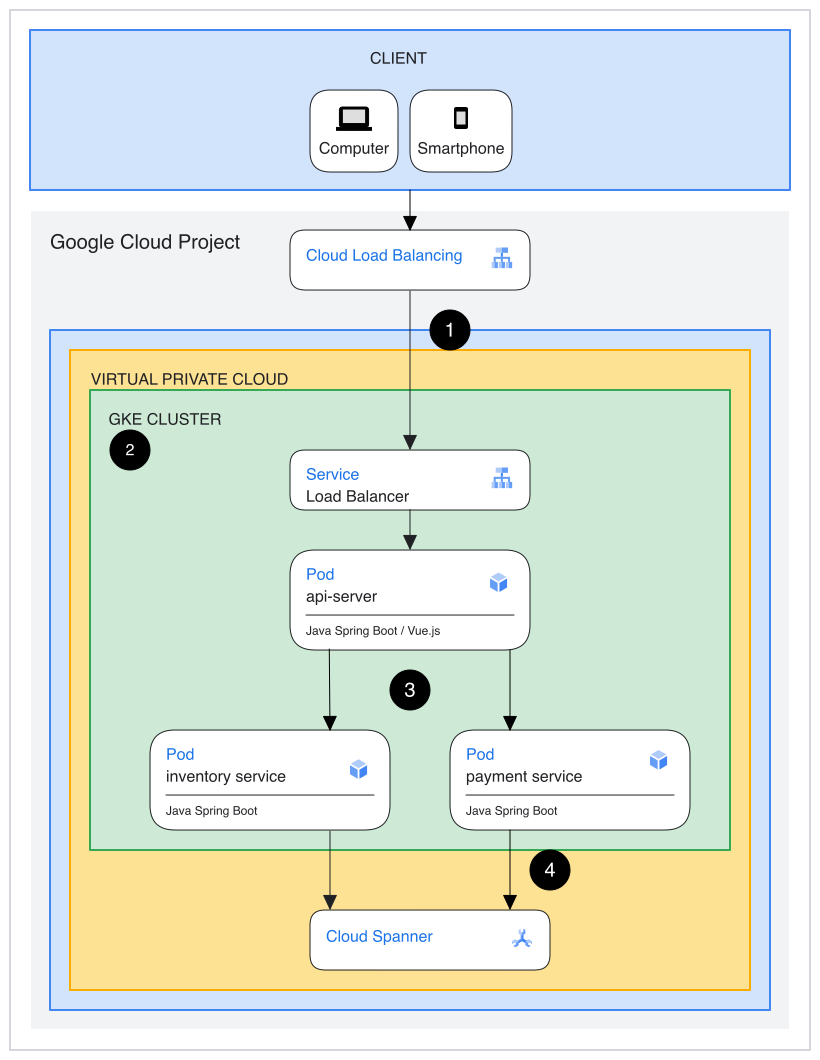
Virtual machines allow apps to run smoothly. Choose a cloud provider with reliable services. Create a virtual machine using the provider’s console. Select an operating system compatible with Java. Install Java Development Kit on the machine. Allocate resources wisely for performance.
Containers make app deployment easy. Use Docker to build containers. Kubernetes helps manage these containers. Create a Dockerfile for your Java app. Build the image using Docker commands. Deploy the container using Kubernetes. Monitor the app using Kubernetes tools.
Network configuration is crucial for apps. Set up firewalls to protect data. Use VPN for secure connections. Load balancers distribute traffic evenly. Ensure SSL certificates are installed. Regularly check security logs for threats. Protect user information at all costs.
Credit: cloud.google.com
Deploying Java Application On Cloud
Deployment tools make cloud hosting easy. They help put your Java application online. Popular tools include Jenkins and Docker. Jenkins automates tasks. Docker packages applications into containers. Tools save time. They simplify processes. Even beginners can use them easily.
CI/CD stands for Continuous Integration and Continuous Deployment. It helps in updating applications fast. Developers make changes quickly. CI/CD pipelines test and deploy these changes. Automation reduces errors. Applications run smoothly on the cloud. CI/CD tools like GitLab and CircleCI are common. They are helpful for developers.
Monitoring keeps track of application performance. It helps in finding issues early. Logs record every event in the application. Tools like New Relic and Loggly are used. They show what’s happening in real-time. Good monitoring ensures the app runs well. Logs help in fixing problems quickly.
Managing And Scaling
Good performance is key for web apps. Monitoring tools help watch how your app runs. They check for slow parts and fix them. Alerts let you know when something goes wrong. Performance data helps improve app speed. Reports show where changes are needed.
Cloud can grow with your app. Dynamic scaling adjusts resources as needed. If more people use your app, it adds more space. Automatic scaling saves money. It only uses what you need. You pay for what you use.
Traffic spikes happen during busy times. Load balancing spreads traffic evenly. It keeps your app running smoothly. Cloud providers offer tools to handle extra traffic. They keep apps from crashing. Traffic management ensures users have a good experience.

Credit: www.youtube.com
Cost Optimization Strategies
Reserved Instances can help save money. Pay less for cloud servers. Commit to using servers for a long time. This way, costs go down. Plan your needs in advance. Use only what you need. This is smart spending.
Data transfer can be costly. Limit the amount of data sent. Use cloud regions near users. This keeps costs low. Monitor data usage often. Adjust plans to save more. Careful planning helps save money.
Storage can be expensive. Use tiered storage options to save. Store old data in cheaper options. Delete unnecessary files. This frees up space. Regular checks prevent overspending. Smart storage saves money.
Troubleshooting Common Issues
Hosting a Java web application on the cloud often presents challenges. Issues like configuration errors or server downtime can disrupt functionality. Knowing common troubleshooting steps ensures smoother deployment and maintenance.
Addressing Connectivity Problems
Connectivity problems can stop your app. Check your network settings first. Ensure the firewall allows the right ports. Verify the server is running and reachable. Use ping tests to see if the app connects. Update your DNS settings if needed. Restarting the router can also help.
Debugging Deployment Errors
Deployment errors are common. Look at the error logs for clues. Check if all config files are correct. Ensure the Java version matches your app. Verify all required libraries are present. Re-deploy to see if the problem is fixed. Sometimes a simple restart helps.
Resolving Performance Bottlenecks
Slow apps frustrate users. Identify bottlenecks using performance tools. Check if CPU or memory is overused. Optimize database queries for speed. Limit the number of simultaneous users. Cache data to reduce load times. Monitor the app to catch new issues.
Credit: code.visualstudio.com
Frequently Asked Questions
How To Deploy A Java Application On Cloud?
Deploy a Java application by choosing a cloud provider like AWS, Google Cloud, or Azure. Set up an account and configure the environment. Use services like AWS Elastic Beanstalk or Google App Engine. Upload your Java files, configure database connections, and start the deployment process.
How To Move A Java Application To The Cloud?
To move a Java application to the cloud, choose a suitable cloud provider. Prepare your application using containers or virtual machines. Configure your cloud environment and deploy your application. Ensure proper security and scalability settings. Monitor performance and make necessary adjustments for optimization.
How Do I Deploy A Web Application To The Cloud?
Choose a cloud provider like AWS or Azure. Set up an account. Create a virtual server. Deploy your application using cloud services. Monitor and manage resources for optimal performance.
How To Host A Java Application Online?
Host a Java application online by choosing a cloud service like AWS or Google Cloud. Set up a virtual server and install Java runtime. Deploy your application using tools like Apache Tomcat or Docker. Configure DNS settings and security protocols for accessibility and protection.
Conclusion
Hosting a Java web application on the cloud is straightforward. First, choose a reliable cloud provider. Next, prepare your application for deployment. Ensure all dependencies are included. Then, configure the server settings. Security and performance settings are crucial. Deploy the application using the cloud platform tools.
Monitor your application regularly. This helps maintain optimal performance. Troubleshoot issues promptly to minimize downtime. Cloud hosting offers flexibility and scalability. Ideal for growing businesses. With practice, you’ll become proficient. Your Java application will thrive in the cloud. Enjoy the benefits of cloud technology!


