
If you’ve developed an ASP.NET Core Web API, you might be wondering how to effectively host it for the world to see. Whether you’re a seasoned developer or a curious beginner, understanding the hosting process is crucial for making your application accessible and functional.
Imagine your API as a hidden gem, waiting to be discovered and utilized by users across the globe. In this guide, you’ll learn the essential steps to host your ASP. NET Core Web API, ensuring smooth operation and maximum reach.
By the end of this article, you’ll have the confidence and know-how to deploy your API with ease, unlocking its full potential. Ready to dive in and get your API online? Let’s get started!
Choosing A Hosting Environment
Windows and Linux are both popular for hosting. Windows is easy for beginners. It supports Microsoft tools well. Linux is open-source and flexible. It’s often cheaper than Windows. Security is strong on both platforms. Think about your app’s needs. Windows is better with ASP.NET Core. Linux has many server options. It works well with cloud services.
Cloud hosting is easy to set up. It scales automatically with demand. On-premise hosting needs a physical server. It gives full control over hardware. Cloud is usually less costly upfront. On-premise can be expensive to start. Security can be strong in both setups. Cloud providers offer backup solutions. On-premise requires manual backups. Choose based on budget and control needs.
Preparing The Application
Configuration files are essential for any application. They store important settings. Appsettings.json is a common file. It holds settings like connection strings. Make sure to keep this file safe. Don’t share sensitive data. Use placeholders for passwords. Protect your application from risks.
Environment variables are key to flexibility. They allow apps to adapt. Use them for different environments. Set variables for development, testing, and production. They help keep your data secure. Change values without altering code. This prevents errors and ensures smooth operations.
Deployment Strategies
With self-contained deployment, all app files are together. The app does not need the .NET runtime on the server. This makes it easy to run. Each app gets its own runtime. This is good for apps that need to stay the same. Updates do not affect them.
The app runs on any server. No need to install extra things. But the app size gets bigger. This can use more space. Yet, it is a simple way to deploy.
In framework-dependent deployment, the app uses the .NET runtime on the server. This makes the app smaller. It shares the runtime with other apps. This saves space.
The app must match the server runtime. If the runtime updates, all apps update too. This can be good for getting new features. But it can also cause problems if things break. It is best for apps that can change often.
Setting Up Iis For Hosting
Open the Control Panel on your computer. Find the option for Programs and Features. Click on it. Look for Turn Windows features on or off. Click it to open a new window. In this window, find Internet Information Services (IIS). Check the box next to it. Click OK to install. Wait for the installation to finish. Your computer may need to restart.
After installing, open IIS Manager. You can find it in the Start menu. In IIS Manager, locate Sites. Right-click and select Add Website. Enter a name for your site. Choose a physical path where your code is. Set the port number. Often, port 80 is used. Click OK to create the site. Test by visiting localhost in your browser.
Using Nginx For Linux Hosting
Nginx is a popular web server. It is lightweight and fast. First, open your terminal. Type sudo apt update. Then, install Nginx with sudo apt install nginx. Wait for the process to finish. Nginx will start automatically. Check its status using systemctl status nginx. Make sure it is active and running.
You need to configure Nginx for your Web API. Navigate to /etc/nginx/sites-available/. Create a new config file. Use sudo nano myapi.conf. Add server details there. Set the server_name and port. Point to your API directory. Use location / to define routes. Save and exit the file. Link it using sudo ln -s /etc/nginx/sites-available/myapi.conf /etc/nginx/sites-enabled/. Finally, restart Nginx with sudo systemctl restart nginx.
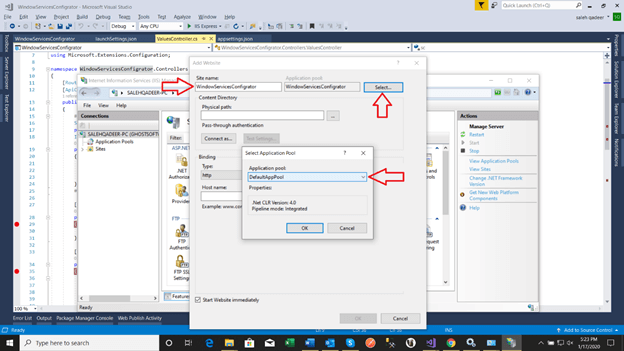
Credit: www.c-sharpcorner.com
Docker Container Hosting
Building a Docker image is easy. First, you need a Dockerfile. This file tells Docker how to build the image. Start with a base image like mcr.microsoft.com/dotnet/aspnet. Add your app files using the COPY command. Remember to set the ENTRYPOINT to run your app. Finally, build the image with the docker build command. Now, your image is ready!
Running your app in a container is simple. Use the docker run command. This starts your app inside a container. Always specify the image name and port. For example: docker run -p 80:80 your-image-name. Your app is now live on the specified port. Easy and fast!
Configuring Security
SSL certificates protect data. They create a secure connection. It’s like a digital lock. Websites need this lock. It keeps user information safe. SSL encrypts data between servers and browsers. Important for any web application. Users see a padlock icon. This shows that the site is secure. Trust is built with SSL. Always use strong certificates. They should be from trusted sources. Regular updates are crucial. Keep certificates valid.
Firewalls act like guards. They block unauthorized access. Monitor all incoming traffic. Only allow safe connections. Set rules for data flow. Firewalls protect against threats. They stop malware and attacks. Always update firewall software. Check logs regularly. These show attempted breaches. Adjust settings as needed. Use both software and hardware firewalls. This doubles protection. Make sure firewall is active. Never leave it off.

Credit: learn.microsoft.com
Monitoring And Logging
Monitoring tools are important for your web API. They help track performance and errors. Popular tools include Prometheus and Grafana. These tools show data in charts and graphs. They make it easy to see how the API works. Set up alerts for problems. Alerts send messages when something goes wrong. This way, you can fix issues quickly. Monitoring keeps your API running smoothly.
Logging saves important information. It helps find bugs and track events. Use Serilog or Log4Net for logging. These tools store logs in files or databases. Logs show what happens in the API. They provide details about requests and responses. You can check logs to understand errors. Logs are helpful for developers. They are useful for improving the API.
Troubleshooting Common Issues
Code can have errors. Errors make programs crash. To fix errors, use try-catch blocks. They help catch problems. Always log errors. Logs help find the root of issues. Add friendly error messages. Users feel better with clear messages.
Slow programs frustrate users. Check for slow database queries. Optimize them for speed. Use caching to store data. Caching makes data retrieval fast. Always test performance regularly. Identify problem areas early.

Credit: www.youtube.com
Frequently Asked Questions
How To Host A .net Core Web Api?
Host a. NET Core Web API by deploying on IIS, Azure, or Docker. Install necessary software and configure settings. Ensure proper security measures are in place. Follow deployment guides specific to each hosting platform for seamless integration. Optimize for performance and scalability to meet user demands.
How Do I Host My Web Api?
Host your Web API using cloud services like AWS, Azure, or Google Cloud. Deploy on a server or container. Ensure proper security and scalability. Use a domain name for easy access. Implement monitoring tools for performance tracking.
Can We Host Asp.net Web Api Without Iis?
Yes, you can host ASP. NET Web API without IIS using self-hosting. Use OWIN or Kestrel server for this purpose.
How To Publish Asp.net Web Api?
Publish your ASP. NET Web API by building it in Visual Studio. Deploy it using IIS, Azure, or Docker. Ensure the web. config file is correctly configured. Set up necessary hosting environments. Test the deployment to confirm it’s working. Optimize performance and security settings for best practices.
Conclusion
Setting up an Asp. Net Core Web API is straightforward. Follow the steps. Choose the right hosting environment. Configure your server properly. Ensure your application is secure. Test everything thoroughly before going live. Regular updates keep your API running smoothly.
Use efficient coding practices for better performance. Remember, a well-hosted API supports business success. Troubleshooting skills help resolve issues quickly. Stay informed about new technologies. Expand your knowledge continuously. Hosting an API may seem daunting at first. With practice, it becomes easier.
Take your time. Be patient. Happy hosting!


