
Are you ready to take your application live on the web but aren’t sure where to start? Hosting your application online is a crucial step in sharing your creation with the world, and it doesn’t have to be a daunting task.
You might feel overwhelmed by the technical jargon and endless options, but with the right guidance, you’ll discover it’s more manageable than it seems. In this guide, you’ll learn step-by-step how to host your application on the web, so you can focus on what matters most—showcasing your hard work and innovation to users everywhere.
Imagine the feeling of seeing your application live and accessible at any time, from anywhere. Keep reading to find out how you can make this a reality and gain the confidence you need to navigate the world of web hosting.
Choosing The Right Hosting Service
Shared hosting is like sharing a room. Many people use the same space. It is cheaper and simple. Dedicated hosting is having your own room. It is more private and secure. It costs more, but you get more control. Which one fits your needs?
Cloud hosting uses many computers. It is very flexible. You can add more space easily. It is good for growing businesses. Security is also strong. Cloud hosting can be more costly, but it offers many benefits.
Check the provider’s reputation. Look at reviews and ask friends. Support is important. Can you reach them anytime? Pricing should be clear. No hidden fees. Choose a provider that meets your needs and budget.
Preparing Your Application
Check if your application meets all required needs. Make sure it runs smoothly on different devices. Ensure the code is clean and well-organized. This will help in easy debugging. Prepare all necessary files and documents for hosting. Keep a backup to avoid any data loss.
Improve your application’s speed and performance. Use compressed images to make pages load faster. Minimize unnecessary files and code. This helps in quick loading. Test your application for responsive design. Ensure it looks good on all screen sizes.
Protect your application from online threats. Use secure protocols like HTTPS. Keep your software updated to avoid vulnerabilities. Implement strong passwords and user authentication. This keeps data safe and secure.
Domain And Dns Configuration
First, pick a unique domain name. This name will be your address online. Use a trusted domain registrar to register your name. Choose a .com, .net, or .org for best results. Pay a small fee to own the domain for a year. You can renew it later. Keep your contact details up-to-date with the registrar.
DNS records help direct users to your site. Set up an A record to point to your web server’s IP address. Add a CNAME record if needed for subdomains. Use an MX record for email services. Check with your web host for exact settings. Keep a note of all records for future use.
Protect your domain with privacy settings. This hides your personal details from the public. Enable two-factor authentication on your account. It adds an extra layer of security. Use a strong password and change it often. Avoid sharing your login details with others. Always monitor your domain for suspicious activities.
Deploying Your Application
FTP and SFTP are common ways to upload files. FTP is fast and simple. SFTP is more secure because it uses encryption. Both methods need a client like FileZilla. You connect to the server with your login details. Drag and drop your files to upload them. Always check your files after uploading. Sometimes files get corrupted.
Git helps you track changes and collaborate. It is a version control system. Use `git push` to send your files to the server. You need a Git repository on the server. This method is efficient and saves time. Make sure to commit your changes first. The server updates automatically after a push.
Tools like Jenkins and Travis CI help automate deployment. They run tests and deploy code automatically. These tools save time and reduce errors. Set them up once, then they work on their own. Always monitor them to make sure everything works. Automation makes deployment easy and fast.
Configuring Server Environment
A web server helps show your app online. Choose a reliable server like Apache or Nginx. Install the server on your machine. Follow steps in the setup guide. Check settings to ensure everything works. Start the server and test it with a browser.
Databases store your app’s data. Use a database system like MySQL or PostgreSQL. Install it on your server. Set up a database for your app. Create tables to hold data. Use simple commands to manage data. Make sure the database connects to your app.
Environment variables store important settings. They keep passwords and keys safe. Add variables to your server. Use a file or a tool to manage them. Keep them secret and secure. Use these variables in your app code. This helps your app run smoothly.
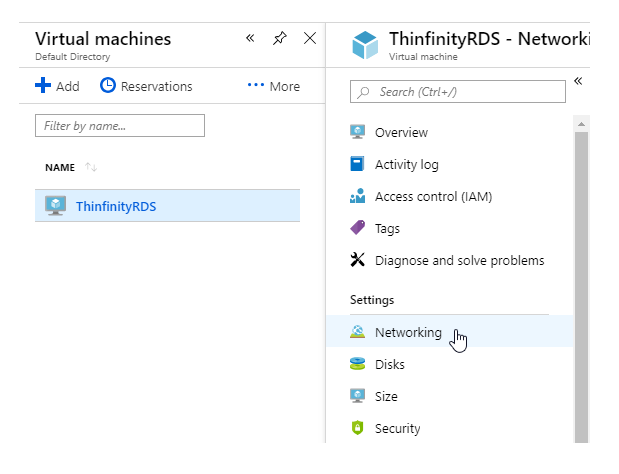
Credit: blog.cybelesoft.com
Testing And Troubleshooting
Setting up a web application requires careful testing and troubleshooting to ensure seamless performance. Identify potential issues early to avoid downtime and user complaints. Use reliable tools to check server configurations and application compatibility for a smooth hosting experience.
Debugging Common Issues
Bugs can break your app. Debugging is like finding and fixing these bugs. Use tools like console logs to see errors. Check your code for typos or missing parts. Sometimes, a bug hides in the code logic. Make sure your logic makes sense. Always test changes right after you fix a bug. This helps make sure the bug is gone.
Performance Testing
Apps need to be fast. Performance testing checks how fast your app runs. Use tools to see where the app slows down. Look for bottlenecks in the code. Optimize these parts to speed up the app. Good performance keeps users happy and engaged.
User Acceptance Testing
User acceptance testing ensures the app works well for users. Get some users to try your app. Watch how they use it. Ask for feedback on the app’s ease of use. Make changes if users find it hard to use. This testing makes sure users like the app.
Monitoring And Maintenance
Monitoring tools are vital. They help track your application’s performance. Look for tools that alert you on issues. Choose those that provide real-time data. Ensure you can view errors and system health. This keeps your application running smoothly.
Backups are essential. They protect your data from loss. Always schedule regular backups. Use cloud services for storing backups. Check backup integrity often. This ensures your data is safe and recoverable.
Scaling helps handle more users. Use scalable infrastructure. Update software regularly. Keep your application optimized. Always test updates before applying. This prevents unexpected issues.
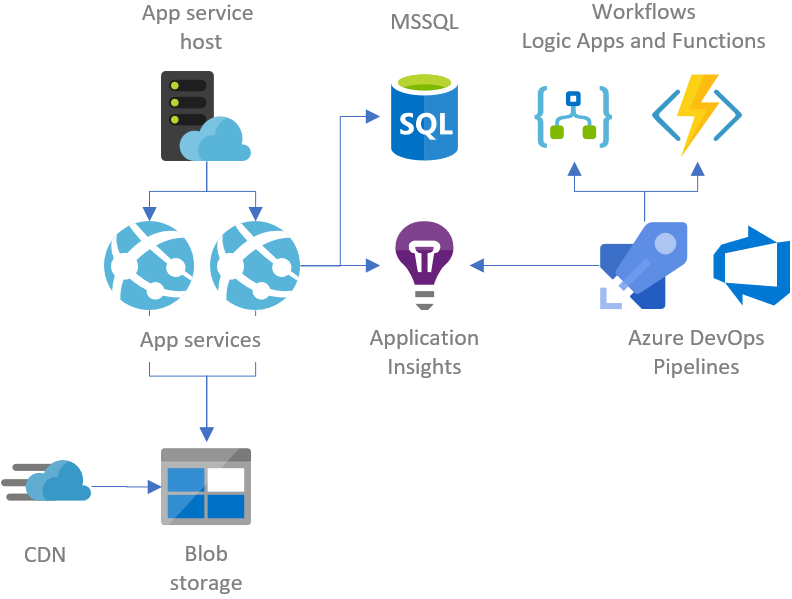
Credit: gunnarpeipman.com

Credit: www.programonaut.com
Frequently Asked Questions
What Is The Best Hosting For A Web Application?
The best hosting for a web application depends on your needs. Consider providers like AWS, Google Cloud, and Microsoft Azure. They offer scalability, security, and reliability. Evaluate their pricing, support, and features to find the perfect fit. Always prioritize speed and uptime for optimal performance.
How Do I Host A Local Web Application?
Install a local server software like XAMPP or WAMP. Configure settings and place your web application files in the server’s directory. Start the server to access your application through a browser using localhost. Ensure necessary dependencies are installed. Regularly update your server software for security and performance.
How To Host The Application?
Choose a reliable hosting provider. Select a plan that fits your app’s needs. Upload your application files. Configure server settings and ensure security measures. Test the application for functionality.
How Do I Deploy My Web Application In The Internet?
Deploy your web application by choosing a hosting provider. Set up a server and install necessary software. Upload your application files using FTP or a version control system. Configure DNS settings to point your domain to the server. Finally, test your application for functionality and security before launching.
Conclusion
Hosting an application on the web can seem complex. But it becomes simpler with clear steps. Start by choosing a reliable hosting service. Configure your server settings carefully. Upload your application files efficiently. Test your application to ensure it runs smoothly.
Remember, security is crucial. Regular updates keep your application safe. Monitor your application’s performance consistently. Troubleshoot issues promptly to avoid downtime. Hosting your application successfully requires patience and practice. With time, you’ll gain confidence and skills. Follow the guide closely, and soon you’ll host like a pro.
Your web presence will grow steadily.


