
Are you ready to take control of your online presence and host your own website? Amazon Web Services (AWS) offers you the tools and power to make it happen with ease.
Imagine having a reliable, scalable, and cost-effective solution right at your fingertips. AWS isn’t just for tech giants; it’s for anyone looking to elevate their website hosting game. In this guide, you’ll discover step-by-step instructions to navigate the AWS platform without feeling overwhelmed.
Whether you’re a beginner or a seasoned developer, this article will empower you to turn your website dreams into reality. Get ready to unlock the secrets of hosting a website using AWS and see your vision come to life. Keep reading, because mastering AWS could be your ticket to online success.
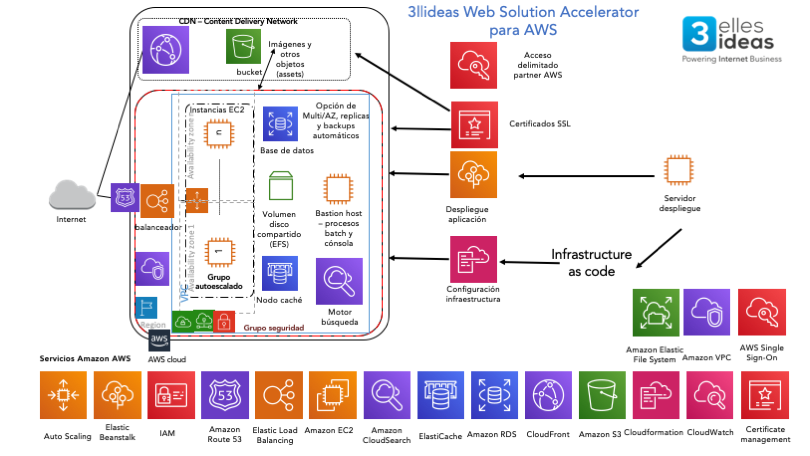
Credit: www.3llideas.com
Aws Basics
AWS stands for Amazon Web Services. It is a cloud service. People use it to host websites. It is very popular worldwide. AWS offers many tools and services. It helps businesses grow and store data. You can use AWS to run applications. It is flexible and secure. AWS can also save you money. It does this by offering pay-as-you-go pricing. This means you only pay for what you use.
AWS provides many services. Some of these are EC2 and S3. EC2 is used for computing power. S3 is for storing files. AWS also has RDS for databases. It helps in managing data. AWS offers CloudFront to speed up content delivery. There is also Route 53 for domain management. These services make hosting easy and reliable.
Preparing For Hosting
Begin by creating an account on the AWS website. This is the first step. Make sure to enter all required information. You will need an email, password, and billing details. Once done, verify your account. Check your email for a verification message. Follow the link to complete this step. Now your AWS account is ready.
AWS offers a free tier for new users. This allows you to test services. But be aware of potential costs. Charges may apply once the free limit is reached. Always monitor your usage. Use the AWS cost calculator to estimate expenses. This tool helps in planning your budget. Keep track of your spending to avoid surprises.
Choosing The Right Aws Service
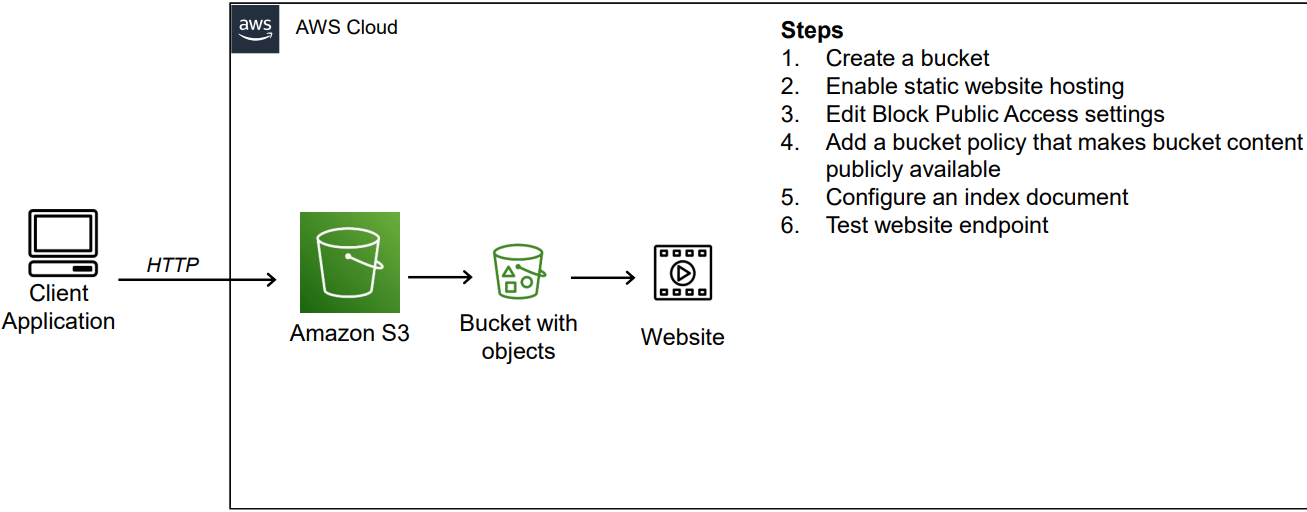
EC2 is like renting a computer. You run websites on it. It is good for dynamic content. You control everything. S3 is different. It stores files. You use it for static content. Like pictures and videos. It is cheaper. Easy to use. Both are strong options. Each has its own use. Choose based on your needs.
AWS has many choices. Lightsail is simple. Easy to start with. Elastic Beanstalk helps with complex sites. It handles setup for you. Lambda runs code only when needed. Saves money. CloudFront speeds up delivery. Makes sites faster. Each option has its benefits. Pick what suits your project best.
Credit: medium.com
Configuring Your Server
Discover the simplicity of hosting a website with Amazon Web Services. Start by configuring your server using AWS tools. Navigate the user-friendly interface to set up a secure and scalable environment for your site.
Launching An Ec2 Instance
Start by logging into the AWS Management Console. Click on the EC2 service. Choose “Launch Instance”. Pick a suitable Amazon Machine Image (AMI). Select an instance type that matches your needs. Micro instances are good for beginners. Click “Next” to configure instance details. Review the settings and click “Launch”.
Security Groups Setup
Security groups act like a firewall for your instance. Set rules to allow or deny traffic. Choose the security group while launching the instance. Define rules for inbound and outbound traffic. Make sure HTTP and SSH ports are open. Review your settings before saving.
Elastic Ip Allocation
Elastic IPs provide a static IP address for your instance. Go to the EC2 dashboard. Click on “Elastic IPs” from the menu. Choose “Allocate New Address”. Associate the Elastic IP with your instance. This helps in maintaining a consistent address even if the instance changes.
Deploying Your Website
Put your website files in an S3 bucket. This is like a folder. Use the AWS console to upload files. Drag and drop files into the bucket. Make sure files are public. Check the permissions. Public files can be seen by everyone.
Set up a web server. Use Apache or Nginx. Choose one to start. Edit the config files. These files tell the server what to do. Make sure it points to your S3 bucket. This way, people can see your site.
Pick a domain name. This is your website’s address. Use AWS Route 53 for domain names. Link your domain to your S3 bucket. Use DNS settings to connect them. People type your domain to visit your site.
Enhancing Performance
CloudFront is a service from Amazon. It helps your website load fast. It uses CDN technology. This means it uses many servers. These servers are around the world. They bring content closer to users. This reduces latency. Your website becomes quicker. It also improves user experience. Websites become reliable. It handles sudden traffic spikes well.
Elastic Load Balancer (ELB) helps distribute traffic. It spreads it across multiple servers. This keeps websites stable. If one server is busy, ELB uses another. It ensures high availability. Websites stay online, even under heavy load. ELB also checks server health. It removes unhealthy ones. This keeps your website smooth. Your users remain happy.
Monitoring And Maintenance
Ensuring smooth website operation on Amazon Web Services involves regular monitoring and maintenance. Keep an eye on performance metrics to quickly address issues. Regular updates and security checks maintain optimal functionality and safeguard against threats.
Utilizing Cloudwatch
Amazon CloudWatch helps you monitor your website. It checks website health. You can see traffic, errors, and alerts. Set alarms for important events. If something goes wrong, it tells you fast. It helps keep your website running smoothly. You can look at data over time. This helps find patterns and problems. CloudWatch is a strong tool for website health.
Regular Backups
Backing up your website is important. It keeps your data safe. AWS offers tools for easy backups. You can use Amazon S3 for storing backups. Make sure backups happen often. Daily backups are a good idea. If something breaks, you can restore quickly. Keep backups for a long time. Old backups can help fix problems. Regular backups keep your website secure.

Credit: www.signitysolutions.com
Troubleshooting Common Issues
Hosting a website using Amazon Web Services can sometimes present challenges. Common issues include server configuration errors and domain name settings. Troubleshooting involves checking permissions, verifying DNS records, and ensuring correct security settings.
Connection Problems
Connection issues can be frustrating. Check your server’s network settings. Ensure your firewall allows traffic. Confirm your security groups are set correctly. Sometimes, restarting the server helps. Verify if your IP is public or private. Public IPs are needed for external access. Ensure your instance status is running. Check your router settings too. Incorrect settings can block connections.
Dns Configuration Errors
DNS errors can cause website problems. First, check your DNS records. They should point to the right IP. Ensure your domain name is registered and active. Verify the nameservers are correct. Incorrect nameservers lead to errors. Sometimes, DNS changes take time. Wait for propagation to complete. Check your TTL settings. Lower TTL values might help quick updates. Test your DNS with online tools. They identify misconfigurations easily.
Frequently Asked Questions
Can I Use Aws To Host My Website?
Yes, AWS can host your website. It offers services like EC2, S3, and CloudFront for website hosting. AWS provides scalability, flexibility, and reliability. You can choose from various hosting options to fit your needs. AWS also supports WordPress, static sites, and complex web applications.
Is Aws Good For Web Hosting?
AWS is excellent for web hosting. It offers scalable solutions, robust security, and global availability. Users can efficiently manage resources, ensuring optimal performance. With flexible pricing and various services, AWS suits both small businesses and large enterprises. Reliable support and easy integration make it a top choice for hosting websites.
How To Create A Web Server In Aws?
Launch an EC2 instance from the AWS Management Console. Choose an Amazon Machine Image (AMI) and instance type. Configure security groups for network access. Assign an Elastic IP for a static address. Connect via SSH to install and configure your desired web server software.
Can I Use Aws As A Server?
Yes, AWS can be used as a server. It offers cloud-based services like EC2 for server hosting. AWS provides scalable, reliable infrastructure for various applications. Deploy and manage servers easily with AWS’s flexible options. Enjoy benefits like cost-efficiency, security, and global reach with AWS server solutions.
Conclusion
Hosting a website on Amazon Web Services is straightforward. AWS offers reliable, secure options for website hosting. It’s suitable for small and large sites alike. Begin with choosing the right plan for your needs. Use AWS tools to manage your site efficiently.
Monitor your site’s performance regularly for best results. AWS provides excellent scalability options. You can easily adjust resources as your site grows. With AWS, you can ensure your site runs smoothly. Explore AWS features to enhance your website’s functionality. Start your hosting journey with AWS today.
Enjoy the benefits of a robust hosting platform.


