
Are you ready to take control of your digital space? Imagine having your very own web server, running smoothly on a Linux system, where you can host websites, manage data, and have full control over your online presence.
It sounds empowering, doesn’t it? If you’re curious about how to make this a reality, you’ve come to the right place. In this guide, we’ll walk you through the steps of hosting a web server on Linux, breaking down complex processes into simple, actionable tasks.
Whether you’re a tech enthusiast or a business owner looking to expand your digital capabilities, you’ll find the information you need right here. By the end of this article, you’ll not only understand the technical aspects but also feel confident in setting up and managing your own server. Ready to unlock the potential of Linux hosting? Let’s dive in!

Credit: www.veeble.com
Choosing The Right Linux Distribution
Start by picking a Linux distribution. Some are easier for beginners. Ubuntu and Debian are popular choices. They are user-friendly and have good support. CentOS is also a good option. It is stable and used in many servers. Fedora offers the latest features. But it might be too complex for new users. Consider your needs and skills when choosing. Each distribution has its own strengths. Make sure to check the community support. It can help solve problems quickly. A good community is very helpful.
Download the distribution you like. Use the official website. This ensures you get a safe version. Install it on your computer. Follow the instructions provided. Each distribution has a guide. It helps you step by step. Once installed, you are ready to configure your server.
Setting Up The Environment
First, get a Linux distribution. Popular choices include Ubuntu and Fedora. Download the installation file from the official website. Use a USB stick to install it on your computer. Follow the on-screen instructions. It is as easy as clicking “Next”.
Open the terminal on your Linux system. Type the command sudo apt update and press enter. This checks for new updates. Then type sudo apt upgrade to install them. Always keep your system updated. This helps avoid problems later.
Installing Web Server Software
Apache is a popular web server. First, open your terminal. Type the command: sudo apt update. This updates your package list. Next, type: sudo apt install apache2. Wait for it to finish. Apache is now installed. You can check if it’s running. Type: sudo systemctl status apache2. Look for the green “active” status. Your Apache server is ready.
Nginx is another web server. It is fast and lightweight. Start by opening your terminal. Update the package list with: sudo apt update. Install Nginx with: sudo apt install nginx. Once done, start the server. Use: sudo systemctl start nginx. Check its status with: sudo systemctl status nginx. Look for “active” in green. Your Nginx server is now set up.
Configuring The Web Server
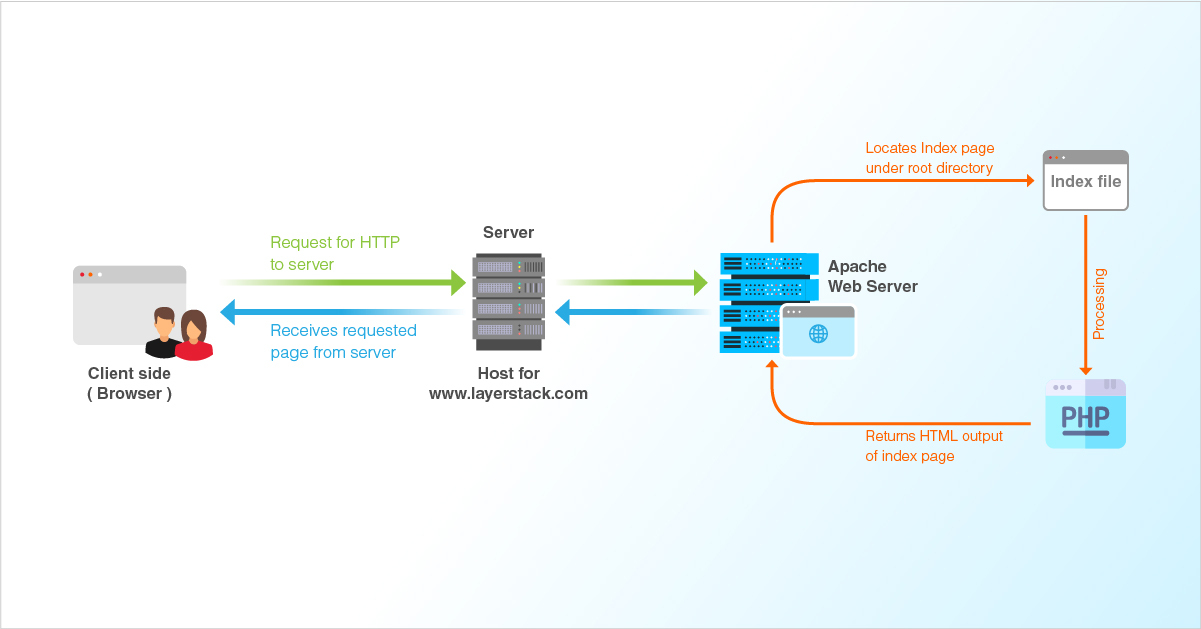
Linux web servers need basic settings to work. First, install the web server software. Apache is common. Others include Nginx and Lighttpd. Use package manager to install. Update the server software often. This keeps it running well. Set the root directory for files. The root directory holds the web pages. Choose a domain name for your site. It helps users find your site online. Test the server to ensure it works. Fix errors quickly. This makes the website reliable.
Security is important for web servers. Enable firewalls to block threats. Use SSH keys instead of passwords. They are safer. Keep server software updated. Old versions have risks. Install SSL certificates. They encrypt data. Check user permissions regularly. Limit access to important files. Back up the server often. This saves data if there is an attack. Secure servers protect users and data.
Managing Web Content
Setting up a web server on Linux involves choosing the right distribution and installing necessary software like Apache or Nginx. Adjusting configurations for security and performance ensures optimal operation. Regular updates and monitoring keep the server running smoothly.
Setting Up Web Directories
Web directories are special folders. They hold your site files. Choose a folder for your main site. Call it public_html or www. This folder is your web root. All files go here. Use permissions to keep files safe. Set permissions to control file access. Only you can change these files. Make more folders for images and scripts. Name them clearly. This helps you stay organized.
Uploading And Managing Files
Upload files using a program like FTP. FTP stands for File Transfer Protocol. It moves files from your computer to the server. Use a secure connection. This keeps your files safe. After uploading, check file names. They should be simple and clear. Use lowercase letters. Avoid spaces and special characters. Update files when needed. Keep your site fresh and working well.
Credit: www.youtube.com
Enabling Domain And Dns
First, you need a domain name. This is your web address. Choose a name that is easy to remember. Visit a domain registrar like GoDaddy or Namecheap. Type your domain name in the search box. If it’s available, you can buy it. The cost may vary. Usually, it’s around $10 to $15 per year. After buying, you own the domain for a year. Remember to renew it each year.
DNS helps connect your domain to your web server. Log in to your registrar account. Find the DNS settings option. You will see fields for nameservers. Enter the nameservers provided by your hosting provider. Save the settings. It might take some time to update. Once done, your domain points to your server. This process is crucial for your site to be live.
Testing And Troubleshooting
Setting up a web server on Linux requires careful testing and troubleshooting. Identify and resolve common issues like configuration errors, firewall settings, and software dependencies to ensure smooth operation. Regular monitoring and updates keep your server secure and efficient.
Verifying Server Functionality
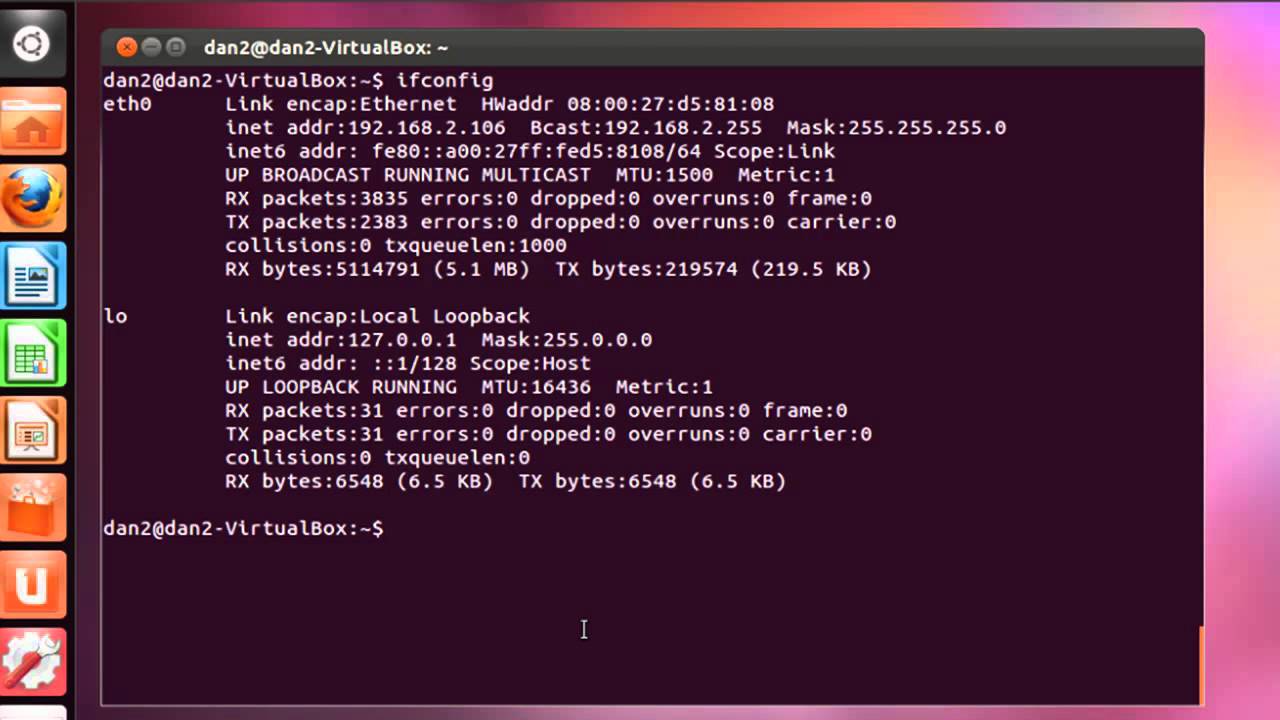
Start by checking if the server is running. Open a terminal and type systemctl status apache2. This command checks the server’s status. If it says “active”, your server is running. Next, open a browser and enter the server’s IP address. You should see the default web page. If not, check your firewall settings. The firewall might block the connection.
Common Issues And Fixes
Sometimes, the server won’t start. This could be due to configuration errors. Check your config files for typos. Another common issue is port conflicts. Make sure no other service uses port 80. If the server is slow, it might be under heavy load. Try restarting it to clear the load. If you face permission issues, check user rights. Ensure the server user has access to necessary files.
Maintaining Your Web Server
Keeping your web server updated is very important. Security patches fix holes in your software. These patches keep your server safe from attacks. Updates also give you new features. They make your server run better. Use a package manager like APT or YUM. These tools help install updates easily. Set up automatic updates if possible. This saves time and effort.
Watching your server’s performance helps keep it running well. Check the CPU usage and memory often. High usage can slow your server. Use tools like htop or top. These show what parts need attention. Keep an eye on your disk space too. Full disks can cause errors. Regular checks make sure everything runs smoothly.
Credit: www.layerstack.com
Frequently Asked Questions
How To Host A Web Server In Linux?
To host a web server on Linux, install Apache or Nginx. Configure server settings and open firewall ports. Upload your website files to the server directory. Start the server using appropriate commands. Ensure your domain points to your server’s IP address.
Regularly update and secure your server.
Which Linux Os Is Best For Web Servers?
Ubuntu and CentOS are the best Linux OS choices for web servers. Ubuntu offers user-friendly features and extensive community support. CentOS provides enterprise-level stability and robust security, ideal for server environments. Both are excellent for hosting websites, ensuring reliability and performance.
How To Create A Server In Linux?
To create a server in Linux, install a server distribution like Ubuntu Server. Use terminal commands to set up services. Configure network settings and security measures. Regularly update and monitor server performance.
Which Web Server Is Used For Linux?
Linux commonly uses web servers like Apache, Nginx, and LiteSpeed. Apache is the most popular choice. Nginx offers high performance and scalability. LiteSpeed provides speed and security. Choose based on your needs and server requirements.
Conclusion
Setting up a web server on Linux is straightforward. Start by choosing the right Linux distribution. Install essential packages like Apache, Nginx, or similar. Configure settings based on your needs. Regularly update and secure your server. Remember to backup data often.
Follow these steps, and you’ll run a web server smoothly. Linux offers reliability and flexibility. Perfect for hosting your site. Enjoy your web hosting journey on Linux. Keep learning and exploring. This guide serves as your stepping stone. Your server management skills will improve with practice.
Happy hosting!


