
Are you curious about how to elevate your web scraping game by hosting it on AWS? You’ve come to the right place!
If you’ve ever struggled with slow data extraction or limited resources, AWS can be the perfect solution for you. Imagine unlocking the power to scale your operations, access cutting-edge technology, and boost your data collection efficiency. This guide will show you exactly how to set up your web scraper on AWS with ease.
You’ll learn step-by-step how to leverage AWS’s robust infrastructure to gather the data you need, faster and more reliably than ever before. Stay tuned to discover how you can transform your web scraping process and why AWS is the game-changer you’ve been looking for.
Benefits Of Hosting On Aws
AWS offers a reliable and scalable platform for web scrapers. It can handle large amounts of data with ease. AWS provides various tools to manage and monitor your scraper. These tools ensure your scraper runs smoothly. You can increase or decrease server power as needed. This flexibility helps save costs on unnecessary resources. AWS data centers are secure and worldwide. Your scraper will have low latency and high speed access. With AWS, you get 24/7 support to solve any issues quickly. This makes hosting on AWS a smart choice.
Credit: medium.com
Choosing The Right Aws Service
EC2 Instances are like computers in the cloud. They can run all the time. They are great for web scraping tasks. You can choose the size you need. Small tasks need small instances. Big tasks need big instances. You only pay for what you use. EC2 is flexible and powerful. It can handle many scraping jobs. It needs some setup work. But it is worth it.
Lambda Functions are super cool. They only run when needed. No need to keep them on. They are good for small tasks. They can start fast and stop fast. They save money. No running costs when not in use. Perfect for occasional scraping jobs. Easy to use with other AWS tools. Just write your code and go.
Elastic Beanstalk is like a magic helper. It helps deploy apps fast. It can handle web scrapers too. You do not worry about servers. Elastic Beanstalk does the hard work. Great for people who want easy setup. It supports many programming languages. A nice choice for web scraping projects.
Setting Up An Ec2 Instance
First, sign in to your AWS account. Go to the EC2 dashboard. Click on “Launch Instance”. Choose an Amazon Machine Image (AMI). Select an instance type. Free tier users can choose the t2.micro instance. Click “Next” until you reach the review page. Review your choices. Then, click “Launch”.
Create a new security group. Name it something easy to remember. Allow HTTP and SSH traffic. Set the source to “Anywhere”. Click “Review and Launch”. This step keeps your instance safe. It decides who can access your instance.
Connect to your instance using SSH. Use a terminal or PuTTY for this. Once connected, update the server. Run sudo apt-get update. Install Python and other tools. Use sudo apt-get install python3. This installs Python 3. Install any other software you need. Your server is now ready to host a web scraper.
Deploying A Web Scraper
Use AWS services to upload your code. AWS S3 is a great choice. First, create a new bucket. Then upload your code files there. Keep your files organized. This helps in easy access later. Make sure the files are in the correct format. This ensures they run smoothly.
Environment variables are important. They store sensitive data. Data like API keys and passwords. Use AWS Systems Manager Parameter Store. It helps manage these variables. Create new parameters for each variable. Assign meaningful names to them. This keeps your environment neat and secure.
Testing is crucial. Run your scraper on AWS. Check if it fetches data correctly. Look for errors and fix them. AWS CloudWatch can help. It monitors your scraper’s performance. Use logs to find issues quickly. Ensure everything runs smoothly before going live.
Using Lambda For Web Scraping
Deploying a web scraper on AWS Lambda offers a cost-effective and scalable solution. It enables automated data extraction without server maintenance. Enjoy efficient performance and seamless integration with other AWS services.
Creating A Lambda Function
Amazon Lambda is great for web scraping. It lets you run code without managing servers. First, create a new Lambda function. Choose a runtime like Python or Node.js. These are good for scraping tasks. Write your scraping code inside the function. Make sure the code is efficient. It should not take long to run. Test the function to see if it works well. Fix any errors you find. Save your function when done. Now, the function is ready to scrape web data.
Managing Permissions
Permissions are important for Lambda. You need to set them right. Use IAM roles to manage access. Lambda needs permission to access data. You can give it permissions through IAM. Attach the role to your Lambda function. This lets it access resources. Check permissions often. Ensure they are correct. This keeps your data safe.
Scheduling With Cloudwatch
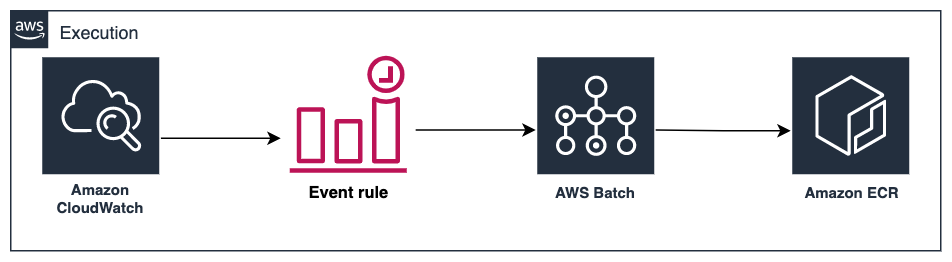
CloudWatch helps schedule tasks. You can automate scraping with it. Set up a CloudWatch event. Choose how often the event runs. Link it to your Lambda function. Now, the scraper runs on a schedule. It can run daily or hourly. You choose the time. This makes web scraping easy and automatic.

Credit: cheesecakelabs.com
Data Storage Solutions
Store large amounts of data with Amazon S3 Buckets. They are like big containers for your files. Perfect for images, videos, and documents. Easy to access and manage. Secure and scalable storage option. You pay only for what you use. Great for web scraper data.
DynamoDB keeps your data neat and organized. It’s fast and reliable. Excellent for structured data. You can search and sort easily. It handles lots of requests at once. Ideal for storing key-value pairs. Helps in quick data retrieval.
Use RDS for complex data needs. It supports popular databases like MySQL and PostgreSQL. Great for handling relationships between data. Offers automatic backups and updates. Keeps your data safe and sound. Best for web applications needing structured data.
Handling Large Scale Scraping
Auto Scaling Groups help your web scraper grow. They let you add more servers when needed. This keeps your scraper fast. Without these groups, your scraper might slow down. Or even crash. Auto Scaling is smart. It checks if more resources are needed. Then it acts. This ensures smooth scraping always.
Network traffic can be tricky. Too much traffic can slow things down. AWS offers tools to help. Load Balancers spread traffic evenly. This keeps your scraper fast. They help manage big traffic spikes. Your scraper stays smooth and reliable. Using these tools is easy. They are designed for beginners.
Using resources wisely is key. Scrapers need CPU and memory. AWS helps manage these. CloudWatch monitors usage. It shows how much is used. This helps in saving costs. Less waste means more savings. Proper resource use keeps costs low. Your scraper runs efficiently.
Credit: aws.amazon.com
Cost Management Tips
Setting up AWS Budgets helps keep track of spending. It alerts you when costs rise. You can set limits to control expenses. It’s a useful tool for managing costs. Keep an eye on monthly bills. This helps avoid surprises. Staying within budget is crucial.
Selecting cost-effective services saves money. Look for services that match your needs. Choose options that offer scalability. Avoid paying for unused resources. Use free tier options if available. Always check pricing models. Compare prices before making a decision.
Using the right size instances cuts costs. Assess your usage needs. Choose instances that fit your workload. Avoid over-provisioning. It wastes resources and money. Regularly review instance sizes. Adjust them as requirements change.
Security Best Practices
Use IAM roles for safe access. They give the right permissions. No need for long-term access keys. Roles are better than user accounts. They are easy to manage. Assign roles to your AWS services. This keeps your data safe. Only allow what is necessary.
Always encrypt data at rest and in transit. Use AWS Key Management Service. It helps in managing keys. Encryption keeps data private. No one can read it without keys. Protect sensitive information. Never store plain text data. This prevents data leaks. Keep your web scraper secure.
Conduct security audits regularly. Check for weak points. Make sure all settings are secure. Use AWS security tools. They help in finding threats. Fix problems quickly. Keep logs for future reference. This helps in understanding past issues. Stay updated with new security practices. Your data stays safe.
Troubleshooting Common Issues
Hosting a web scraper on AWS can be tricky. Common issues involve configuring the server and managing resources. Ensuring your scraper runs efficiently requires troubleshooting network and permission settings.
Debugging Connectivity Problems
Connectivity issues can stop your web scraper. Check your internet connection first. Ensure your AWS server is online. Use ping to test the connection. Verify your IP address settings. Sometimes, incorrect settings cause problems. Look at your firewall rules. They might block your scraper. Adjust settings if needed. Check the security groups on AWS. They control access. Ensure correct permissions. If all else fails, restart your server. It might fix the problem.
Analyzing Performance Bottlenecks
Slow performance affects scraper results. Check CPU usage on your server. High usage slows things down. Look at your memory usage. Low memory can stop processes. Optimize your code for speed. Efficient code runs faster. Use logging to track execution time. It helps find slow parts. Review your data processing methods. They might be inefficient. Update them for better speed. Ensure your network bandwidth is enough. Low bandwidth causes delays.
Resolving Permission Errors
Permission errors block access. Check your AWS IAM settings. They control user access. Ensure your user has the right permissions. Look at your file permissions on the server. Sometimes, incorrect settings cause errors. Adjust them as needed. Review your security policies. They might restrict access. Update policies to allow your scraper. Double-check your access keys. Incorrect keys lead to denied access. Reset them if necessary.
Frequently Asked Questions
How Do I Deploy A Web Scraper?
Deploy a web scraper by choosing a programming language like Python. Use libraries such as BeautifulSoup or Scrapy. Write the scraping code and test it locally. Deploy on platforms like Heroku or AWS. Schedule tasks using cron jobs or cloud services to automate scraping.
Ensure compliance with website terms.
Is Web Scraping On Amazon Allowed?
Web scraping Amazon without permission violates their terms of service. Unauthorized data extraction can lead to legal consequences. Always follow Amazon’s guidelines and consider using their official APIs for data access. Adhering to their policies ensures compliance and avoids potential risks.
Can You Host A Web App On Aws?
Yes, you can host a web app on AWS. Use services like EC2, Elastic Beanstalk, or Lightsail. AWS provides scalable, secure hosting solutions tailored for web applications. Benefit from global infrastructure, flexible pricing, and seamless integration with other AWS services.
How Do I Set Up A Web Scraper?
Install a web scraping tool like Beautiful Soup or Scrapy. Choose a target website. Inspect the site’s HTML structure. Write a script to extract data. Test and refine your scraper. Ensure compliance with legal and ethical guidelines.
Conclusion
Hosting a web scraper on AWS is straightforward. Start with choosing the right instance. Set up the environment carefully. Consider security measures to protect data. Monitor performance regularly to ensure efficiency. AWS provides flexibility and scalability. It suits different needs and budgets.
Keep learning about new AWS features. They can improve your web scraping experience. With practice, hosting becomes easier. Your web scraper will run smoothly and effectively. AWS is a reliable choice for hosting. It helps you gather data efficiently. Remember, small tweaks can optimize your setup.
Happy scraping!


