
Are you ready to take your web application live for the world to see? Hosting your web app can feel like a daunting task, but it doesn’t have to be.
Imagine the satisfaction of watching your creation come to life on the internet, accessible to users everywhere. By the end of this guide, you’ll know how to make that happen seamlessly. Whether you’re a seasoned developer or just starting out, understanding the hosting process is crucial.
We’ll break it down into simple steps, so you can confidently bring your web application into the digital spotlight. Keep reading, and discover how straightforward and rewarding hosting your web app can be!
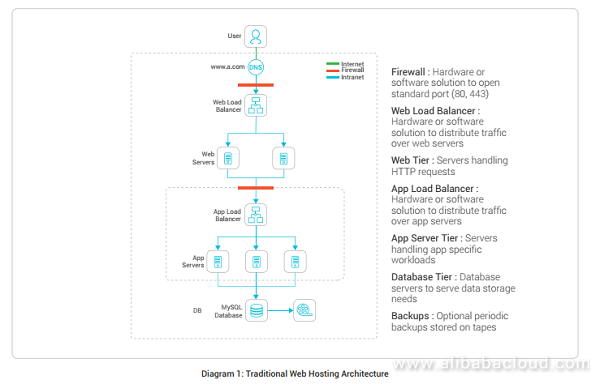
Credit: www.alibabacloud.com
Choosing The Right Hosting Provider
There are different types of hosting services. Each has its own pros and cons. Shared hosting is the most basic. It is also the cheapest. You share a server with other websites. VPS hosting is a step up. You get more control and resources. Dedicated hosting gives you a whole server. It’s great for big websites. Cloud hosting is flexible. You pay for what you use.
Think about your website needs. How much traffic do you expect? Do you need special software? Check the cost. Can you afford it long-term? Look at the support offered. Is help available 24/7? Also, consider the uptime. A good provider should have 99% uptime or more.
Domain Name Registration
Picking a good domain is important. It should be short and memorable. Avoid using complicated words. People should spell it easily. Think about your brand when choosing. Does it fit your business? Ensure it is unique and not taken. Use tools to check availability.
Once you have a name, it’s time to register. Find a trusted domain registrar online. Some popular ones are GoDaddy, Namecheap, and Google Domains. Create an account with the registrar. Search for your chosen domain. If it’s available, go ahead and register. Pay the registration fee. Fees can vary, so compare prices. Now, you own your domain name.
Setting Up Your Server
Choosing between shared and dedicated servers is important. A shared server hosts many websites together. It is less expensive. But it may be slower. A dedicated server hosts only your website. It is faster. But costs more. Think about your needs and budget before deciding.
Setting the right server settings is crucial. First, ensure the server is secure. Use strong passwords. Update software regularly. Check your server’s firewall settings. Allow only necessary traffic. Next, ensure the server is fast. Optimize it for speed. Remove unwanted files and programs. Monitor server performance often. Keep an eye on server uptime. Aim for at least 99% uptime.
Deploying Your Web Application
First, choose a reliable hosting provider. Upload files using FTP or SFTP. These tools help transfer files easily. Ensure files are in the right directory. This step is crucial for your app to work. Use a secure connection for safety. Protect your data and privacy.
Set up your database correctly. This helps your app store data. Use proper credentials for access. Double-check your settings to avoid errors. Test connections to ensure everything works. Keep your data safe from hackers. Regular backups prevent data loss.
Ensuring Security
Hosting a web application securely involves configuring firewalls and encryption protocols to protect data. Regular updates and backups are crucial for safeguarding sensitive information. Implementing strong authentication measures ensures only authorized users access the application.
Ssl Certificates
SSL certificates help keep data safe. They encrypt information sent between users and your site. This means no one else can read it. SSL also helps your website look trustworthy. Visitors see a lock symbol in the address bar. This gives them confidence that their data is safe. Getting an SSL certificate is easy. Many hosting companies offer them for free.
Firewalls And Backups
Firewalls act like a shield. They protect your website from bad traffic. Firewalls block harmful data from entering. It’s important to use them for added safety. Backups are also crucial. They save copies of your website data. If something goes wrong, you can restore your site. Regular backups ensure you never lose important information.

Credit: www.youtube.com
Optimizing Performance
Caching speeds up your web app. It saves data for quick access. This helps reduce server load. Your app runs smoother. Users get fast responses. Some common caching methods include browser caching and server-side caching. Browser caching saves data on the user’s device. Server-side caching stores data on the server. Both methods reduce data requests. Your app will load faster. Users will be happier.
Monitoring tools help track your app’s health. They show how your app performs. You can see any issues quickly. Popular tools include New Relic and Datadog. These tools alert you to errors. They also report on speed and uptime. Fix issues before users notice. Keep your app running smoothly. Happy users mean a successful app.
Managing Updates And Maintenance
Regular updates keep your web application safe. They improve performance and fix bugs. Set a schedule for updates. Update your web application monthly. Always test updates first. This avoids breaking your app. Use tools to automate updates. Automation saves time. It reduces errors. Keep track of what updates you install. Document changes for future reference.
Troubleshooting helps you fix problems fast. Identify common issues in your web application. These might be slow load times or broken links. Check error logs regularly. Logs show you what went wrong. Use them to find solutions. Restart your server if issues persist. Sometimes a simple restart fixes problems. Consult online forums for advice. Other developers share solutions there. Keep a list of solved issues. This helps next time a problem arises.
Understanding Costs And Budgeting
Starting a web app needs some initial money. Buying a domain is the first step. It usually costs between $10 to $15 a year. Next, you need web hosting. Basic hosting plans can start at $3 per month. For better speed, you might need a more expensive plan. Another cost is SSL certificates. These keep data safe and secure. Some hosts offer free SSL, but others might charge $10 to $100 per year.
After setup, there are regular costs too. Monthly hosting fees need to be paid. If your site grows, fees can go up. Software and plugin updates may also cost money. Keeping the site secure is important. You might need to buy extra security tools. Technical support can also be an extra expense. It helps fix problems quickly. Budgeting for these is important.

Credit: www.programonaut.com
Frequently Asked Questions
How To Host Your Own Web Application?
Choose a reliable hosting provider and select a suitable plan. Upload your web application files using FTP. Configure domain settings and databases. Ensure security measures are in place. Test the application to confirm functionality. Optimize performance for faster loading times and better user experience.
How Is A Web Application Hosted?
To host a web application, choose a server, install necessary software, and deploy your code. Use services like AWS, Google Cloud, or DigitalOcean for scalability and reliability. Ensure your domain is connected to the server. Regularly update and secure your application for optimal performance.
Where Can I Host My Web Application?
Host your web application on platforms like AWS, Google Cloud, or Azure. These services offer scalability, security, and reliability. You can also consider DigitalOcean or Heroku for simpler setups. Choose a provider based on your application’s specific needs, including budget, performance, and support options.
How To Host The Application?
To host an application, choose a reliable hosting provider. Set up a server environment compatible with your application. Deploy the application files, configure the necessary settings, and point your domain to the server. Ensure security measures are in place and monitor performance regularly.
Conclusion
Hosting a web application is simpler with the right steps. Begin by choosing a reliable hosting provider. Ensure your server meets application requirements. Configure settings for optimal performance. Secure your application with SSL certificates. Regular updates keep your application safe and efficient.
Monitor server performance for smooth operation. Troubleshoot issues promptly for a seamless user experience. Implement backups to prevent data loss. Follow these steps for successful hosting. Enjoy the benefits of your web application. Your journey to hosting success starts now.


