
Are you ready to take your web application live but unsure where to start? Hosting a web application online might seem daunting, but with the right guidance, you can navigate this process smoothly.
Imagine the satisfaction of seeing your creation accessible to users around the globe. This guide is designed to help you make that happen, by breaking down the hosting process into simple, actionable steps. You’ll learn exactly what you need to do to ensure your web application is not only up and running but also optimized for performance and reliability.
So, if you’re eager to turn your project from a local gem to an online powerhouse, keep reading to discover how you can host your web application with confidence and ease.

Credit: manuelreinfurt.medium.com
Choosing The Right Hosting Provider
Shared hosting means many websites share one server. Cost is low. Resources are shared. This can slow down your site. Good for small websites or beginners.
Virtual Private Server, or VPS, gives you more control. It is like having your own mini-server. More power than shared hosting. Costs more too. Great for growing websites.
Dedicated server is all yours. No sharing with others. Fast and reliable. Best for big websites. Higher cost. You need tech skills to manage it.
Cloud hosting uses many servers. Scalable and flexible. Pay for what you use. Handles traffic spikes well. Good choice for modern websites.
Domain Name Registration
Choosing the right domain name is important. It should be short and easy to remember. Use words that are simple and clear. Avoid using numbers and hyphens. They can confuse people. Make sure it relates to your website’s purpose. Check if the name is available. You can use online tools for this. Pick a name that is unique and stands out.
Once you pick a name, you need to register it. This means buying the name for your use. There are many companies where you can do this. These are called domain registrars. Prices can vary. Check for the best deals. Keep your details private if you can. This protects your personal information. You might need to renew the name every year. So remember the renewal date.
Setting Up The Server Environment
Choose an operating system that fits your needs. Linux is very popular. Windows can be used too. Both have advantages. Linux is often free. Windows can be easier for beginners. Think about your app’s needs. Also, consider costs and support. Make sure your server has updates. This keeps it safe. Updates fix bugs. They also improve performance.
A web server is vital for hosting. Apache and Nginx are common choices. Apache is widely used. Nginx is fast and efficient. Choose based on your app’s requirements. Configure your server properly. Set up security measures. Use firewalls and secure ports. Optimize for speed. Adjust settings for performance. Regularly monitor server health. Keep logs for tracking issues.
Databases store app data. MySQL and PostgreSQL are popular options. MySQL is easy to use. PostgreSQL is very powerful. Choose based on data needs. Set up your database correctly. Ensure data is safe and secure. Use backups to prevent data loss. Optimize for speed. Index tables for fast searches. Maintain databases regularly. Check for errors and fix promptly.

Credit: hostadvice.com
Deploying The Web Application
First, choose a reliable hosting service. Make sure it supports your application’s technology. Use an FTP client to upload files to the server. FTP stands for File Transfer Protocol. You will need the server address, username, and password. Drag your files to the server’s folder. Check if all files are uploaded. This is important for the application to work.
Go to the server’s control panel. Find the settings section. Set the correct environment for your application. This could be development or production. Adjust the database settings if needed. Input the correct database name, username, and password. Update the configuration file with these details. Save the changes. Test the application to see if it runs correctly.
Securing The Web Application
An SSL Certificate is essential for web safety. It encrypts user data. It protects information from hackers. Install it correctly. Ensure it covers all pages. Check its validity regularly. Renew it before expiry. This keeps data safe. Trust is built with secure connections.
A firewall blocks harmful traffic. Set it up to guard your site. Configure it to block suspicious access. Keep it updated to recognize new threats. It acts as a barrier. A good firewall protects user data. Monitoring is key. Ensure it works properly.
Security audits check for vulnerabilities. They ensure your site is safe. Conduct them often to find weak spots. Fix issues quickly. Audits help maintain trust. They prevent data leaks. A secure site keeps users happy. Regular checks are important. Stay alert to new threats.
Monitoring And Maintenance
Performance Monitoring Tools help keep your web app fast. These tools watch how well your app runs. They alert you if something goes wrong. Good tools can prevent big problems. They keep your users happy. Choose a tool that fits your app’s needs.
Regular Backups are very important. Backups save your data in case of loss. Store backups in a safe place. Make sure to test your backups often. This ensures they work when needed. A good backup plan can save a lot of trouble.
Software Updates keep your app secure. Updates fix bugs and make apps better. Always update your software quickly. This prevents security risks. Use automated tools to help with updates. This keeps your app safe and up-to-date.
Scaling And Optimization
Load balancing helps spread traffic across multiple servers. This ensures no server is overwhelmed. It provides better performance and reliability. If one server fails, others can take over. This reduces downtime and keeps the application running smoothly.
Caching stores frequently accessed data in memory. This makes data retrieval faster. A well-implemented cache reduces server load. It also speeds up the application. Users experience quicker response times. Consider using tools like Redis or Memcached for caching.
Optimizing your database improves query performance. Use indexes to speed up data retrieval. Regularly clean up and organize your data. Avoid unnecessary queries and joins. This ensures your application runs efficiently.
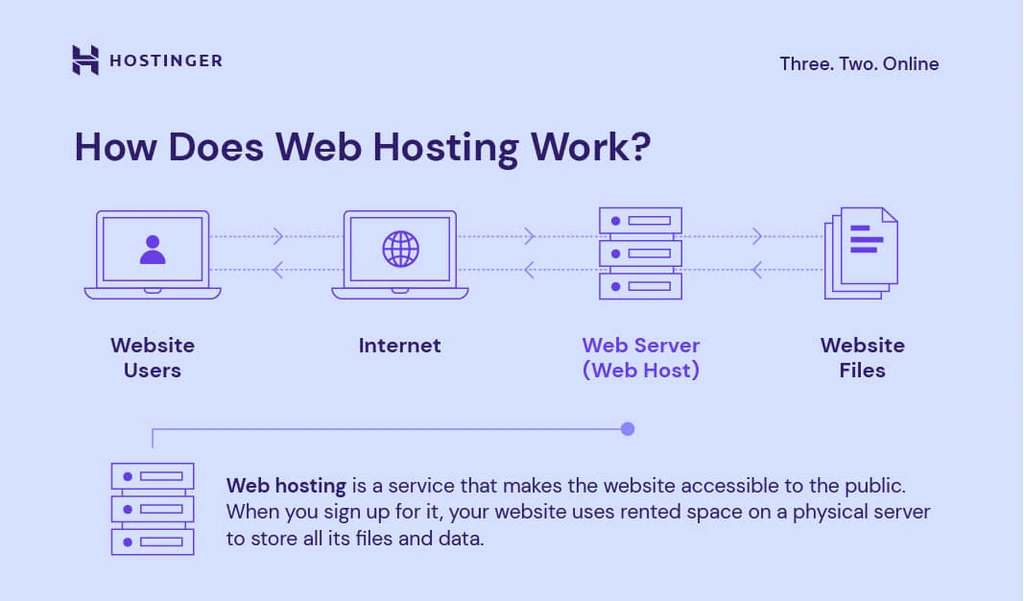
Credit: www.hostinger.com
Frequently Asked Questions
How Do I Host My Own Web Application?
Choose a reliable hosting provider. Set up a server environment. Deploy your application files. Configure domain settings. Ensure security measures are in place.
Where Can I Host My Web Application?
Host your web application on platforms like AWS, Google Cloud, or Azure. Choose based on scalability, security, and pricing. Consider using Heroku or DigitalOcean for simplicity and ease. These options offer reliable services and flexible plans to suit your needs.
How Do I Deploy My Web Application In The Internet?
Deploy your web application by choosing a reliable hosting provider. Set up a server, upload your files, configure domain settings, and ensure security measures. Use tools like FTP or SSH for file transfers. Verify functionality and optimize performance for a seamless user experience.
What Is The Best Hosting For A Web Application?
Choose cloud hosting like AWS, Google Cloud, or Azure for scalability and flexibility. Consider cost, performance, and security features. Ensure reliable uptime, robust support, and compatibility with your web application’s needs. Prioritize hosts offering easy integrations and seamless updates for the best experience.
Conclusion
Hosting a web application can seem complex at first. Break the process into simple steps. Choose the right hosting provider. Set up your server. Deploy your application with care. Ensure security and regular updates. Test your application thoroughly. Support your users with reliable service.
Troubleshoot issues promptly. Keep learning and adapting to changes. Hosting your web application successfully is achievable. Follow the steps. Stay focused and organized. Your application will be live and running smoothly. Happy hosting!


