
Are you ready to share your web application with the world? Hosting it on the internet is your next big step, and it’s easier than you might think.
Imagine your application running smoothly online, accessible to users everywhere, and you in control of its performance. This guide is here to simplify the process for you. You’ll learn about choosing the right hosting service, setting up your server, and ensuring your application is secure and efficient.
With clear steps and practical tips, you’ll be equipped to launch your web application successfully. Dive in and discover how you can turn your digital vision into reality!
Choosing The Right Hosting Provider
Shared hosting is like sharing a big house. Many people live there. Resources are divided among all. It is cheap and easy to start. But, the website can be slow. Dedicated hosting is like having your own house. All resources are yours. It is faster and more secure. But, it costs more money. Choose based on your needs and budget.
Cloud hosting uses many servers. If one server fails, others help. It is reliable and scalable. This means you can grow your website. Pay only for what you use. It is a good choice for growing websites. Many big companies use cloud hosting today. It is both flexible and smart.
Before choosing, think about a few things. Price is important. How much can you spend? Check the uptime guarantee. It should be high. Look for customer support. They should help when you need it. Security is a must. Protect your data and your visitors. Finally, think about scalability. Can the host grow with you?
Setting Up Domain Name
A domain name is your website’s address. You need to register it first. Many companies offer this service. Choose a name that is easy to remember. Some popular domain registrars include GoDaddy and Namecheap. They help you register your domain quickly.
DNS settings are like a phone book for the internet. They help link your domain to your web server. You must update DNS records after registering your domain. Common records are A, CNAME, and MX. Each serves a different purpose. Adjust settings carefully to avoid errors.
Domain privacy keeps your personal information safe. It hides your details from public view. Most registrars offer this service for a fee. Domain security is also important. Use strong passwords and enable two-factor authentication. This helps protect your domain from hackers.
Preparing The Web Application
Clean code is important. It makes the app run faster. Remove unused code and files. This saves space and helps performance. Use tools to check your code. They find mistakes and improve quality. Minify CSS and JavaScript files. Smaller files load quicker. Always test your app after changes.
A good database setup makes your app strong. Choose a database that fits your needs. Set up tables and fields correctly. Use indexes to speed up searches. Regularly back up your database. This keeps your data safe. Also, check for errors often. Fix them quickly.
Security is a must for web apps. Protect user data with encryption. Use HTTPS for secure connections. Keep software updated. New updates fix security holes. Use strong passwords and change them often. Also, limit access to important parts of the app. Regularly test for security issues.
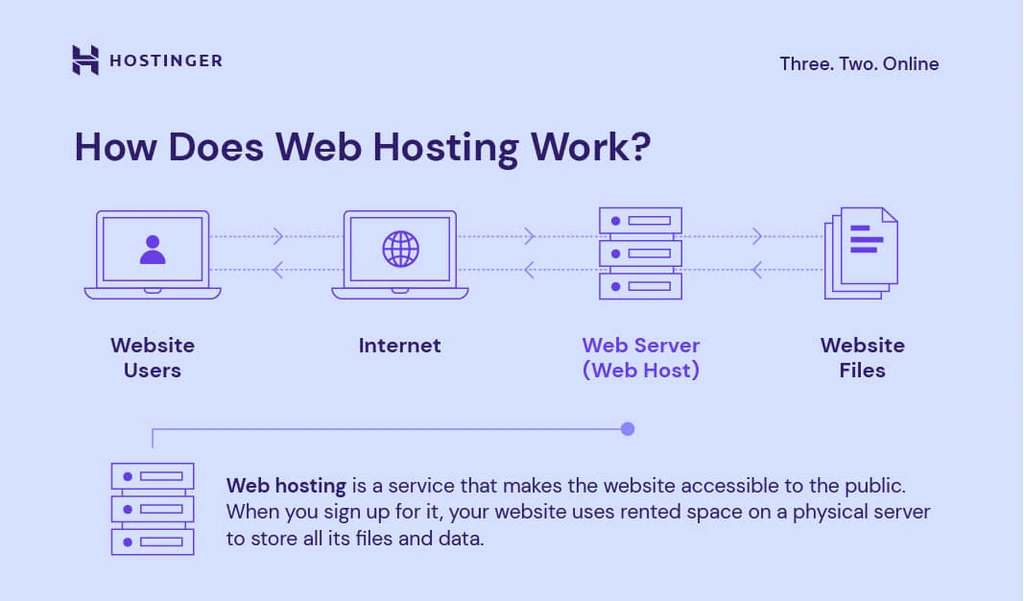
Credit: www.hostinger.com
Deploying The Application
FTP helps you upload files to a server. First, connect to your server using an FTP client. Enter your server’s address, username, and password. Click ‘connect’ to access the server. Next, select your files and upload them. Ensure all files are transferred correctly. This method is simple and good for small sites.
Version control keeps track of changes. Git is a popular tool for this. First, push your code to a remote repository. Then, set up your server to pull code from the repository. This ensures your application is always up to date. It also helps in tracking changes easily.
Automated tools make deployment easy. Tools like Jenkins or CircleCI are popular. Set up your build pipeline with these tools. They automatically deploy code to servers. This saves time and reduces errors. Automation makes managing large applications easier.
Configuring Server Environment
Setting up a server environment is crucial for hosting a web application online. Start by selecting a reliable hosting provider. Ensure your server has the necessary software, like Apache or Nginx, to handle web requests efficiently.
Server Software Installation
Begin by choosing the right server software. Options include Apache, Nginx, and IIS. Install the software on your server. Follow the installation instructions provided by the software. Ensure the software is up-to-date. An updated server is secure and fast. Check for any dependencies needed during installation. Use package managers like apt or yum for Linux servers.
Setting Up Environment Variables
Environment variables are important for server configuration. They store settings and paths. Set variables like PATH and HOME. Use a configuration file to manage these variables. Ensure the variables are correct. Incorrect settings can cause errors. Check the syntax of the file. Save changes and restart the server. This ensures the settings take effect.
Ssl Certificate Configuration
SSL certificates secure web connections. Install a certificate on your server. Purchase from trusted providers. Free options include Let’s Encrypt. Configure the server to use SSL. Edit the configuration files for your server software. Redirect HTTP to HTTPS for security. Test the SSL setup. Ensure there are no warnings or errors.
Monitoring And Maintenance
Performance Monitoring Tools help keep your web application running smoothly. Use tools like Google Analytics and New Relic to watch your app’s speed and usage. They show how users interact with your app. This helps spot problems quickly.
Regular Backups are crucial to protect your data. Create backups daily or weekly to avoid data loss. Store backups in a safe location. This ensures you have a copy if something goes wrong.
Security Updates are important to keep your app safe. Install updates as soon as they are available. Updates fix holes in security and keep hackers out. Make sure your software is always up to date.
Troubleshooting Common Issues
Server errors can be tricky. Check the error logs first. Logs hold clues about what’s wrong. Restarting the server might help. Sometimes, it’s simple fixes. Ensure server settings are correct. Check file permissions too. Wrong permissions cause issues. Use tools like Postman to test. Test APIs or endpoints. This helps find errors.
DNS problems cause web issues. Verify your DNS records. Records must be correct. Use dig or nslookup commands. These help check DNS entries. Clear DNS cache if needed. Sometimes cache has old data. Update your DNS settings. Check with your DNS provider. They can assist with errors.
Traffic surge can slow websites. Use load balancers to help. Balancers spread traffic evenly. Optimize your server settings. This makes it handle more requests. Cache static content to reduce load. Monitor traffic with tools like Google Analytics. Know when surges happen. Plan for big traffic days.

Credit: www.youtube.com
Scaling Your Application
Load balancing keeps your app running smoothly. It spreads traffic across multiple servers. This prevents any one server from getting overwhelmed. The simplest way? Use a round-robin method. It sends each new request to the next server in line. Another option is least connections method. It directs traffic to the server with the fewest active connections. Both methods help reduce downtime and keep users happy.
Database scaling is crucial for handling growing data. Start with vertical scaling. Add more power to your existing database server. Then try horizontal scaling. Spread your database across multiple servers. Consider using replication. It copies data to different locations. This improves read performance and ensures data safety. Proper scaling lets your app grow without slowdowns.
Smart resource use saves money. It boosts performance too. First, set up auto-scaling. It adjusts server power based on demand. Next, monitor your app’s CPU and memory usage. Cut down on unnecessary processes. They waste resources. Lastly, use caching. It stores frequent data for quick access. These steps help your app run better.

Credit: learn.microsoft.com
Frequently Asked Questions
How Do I Deploy My Web Application In The Internet?
Deploy your web app online by choosing a hosting provider, uploading your files, and configuring server settings. Ensure domain registration, set up SSL for security, and test functionality. Use deployment tools like Git or FTP for seamless updates and maintenance.
Optimize for speed and SEO for better visibility.
How Do I Host A Website On The Internet?
To host a website, purchase a domain name and select a reliable hosting provider. Upload your website files using an FTP client or cPanel. Ensure your DNS settings point to your hosting server. Test your website to confirm it’s live and functioning properly.
What Is The Best Hosting For A Web Application?
Choose cloud hosting for scalability and reliability. Opt for AWS, Google Cloud, or Azure for top performance. Ensure security features and customer support. Compare pricing and resources to suit your application’s needs. Prioritize uptime and backup solutions for uninterrupted service.
Does A Web Application Need A Server?
Yes, a web application requires a server to store, process, and manage data. The server handles user requests and delivers the necessary resources. Servers can be physical or cloud-based, providing essential infrastructure for the application’s functionality and accessibility.
Conclusion
Hosting a web application online is simpler than it seems. Follow the steps outlined for a smooth process. Choose the right platform and ensure proper security. Test your application to avoid issues. Monitor its performance to keep it running well.
Regular updates are key for security and functionality. Keep learning about new hosting practices. This ensures your application stays relevant and efficient. With these tips, your web application can thrive on the internet. Stay proactive and your efforts will pay off.


