
Are you ready to bring your web app to the next level by hosting it on AWS? Imagine the possibilities: faster performance, seamless scalability, and robust security—all at your fingertips.
Whether you’re a seasoned developer or just starting out, AWS offers an array of powerful tools to help your web app thrive in the digital landscape. But where do you start? With so many options, it can feel overwhelming. Don’t worry; you’re not alone in this.
This guide is crafted to lead you through each step of the process, ensuring you feel confident and empowered. By the end of this article, you’ll not only understand how to host a web app on AWS, but you’ll also discover how this move can transform your app’s potential. Keep reading to unlock the secrets of efficient web hosting on AWS!
Choosing The Right Aws Service
EC2 gives you full control over the server. You can install any software you need. It’s like owning a computer in the cloud. Elastic Beanstalk makes things easier. It manages servers for you. You don’t need to worry about setup. Just upload your app and let Elastic Beanstalk do the work. It’s great for beginners. But EC2 is better if you want more control.
S3 is perfect for static sites. It stores files like HTML, CSS, and images. You can host a website without a server. It’s easy and cheap. Just upload your files to S3. Set permissions for public access. Then your site is live. S3 handles traffic well. Your site stays fast, even with many visitors.
Preparing Your Web App
Setting up your web app on AWS involves selecting the right services and configuring your environment. Ensure your app is secure, scalable, and optimized for performance. AWS offers various tools to simplify hosting, making it accessible even for beginners.
Code Optimization
Make your code clean and simple. Remove any unnecessary parts. Shorter code runs faster. Test your code often. Look for bugs and fix them. Clean code is easy to read. It helps other developers. Use comments to explain your code. This is helpful for everyone.
Dependency Management
Manage your app’s dependencies carefully. Use a package manager like npm or pip. It helps keep all parts organized. Update your libraries often. This keeps your app safe. Avoid too many dependencies. They can make your app slow. Check if you need each one. This makes your app run better.
Setting Up Your Aws Account
First, go to the AWS website. Click on “Create an Account”. Enter your email and password. Choose a unique account name. Follow the prompts to finish the process. AWS will ask for your billing information. Enter your credit card details carefully. AWS might charge a small amount for verification. Don’t worry; it will be refunded. After that, you can sign in and explore the AWS dashboard.
It’s smart to set budget alerts on AWS. This helps you avoid unexpected charges. Go to the Billing Dashboard. Click on “Budgets”. Create a new budget. Set a limit for your spending. AWS will alert you if you get close to this amount. You can choose to get alerts via email. This keeps your spending under control.
Credit: wdevon99.medium.com
Launching An Ec2 Instance
Choose the right instance type for your app. Small apps may need a t2.micro. Bigger apps might need t2.large. Always check what your app needs. Different types have different memory and CPU. Make sure to pick the best fit for your app. This helps your app run smoothly.
Set up your security group carefully. This controls who can access your app. Allow HTTP and HTTPS traffic. Block unsafe connections. Let only trusted IPs access your app. This keeps your app safe. Always review and update security settings. Safety first!
Deploying With Elastic Beanstalk
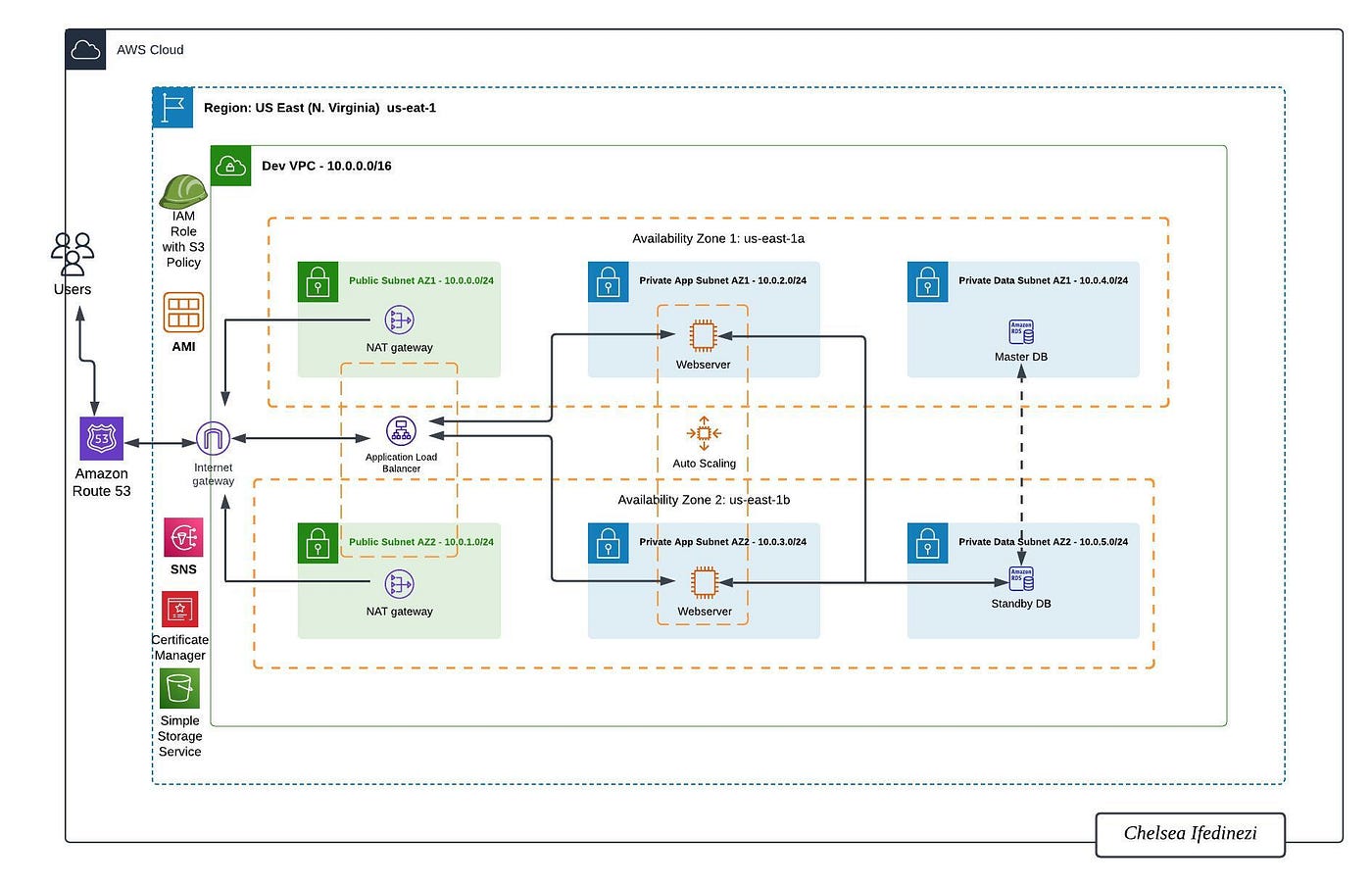
Setting up the right environment is important. Choose the platform that fits your app. Elastic Beanstalk supports many languages. You can use Java, Python, or Node.js. Configure your environment variables. These store important settings. Make sure to select the right instance type. It decides the power your app will have. Configure your security settings. This keeps your data safe. Review your configuration twice before saving.
Upload your application code using the Elastic Beanstalk console. Use a ZIP file for your code. Make sure your code is ready and working. Click on “Create New Application” in the console. Follow the steps to upload your code. Elastic Beanstalk will handle the deployment. It makes the process simple. You can see the progress in the console. Once complete, your app will be live.
Credit: medium.com
Using Aws S3 For Hosting Static Content
First, create a new bucket in AWS S3. Choose a unique name. Select a region close to your users. Enable public access for hosting. This allows anyone to see your site. Next, set up versioning. This helps track changes. You can always go back to old files. Keep your bucket clean and organized. Store files in folders. This makes it easy to find things later.
You must set permissions for your bucket. Start by clicking on the permissions tab. Choose “Edit” to change settings. Give public read access to your files. Use policy documents for this. Write them carefully. They control who sees your files. Avoid giving write access to everyone. This keeps your files safe. Review permissions often. Adjust them as needed.
Configuring Domain And Dns
AWS Route 53 is a domain name system service. It helps connect your domain to your web app. First, sign in to your AWS account. Then, go to the Route 53 service. Choose Create Hosted Zone. Enter your domain name. This will create a zone for your domain. Copy the nameservers provided. These are important for the next step.
Go to your domain registrar. This is where you bought your domain name. Find the DNS settings. Paste the nameservers from Route 53 into the DNS settings. This links your domain to AWS. Save the changes. Wait a few minutes. Your web app is now connected to your domain. It may take time to update everywhere. Check if the connection works by visiting your domain.
Monitoring And Scaling
AWS simplifies hosting your web app with efficient monitoring tools. Spot issues quickly and ensure performance. Scaling options allow your app to handle increased traffic with ease, providing a seamless user experience.
Cloudwatch Metrics
CloudWatch is a tool on AWS. It helps you watch your web app. You see how much CPU and memory your app uses. You can also track network traffic. CloudWatch shows you graphs and numbers. This helps you know if your app is working well. If your app is slow, you can add more resources. CloudWatch also sends alerts. You get a message if something is wrong. This helps you fix problems fast.
Auto Scaling Groups
Auto Scaling Groups help your app handle more users. If many people use your app, it can slow down. Auto Scaling adds more servers when needed. This keeps your app fast. You set rules for scaling. When traffic is high, more servers start. When traffic is low, servers stop. This saves money. Auto Scaling makes sure your app is always ready. It helps your app stay strong and quick.
Ensuring Security And Compliance
IAM roles help in managing access. They control who can do what with AWS services. Permissions are crucial. They define what actions are allowed. Set permissions carefully. Only give access to what is needed. This limits risk. Use least privilege approach. This is safer.
Data encryption protects sensitive information. Use it for data at rest and in transit. AWS offers tools for this. AWS KMS is useful. It manages encryption keys. Always keep keys secure. Encrypt databases, files, and backups. Make sure encryption is strong. This ensures data safety.
Cost Optimization Strategies
Buying Reserved Instances can save money. You pay less by booking in advance. This works well for apps with constant demand. Long-term plans can help with this. Costs drop when usage is predictable. Careful planning is key to save money.
Spot Instances are cheaper but risky. They work when computing needs are flexible. AWS offers these at a lower cost. But, they can be taken back anytime. Use them for tasks that can stop and restart. This helps save money while running tasks.
Credit: d1.awsstatic.com
Frequently Asked Questions
Can You Host A Web App On Aws?
Yes, you can host a web app on AWS. AWS provides scalable solutions like EC2, Elastic Beanstalk, and Lambda. These services offer flexibility, security, and reliability for web app hosting. AWS also supports various programming languages and frameworks, ensuring seamless deployment and management of your web application.
Which Aws Service Will Be Used To Host Web Applications?
AWS Elastic Beanstalk hosts web applications efficiently. It deploys and scales applications automatically. Amazon EC2 is another option for hosting web apps. AWS Lightsail offers a simpler solution for small projects. AWS services ensure flexibility, scalability, and reliability. Choose based on your application’s specific needs and scale.
Can I Host A Website On Aws For Free?
Yes, you can host a website on AWS for free using the AWS Free Tier. It offers limited resources, including EC2 and S3, for 12 months. Ensure you monitor usage to avoid charges.
How Do I Host A Web Based App?
Choose a reliable hosting provider. Set up a server with necessary software like Apache or Nginx. Upload your app files via FTP. Configure domain settings to point to the server. Ensure security measures are in place. Regularly update and monitor your app for optimal performance and user experience.
Conclusion
Hosting your web app on AWS brings flexibility and scalability. AWS offers powerful tools for seamless deployment. Follow these steps to ensure a smooth process. Start with account setup and selecting the right service. Upload your app and configure settings wisely.
Monitor performance and tweak as needed. AWS provides resources to support your app’s growth. Stay informed with AWS updates and community forums. Experiment and learn continuously. Hosting on AWS can enhance your app’s reliability and reach. Embrace the journey and watch your app thrive.


