
Imagine having your web app live on the internet, accessible to anyone, anytime, without the hassle of expensive hosting services. Sounds like a dream, right?
Well, with GitHub, this dream is within your reach. You might be wondering how you can make this happen. Hosting your web app on GitHub is not only cost-effective but also remarkably straightforward. In this guide, you’ll discover step-by-step how to leverage GitHub to showcase your web app to the world.
Whether you’re a seasoned developer or just starting out, you’ll find that GitHub is a powerful platform ready to elevate your project. Dive in and learn how you can bring your web app to life with ease. Your journey to seamless hosting begins here—get ready to unlock the potential of your web app on GitHub!
Setting Up A Github Account
Start by visiting the GitHub website. Click on the sign-up button. Fill in your email and password. Choose a username that you like. This name will be your online identity on GitHub. Make sure to verify your email address. This step is important. It secures your account. Now, you have a GitHub profile. Welcome to the coding world!
A repository is like a folder for your code. It holds all the files needed for your project. Each repository has a name. Choose a name that explains your project. You can make it public or private. Public means anyone can see it. Private is for your eyes only. You can also add a readme file. This file explains what your project does. It helps others understand your work.

Credit: pages.github.com
Preparing Your Web App
Use clean and simple code. It helps others understand it fast. Comments are important. They tell what the code does. Always name files and variables clearly. This avoids confusion. Use consistent indentation. It makes code neat and readable. Avoid long lines of code. Break them into smaller parts. Always test your code. Fix errors before sharing.
Keep files in proper folders. It helps find them quickly. Use a main folder for your project. Inside, create subfolders like css, js, and images. Name your files well. It explains their purpose. Avoid clutter in your main folder. Move unused files to a separate folder. Make a file named README. It gives an overview of your app.
Using Git For Version Control
Git is a tool to track changes in your code. First, download Git from the official site. Choose the version for your computer’s system. Follow the steps to install. It’s like installing a simple game. After the install, open the terminal or command line. Type git –version. This checks if Git is ready. If you see a version number, Git is installed. If not, try the steps again.
Committing saves your work in Git. Make sure your files are ready. Open the terminal. Type git add . to add all files. This tells Git to track the files. Next, type git commit -m “Your message here”. This saves your changes with a note. The message helps you remember what was changed. Now, your changes are safe in Git.

Credit: www.youtube.com
Creating A Repository For Your App
Start by going to Github and logging into your account. Click the plus sign at the top right corner. Choose New Repository from the dropdown menu. A new page will load. Enter a name for your repository. Make it simple and easy to remember. Add a description if you want. This step is optional.
Select Public or Private for your repository. Public means everyone can see it. Private means only you can see it. Next, check the box that says Initialize this repository with a README. It helps people understand your project. Finally, click the Create repository button. Your repository is now ready!
Click the Upload files button on the main page of your repository. You can drag and drop files or choose them from your computer. Make sure to upload your HTML, CSS, and JavaScript files. These files are needed for your web app to work. Once uploaded, write a short commit message. This is like a note about what you did.
Click the Commit changes button to save. Your files are now in your repository. You can view them anytime. Your web app is one step closer to being online!
Enabling Github Pages
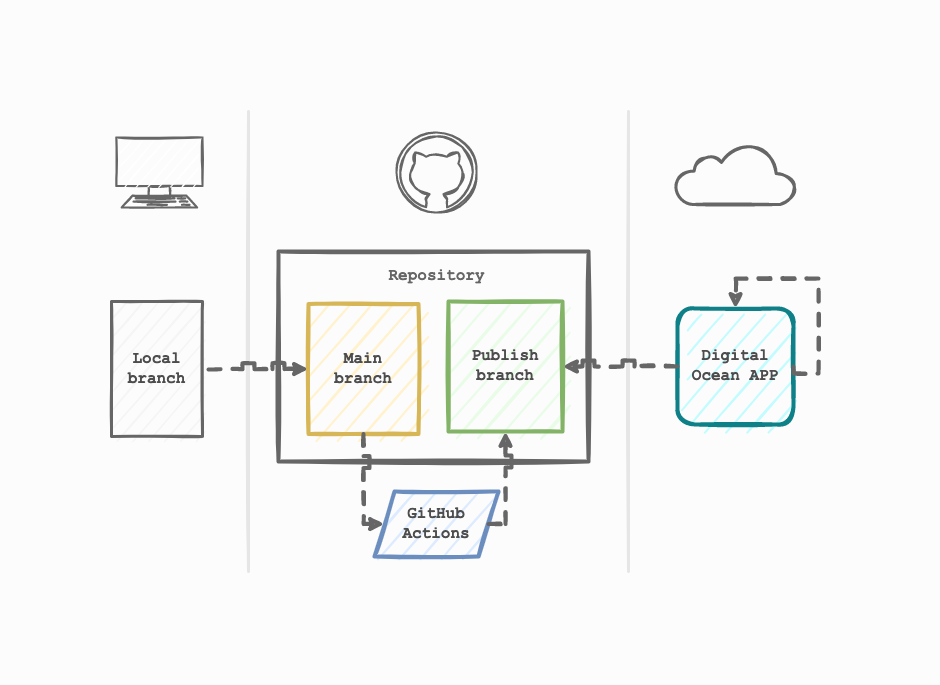
GitHub Pages lets you host websites straight from your GitHub repository. First, go to your repository’s settings. Find the GitHub Pages section. Select the source branch to use. Usually, it’s the main branch. GitHub will create a URL for your site. This URL is where your web app will live. Make sure your code is ready to go live.
You can use a custom domain for your GitHub Pages site. First, buy a domain from a domain provider. Then, go to your domain settings on the provider’s site. Add a CNAME file to your GitHub repository. This file includes your domain name. Next, set up DNS records. These records point your domain to GitHub’s servers. This makes sure your domain works with GitHub Pages.
Credit: thiagoalves.ai
Troubleshooting Common Issues
Hosting a web app on GitHub can be challenging. Common issues include repository errors and incorrect file paths. Ensure proper setup by verifying file structure and permissions.
Resolving Deployment Errors
Sometimes, deployment errors can occur on Github. Check your repository settings first. Ensure your branch settings are correct. The GitHub Pages section should be configured. Verify if your source branch is set right. Sometimes build processes fail. Look at the build log for clues. Ensure all dependencies are listed. Missing files can cause deployment failures. Always double-check your files. Make sure file paths are correct. Incorrect paths lead to errors. Update any wrong paths. Retry the deployment process. Following these steps can help fix errors.
Managing File Conflicts
File conflicts happen when changes clash. First, pull the latest changes. This helps avoid conflicts. Review the conflict markers in files. They show the conflicting parts. Decide which changes to keep. Remove the other ones. Save the file after resolving conflicts. After saving, stage the file. Commit the changes to your branch. Push the changes back to GitHub. This will update the repository with resolved files. Managing conflicts is vital for smooth collaboration.
Maintaining Your Web App
Hosting your web app on GitHub is simple and effective. Start by creating a repository and uploading your files. Enable GitHub Pages in the repository settings to make your app live.
Updating Content
Keeping your web app fresh is important. Users love new features and content. Regular updates make your app better. Fix bugs quickly to keep users happy. Add new features slowly. This helps users understand changes easily. Update visuals to keep the app modern. Use bright colors and clear pictures. This makes your app look nice.
Monitoring Performance
Check how your app runs often. Fast apps keep users happy. Slow apps make users leave. Look at loading times. Make them short. Watch how much data your app uses. Less is better. Check for errors. Fix them quickly. Errors can confuse users. Use tools to watch your app. Tools help find problems fast. This keeps your app running well.
Frequently Asked Questions
Can Github Host A Web App?
Yes, GitHub can host web apps using GitHub Pages. It supports static websites and web applications. GitHub Pages is free and allows custom domains. You can easily deploy your web app from a GitHub repository. It’s ideal for personal projects, portfolios, and documentation websites.
How To Run A Web Application In Github?
To run a web application on GitHub, use GitHub Pages. Push your repository and enable GitHub Pages under settings. Select a branch for deployment, then visit the provided URL to access your web application. Ensure your files are correctly structured with an index.
html for best results.
Can I Host My Website On Github For Free?
Yes, you can host your website for free using GitHub Pages. It’s ideal for static sites and supports custom domains. Simply upload your HTML files to a repository, enable GitHub Pages, and your site goes live. It’s perfect for personal projects, portfolios, and documentation sites.
Can I Run An App On Github?
No, you cannot directly run an app on GitHub. GitHub hosts code repositories for collaboration and version control. To run an app, clone the repository to your local machine or server, then execute it in the appropriate environment. Use platforms like GitHub Actions for continuous integration and deployment.
Conclusion
Hosting a web app on GitHub is simple and effective. GitHub Pages provides a reliable platform for developers. It helps showcase projects to the world. Follow the steps outlined to ensure a smooth process. Remember to keep your repository organized.
This will make updates easy and efficient. Sharing your work on GitHub boosts visibility. It can attract collaborators and feedback. Engage with the GitHub community for learning and support. Now, you have the tools to publish your app. Start sharing your creations today!


