
Are you ready to take your Ruby on Rails web application from your local machine to the world wide web? Hosting your app might sound daunting, but it’s a crucial step to reach your audience and make your project shine.
Imagine the satisfaction of seeing your creation live, accessible to users around the globe. Whether you’re a seasoned developer or just starting out, understanding how to effectively host your Rails app is key to your success. In this guide, you’ll discover the essential steps to get your app up and running smoothly.
You’ll learn how to choose the right hosting service, configure your environment, and ensure your application runs efficiently. Stick around, and by the end of this article, you’ll have the confidence and knowledge to make your app accessible to the world. Ready to unlock the potential of your Ruby on Rails application? Let’s dive in!
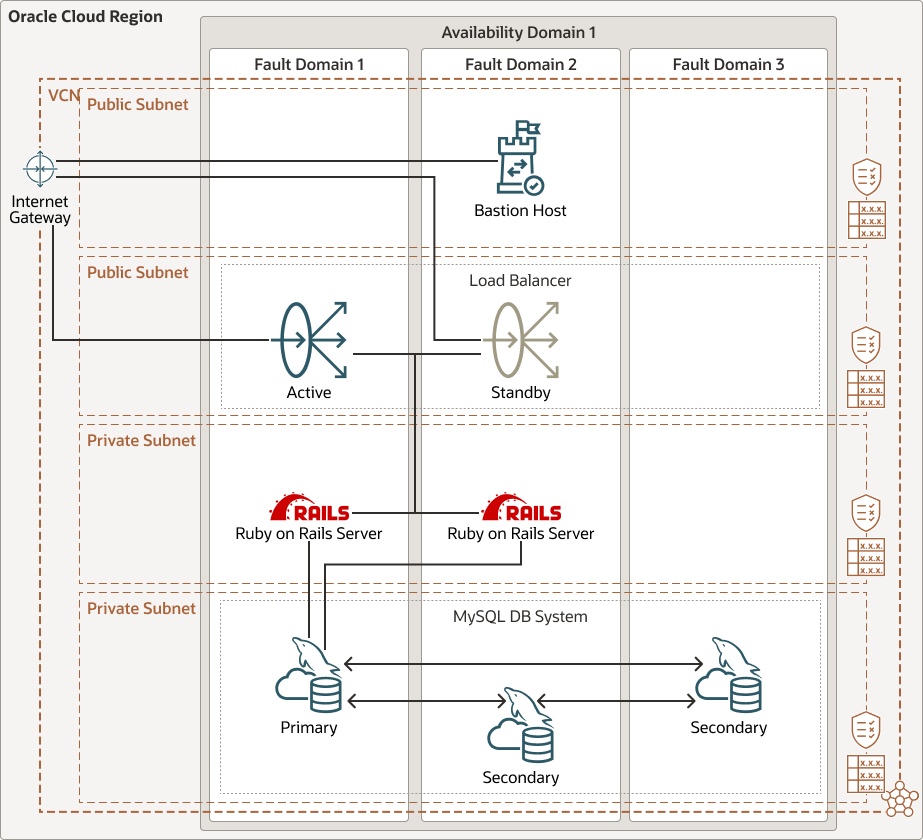
Credit: docs.oracle.com
Choosing A Hosting Provider
Shared hosting is cost-effective. Many sites share one server. This can slow down your site. Dedicated hosting offers a whole server just for you. It’s faster and more reliable. But it’s more expensive. Choose based on your budget and needs.
Cloud hosting provides flexibility. Resources scale up or down as needed. It can handle high traffic. Popular providers include AWS, Google Cloud, and Azure. Compare their prices and features. Pick the one that fits your app best.
Focus on security features. SSL certificates are essential. Check for backup options. Support is crucial. Ensure 24/7 support is available. Look for uptime guarantees. More uptime means more reliability. Consider the control panel. It should be easy to use. These features help keep your app safe and running smoothly.
Credit: www.hostinger.com
Setting Up The Development Environment
First, download the latest version of Ruby. Visit the official Ruby website to find it. After downloading, follow the installation steps. Next, install the Rails framework. Open your terminal and type gem install rails. This command will set up Rails on your computer. Make sure both Ruby and Rails are working. Test them by typing ruby -v and rails -v in the terminal. If you see version numbers, you are ready.
Choose a database for your application. Popular choices include SQLite, PostgreSQL, and MySQL. Open the database.yml file in your Rails project. Edit it to match your database settings. Ensure your database server is running. Create the database by running rails db:create in the terminal. This will prepare the database for your application.
Bundler helps manage your application’s dependencies. Each dependency is a gem. Open the Gemfile in your Rails project. Add any needed gems. Run bundle install to install these gems. This command will ensure your app has all it needs. Always check the Gemfile.lock file. It lists the exact versions of the gems installed. This helps keep your app stable.
Deploying The Application
Make sure your code is clean and organized. Remove any unnecessary files. Check for syntax errors. Test your application locally to ensure it works. A tidy codebase makes deployment smooth.
Use Git to track changes in your code. Create a repository for your project. Commit your changes regularly. This helps in tracking progress. It also allows you to revert changes if needed.
Deployment tools like Capistrano and Heroku make hosting easy. Capistrano automates the deployment process. Heroku provides a platform for hosting applications. Choose the one that suits your needs best.

Credit: railsware.com
Configuring The Server
Setting up a web server is important. Choose a server like Nginx or Apache. They help show your website to people. Install the server software on your machine. Make sure it’s running. Check if it listens to the correct port. Usually, port 80 or 443. Configure the server to point to your Rails application. This helps it know where your app is.
SSL certificates keep data safe. They are like locks for your website. Buy a certificate from a trusted company. Follow their steps to install it. Set your server to use HTTPS. This makes the site secure. Always check the certificate’s expiry date. Renew it when it expires. This keeps your site trusted.
Environment variables store important info. Like secrets and passwords. They keep data safe. Use a `.env` file to manage them. Place this file in your app’s root directory. Never share this file. Always keep it secret. Load these variables in your app. This helps your app run smoothly.
Database Management
Picking the right database is key. Ruby on Rails works well with many. Popular choices are PostgreSQL and MySQL. Think about your needs. Do you need speed or lots of features? This helps you decide.
Migrations help change your database schema. It’s like a plan for changes. Seeding fills your database with starter data. Both keep your app running smoothly. They ensure everything is up-to-date.
Backups are very important. They keep your data safe. Always have a plan to recover lost data. Use cloud storage for backups. Keep copies in different places. Regular backups ensure you can restore data if needed.
Monitoring And Scaling
Keeping your Ruby on Rails app fast is vital. Tools like New Relic and Datadog help monitor your app. They track your app’s speed and find slow parts. Log monitoring tools like Loggly can catch errors early. These tools help you fix problems before users notice. It’s like having a watchful eye on your app.
Users can slow down your app. Load balancing helps manage this. It spreads user requests across many servers. Round-robin is a simple way to do this. It sends requests to each server in turn. Another method is least connections. It sends requests to the server with the fewest users. This keeps everything running smoothly.
Traffic can change quickly. Auto-scaling helps your app handle this. It adds or removes servers based on need. AWS Auto Scaling is a popular choice. It watches your app and adjusts resources. This keeps your app ready for any user load. It’s like having a flexible team that grows with demand.
Security Practices
Securing your Ruby on Rails web application involves essential practices. Regularly update the framework and dependencies. Implement strong password policies to protect user data.
Protecting Against Common Vulnerabilities
Common vulnerabilities can harm your web application. Always keep your Ruby on Rails app updated. Use strong passwords for all users. Encrypt sensitive data to keep it safe. Use HTTPS to protect data during transfer. Validate all user inputs to prevent attacks.
User Authentication And Authorization
Ensure each user has a unique login. This boosts security. Use two-factor authentication for extra protection. Limit access to sensitive areas of your app. Only authorized users should have access. Regularly update user permissions. This prevents unauthorized access.
Regular Security Audits
Conduct security audits often. They help find weak spots. Fix issues quickly to prevent exploits. Hire experts to check your app’s security. Keep logs of all audits. Review them regularly for improvements.
Troubleshooting Common Issues
Use debugging tools like Pry or Byebug. They help you find errors. Check your code line by line to see where the problem is. Print statements can help you see values. Always review logs for clues. They show what went wrong. Keep your code simple. It is easier to find bugs this way.
Check your server status often. Use tools that alert you when the server is down. Keep a backup plan ready. Have support contacts for quick help. Restarting the server might fix small issues. Always update your server software. It helps prevent many problems.
Use error logs to find issues. They show what went wrong. Log important events in your application. This helps you track them later. Set up alerts for critical errors. This way, you know quickly when something is wrong. Use tools like Sentry for error reporting. They give you more details.
Frequently Asked Questions
Where To Host The Ruby On Rails App?
Host your Ruby on Rails app on platforms like Heroku, AWS, DigitalOcean, or Linode. Choose based on scalability needs. Consider using Docker for easy deployment. These services offer robust support and flexibility for Rails applications. Ensure the platform aligns with your project’s budget and technical requirements.
What Web Server Does Ruby On Rails Use?
Ruby on Rails primarily uses Puma as its default web server. Puma offers great concurrency and performance. Additionally, developers can use other servers like Unicorn or Passenger based on their specific needs. Rails is flexible, allowing you to choose the best server for your application.
How Do I Run A Ruby On Rails Application?
Install Ruby, Rails, and dependencies. Create the Rails application using `rails new app_name`. Navigate to the app directory. Run `rails server` to start the application. Access it via `http://localhost:3000` in your browser.
Does Anyone Still Use Ruby On Rails?
Yes, Ruby on Rails is still used by developers worldwide. Popular platforms like Shopify and GitHub rely on it. Its efficiency and rapid development capabilities continue to attract startups and large enterprises. The framework maintains a strong community, ensuring ongoing updates and support.
Conclusion
Hosting a Ruby on Rails application can seem daunting at first. But with the right steps, it becomes manageable. Choose a reliable hosting provider. Ensure your server meets Rails requirements. Set up your environment carefully. Deploy your application using a tool like Capistrano.
Regularly update and maintain your application for security. Remember, practice makes perfect. Start small, learn, and grow. With time, hosting will become second nature. Your application will thrive with patience and attention. Happy coding!


