
Imagine your website is as fast and responsive as a native app, yet accessible from any browser. That’s the magic of Progressive Web Apps (PWAs).
If you’ve been thinking about enhancing user experience and boosting engagement, hosting a PWA might just be your next big step. But how do you get started? Don’t worry, you’re not alone in this. Many have navigated these waters and come out with sleek, efficient web apps that delight users.
In this guide, you’ll discover the simple, step-by-step process to hosting your very own PWA. Ready to create an app that’s fast, reliable, and engaging? Let’s dive in, and by the end of this article, you’ll have the confidence to transform your digital presence.
Credit: www.heroku.com
Understanding Progressive Web Apps
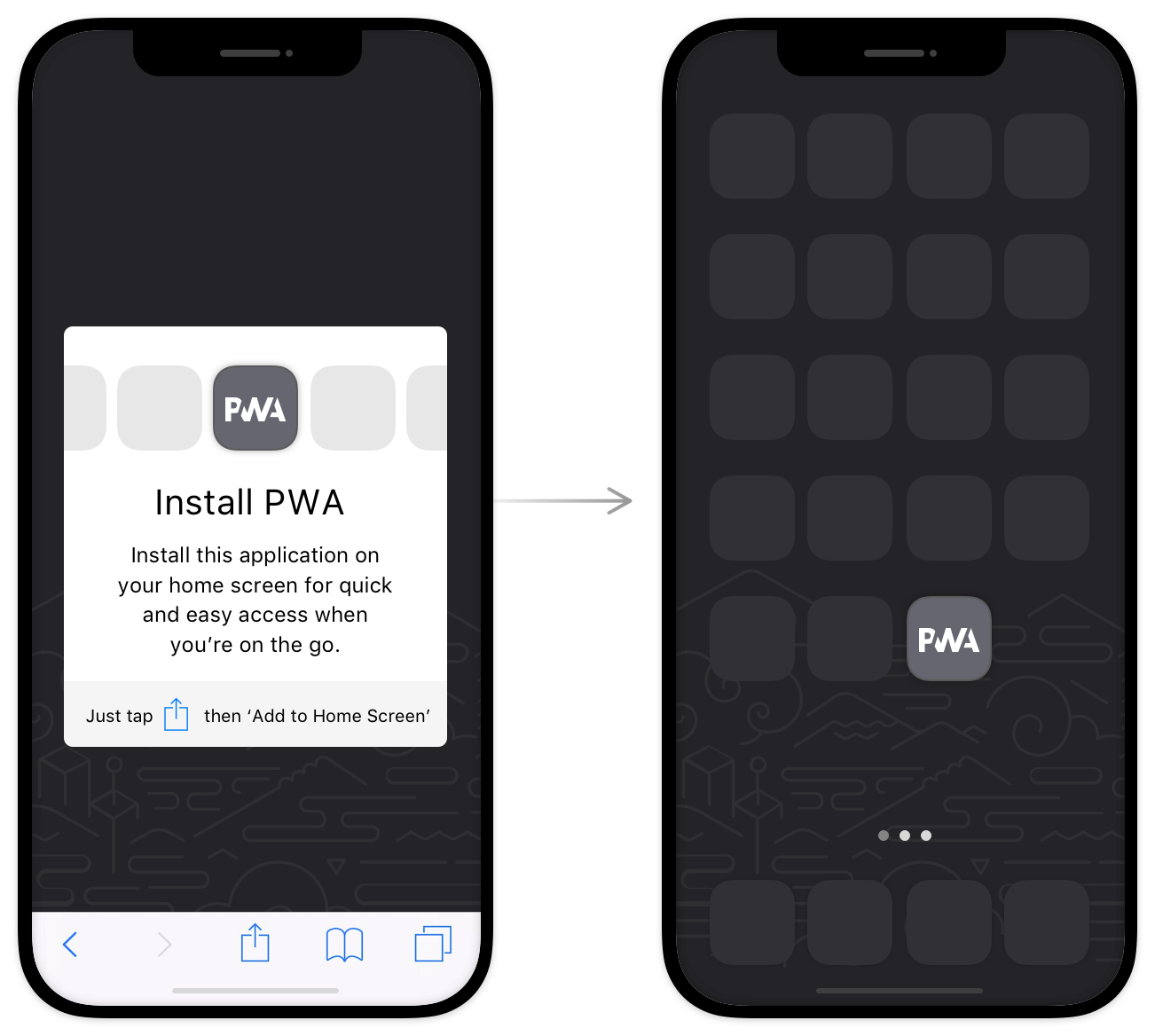
Progressive Web Apps, or PWAs, are websites that act like apps. They can be used on any device. PWAs work without an internet connection. They load very fast. They also use less data. Users can save them on their home screens. They don’t need to go to an app store. It’s like magic. PWAs give notifications. This keeps users updated. They are also secure. They use HTTPS for safety. The experience is smooth and easy.
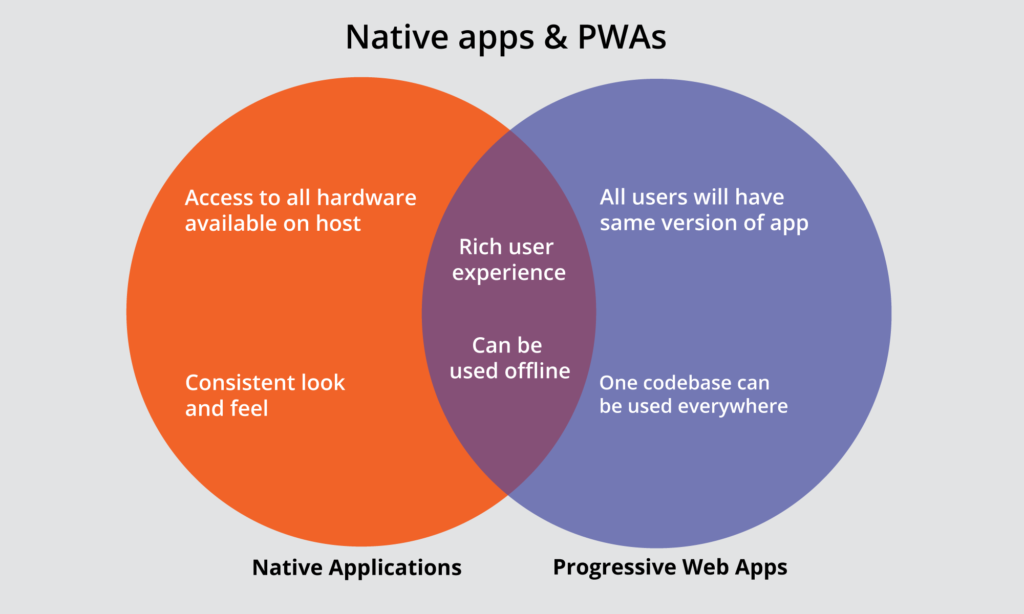
PWAs are easy to update. No need to go to an app store. They work on all devices. This means everyone can use them. They save space on devices. No large downloads needed. Businesses save money with PWAs. They don’t need to make different apps for iOS and Android. Users also stay engaged with push notifications. It’s a win for both users and businesses.
Setting Up Your Development Environment
Building a Progressive Web App requires certain tools. First, install a good code editor. Visual Studio Code is a popular choice. It is free and easy to use. Next, download Node.js. It helps run JavaScript on your computer. Make sure to have npm. It comes with Node.js and helps manage packages. You will also need a web browser. Google Chrome is recommended. It supports many developer tools. Keep these tools updated. They help in smooth development.
Set up your workspace for coding. Create a folder for your project. Name it clearly, like “MyFirstPWA”. Open your code editor. Navigate to your project folder. Inside, create three folders: src, public, and scripts. The src folder holds your source files. Public is for files users will see. Scripts is where your JavaScript files will go. Arrange your workspace neatly. This makes coding easier and faster.
Building Your Progressive Web App
A simple and clean layout is key. Users should find it easy to navigate. Fast loading speeds keep users engaged. Use responsive design. Make sure your PWA works on all devices. Offline access is important. Users must access features even without internet. Push notifications keep users informed and engaged. They remind users to return. App-like experiences make your PWA feel like a native app. Users enjoy smooth transitions and interactions.
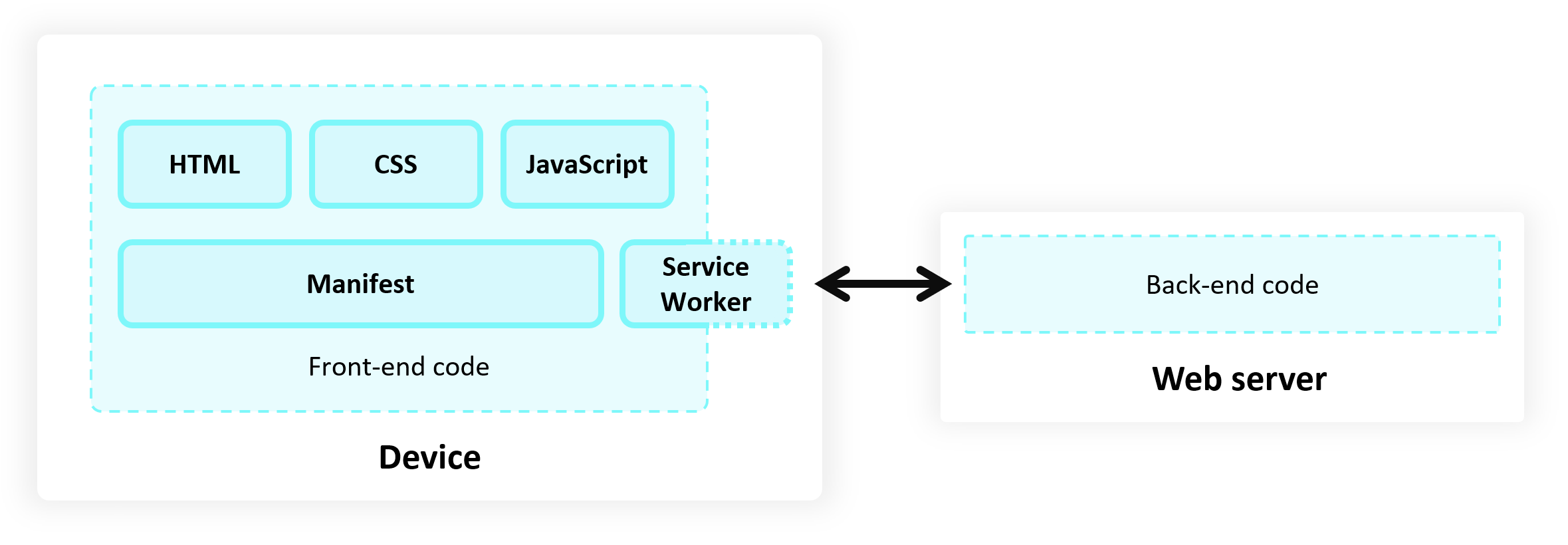
Use service workers for offline functionality. They store data for later use. Cache important files. This ensures fast loading and improves user experience. Choose HTTPS for security. It protects user data. Test your PWA on various browsers. Ensure it works well everywhere. Optimize images to reduce loading time. Smaller images load faster. Minimize JavaScript. Too much can slow your app. Keep code clean and organized. Easy to read and understand.
Choosing A Hosting Platform
It’s crucial to find the right host. Some platforms are more popular. Others might be more cost-effective. Shared hosting is a budget-friendly solution. It’s perfect for small apps. But it might be slower. For bigger apps, consider VPS. It’s faster and more secure. Yet, it’s pricier. Cloud hosting offers flexibility. It can handle traffic spikes. But, it can be complex. Choose based on your app’s needs.
Opt for shared hosting if you need to save money. It’s affordable for small projects. But, it may have slower speeds. Look for discounts or free trials. Some hosts offer them. Compare prices of different hosts. Always read reviews. They show real user experiences. This helps in making the right choice.
Deploying Your Pwa
Start by choosing a hosting platform for your Progressive Web App. Options include GitHub Pages, Firebase, or Netlify. Each platform has easy setup steps. Follow them to get your app online.
First, create an account on your chosen platform. Next, upload your app files to the server. Ensure all files are in the right location. Check your file paths twice.
Configure your settings for the app. Adjust domain settings if needed. Make sure your PWA is secure. Use HTTPS for safe browsing.
Open your app in a browser. Check if it loads correctly. Test on different devices. Ensure it works on phones and tablets.
Look for errors in the console. Fix any problems quickly. Verify offline functionality. Your app should work without internet.
Finally, ask friends to test your app. Gather feedback and make improvements. A smooth app is important. Your users will appreciate it.
Credit: learn.microsoft.com
Optimizing Performance And Security
Fast loading is key for any Progressive Web App. Use a service worker to control cache. This helps load pages quickly even offline. Minimize large files. Compress images and scripts for speed. Lazy load images to save time. Users will see content faster. Avoid unnecessary code. Clean code means better performance.
Choose a reliable server. It should be near users. This reduces load time. CDNs can help. They store data in many places. Users get content from the closest server. This makes your app efficient and quick.
Security is vital for user trust. Use HTTPS for all connections. This keeps data safe. Regular updates are important. They fix security holes. Always check for the latest updates. Validate user input. This prevents bad data from harming your app. Ensure you use strong passwords. They protect admin areas from attacks.
Monitor your app’s security. Use tools to check for threats. Educate users on security. Tell them about phishing and safe practices. When users are informed, they stay safe.
Monitoring And Maintenance
Understanding how users interact with your app is crucial. Use tools like Google Analytics to track user engagement. This data helps you see what users like. It also shows areas that need improvement. Look for patterns in user behavior. Are they leaving quickly? Are they spending time on certain pages? This insight is valuable. It helps you make your app better.
Keeping your app updated is important. Regular updates fix bugs and improve performance. Always listen to user feedback. It guides you in making improvements. Ensure the app remains fast and smooth. Users enjoy using apps that work well. Regular updates show users you care. It builds trust and keeps them coming back.
Credit: www.directimpactsolutions.com
Frequently Asked Questions
How Do You Create A Progressive Web App?
To create a progressive web app, start by building a responsive web design. Implement service workers for offline functionality. Use a web app manifest to define app metadata. Ensure fast loading times and enable push notifications. Test and optimize for various devices and browsers.
How Much Does It Cost To Build A Pwa?
Building a PWA typically costs between $3,000 and $20,000. The price depends on complexity, features, and developer rates. A basic PWA might cost less, while complex ones with advanced features require a higher budget. Always consult multiple developers for accurate estimates.
Is Pwa Still Relevant?
PWA remains highly relevant due to its ability to enhance mobile user experience. It offers offline functionality, fast loading speeds, and improved engagement. Businesses benefit from increased conversions and better performance on various devices. PWA’s adaptability and accessibility make it essential in modern web development.
What Is The Difference Between A Website And A Progressive Web App?
A website is accessed via browsers and is static. A progressive web app (PWA) offers app-like features, offline access, and faster performance, providing a more engaging user experience.
Conclusion
Hosting a Progressive Web App is simpler than it seems. Start with choosing the right server. Then, focus on secure HTTPS connections. Don’t forget regular updates for security. Optimize your app for speed and reliability. A well-hosted app improves user experience.
Users appreciate fast loading times and seamless performance. Keep an eye on analytics to track success. Monitor user interactions and feedback. Constantly refine the app for better engagement. Hosting effectively leads to happy users. Happy users return frequently. Finally, a well-hosted app boosts your online presence.
It creates a positive impact.


