
Are you ready to bring your creative vision to life on the web? Hosting a custom web page in WordPress might seem like a daunting task, but it’s easier than you think.
Imagine having a unique space on the internet that truly reflects your brand and message. Exciting, right? In this guide, you’ll discover step-by-step instructions on how to transform your ideas into a stunning WordPress page. Whether you’re an entrepreneur, a blogger, or just someone eager to showcase your portfolio, this article is tailored for you.
By the end, you’ll have the confidence and tools to create a captivating online presence. Let’s dive in and unlock the potential of your creativity!
Choosing A Hosting Provider
Finding a good hosting provider is important. A strong provider keeps your website running smoothly. Choose a provider with good reviews and a history of reliability. Look for options that offer 24/7 customer support. This helps if something goes wrong.
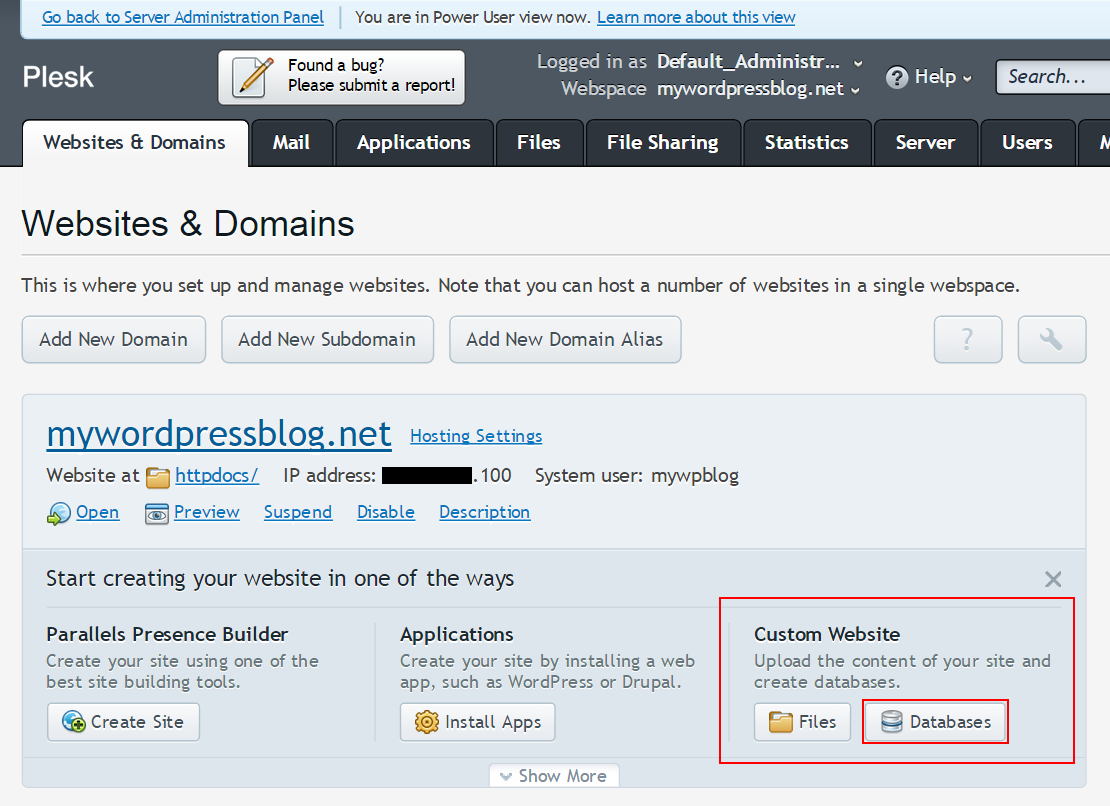
Check if they provide easy WordPress installation. This makes setting up your site easier. Consider the cost. Some providers offer good deals for beginners. Make sure they have a user-friendly control panel. It helps you manage your site better.
Think about the storage and bandwidth they offer. More storage means more space for your files. Bandwidth affects how fast your site loads. A good hosting provider can make your site fast and reliable. Always read the terms before signing up.
Credit: www.elegantthemes.com
Setting Up A WordPress Site
Start by choosing a hosting provider. Many options are available. Pick the one that suits your needs. After selecting, go to their website. Find the WordPress installer. Most hosts have a simple installer. Click on the installer. Follow the steps. WordPress will be ready in minutes. Easy and quick!
Log in to your WordPress dashboard. The dashboard is your control center. First, set your site title. This is the name of your site. Next, choose a tagline. A tagline is a short description. Then, set your time zone. This ensures the correct time is shown. Finally, save all changes. Your site is now set up. Ready to use!
Creating A Custom Web Page
Page builders make creating custom pages easy. They offer drag-and-drop tools. No coding is needed. Popular choices include Elementor and Beaver Builder. You can choose a template. Then, start adding content and images. Adjust the layout as you like. It’s a simple way to design beautiful pages. Even beginners can use these tools with ease. They save time and effort.
HTML and CSS allow you to make unique designs. These languages give you full control. HTML builds the structure of your page. CSS styles it. You can change colors, fonts, and sizes. This customization makes your page stand out. It’s great for those who know coding basics. Start by editing the HTML code. Then, add CSS for styling. This approach offers endless design possibilities.
Credit: www.wpbeginner.com
Adding Functionalities
Plugins help add features to your web page. Find useful plugins in the WordPress Plugin Directory. Click ‘Install Now’ to add them. After installing, activate the plugin. Activation allows the plugin to work. Each plugin has its own settings. You can change these settings as needed. Always check plugin reviews before installing. Good reviews mean the plugin works well. Too many plugins can slow your site. Choose only the ones you need.
Widgets are small tools for your web page. Add widgets from the Widgets section in your WordPress dashboard. Drag and drop to place them on your page. Each widget has different options. You can customize these options. Popular widgets include calendars, social media links, and search bars. Widgets make your site more interactive. Choose widgets that fit your site’s design.
Optimizing For Performance
Hosting a custom web page in WordPress requires efficient performance optimization. Start by selecting a lightweight theme to reduce load times. Utilize caching plugins to enhance speed and ensure faster page delivery to visitors.
Speed Optimization Tips
A fast website makes users happy. Start by choosing a good hosting provider. This helps your page load quickly. Use a lightweight theme. Heavy themes slow down your site.
Compress your images. This makes them load faster. Use plugins like WP Smush or EWWW Image Optimizer. They help reduce image size without losing quality.
Minify your CSS and JavaScript files. This removes unnecessary code. Use plugins like Autoptimize for this task. They make your site faster. Also, use a caching plugin like W3 Total Cache. This stores a version of your site for quick viewing.
Seo Best Practices
SEO helps people find your site. Use a simple URL structure. It should be easy to read. Include keywords in your content. They help search engines understand your topic.
Write clear and short titles. They should tell what your page is about. Use meta descriptions. They give a quick summary of your page.
Use alt tags for images. They describe what the image is about. This helps search engines and people who can’t see the images. Finally, make sure your site is mobile-friendly. Many people use phones to browse the web.
Credit: codex.wordpress.org
Securing Your Web Page
Security plugins protect your site. They stop bad guys. Use plugins like Wordfence or Sucuri. These plugins are strong. They block threats. Your site stays safe. Easy to set up. No coding needed.
Backups are important. They save your site data. Use tools like UpdraftPlus. This tool is popular. It’s easy to use. Backups can save time. They help when things go wrong. Restore your site quickly. Peace of mind.
Launching Your Web Page
Check your web page on different devices. Smartphones, tablets, and computers. Look for any layout issues. Does the text appear clearly? Are images loading properly? Use tools to see how your site looks on various screens. Make sure buttons work. Test links too. Ensure fast loading speed. Slow pages lose visitors. Test the navigation menu. It should be easy to use. Review your site for broken links. Fix them quickly. Keep the user experience smooth. Errors can frustrate users. Check for responsive design. The page should adjust to screen size.
Ensure all content is correct. Spelling and grammar matter. Errors can look unprofessional. Review your page for clarity. Is the message clear? Does it make sense? Update any outdated information. Fresh content is key. Verify images are relevant. High quality images attract users. Check your site’s SEO settings. Optimize for search engines. Use keywords wisely. Ensure your site’s security. Protect user data. Use a secure server. Review your site’s privacy settings. Make sure you’re compliant with laws. Double-check links. They should lead to the right pages. Test the site speed again. Fast sites keep users happy.
Frequently Asked Questions
How Do I Host A Custom Website On WordPress?
Host your custom website on WordPress by choosing a reliable hosting provider. Install WordPress using the provider’s one-click installation feature. Customize your website with themes and plugins. Optimize for SEO and mobile responsiveness. Regularly update and backup your site for security and performance.
Can I Host A Website On WordPress For Free?
Yes, WordPress. com offers free website hosting. You get a subdomain and limited features. To access advanced functionalities, consider upgrading to a paid plan. Free hosting is ideal for beginners or small projects. It helps you start easily without upfront costs.
How Do I Create A Custom Page In WordPress?
To create a custom page in WordPress, go to the dashboard. Click “Pages” then “Add New. ” Choose a template from “Page Attributes. ” Customize using the block editor. Save or publish your page. For advanced design, use a page builder plugin like Elementor or WPBakery.
Can You Self Host A WordPress Website?
Yes, you can self-host a WordPress website. Choose a hosting provider, install WordPress, and manage it yourself. Ensure your hosting plan meets WordPress requirements. This allows more control and customization over your website compared to WordPress. com. Remember to secure your site and perform regular updates.
Conclusion
Creating a custom web page in WordPress is simple. Follow the steps carefully. Customize themes to match your vision. Use plugins to enhance functionality. Always preview changes before publishing. This ensures everything looks perfect. Maintain your page regularly. Keep it fresh and updated.
Engage with your audience through comments. Respond promptly to keep them interested. Hosting your own page boosts your online presence. It also showcases your brand effectively. Enjoy the process and creativity involved. With practice, you’ll find it easier each time.
Start building today, and see your website grow!


