
Are you concerned about the security and privacy of your WordPress site? You’re not alone.
Many website owners worry about revealing too much information that might attract unwanted attention. One key piece of data that often gets overlooked is your WordPress theme information. While themes are crucial for the aesthetics and functionality of your site, publicly displaying your theme details can expose you to potential risks, such as hacking or copying.
Imagine a world where you have complete control over what others see about your site. By learning how to hide your WordPress theme information, you can add an extra layer of security and keep your website unique. This guide will walk you through simple, effective steps to conceal this information, allowing you to safeguard your digital presence. Ready to take control and protect your site? Let’s dive in!
Why Hide Theme Information
Many worry about security on their WordPress site. Hiding theme details can help. It keeps your site safe from hackers. They can’t see what theme you use. This makes it harder for them to find weaknesses.
Your site can look unique by hiding theme info. Others can’t copy your design easily. It helps your site stand out from the crowd. Protect your creativity and hard work.
Some want to keep their brand image consistent. Hiding theme info helps in this. Visitors focus on your content, not your theme. It keeps your site professional and clean.
Loading speed can improve by hiding theme data. Less information means faster site loading. This can help keep visitors on your page longer. Improved speed makes a better user experience.
Risks Of Exposing Theme Data
Exposing your theme data can be risky. Hackers may find security holes. They can use these to break into your site. Your site’s design might be copied by others. This can hurt your brand.
SEO rankings might drop if your theme is exposed. Competitors could learn your site’s secrets. They might use this to gain an edge. Protecting your theme data is important for safety and success.
Using Custom Functions
Custom functions help conceal your WordPress theme details effectively. They can tweak your site’s code, ensuring privacy. Simple adjustments in functions. php file can hide theme information from prying eyes, keeping your site secure.
Adding Code To Functions.php
To hide your WordPress theme information, add code to functions.php. This file controls your theme’s behavior. First, locate the file in your theme folder. Open it with a code editor. Paste the following code into the file:
remove_action('wp_head', 'wp_generator');
This code stops WordPress from showing version details. Your theme information stays private. Make sure you save changes. Check your site for errors. If errors occur, remove the code. Always create a backup before editing files.
Benefits Of Custom Functions
Custom functions offer several benefits. They help secure your website. You can hide sensitive information. This keeps hackers away. It also gives you control. You decide what others see. Your site looks cleaner. You can customize functions easily. No need for plugins. Plugins can slow down sites. Custom functions keep it fast. They are lightweight. Save space on your server. Custom functions are efficient. They enhance performance.

Credit: themegrill.com
Modifying Style.css File
The style.css file holds important theme headers. It tells about the theme. You can change these headers. First, find the file in your theme folder. Then, open it with a text editor. Look for lines at the top. They start with a comment sign (/). Edit these lines to hide theme info. Change Theme Name, Theme URI, and Author. Save the file when done. This makes it harder to see your theme details.
Changing theme headers can affect updates. Themes often get updates. These updates fix bugs. They also add new features. Editing headers may stop updates. This is because updates might overwrite changes. Your edits can get lost. Be careful when hiding theme info. Backup your changes. Use a child theme if possible. This keeps your edits safe during updates.
Utilizing Plugins
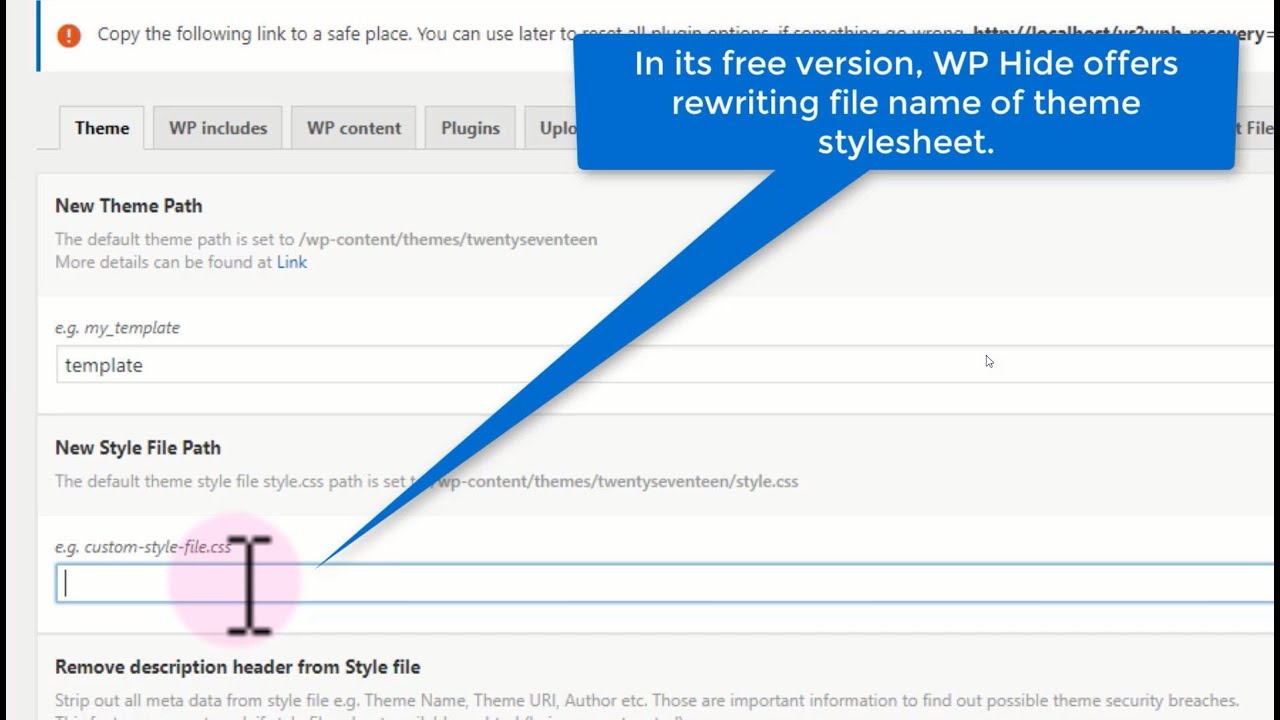
Plugins are tools to change your WordPress look. WP Hide & Security Enhancer is a favorite. It helps hide your theme’s name and details. Another option is Hide My WP Ghost. It makes your site more secure and less visible. You can also try Sucuri Security. It offers many features to protect your site. These plugins help keep your site safe and clean.
Setting plugins can be easy. First, go to your dashboard. Click on ‘Plugins’. Find the plugin you want. Click ‘Install’ and then ‘Activate’. Go to the settings of the plugin. Follow the simple steps. Choose options to hide theme info. Always check your site after changes. This ensures everything works well. Keep plugins updated. It helps to maintain security.
Credit: spiraclethemes.com
Server-side Techniques
Enhance your website’s security by hiding your WordPress theme information. Use server-side techniques like modifying the theme’s style. css file. This prevents curious visitors from easily identifying your theme.
Modifying .htaccess
The .htaccess file is important for WordPress. It helps control access. By changing this file, you can hide theme information. First, find the .htaccess file in your website folder. It is usually in the root directory. Add special rules to this file. These rules stop others from seeing your theme info. Use “RewriteRule” commands to block access. This keeps your theme safe. Always save changes after editing the file.
Server Security Practices
Keep your server safe. Use strong passwords. Change them often. Update server software regularly. This keeps hackers away. Use a firewall to protect your website. Firewalls block unwanted traffic. This keeps your data safe. You can also use security plugins. Plugins add extra protection. They make your server more secure. Always monitor server activity. Check logs for strange actions. This helps find problems early.
Regular Maintenance
Keeping your themes and plugins updated is very important. New versions fix bugs and security issues. Updates make your site safer. Check for updates weekly. Update as soon as you see them. Don’t wait too long. Outdated plugins can be risky. They might have vulnerabilities. These can let bad people into your site.
Always watch for vulnerabilities. Use tools to help with this. Tools can scan your site. They look for weak spots. Fix any weak spots fast. This keeps your site safe. Check your site every week. Make sure nothing is wrong. A secure site is a happy site.
Credit: www.youtube.com
Frequently Asked Questions
How Can I Hide My Theme Name?
To hide your WordPress theme name, you can edit the theme’s CSS and PHP files. Use a child theme to prevent overwriting during updates. Alternatively, employ plugins designed for this purpose, such as WP Hide & Security Enhancer, which offer user-friendly interfaces for theme concealment.
Is Hiding Theme Information Secure?
Hiding theme information adds a layer of security but isn’t foolproof. It helps prevent theme-specific attacks by obscuring vulnerabilities. However, it’s crucial to regularly update themes and plugins, and implement other security measures like firewalls and regular backups for comprehensive protection.
Can I Use Plugins To Hide Theme Info?
Yes, plugins are an effective way to hide theme information. Plugins like WP Hide & Security Enhancer simplify the process with easy-to-use settings. They allow you to conceal theme details without manual code editing, enhancing security and maintaining site functionality seamlessly.
Will Hiding Theme Affect Site Performance?
Hiding theme information generally doesn’t affect site performance. However, ensure that any methods or plugins used are optimized and compatible. Poorly coded solutions could cause conflicts or slowdowns. Always test changes in a staging environment before applying them to your live site.
Conclusion
Securing your WordPress theme information boosts site safety. It protects data from prying eyes. By following steps like using plugins, you maintain privacy. This ensures hackers and competitors can’t steal your design. A secure site builds trust with visitors. They feel safe browsing your pages.
Regularly update your theme and plugins. Stay informed about security practices. This keeps your site running smoothly. Implementing these strategies strengthens your online presence. It’s simple yet effective. Make these changes today. Enjoy peace of mind knowing your site is secure.
Your efforts will pay off in the long run.


