
Have you ever felt like your WordPress site reveals too much? You might be proud of your theme choice, but sometimes, keeping it under wraps has its advantages.
Whether you want to protect your website from competitors, enhance security, or simply keep your design choices a secret, hiding your WordPress theme can be a smart move. Imagine the peace of mind knowing your site’s style is your private affair.
You’ll discover straightforward steps to conceal your WordPress theme, ensuring your site remains uniquely yours. Ready to enhance your site’s privacy and security? Let’s dive in and uncover the secrets to keeping your WordPress theme hidden from prying eyes.
Reasons To Hide WordPress Theme
Hiding your WordPress theme can improve security. Hackers often target themes to find weaknesses. By hiding it, you reduce this risk. Another reason is to keep your website unique. Others might copy your design if they know your theme. Hiding it makes your site stand out. Some people also hide themes to protect business secrets. You may have special features that you want to keep private. It also helps in keeping your brand identity strong. Consistent branding is key for trust and recognition. If everyone knows your theme, they might see your site as less unique. So, hiding your theme can be a smart choice for many website owners.
Risks Of Hiding Your Theme
Hiding your WordPress theme might seem smart. It can make your site look unique. But it has risks. Security can be a big issue. Hackers might target your site more. Themes have updates. Updates fix bugs and improve security. Missing updates can cause problems. Your site might break. Visitors will not like that. They want a smooth experience. Trust can be lost if your site looks strange. Users like familiar designs. They feel safe when things look normal. Hiding themes can make things confusing. Search engines might not like it. They want clean code. Your site might rank lower. SEO is important for visibility. A visible site gets more visitors. Think carefully before hiding your theme.
Techniques For Concealing Theme
Editing theme files helps to hide your theme. Access the theme editor in WordPress. Make changes to the style.css file. Remove or alter theme details. This makes it less obvious to users.
Create a child theme for better control. It lets you keep your main theme intact. Hide the original theme details. Use your child theme to make custom changes. This keeps your website unique and less detectable.
CSS and JavaScript customization can conceal your theme. Add custom codes to change how your site looks. Hide parts of your theme with CSS. Use JavaScript to change user interactions. This helps keep your theme hidden.
Plugins For Theme Concealment
Some plugins help hide your WordPress theme. WP Hide & Security Enhancer is popular. It hides all theme details. Hide My WP Ghost is another choice. It protects your site too. WP Hide & Security Enhancer is free. It offers many features. Hide My WP Ghost has premium options. It provides extra security. Both plugins are easy to use. They work well with most themes.
Go to your WordPress dashboard. Click on “Plugins” then “Add New”. Search for the plugin name. Click “Install Now”. Wait for installation. Click “Activate”. Follow on-screen instructions. Set up the plugin as you like. Check settings twice. Make sure everything works fine.
Manual Code Modifications
Modify WordPress theme code manually to enhance privacy. Adjust CSS and PHP files to hide theme details from prying eyes. Ensure your website remains discreet and secure by concealing theme identifiers effectively.
Modifying Header And Footer
Changing the header and footer files helps hide your theme. Locate these files in your theme folder. Edit them carefully. Remove or alter theme-related details. This makes your theme less visible. Check changes often. Ensure your site looks good.
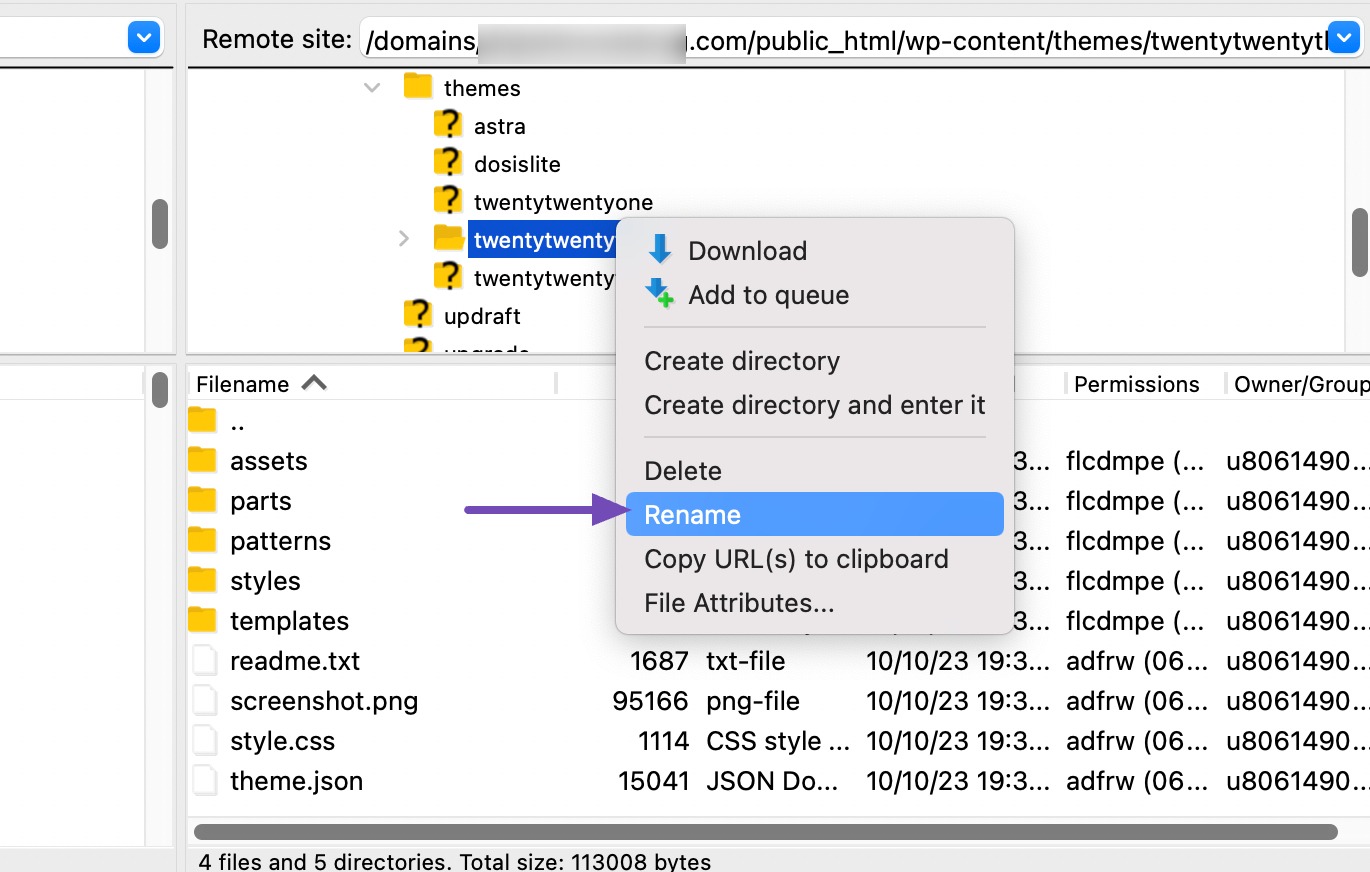
Changing Theme Name And Uri
Altering the theme name is simple. Find the style.css file. It stores theme information. Change the name and URI there. This masks your theme identity. Your site will look unique. Be careful when editing. Mistakes can break your site. Backup your files first. Always keep a copy.
Credit: rankmath.com
Testing Theme Visibility
Developer tools help you see your theme’s code. Open your website in a browser. Right-click anywhere on the page. Choose “Inspect” from the menu. A new panel shows up. This panel displays your website’s code. Look for words like “theme” or “style.css”. These tell others which theme you use. You can try to hide these clues.
Online theme detectors find your WordPress theme. Go to a theme detector website. Enter your website’s URL. Click the button to search. The detector shows your theme name. It can also show plugins. This tells others a lot about your site. Knowing this can help you stay private.
Maintaining Theme Privacy
Regular updates keep your theme safe. Use the latest version always. Check for updates often. This helps fix bugs fast. Bugs make themes unsafe. Update plugins too. Plugins can cause problems. Check if themes and plugins work well together. If not, it can be risky. Updates improve security. They make your site safer. Don’t ignore updates.
Security is very important. Check your site for security breaches. Use tools that find threats. These tools watch for problems. They can alert you quickly. Take action if you see a warning. Breaches can harm your site. They can steal data. Protect your site with strong passwords. Change passwords often. This keeps hackers away. Your site must be safe always.

Credit: www.youtube.com
Credit: rankmath.com
Frequently Asked Questions
How Do I Hide My WordPress Theme?
Use a custom CSS plugin to hide theme details. Modify theme files to remove meta generator tags. Utilize security plugins for additional protection. Regularly update your WordPress settings and plugins for optimal security.
How Do I Make My WordPress Site Not Visible?
Go to WordPress dashboard, click “Settings,” then “Reading. ” Select “Discourage search engines from indexing this site” and save changes. For complete privacy, use plugins like “Password Protected” or “Under Construction. ” Adjust user roles to limit access.
How To Hide A WordPress Page Without Deleting It?
To hide a WordPress page, change its visibility to “Private” in the “Publish” settings. Alternatively, use a plugin like “Yoast SEO” to set “noindex” for search engines. These methods keep the page accessible only to those with direct links or permissions.
How Do I Turn Off The WordPress Theme?
To disable a WordPress theme, log into your WordPress dashboard. Navigate to “Appearance” then “Themes”. Choose an alternative theme and activate it. This will deactivate your current theme, effectively turning it off. Always ensure your site’s functionality is intact after switching themes.
Conclusion
Hiding your WordPress theme is simple and protects your site’s identity. These steps ensure your site looks professional and secure. Visitors focus on content, not design details. Custom coding offers flexibility, while plugins simplify the process. Always test changes to avoid errors.
Keep your site updated for security reasons. Regularly review settings to maintain the hidden status. This approach helps in safeguarding your digital presence. Now your site is ready for a fresh look. Enjoy the benefits of a cleaner, more private website experience.
Happy blogging!


