
Are you looking to give your WordPress site a sleek, professional look using the Divi Theme? If so, you might have come across a small yet significant hurdle: the page title.
Sometimes, these titles can disrupt your design’s flow or simply aren’t necessary for your content. But don’t worry—you’re not alone in wanting to hide them. This article will guide you through simple steps to conceal page titles in the Divi Theme, making your website look cleaner and more focused.
You’ll discover how easy it is to enhance your site’s appearance with just a few clicks. Ready to dive in and transform your web pages? Let’s get started!
Benefits Of Hiding Page Titles
Hiding page titles can make your website look cleaner. A clean design is more inviting to visitors. Visual clutter can distract users. A neat page draws their eyes to the right places. It helps your site look more professional. A tidy website is pleasing to the eyes.
Without a title, content gets more attention. Readers focus on the main message. This keeps visitors engaged with the text. Important details stand out. It helps users understand the page better. Clear content makes readers stay longer.

Credit: www.youtube.com
Using Divi Theme Options
Divi Theme offers easy customization for WordPress users. Hiding the page title can be done quickly through Divi Theme Options. Navigate to “Page Settings” and disable the title display for a cleaner look.
Accessing Theme Customizer
To hide page titles in Divi, start by opening the WordPress dashboard. Find the ‘Appearance’ tab. Click on it. Now, locate ‘Customize’. Select it. This opens the Theme Customizer. Here, you can change many things. Look for ‘Theme Options’. Click on it. Next, choose ‘General Settings’. You can find options to disable page titles globally. This means no page will show its title. Make sure to save your changes.
Now, your pages look cleaner. No titles cluttering the view. This is helpful for a simple design. Make sure to check every page. Sometimes, titles still appear. Fix it by adjusting individual page settings. Now, enjoy your title-free pages!
Custom Css Method
Use custom CSS to hide the page title in Divi Theme for WordPress effortlessly. Simply add a few lines of CSS code to your Divi options or child theme stylesheet. This approach offers a clean way to streamline your page design without altering core theme files.
Locating Page Id
To hide a page title in Divi, first find the Page ID. Go to the WordPress dashboard. Click on “Pages” to see all pages. Hover over the page you want to edit. Look at the bottom of your browser. You will see a URL. The URL has a number at the end. This number is your Page ID. Write it down or remember it.
Adding Custom Css Code
Now, add some Custom CSS to your site. Go to the WordPress dashboard. Click on “Divi” and then “Theme Options”. Find the “Custom CSS” box. Type this code: #post-{Page ID} .et_pb_title { display: none; }. Replace {Page ID} with the number you found. Finally, click “Save Changes”. Your page title is now hidden.
Credit: memberfix.rocks
Using Divi Builder Settings
Open your page using the Divi Builder. Look for the settings icon. Click it to see more options. You will find a tab called “Advanced”. Click on it. You will see many options here. Find the one labeled “Visibility”.
This is where you can hide the page title. Click on the switch next to “Hide Page Title”. Make sure it is turned on. This will make your page title disappear. Remember to save your changes.
Visibility options are simple to use. They control what shows on your page. You can hide the title with just one click. No coding is needed. Just use the toggle switch to turn it off.
This helps keep your page clean. Fewer distractions for visitors. They see only the content you want them to see. The page looks neat and tidy.
Plugins For Title Management
Managing titles in Divi is simple with plugins. Some plugins are quite popular. They help with title tasks. They make title hiding easy. They work well with Divi.
Popular Plugins For Divi
- Divi Title Toggle – Easy to use. Hides titles quickly.
- Divi Ghoster – Offers many tools. Good for title management.
- Divi Builder – Known for design. Helps with title settings.
Installation And Configuration
Install plugins in WordPress dashboard. Click “Add New.” Search by name. Click “Install.” Then click “Activate.”
Configure by going to settings. Look for plugin name. Click to open options. Adjust settings as needed. Save changes.
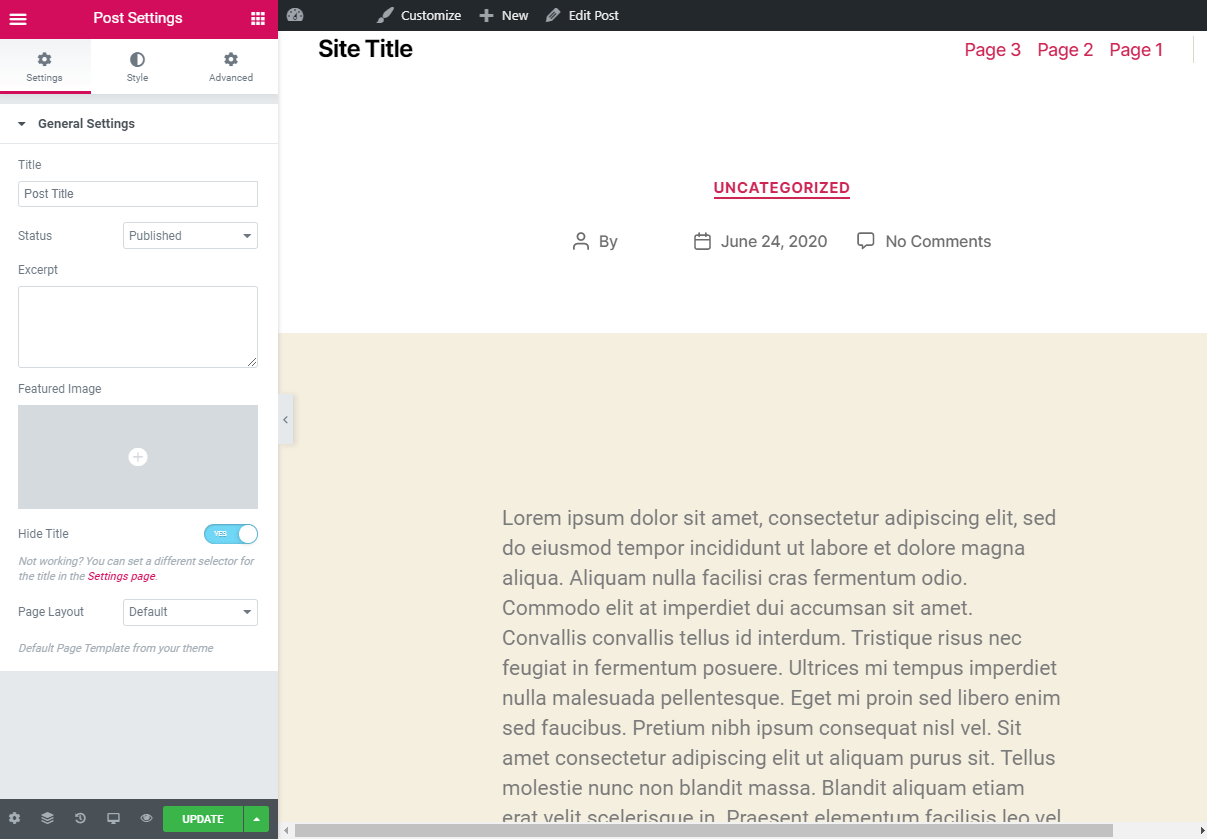
Now, titles can be hidden. Choose page or post. Find title option. Select “Hide.” Title will not show.
Credit: kinsta.com
Troubleshooting Common Issues
Discover how to hide the page title in Divi theme effortlessly. Navigate to the WordPress dashboard, select the page, and adjust the Divi settings to remove the title. Enhance your site’s appearance with this straightforward tweak.
Title Not Hiding
The page title is sometimes visible even after hiding it. This can be due to CSS conflicts. Themes or plugins may have styles that override your settings. Check your CSS code for any conflicting rules. Clear the cache to see changes.
Css Conflicts
CSS conflicts can cause display issues. Other styles might override your custom CSS. Ensure no other code affects the title visibility. Use browser tools to inspect the page. This helps identify where conflicts happen. Adjust the CSS code to fix it.
Frequently Asked Questions
How To Remove Page Title In Divi?
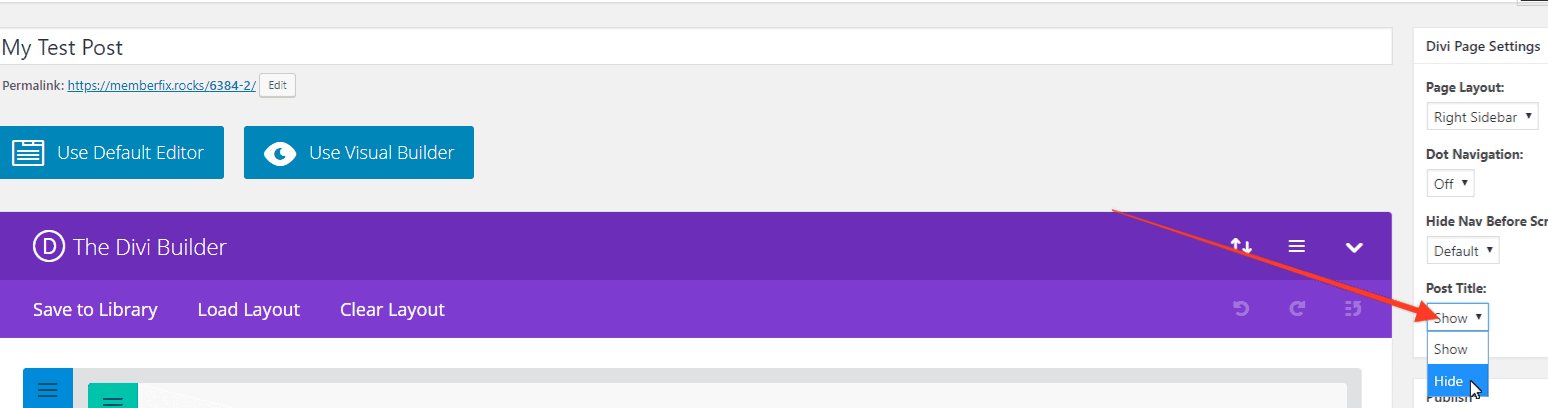
To remove the page title in Divi, navigate to your WordPress dashboard. Edit the desired page and locate the “Divi Page Settings” option. Toggle the “Hide Title” switch to enable it. This will effectively hide the page title from the front end, providing a cleaner look.
Can I Hide Titles Without Coding?
Yes, you can hide titles without coding in Divi. Use the built-in Divi Page Settings. Simply toggle the “Hide Title” option. This user-friendly approach ensures you can manage page aesthetics without technical expertise or modifying any code within your WordPress site.
Does Hiding Titles Affect Seo?
Hiding titles in Divi doesn’t directly affect SEO. Titles are crucial for search engines but hiding them visually won’t impact their indexing. Ensure that your HTML structure remains intact. Use descriptive meta titles and headings to maintain SEO value while improving the page’s visual appeal.
Are There Plugins To Hide Titles?
Yes, there are plugins available to hide titles in WordPress. Plugins like “Title Remover” allow easy management of page titles. They provide a straightforward interface to toggle title visibility. This can be especially helpful for users who prefer not to delve into theme settings.
Conclusion
Hiding page titles in Divi is simple and effective. This guide helps you customize your WordPress site easily. Follow the steps, and your pages will look cleaner. Visitors will focus on your content, not the page title. Divi offers flexibility for any design.
You can create a professional website effortlessly. No need for coding skills. Enjoy a seamless experience with Divi’s user-friendly tools. Keep exploring to make your site unique and engaging. Try it out today, and see the difference it makes. Your website can look exactly how you want it.


