
Are you concerned about the security of your WordPress site? You’re not alone.
With cyber threats on the rise, protecting your account login page is more crucial than ever. Hackers often target the login page as it’s the gateway to your valuable data. But what if you could make it nearly invisible to prying eyes?
In this guide, we’ll reveal how to hide your account login from your WordPress theme. Imagine the peace of mind you’ll have, knowing your site is shielded from unwanted access attempts. Stay with us, and you’ll discover simple, effective strategies to enhance your site’s security effortlessly. Ready to safeguard your digital presence? Let’s dive in!
Credit: ithemelandco.com
Security Importance
Online security is vital for everyone. Protecting your website is crucial. Hackers often target weak spots. One common area is the login page. Hiding it adds an extra layer of security. This means fewer chances for hackers to gain access. It is like locking an extra door in your house.
Most websites face threats daily. A hidden login page reduces these threats. Many people don’t realize the risk. They leave login pages visible. This makes it easy for hackers. Hidden pages are harder to find. This keeps your data safer. Always think about security first. Protect your site like a treasure.
Common Risks
Hackers can find your login page easily. They use it to access your site. This could lead to stolen data. It might hurt your site’s reputation. Protecting this page is important. It can stop unwanted access. Always use strong passwords.
Hiding the login can confuse some users. They might struggle to find it. This can lead to frustration. Some users may leave your site. Make sure to guide them well. Provide clear instructions if you hide it.
Some plugins may not work well. They might clash with hidden login settings. This can cause site errors. Always check plugin compatibility. It helps in keeping your site stable.
Plugins For Login Hiding
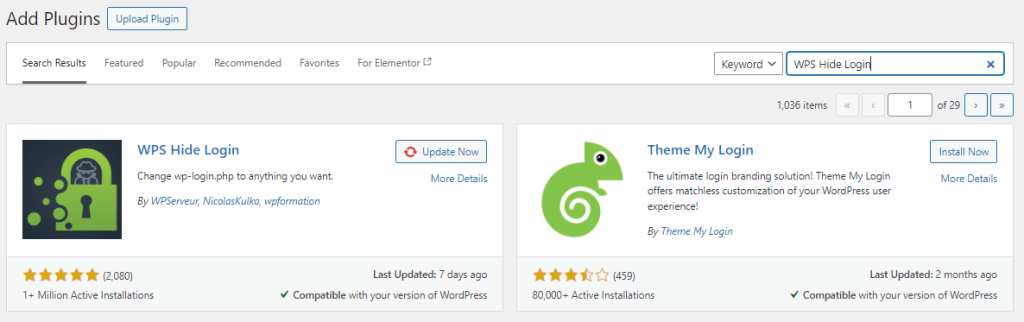
WordPress has many plugins for hiding logins. WPS Hide Login is a top choice. It lets you change the login URL easily. Loginizer is another good option. It adds extra security layers.
Install plugins in simple steps. Go to your WordPress dashboard. Click on Plugins, then Add New. Search for the desired plugin. Click Install, then Activate.
Configuring plugins is simple. Open the plugin settings. Change the login URL to something unique. Use a URL that’s hard to guess. Save your changes to apply new settings. Always test the new login URL. Ensure it works well before logging out.
Credit: ultahost.com
Customizing .htaccess
Customizing the. htaccess file helps hide the account login page from WordPress themes. This tweak enhances security by restricting access to sensitive areas. Protect user information by managing visibility and control of login entry points effectively.
Basic .htaccess Edits
The .htaccess file is powerful. It controls access to your site. Edit it with care. Mistakes can break your site. Use a text editor to open it. Find the line that says Order Deny,Allow. Add Deny from all below it. This hides your login page. Always backup your file before changes. If something goes wrong, restore it.
Advanced Security Rules
Advanced rules make your site safer. Use them to protect your site. Block IP addresses that seem dangerous. Add deny from [IP] in your .htaccess file. This stops hackers from accessing your login page. Limit access to specific IPs. This allows only trusted users. Use allow from [IP] for this purpose. These steps keep your site secure. Always test after edits.
Modifying Login Url
Changing the login URL makes your site safer. First, log into your WordPress dashboard. Then, go to the functions.php file in your theme. Add a new function to change the login URL. Make sure to test the new URL. Ensure it works before logging out. This prevents future issues. Remember to save all changes.
Plugins make URL changes easy. Install a plugin like WPS Hide Login. After installation, activate the plugin. Then, go to settings and enter your new login URL. This process is simple. It requires no coding skills. Plugins often provide extra security features too. Choose plugins that update regularly.
Implementing Captcha
CAPTCHA stops bad robots. It protects your site. This keeps your login safe. Only real users can enter. This helps reduce spam. Your site stays clean and secure. Users feel safer. They know their data is protected. This builds trust.
First, choose a CAPTCHA plugin. Next, install it on your site. Then, activate the plugin. Go to settings. Configure the CAPTCHA options. Save your changes. Test the CAPTCHA. Make sure it works. Ask a friend to try it. Check for any issues. Solve them quickly. Enjoy a safer site.
Ip Blocking Techniques
Block unwanted IPs to protect your site. You can use plugins. WordPress plugins make this easy. Plugins help in filtering out bad IPs. They stop hackers from accessing your site. Regularly update your plugins. Updated plugins work better. They keep your website safe.
Allow only trusted IPs for log in. Whitelisting keeps your site secure. Add safe IPs to your list. Trusted IPs can access your site easily. This reduces the risk of attacks. Check your whitelist often. Remove any unknown IPs. Keep your site protected.
Two-factor Authentication
Two-Factor Authentication (2FA) adds extra security to your account. First, you enter your password. Next, you need a code. This code comes to your phone. It can also come to your email. This way, even if someone knows your password, they can’t log in. They will need the code too. This keeps your account safe.
To set up 2FA, go to your account settings. Look for security options. Click on Two-Factor Authentication. Choose how you want to get your code. You can use a text message. Or you can use an authenticator app. Follow the steps to complete the setup. Make sure to save your backup codes. These help if you lose your phone. Now your account is safer.
Regular Updates And Backups
Keeping your WordPress theme updated is very important. Updates fix bugs and improve security. They also add new features. An outdated theme can be risky. Hackers can find ways to break in. Always check for updates often. It helps keep your site safe.
Having a good backup plan is smart. Backups save your content and settings. If something goes wrong, you can restore everything. There are many ways to back up your site. Use a plugin or a service. Some people prefer manual backups. Always store backups in a safe place. This could be online or on a hard drive. A backup can save your site from disaster.
Monitoring Login Attempts
Some tools help watch over login tries. They keep your site safe. Security plugins are helpful. WordFence and Login Lockdown are two examples. They track every login attempt. You can see who tries to get in. This helps catch any wrong actions. These tools can send alerts. If someone tries too many times, you get a warning.
Login data tells a story. It shows who logs in and when. You can find out if someone is trying too much. Failed attemptsData patterns

Credit: www.youtube.com
Frequently Asked Questions
How Can I Hide The Login Url In WordPress?
To hide the login URL, use a plugin like WPS Hide Login. It allows you to change the default login URL to something unique. This helps improve security by preventing unauthorized access attempts. Always remember to keep your new URL secure and share it only with trusted users.
Why Should I Hide The WordPress Login Page?
Hiding your login page enhances security by reducing the risk of brute force attacks. It keeps hackers guessing the login URL, making unauthorized access more difficult. This simple measure can significantly reduce potential vulnerabilities. It’s a proactive step towards safeguarding your WordPress site from malicious threats.
What Plugins Help Hide WordPress Login?
Plugins like WPS Hide Login, Hide My WP, and iThemes Security are popular choices. They allow you to customize your login URL, enhancing security. These plugins are easy to install and configure, providing an extra layer of protection. Choose one based on your specific needs and site configuration.
Is It Safe To Change The Login Url?
Yes, changing the login URL is safe and recommended. It adds an additional security layer by obscuring the default login path. This deters unauthorized access attempts and reduces the risk of brute force attacks. Always use a reliable plugin to ensure the process is smooth and effective.
Conclusion
Hiding your WordPress login page boosts security. Simple steps make it possible. Protecting your site should be a priority. With the right tools, it’s easy. You learned to customize login URLs. This helps prevent unauthorized access. Practice these methods regularly.
Keep your website safe from hackers. Your effort now saves trouble later. Stay updated with new security practices. Your website deserves the best protection. Follow these tips to secure your WordPress site.


