
Imagine having the power to give your WordPress site a unique twist by using not just one, but two themes. It’s like having the best of both worlds for your blog or business.
You might think it’s complicated, but it’s actually simpler than it seems. By the end of this article, you’ll discover how to effortlessly blend two themes, creating a captivating and personalized website experience for your visitors. Are you ready to unlock this secret and transform your site into something extraordinary?
Let’s dive in and explore how you can achieve this with ease.
Benefits Of Using Multiple Themes
Using two themes can make your site more flexible. Different themes can show different parts of your site in a unique way. This can help your site look fresh and exciting. Visitors will enjoy seeing new designs on different pages. With two themes, you can test what works best for your audience. This means you can improve and change quickly. Also, it helps in keeping your site organized. You can have one theme for a blog and another for a shop. This makes it easy for visitors to find what they need. Your site can become more interactive and fun. People will stay longer and explore more.
Credit: www.hostinger.com
Choosing Compatible Themes
Selecting two themes for your WordPress site is crucial. They should be compatible with each other. This ensures your site works well. Themes must not clash in design. Avoid themes with the same layout. This makes them look similar. A good mix gives your site a fresh look.
Check if the themes support the same plugins. This helps in smooth functioning. Some themes may not support all plugins. Test them on a demo site first. This saves time and effort later. Remember, a balanced look keeps visitors happy. Your site should be easy to navigate.
Installing A Second Theme
Using a child theme is a smart choice. It lets you add changes without breaking the main theme. A child theme keeps the main theme safe. It stores customizations separately. This means updates won’t erase your changes.
For safe theme switching, backup your site first. This protects your data if something goes wrong. Next, activate the new theme. Check your site to make sure everything looks right. If not, you can switch back easily.
Using Plugins For Multiple Themes
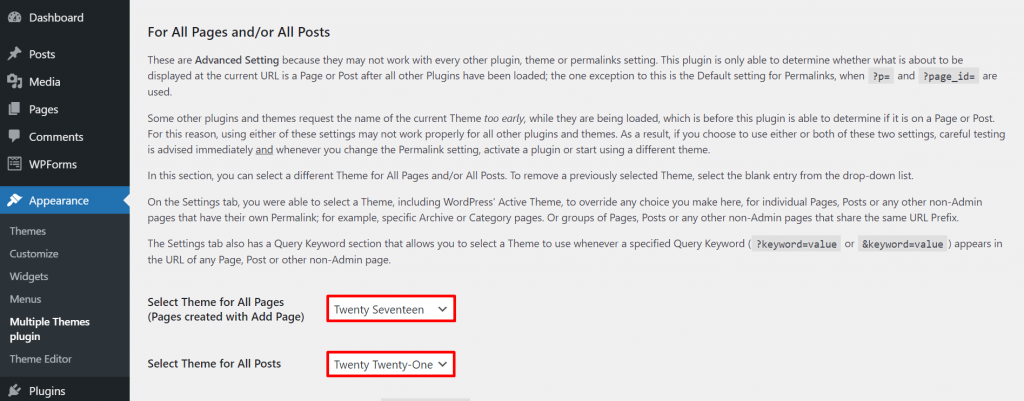
Plugins can help you use two themes. They make it easy and fast. Theme Switcha is a popular choice. It lets you switch themes quickly. Another is Multiple Themes. It allows different themes for different pages. These plugins have many features. They are easy to install and use.
Configuring plugins is important. It ensures themes work well together. First, install the plugin. Then, go to settings. Choose your themes. Save changes. Test your site. Make sure it looks good. If anything is wrong, check settings again. Plugins often have help guides. Use them if needed. Remember, keep plugins updated.
Custom Code Solutions
Using functions.php allows you to add special code. This code can make your theme unique. Always back up before editing. Mistakes can break your site. Use a child theme. This keeps the main theme safe. Add code snippets carefully. They change how your theme works.
Custom CSS lets you change the look of your site. Open the WordPress customizer. Find the “Additional CSS” section. Paste your CSS code here. It changes colors, fonts, and more. Test changes before saving. Make sure they look good on all devices. Too much CSS can slow your site. Keep it simple and clean.
Credit: www.inmotionhosting.com
Testing And Troubleshooting
Switching between themes in WordPress can enhance your site’s look. Use plugins like “Multiple Themes” for easy management. Troubleshoot issues by clearing cache or checking for plugin conflicts.
Common Issues
Themes may not work well together. This can cause display problems. Pages might look odd or break. Some plugins can also conflict. They might stop working. Always check for these common issues.
Debugging Tips
Start by checking your theme settings. Ensure everything is correct. Next, disable all plugins. Then, turn them on one by one. This helps find the problem. Also, check your error logs. They show what went wrong. Keep your WordPress updated. Updates fix many bugs. If stuck, ask for help. The WordPress community can assist you.
Best Practices For Theme Management
Keeping your themes updated is very important. Updates fix bugs and improve security. Developers release updates often. Always check for new updates. Update themes regularly to keep your site safe. Using outdated themes can be risky. Your website might face security threats. Regular updates keep your site secure and fast. Never ignore these updates.
Backups protect your site from data loss. Always save your website’s data. Use tools to backup your themes. Schedule backups to occur frequently. Losing data can be very bad. Always keep a copy of your site files. Backups help restore your site easily. Choose a reliable backup tool. Saving backups can save your day.
Credit: www.wpbeginner.com
Frequently Asked Questions
Can I Use Two Themes In WordPress?
Yes, you can use two themes in WordPress by utilizing plugins. These plugins allow different themes for different pages or posts. It’s a great way to customize your website and enhance user experience without affecting the site’s overall functionality.
How Do I Switch Themes On WordPress?
Switching themes in WordPress is easy. Go to Appearance > Themes in the dashboard. Choose the theme you want and click ‘Activate’. Always preview before activating to ensure compatibility with your site’s content and design.
Are Multiple Themes Bad For Seo?
Using multiple themes can impact SEO if not implemented correctly. Ensure consistent navigation and avoid duplicate content. Optimize each theme for speed and mobile responsiveness to maintain good search engine rankings.
Can Plugins Help With Multiple Themes?
Yes, plugins like Multiple Themes or Theme Switcha enable using multiple themes. They offer easy setup and customization options. Always choose reliable plugins and keep them updated for best performance and security.
Conclusion
Having two themes in WordPress offers flexibility. It allows creativity in design. You can cater to different audiences effectively. This approach can enhance user experience on your site. Remember to choose themes that complement each other. Ensure they align with your brand identity.
Test your site thoroughly after setup. This ensures smooth functionality and appearance. Regular updates and maintenance are crucial. They keep both themes running optimally. With careful planning, your site can stand out. Enjoy the benefits of dual themes on WordPress.
Happy designing!


