
Are you tired of your WordPress site looking like everyone else’s? Do you crave a unique design that truly stands out but don’t want to break the bank on a premium theme?
You’re not alone. Many WordPress users like yourself are eager to customize their themes but feel overwhelmed by the technical jargon. Imagine having the power to tweak your website exactly how you want it, without having to become a coding expert overnight.
We’ll demystify the process of “hacking” into a WordPress theme—ethically and safely. You’ll discover simple, effective strategies to personalize your site, unlocking its full potential and making it a true reflection of your brand. Ready to take control and transform your WordPress theme into something spectacular? Let’s dive in!
Choosing The Right Tools
Text editors help in writing code neatly. Simple ones like Notepad++ or Sublime Text are great. For more features, use Visual Studio Code. It makes coding easier and fun. IDEs like PHPStorm are powerful. They help in complex tasks. But they can be harder to learn.
Browser tools show hidden code. They help in finding errors fast. Google Chrome and Firefox have good tools. Use them to check website changes live. These tools are handy for beginners. They are easy to use.
FTP clients help move files online. FileZilla is popular and free. It is simple to use. File managers like Cyberduck are also good. They let you change files quickly. Secure file transfers are important. Always choose safe options.
Understanding Theme Structure
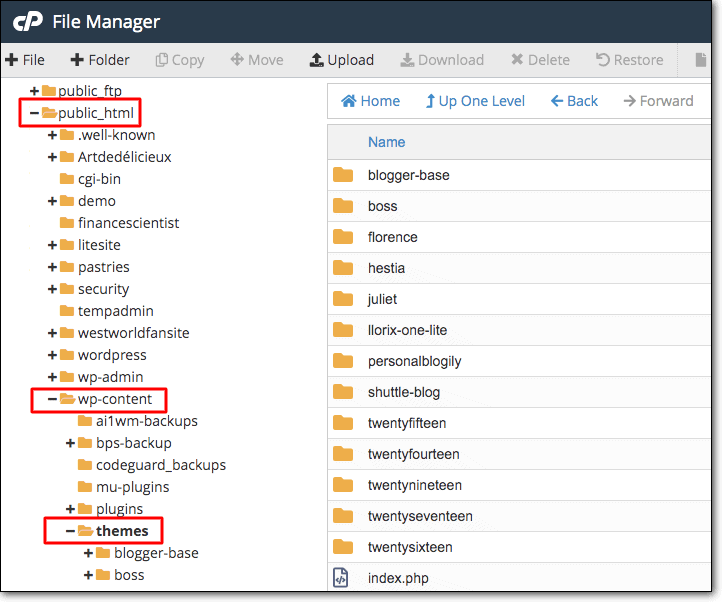
A WordPress theme has many important files. These files live in different folders. Each file tells WordPress how to show your website. The style.css file is very important. It decides how your site looks. The index.php file is also key. It controls what shows on the homepage. All files work together to make your site work well.
WordPress uses a template hierarchy. This is a special order for files. If one file is missing, WordPress looks for another. This helps your site stay safe. The hierarchy makes sure your site always looks good. Understanding this order helps you change themes easily.
Functions add special features to your theme. They help your site do more. Hooks are special places in the code. They let you add or change things. Both functions and hooks make your theme better. They help your website work just right.
Customizing Theme Styles
CSS files control the look of your WordPress site. Open the style.css file in your theme folder. Make changes to colors and fonts. Save the file to see changes live. Use a text editor to make changes. Keep your edits simple and clear.
WordPress has a built-in Customizer. It lets you change the theme without coding. Find it under Appearance in your dashboard. Change colors, fonts, and layouts easily. Preview changes before saving them. Use this tool for safe edits.
Child themes let you change the parent theme. Create a new folder for your child theme. Copy the style.css file from the parent theme. Make edits in the child theme’s CSS file. This keeps your changes safe during updates. Use child themes for major changes.

Credit: www.acunetix.com
Modifying Theme Templates
Explore how to change WordPress themes by editing template files. Learn the basics of HTML, CSS, and PHP. Customize layouts and styles to fit your needs.
Editing Html And Php
WordPress themes use HTML and PHP files. These files control the site’s look. To change a theme, open these files. Use a code editor. Make small changes to see effects. Be careful with PHP code. Errors can break the site. Always back up files first. This keeps your work safe.
Using Template Tags
Template tags are like magic words. They pull data from the database. Tags make the site dynamic. For example, php the_title(); ? shows the post title. Use tags to show authors or dates. Tags are easy to learn. They make themes flexible and fun.
Conditional Logic In Templates
Conditional logic changes what users see. It uses if statements in PHP. Show different content for logged-in users. Hide content for guests. Use logic for special pages. Example: display ads only on blog posts. Conditional logic makes your site smart. Play with conditions to improve user experience.
Adding And Managing Widgets
Widgets live in widget areas. These are usually in sidebars. Sidebars can be on the left or right. Some themes have more than one sidebar. This gives more places for widgets.
You can move widgets around. Just drag and drop them. It is easy and fun. Try different spots to see what you like best.
Custom widgets add a special touch. They make your site unique. You can create a widget that fits your style. Some themes support custom widgets. Check if your theme does.
Custom widgets show special content. Like contact forms or social media links. This makes your site more engaging.
Plugins give more power to widgets. Some plugins add new widgets. Others make old widgets better. Install plugins from the WordPress store.
Be careful with plugins. Too many can slow your site. Choose only what you need. Check reviews before installing.
Credit: www.malcare.com
Integrating Custom Scripts
Enqueue scripts to keep them organized. Use wp_enqueue_script() function. Add it inside the functions.php file. This method loads scripts the right way. It prevents script conflicts.
WordPress has some JavaScript libraries. Use them to enhance your theme. Load libraries using wp_enqueue_script(). Always check if the library is already loaded. This will help in avoiding errors.
Script conflicts cause issues. Always check for conflicts first. Use noConflict() method to avoid jQuery conflicts. It helps jQuery work with other libraries. Test scripts on different browsers. Ensure everything works well.
Optimizing For Performance
Minify CSS and JavaScript files. This helps in reducing load times. Smaller files mean faster pages. Use tools like UglifyJS and CSSNano. They strip out unnecessary spaces and comments. This makes your site quicker. Quick sites keep visitors happy.
Large images slow down websites. Use image compression tools. Tools like TinyPNG and JPEGmini work well. They reduce file size without losing quality. Optimized images load faster. Fast loading images improve user experience. Remember, happy users stay longer.
Caching stores data for future use. It speeds up page load time. Use plugins like W3 Total Cache or WP Super Cache. They save data locally. Next visit is faster. Caching reduces server load. Lower server load means smoother performance.
Credit: www.acunetix.com
Ensuring Security
Validating input is crucial for security. Check every user entry. Hackers use weak points to enter systems. Ensure data is correct and safe. Use functions to check data type. Limit input length to avoid attacks.
Sanitizing output protects from harmful code. Clean every output before display. Remove special characters that can be dangerous. Use escape functions. They help keep data safe. Prevent script injections and security breaches.
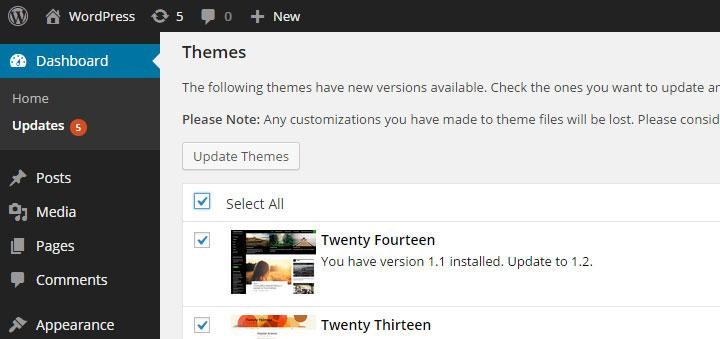
Regular updates and backups are vital. Update themes often. Fix security holes quickly. Back up data to avoid loss. Use tools for automatic backups. They keep data safe. Protect against failures and attacks.
Frequently Asked Questions
What Is A WordPress Theme Hack?
A WordPress theme hack involves modifying a theme’s code to change its appearance or functionality. This requires knowledge of PHP, HTML, and CSS. Always ensure you have backups before hacking a theme, as mistakes can break your site. Consider using child themes to safely apply custom changes.
Why Hack A WordPress Theme?
Hacking a WordPress theme allows you to personalize your site’s design and features. You can add custom elements or improve performance. Modifying themes gives you control over your website’s appearance. Ensure changes align with your brand’s identity and user experience goals.
Is Hacking WordPress Themes Legal?
Yes, hacking WordPress themes is legal if you own the theme. You can modify your purchased or free themes. Ensure compliance with the theme’s license agreement. Avoid using pirated themes, as this is illegal. Always respect copyright laws when hacking themes.
How To Safely Hack A Theme?
To safely hack a theme, use a child theme. This preserves original files while allowing custom changes. Always back up your site before making modifications. Test changes in a staging environment. Regularly update your themes to protect against vulnerabilities.
Conclusion
Exploring a WordPress theme can be rewarding. You gain more control and creativity. Remember to backup your site first. This ensures your data stays safe. Practice regularly to improve your skills. This helps you understand WordPress better. Always check for updates.
Themes change over time. Stay informed about new features. This keeps your site fresh and functional. Experimenting is key. It leads to unique designs. Enjoy the process and learn. You’re building something great.


