
Are you ready to take your website live with HostGator? Whether you’re launching a blog, an online store, or a personal portfolio, choosing the right web host is crucial.
HostGator offers reliable, affordable hosting solutions that can help you get your site up and running in no time. But where do you start? How do you navigate the setup process to ensure your site performs at its best? In this guide, we’ll walk you through every step to get your site on HostGator, from selecting the perfect hosting plan to optimizing your website for speed and security.
Get ready to unlock the potential of your online presence and make your website a success story. Dive in to discover how to turn your vision into reality effortlessly.

Credit: www.hostgator.com
Choosing The Right Hosting Plan
Shared hosting is affordable for new websites. Many sites share one server. It’s a good start for small businesses or personal blogs. You save money with shared hosting. But, if traffic grows, you might need more space. Check if you have enough resources for your needs. It’s simple to use.
VPS stands for Virtual Private Server. It gives you more space than shared hosting. You get your own part of the server. It’s great for growing sites. You have more control over settings. It’s like a step up from shared hosting. But it costs more. Choose VPS if you need more power.
Dedicated servers give you a whole server. Only your site uses it. It’s perfect for big businesses. You get full control and flexibility. It’s secure and can handle lots of traffic. But it costs the most. If your site is very busy, dedicated servers are best. You need technical skills to manage it.
Setting Up Your Account
First, visit the Web Host Gator website. Find the sign-up button on the main page. Click it to start. Fill in your details. Use your email and a strong password. This keeps your account safe. Double-check all the information. Then, click submit. Your account is now ready.
Think about a good name for your site. It should be easy to remember and type. Avoid long names. Check if your name is free. Use the search tool on the website. If it’s taken, try another name. Finally, choose your domain. Now, you’re all set to begin!
Installing WordPress
QuickInstall is a fast way to set up WordPress. First, log into your Host Gator account. Then, find the QuickInstall tool. Click on it. Now, select WordPress from the menu. Fill in your site details. Press Install Now. Your WordPress site will be ready in a few minutes. Remember to save your login info. You’ll need it later.
Manual installation takes a few steps. Download WordPress from their website. Unzip the file. Next, use an FTP client to upload files to your server. Create a MySQL database in your Host Gator account. Name it something simple. Now, open your website. Follow the steps on the screen. Fill in your database info. Click Install WordPress. Your site is now live. Keep your username and password safe.
Credit: html.com
Configuring Site Settings
Choosing the right theme is very important. A good theme makes the site look nice. It also helps users find things easily. Many themes are available for free. Some themes cost money. Free themes have basic features. Paid themes have more options. Always pick a theme that fits your site’s goal. You can change colors and fonts. You can add your own pictures too. This makes the site unique and fun.
Plugins add extra features to your site. Some plugins help with speed. Others help with security. There are plugins for everything. Most plugins are free. Some have a small cost. Always check reviews before using a plugin. Many plugins can slow down your site. Use only what you need. This keeps the site fast and safe for visitors.
Managing Your Website
Updating your website content is very important. Fresh content keeps visitors interested. Make sure to add new articles regularly. Check for spelling mistakes and fix them. Use simple words that are easy to understand. Adding pictures can make the page look nice. Always check if the links work. Broken links can confuse visitors. Write about interesting topics. This keeps people coming back for more.
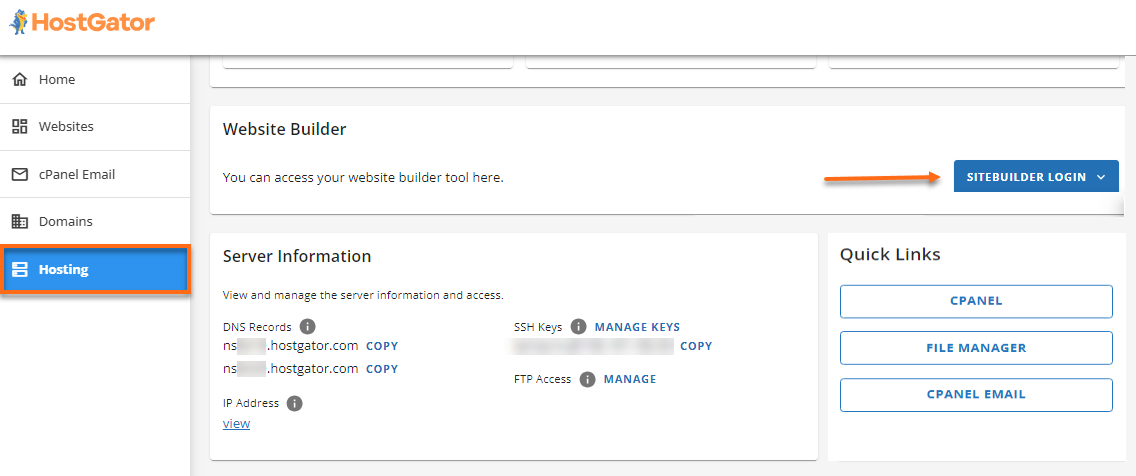
Watching how your site performs is crucial. Use tools to check site speed. Slow sites make visitors leave quickly. Check how many people visit your site. This helps you know what they like. Look at bounce rates. High bounce rates mean people leave fast. Fix problems to keep visitors longer. Make sure the site works well on phones. Many people use phones to browse. Test your site often. This helps you find and fix errors.
Credit: www.hostgator.com
Troubleshooting Common Issues
Websites can sometimes go offline. This is called downtime. It can happen because of server problems. Always check your server status first. Use Web Host Gator’s status page. It shows if servers are working. If your site is still down, contact support. They can help find the problem. It is important to have a backup of your site. This helps if data is lost during downtime.
Security is very important for websites. Hackers can try to steal information. Use a strong password for your account. Change it often to keep it safe. Web Host Gator offers security tools. They can help protect your site. Always update your software. Updates fix security problems. Consider using an SSL certificate. It makes your site safer for visitors. Always check for suspicious activity. Report any problems to support quickly.
Frequently Asked Questions
How Do I Add A Website In Hostgator?
Log into your HostGator account and access cPanel. Click on “Domains” and select “Addon Domains. ” Enter the new domain name, create a directory, and set a password. Click “Add Domain” to complete the process.
How Do I Upload My Website To Hostgator?
Log into your HostGator account. Use File Manager or FTP to upload website files. Choose the correct directory, usually ‘public_html’. Verify your site by visiting your domain. Clear your browser cache if changes aren’t visible.
How To Upload A Website On An Hosting Server?
To upload a website, first choose a reliable hosting provider. Use FTP or the hosting control panel to transfer your website files. Ensure your domain is linked to the server. Check configurations and test the website’s functionality. Regularly update content and monitor performance for optimal results.
Why Is My Hostgator Site Not Working?
Check server status, domain settings, or expired hosting account. Clear browser cache and disable plugins. Contact HostGator support for assistance if issues persist. Ensure your internet connection is stable and verify DNS configurations are correct. Regular updates can prevent potential problems.
Conclusion
Getting your site on HostGator is straightforward. Follow the steps carefully. Choose the right plan for your needs. Create your account with accurate details. Set up your domain, ready for the world. Install WordPress for easy management. Customize your site to suit your style.
Check everything twice for errors. Launch your site, inviting visitors. Share your new creation online. Keep it updated for best results. Enjoy your online presence and growth. HostGator supports you along the way. Your site is now ready to shine.
Explore, learn, and grow online.


