
Imagine having the power to create and manage your own corner of the internet. Getting into web hosting is your first step towards that control.
Whether you want to launch your own website, start a blog, or even build a business, understanding web hosting is crucial. You might feel overwhelmed by the technical jargon and numerous options, but don’t worry—this guide is designed with you in mind.
It’s simple, straightforward, and packed with the essentials you need to dive into web hosting confidently. As you read further, you’ll discover how easy it is to start, and why it could be the perfect opportunity for you. Ready to unlock the potential of the web? Let’s get started.
Choosing The Right Hosting Type
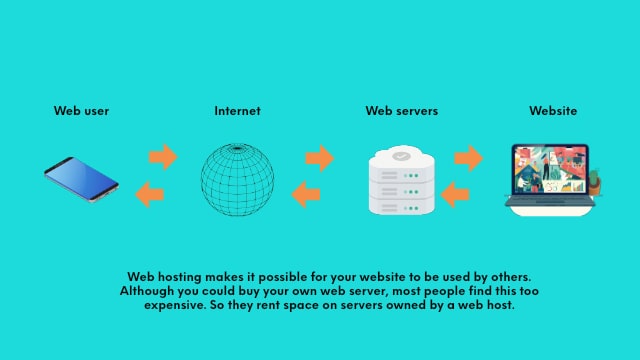
Shared hosting is like sharing a big house. Many websites live on one server. It’s the cheapest option. Perfect for small websites or blogs. You share resources with others. This can slow your site sometimes. But it’s easy to set up and use. No need for technical skills. Best for beginners.
VPS hosting means renting a private room in a big house. You get more resources. It’s more stable than shared hosting. Ideal for growing websites. You have more control and flexibility. Costs more than shared hosting. Some technical knowledge is needed. Good for medium-sized websites.
Dedicated hosting is like owning a house. You have a whole server to yourself. It’s the most powerful option. Best for large websites or businesses. No sharing with others. High speed and performance. Costs the most. Requires technical skills. Perfect for high-traffic sites.
Cloud hosting uses many servers. It’s like living in a hotel. You can expand easily. Pay only for what you use. Very flexible and reliable. Ideal for websites with changing traffic. No server worries. Resources are always available. Costs can vary. Great for sites needing scalability.
Understanding Domain Names
Choosing a domain is important. It represents your website. First, think of a unique name. Then, check if it’s available. You need to register the domain. Use a domain registrar for this. Popular registrars include Namecheap and GoDaddy. They help secure your domain. Once registered, it’s yours. You can now build your website.
Domain extensions are the end of your web address. Common ones are .com, .org, and .net. Each has a different use. .com is for commercial sites. .org is for organizations. .net is often for networks. Choose the right extension. It helps your site look professional.
Domain privacy keeps your information safe. Without it, people see your details. This includes your name and address. Most registrars offer privacy protection. It hides your details from public view. This is important for safety. It helps protect against spam. Choose privacy for peace of mind.
Selecting A Reliable Hosting Provider
Good support is crucial. It’s like having a helping hand. Check if they offer 24/7 support. Live chat is great for quick help. Email support can be slower. Phone support is also important. A helpful team can solve problems fast.
Uptime is the time your site is online. High uptime means fewer disruptions. Look for 99.9% uptime or higher. Some providers offer compensation for downtime. It’s good to read customer reviews. They can show real uptime experiences.
Prices vary greatly. Budget plans often have fewer features. Premium plans offer more power and storage. Monthly payments can be easier to manage. Look for hidden fees. Check for discounts on longer plans. Free trials can be useful to test services.
Setting Up Your Hosting Account
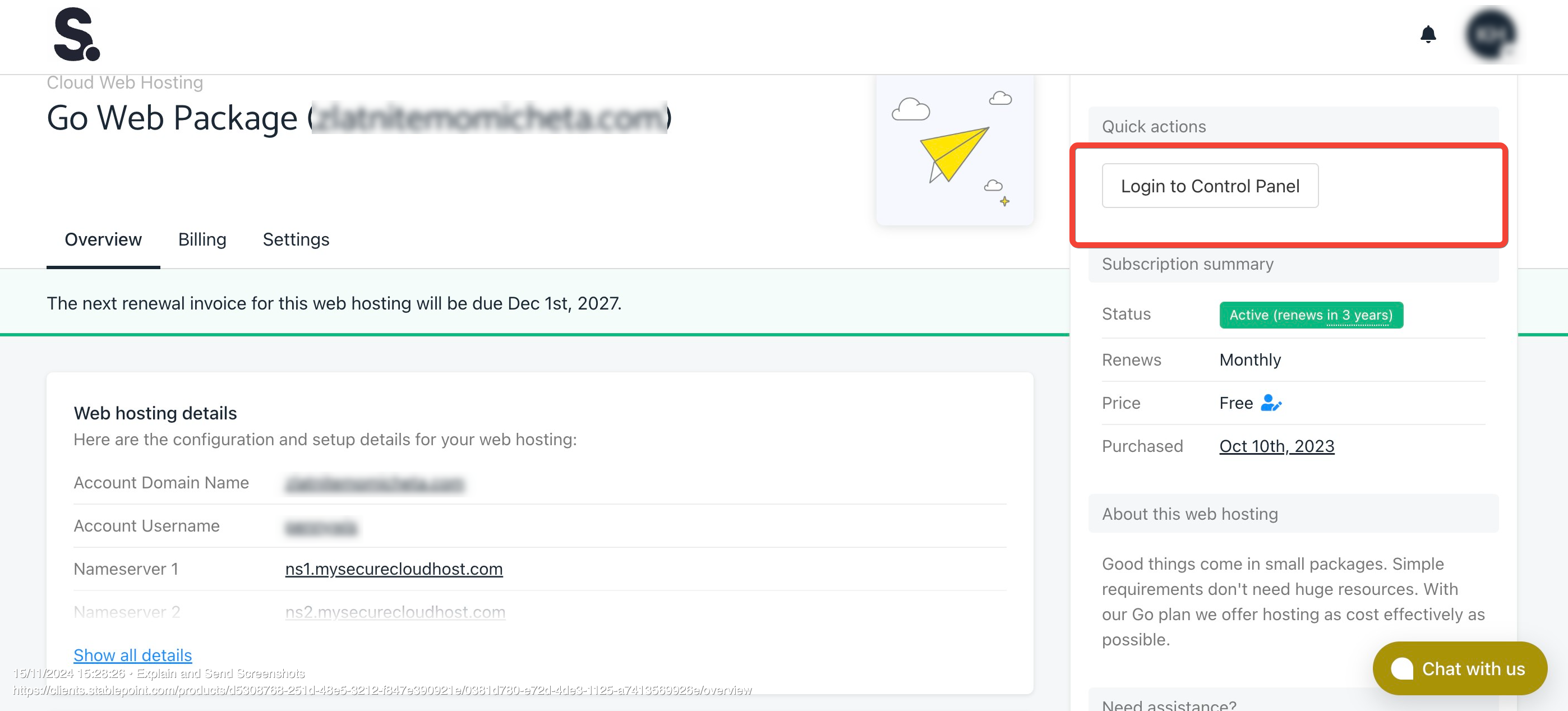
Start by accessing your hosting account dashboard. Find the DNS settings section. This controls where your website points. Enter the nameservers given by your hosting provider. Save the changes. This may take some time to update. Be patient.
Choose a CMS like WordPress or Joomla. Go to the hosting control panel. Look for a one-click install option. Follow the steps to install. Enter your site name and details. Finish by setting up your admin account. Now, your CMS is ready.
Log into your hosting dashboard. Find the email accounts section. Click to create a new email. Enter a username and password. Decide on the storage space. Finally, save to create the account. Now, you can send and receive emails.
Understanding Security Measures
SSL Certificates protect user data. They encrypt information between the server and the user. This makes it safe from hackers. Websites with SSL show a padlock in the browser. This builds trust with users. SSL is important for e-commerce sites. It secures payment information. Always check for SSL when visiting sites.
Regular Backups save your data. They protect against data loss. Files can be lost due to hackers or errors. Backups help restore lost files quickly. Create backups daily or weekly. Store backups in different places. Use cloud services or external drives. This keeps your data safe. Never skip backups.
DDoS Protection stops attacks on websites. DDoS attacks flood sites with traffic. They slow down or crash sites. Use software to detect attacks early. This software filters bad traffic. It keeps your site running. Protect your site and users from DDoS threats. Choose web hosts with DDoS protection.
Credit: www.godaddy.com
Optimizing Website Performance
CDNs help websites load faster. They store copies of your site on many servers worldwide. This means users get content from the server closest to them. Less distance means faster load times. Faster sites make users happy. Search engines like fast sites too. Using a CDN is a smart move.
Caching saves copies of your web pages. This makes them load quicker next time. Browsers don’t need to fetch data again. Less data means faster pages. Cache only important parts of your site. This balance is key. Use caching to improve speed and save resources.
Big images slow down sites. Compress images to make them smaller. Smaller images load quicker. Use the right image format. JPEG for photos. PNG for graphics. WebP is a good format for all. Always check image size before uploading. Fast sites have small images.
Scaling Your Hosting As You Grow
As your website grows, more resources become essential. Upgrading hosting plans gives you more storage and bandwidth. This supports increased traffic and data. Choose a plan that fits your site’s needs. More visitors mean more demand on servers. Check your hosting provider’s upgrade options. Some plans offer better speed and security. Make sure your new plan offers value. Higher plans are often pricier. But they provide essential features.
Load balancing helps distribute traffic evenly. It makes sure no server gets overloaded. With more visitors, servers can get busy. Load balancing solves this problem. It spreads tasks across multiple servers. This process keeps websites fast and smooth. No more slow loading times. Users enjoy a better experience. Consider this as you scale your hosting.
Managing traffic is key to a healthy site. As traffic grows, so do challenges. Traffic management tools help control this. These tools can prioritize important tasks. They also help avoid server crashes. Monitor your site’s traffic regularly. Knowing peak times helps plan better. Use analytics to understand visitor patterns. This information guides your hosting decisions.
Credit: kb.stablepoint.com
Monitoring And Maintenance
Effective monitoring and maintenance are crucial for web hosting success. Regular checks ensure server performance and security. Address issues promptly to keep websites running smoothly.
Performance Monitoring Tools
Performance tools help check server speed and uptime. They show how well a server works. Use these tools to find problems early. Quick fixes keep websites running smoothly. Choose tools that are easy to use. They should give clear reports. Some tools can even send alerts for issues. It’s important to act fast when alerts come.
Regular Software Updates
Software updates keep servers secure. They fix bugs and improve features. Without updates, servers can be at risk. It’s smart to set updates on auto. This saves time and keeps servers safe. Check for updates often. Always read what’s new in each update. This helps understand changes better.
Managing Server Resources
Resources like memory and storage are crucial. Monitor them to avoid crashes. Use tools to check resource use. If resources are low, sites may slow down. Balancing resources ensures smooth operation. Ensure enough resources are available. This keeps websites fast and reliable.

Credit: www.hostgator.com
Frequently Asked Questions
How Do I Get Started With Web Hosting?
Choose a reliable web hosting provider. Sign up for a plan that fits your needs. Register a domain name. Set up your website using a CMS like WordPress. Ensure security with SSL certificates.
How To Become A Web Hosting?
To become a web host, start by researching hosting platforms and services. Set up servers with reliable hardware. Offer competitive pricing and quality customer support. Ensure security and scalability. Market your services effectively to attract clients.
Is Web Hosting A Good Side Hustle?
Web hosting can be a profitable side hustle. It offers recurring income and requires minimal initial investment. Understanding technical aspects and providing excellent customer support are crucial for success. Start small, scale gradually, and leverage marketing skills to attract clients and grow your business efficiently.
What Is The Best Web Hosting For Beginners?
Bluehost is ideal for beginners due to its user-friendly interface and excellent customer support. They offer affordable plans, free domain registration, and a one-click WordPress installation. Bluehost ensures reliable uptime and provides a 30-day money-back guarantee, making it a top choice for new website owners.
Conclusion
Entering the world of web hosting can seem challenging. But with the right steps, it’s manageable. Start small, learn each part, and grow your skills. Choose reliable hosting services to ensure stability. Focus on customer needs for better satisfaction. Stay updated with the latest trends.
This keeps your knowledge fresh and relevant. Remember, patience and practice are key. Your dedication will bring success over time. Enjoy the journey and embrace the learning. Web hosting is not just a task but an adventure. With persistence, you will find your place in this dynamic industry.


