
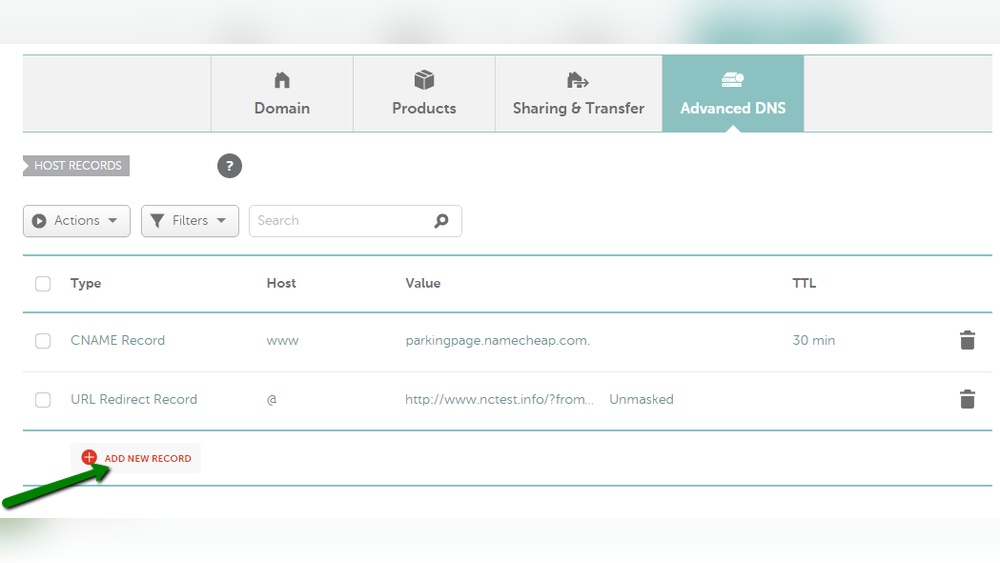
Are you trying to find the host record for your .ng domain but don’t know where to start? Getting this information is crucial if you want to manage your website, set up email services, or improve your online presence.
In this guide, you’ll discover simple, step-by-step ways to quickly access your host record without confusion or delays. By the end, you’ll have full control over your domain settings and be ready to make smart changes with confidence. Keep reading to unlock the key to managing your.
ng domain like a pro.
Credit: www.namecheap.com
What Is A Host Record
A host record is a key part of the Domain Name System (DNS). It connects a domain name to an IP address. This helps browsers find websites easily. Without host records, typing a domain name would not lead to a website.
Host records store important information about your domain. They tell the internet where to send visitors. Each record has a specific role in managing web traffic.
What Does A Host Record Do?
A host record directs internet traffic to the right server. It links your domain name to a specific IP address. This allows users to access websites by typing easy names instead of numbers.
It helps email servers find your domain too. Different types of host records serve different purposes.
The most common host record is the A record. It points a domain to an IPv4 address. Another type is the AAAA record, which points to an IPv6 address.
CNAME records link one domain to another. MX records manage email routing. Each type plays a role in website and email delivery.
Why Host Records Matter For .ng Domains
.ng domains use host records to guide internet users. Proper host records ensure your website is reachable. They also help with email and other services linked to your domain.
Without correct host records, your .ng domain won’t work correctly online.
Types Of Host Records
Host records connect your domain name to different services. These records tell the internet where to find your website or email servers. Each type of record serves a unique purpose. Understanding them helps manage your domain properly.
A Record
The A record links your domain to an IP address. This address points to the server hosting your website. It uses numbers, like 192.168.1.1, to direct traffic. Without an A record, your website won’t load.
Cname Record
The CNAME record points your domain to another domain name. It acts like a nickname for your site. For example, www.example.com can point to example.com. This helps manage multiple domain names easily.
Mx Record
The MX record directs email to your mail server. It tells the internet where to send your emails. Each domain needs MX records for email to work correctly. Without them, you cannot receive emails on your domain.
Tools To Check Host Records
Checking the host record for an NG domain is important. It helps you find the domain’s IP address and other details. Several tools can make this task simple and fast. These tools work well for beginners and experts alike.
Some tools work online through your browser. Others use command line programs on your computer. Both types give accurate results for host records.
Online Dns Lookup Tools
Online DNS lookup tools are easy to use. You just enter the domain name, and the tool shows the host record. Popular websites offer this service for free. They display information like A records, MX records, and CNAME records.
These tools are great for quick checks. No software installation is needed. Results appear within seconds. Examples include DNSChecker.org and MXToolbox.com. They work well for NG domains too.
Command Line Utilities
Command line utilities give more control to users. They run on Windows, Mac, and Linux systems. Using commands like nslookup or dig, you can find host records quickly.
These tools are useful for advanced users. They help with troubleshooting and detailed checks. For example, nslookup example.ng shows the IP address linked to the domain. The command line method is fast and does not rely on websites.
Credit: www.whogohost.com
Step-by-step Guide To Find Host Record
Finding the host record for a .ng domain is simple with the right steps. Host records show which server handles your domain’s services. This guide explains two easy methods to find these records quickly.
Using Online Dns Lookup
Start by visiting a reliable DNS lookup website. Enter your .ng domain name in the search box. Choose the type of record you want to find, like A, CNAME, or MX. Click the search button to view the host records. The results show the server details linked to your domain. This method works well on any device with internet access.
Using Command Prompt Or Terminal
Open Command Prompt on Windows or Terminal on Mac and Linux. Type the command nslookup yourdomain.ng and press Enter. The tool displays the domain’s host records. For more details, use nslookup -type=any yourdomain.ng. This command fetches all DNS records available for the domain. It is quick and does not need a browser or internet tools.
Interpreting Host Record Results
Understanding host record results helps you manage your .ng domain better. These records show where your domain points and how it behaves on the internet.
Host records include several types of data. Each type serves a different purpose for your website or email.
A Record
The A record links your domain to an IP address. This IP address shows where your website is hosted. If the IP is wrong, your site won’t load.
Cname Record
The CNAME record points your domain to another domain name. It helps manage multiple subdomains easily. This record never points to an IP address directly.
Mx Record
MX records control email delivery for your domain. They tell where emails should be sent. Incorrect MX records can cause email problems.
Txt Record
TXT records hold text information. They are often used for verification and security. For example, they help protect against email spam.
Ttl (time To Live)
TTL shows how long the record is cached by servers. A short TTL means changes update faster. A long TTL reduces server load but slows updates.
Common Issues And Fixes
When trying to get the host record for a .ng domain, some common issues may appear. These problems can stop you from finding the correct information. Knowing these issues helps to fix them fast. This section explains the frequent problems and how to solve them.
No Record Found
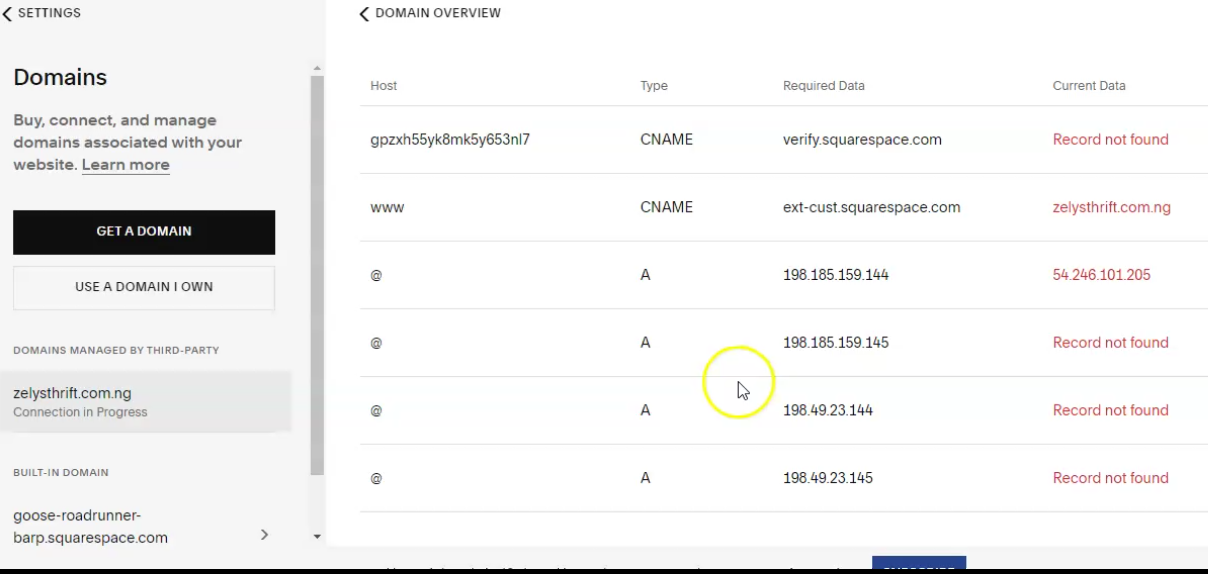
Sometimes, the domain name system shows no record for your .ng domain. This happens if the domain is new or not yet active. It can also mean the domain does not exist or is expired. Check if you typed the domain name correctly. Wait a few hours and try again. Contact your domain provider to confirm the domain status. They can help activate or renew your domain if needed.
Incorrect Record Information
Sometimes, the host record shows wrong details. This can cause your website or email to stop working. Wrong IP address or server names are common errors. To fix this, log in to your domain control panel. Review your DNS settings carefully. Update the host record with the correct information given by your hosting provider. Save changes and wait for the DNS to update, which may take a few hours.

Credit: darkmarc.substack.com
Frequently Asked Questions
What Is A Host Record For A .ng Domain?
A host record maps your domain to an IP address or server. It directs internet traffic to your website or service.
How Can I Find My .ng Domain Host Record?
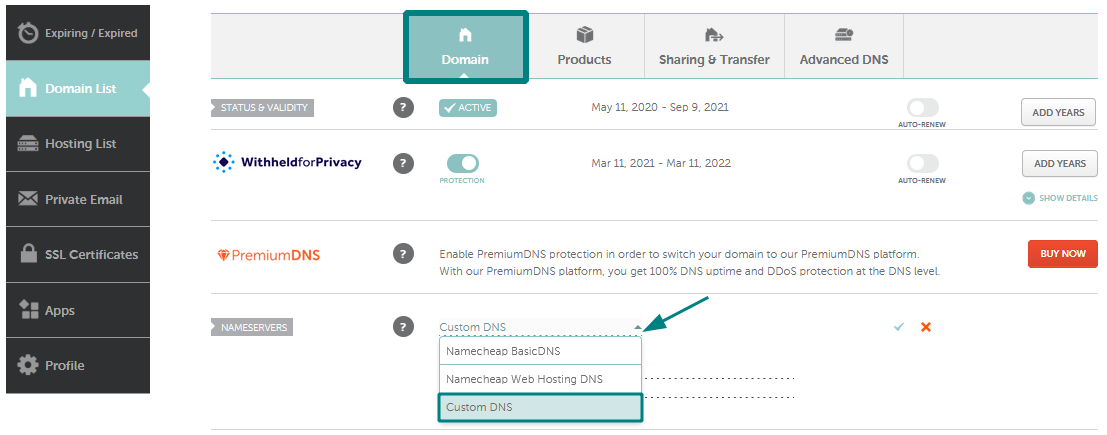
Log into your domain registrar’s control panel. Check the DNS settings or name server section to view host records.
Why Is The Host Record Important For .ng Domains?
Host records ensure visitors reach your website correctly. Incorrect records can cause downtime or failure in website loading.
Can I Change The Host Record For My .ng Domain?
Yes, you can edit host records via your domain registrar. Changes usually take a few hours to propagate.
Conclusion
Getting the host record for a. ng domain is simple with clear steps. Check your domain registrar’s control panel first. Use the DNS management tools provided to find the host record. Keep your records safe and up to date. This helps your website work correctly and reach visitors.
Knowing how to access these settings saves time and avoids problems. Follow the steps carefully, and you will manage your domain with ease. No need to worry or ask for help often. Your domain will stay healthy and active for a long time.


