
Are you planning to switch your domain to a new registrar but feeling stuck because you can’t find your EPP code from Namecheap? You’re not alone.
Many domain owners face this exact hurdle, and the process can seem a bit overwhelming at first. But don’t worry, obtaining your EPP code is a straightforward task once you know where to look. In this guide, we’ll walk you through each step with clear, easy-to-follow instructions.
By the end of this article, you’ll have your EPP code in hand, ready to transfer your domain without any stress. Let’s get started and make this process as smooth as possible for you.
What Is An Epp Code
When managing a domain, the term “EPP code” might pop up, leaving you puzzled. An EPP code, or Extensible Provisioning Protocol code, is a unique identifier that plays a crucial role in domain transfers. Think of it as a secret key, ensuring your domain moves securely between registrars. It’s not just a random string of letters and numbers; it holds the power to unlock your domain’s movement.
What Is An Epp Code?
An EPP code is essential for transferring your domain from one registrar to another. It acts as a password, providing security during the transfer process. Without it, moving your domain can be next to impossible.
Why does this matter to you? Imagine wanting to switch registrars for better service or pricing. Without the EPP code, you might feel stuck. It’s like having the door shut without a key when you want to step into a new opportunity.
Why Is An Epp Code Important?
The importance of an EPP code lies in its security function. It protects your domain from unauthorized transfers. You wouldn’t want someone else to hijack your domain, right? This code ensures that only you, as the legitimate owner, can initiate a transfer.
Have you ever felt the frustration of losing access to something valuable? An EPP code prevents that by safeguarding your domain ownership. It’s your domain’s shield in the digital realm.
How To Locate Your Epp Code On Namecheap
Finding your EPP code on Namecheap is straightforward. Log in to your Namecheap account and navigate to the domain list. Click on the domain you wish to transfer. You’ll find the EPP code under the ‘Domain Management’ section.
It’s like searching for treasure, only simpler. No need for a map—just a few clicks and you have your code ready. Knowing this process can save you time and potential headaches.
Common Mistakes When Handling Epp Codes
Some users often overlook the importance of double-checking the EPP code. Entering it incorrectly can halt the transfer process. Ensure accuracy by copying and pasting the code directly.
Have you ever hurried through a task only to find you’ve missed something crucial? Slow down when dealing with EPP codes. A small mistake can lead to unnecessary delays.
In the realm of domain management, understanding the EPP code’s role is vital. How confident are you in managing your domain transfers? Knowing your way around these codes ensures smooth transitions. Take control and make informed decisions for your domain’s future.
Importance Of Epp Code For Domain Transfers
Transferring a domain from one registrar to another might seem daunting, but understanding the role of the EPP code can make the process smoother. This unique code acts like a key, ensuring that only authorized transfers occur. Knowing why this code is important can save you from headaches and delays in your domain management journey.
What Is An Epp Code?
Think of the EPP code as a secret password for your domain. It’s a unique authorization key that protects your domain from unauthorized transfers. When you decide to move your domain to a new registrar, this code is crucial for initiating the transfer.
Ensuring Security During Transfers
Security is paramount in domain management. Without the EPP code, anyone could potentially move your domain, risking your online presence. The code ensures that only you, as the domain owner, have the power to authorize a transfer.
Facilitating Smooth Domain Transfers
The EPP code is essential for a smooth transfer process. Without it, your transfer request may be rejected, causing unnecessary delays. Having the code ready before initiating a transfer can save you valuable time.
Avoiding Transfer Complications
Imagine planning a website launch only to face transfer complications. Not having the correct EPP code can derail your plans. Ensuring you have it at hand helps avoid these pitfalls and keeps your project on track.
Personal Experience With Epp Codes
Years ago, I tried transferring a domain without understanding the importance of the EPP code. The process stalled for weeks, causing frustration. Learning from this, I now ensure the code is ready, making domain transfers quick and efficient.
Have you ever faced delays in domain transfers? Understanding the importance of the EPP code is your first step towards hassle-free domain management. Prioritize securing this code to ensure your domain moves smoothly and securely.
Setting Up Your Namecheap Account
Setting up a Namecheap account allows you to manage your domain easily. To get the EPP code, log into your Namecheap dashboard. Navigate to the domain list and select ‘Manage’ next to your domain. Locate the EPP code under the ‘Sharing & Transfer’ section for a smooth transfer process.
Setting up your Namecheap account is the first step in obtaining your EPP code, a vital element when you want to transfer your domain. This process is simple and user-friendly, designed to help you access and manage your domain settings without hassle. Whether you’re a seasoned domain owner or a newbie, getting familiar with your Namecheap account will streamline your domain management tasks.Account Login
To begin, you need to log into your Namecheap account. Start by visiting the Namecheap website. At the top right corner, you’ll see the ‘Sign In’ option. Click on it and enter your username and password. If you don’t have an account yet, you’ll need to create one. This step is crucial, as it opens the door to your domain settings and management tools. Are you someone who often forgets passwords? Consider using a password manager to keep track of your login credentials. This small step can save you time and frustration.Navigating To The Domain Management Section
Once logged in, head over to the dashboard. You’ll find it easy to locate the ‘Domain List’ on the left sidebar. This section is your gateway to all domain management tasks. Click on it to view all the domains registered under your account. Have you ever wondered how many domains you can manage in one place? Namecheap lets you handle multiple domains from a single dashboard, making domain management incredibly efficient. In the ‘Domain List’, locate the domain for which you need the EPP code. Here, you can explore various settings, including renewal options, DNS settings, and transfer codes. Navigating this section is straightforward, with clear labels guiding you through each function. Setting up your Namecheap account and navigating to the domain management section is like preparing a toolkit for your domain needs. How prepared are you to manage your domains effectively?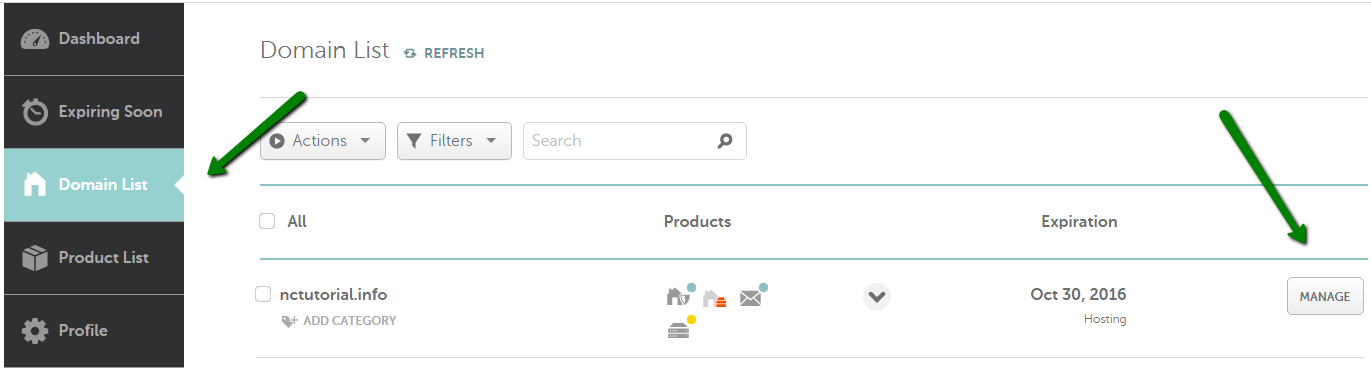
Credit: www.namecheap.com
Locating Your Domain
Finding your domain is key for getting the EPP code from Namecheap. You need to know where your domain is within your account. This helps you manage your domain effectively. Follow these easy steps to locate it without hassle.
Using The Domain List
Log into your Namecheap account. Once inside, head to the Dashboard. Look for the option labeled “Domain List” on the left. Click on it. This section shows all domains registered under your account.
Scroll through the list. Find the domain you need the EPP code for. This list provides quick access to manage each domain. You can see renewal dates and other details here.
Searching For Specific Domains
If you have many domains, searching can be quicker. Use the search bar at the top of the Domain List. Type the domain name you need. Press enter. This filters your list to show only the relevant domain.
Check the domain details once it appears. Ensure you have the correct one. This method saves time and effort. It is particularly useful if your list is long.
Requesting The Epp Code
Transferring your domain from Namecheap to another registrar can seem daunting, but it’s quite simple once you understand the process. One key step in this journey is obtaining your EPP code, a unique identifier needed for domain transfer. Consider this step as your domain’s passport, allowing it to move freely between registrars. But how do you request this crucial piece of information? Let’s dive into the process.
Accessing Domain Details
First, you need to access your domain details. Log into your Namecheap account and head to the ‘Dashboard’. This is your control center, where all your domain info is housed.
Click on ‘Domain List’ to view all the domains you own. This organized list keeps everything at your fingertips. Select the domain you wish to transfer. This will take you to a detailed page about that specific domain.
Ever wondered why Namecheap has such a user-friendly interface? It’s designed to make managing your domains intuitive and hassle-free, even for beginners.
Generating The Epp Code
Now, let’s generate the EPP code. Within the domain details page, look for the ‘Advanced Options’ or a similar tab. This is where you’ll find the button to request your EPP code.
Click on ‘Get EPP Code’. It’s that simple. The code will be sent to your registered email address. Be sure to check your spam folder if you don’t see it right away.
Have you ever experienced the thrill of finding exactly what you need with just a few clicks? Requesting the EPP code is one of those satisfying moments. It empowers you to take control of your domain’s future.
Why is it essential to keep your email updated? Imagine missing out on critical information because your contact details were outdated. Always ensure your registered email is active and correct.
With these steps, you’re well on your way to transferring your domain smoothly. Have you ever thought about where else this newfound knowledge might come in handy? The confidence you gain from mastering these steps could apply to countless tech challenges ahead.

Credit: www.fused.com
Security Tips For Epp Codes
Security is crucial when handling EPP codes. These codes are vital for domain transfers. They act as a lock, ensuring only authorized users can move domains. Misplacing or misusing an EPP code can lead to unauthorized domain transfers. Protecting these codes should be a priority for domain owners. Below are some essential tips to keep your EPP codes secure.
Keeping Your Code Safe
Store your EPP code in a secure location. Avoid writing it on paper or storing it in plain text. Use password managers to keep them encrypted and safe. Change your EPP code regularly. This reduces the risk of unauthorized access. Enable two-factor authentication on your domain registrar account. This adds an extra layer of security.
Using Epp Codes Responsibly
Share your EPP code only with trusted individuals. Verify the recipient’s identity before sharing. Ensure the person requesting the code has legitimate reasons. Monitor your domain activity regularly. Be alert for unauthorized transfer requests. Contact your registrar immediately if you notice suspicious activity.
Troubleshooting Common Issues
Obtaining an EPP code from Namecheap is simple yet crucial for domain transfers. Access your Namecheap account dashboard, locate the domain list, and select your domain. Find the “Get EPP Code” option under domain settings.
Troubleshooting common issues when trying to get your EPP code from Namecheap can be a bit daunting, especially if you’re new to domain management. But don’t worry—many have been in your shoes and have successfully navigated these hurdles. Let’s dive into some of the issues you might face and how to overcome them.Problems Accessing Your Account
One of the first challenges you might encounter is accessing your Namecheap account. It’s crucial to ensure that you have the correct login credentials. Double-check your username and password. If you’re locked out, use the “Forgot Password” feature. An email will guide you through resetting your password. Ensure your email is up-to-date in Namecheap’s records to receive these vital communications. Sometimes, two-factor authentication can cause hiccups. If you enabled it, ensure you have access to your authentication app or backup codes. Losing access to these can delay your process significantly.Epp Code Not Generating
Another common issue is the EPP code not generating as expected. First, confirm that your domain is eligible for transfer—domains are typically locked for 60 days post-registration or recent transfer. Make sure your domain is unlocked in the Namecheap dashboard. If it’s locked, the system won’t generate an EPP code. Go to the “Domain List” and toggle the lock status. If you’re still having trouble, check if your contact information is verified. Domains with unverified details might face restrictions. Update and verify your contact information in the Namecheap account settings. Have you considered reaching out to Namecheap support for persistent issues? They’re equipped to handle unique situations and can offer personalized solutions. Your ability to solve these problems might be easier than you think. Facing technical difficulties can be frustrating, but remember, you’re not alone. Many users have successfully obtained their EPP codes by following these steps. Take a breath, tackle each issue methodically, and soon enough, you’ll have your EPP code in hand.
Credit: m.youtube.com
Faqs About Epp Codes
EPP codes from Namecheap are essential for domain transfers. Log into your Namecheap account. Navigate to the Domain List. Select the domain. Click Manage, then Sharing & Transfer. Find the EPP code under Transfer Out.
Getting an EPP code from Namecheap can seem daunting, especially if you’re unfamiliar with the process. However, understanding the common questions about EPP codes can make the task much simpler. This section aims to demystify any confusion with straightforward answers to frequently asked questions. Whether you’re a seasoned domain owner or a beginner, these insights will help you navigate the process with ease.What Is An Epp Code?
An EPP code, sometimes called an authorization or transfer code, is a unique string of characters used to transfer your domain from one registrar to another. It’s like a password for your domain, ensuring only authorized transfers occur.Why Do I Need An Epp Code?
You need an EPP code when transferring your domain to a new registrar. It acts as a security measure to prevent unauthorized transfers. By providing this code, you confirm that you consent to the transfer.How Do I Obtain An Epp Code From Namecheap?
Getting your EPP code from Namecheap is simple. Log into your Namecheap account, go to the “Domain List” section, and select the domain you wish to transfer. Click on “Manage,” then “Sharing & Transfer,” and finally, click “Get EPP Code.”How Long Is An Epp Code Valid?
The validity of an EPP code can vary, but it typically remains valid for a short period. This ensures the security of the transfer process. Always check with your new registrar to understand their specific requirements.Can I Transfer A Recently Purchased Domain?
Domains are usually locked for 60 days after purchase or transfer, as per ICANN regulations. You’ll need to wait until this period expires before initiating another transfer. Plan accordingly to avoid any disruptions in your domain’s availability.What Happens If I Lose My Epp Code?
If you lose your EPP code, don’t panic. You can easily request a new one from your Namecheap account. Just follow the same steps to generate a fresh code. Always save your EPP code in a secure place for future use.Is There A Fee For Obtaining An Epp Code?
Namecheap does not charge a fee to obtain an EPP code. However, your new registrar might have transfer fees, so it’s wise to check their policies. Understanding any potential costs upfront can help avoid surprises later. Do you ever wonder how smoothly your domain transfer will go? With a clear understanding of EPP codes, you’re well on your way to a seamless transition. Take these actionable insights and feel confident as you manage your domains.Frequently Asked Questions
How To Get Epp Code Namecheap?
Log in to Namecheap account, go to “Domain List”, click “Manage”, then “Sharing & Transfer”. Find EPP code under “Transfer Out”.
How Do I Find The Epp Code Of A Domain?
Log in to your domain registrar account. Navigate to the domain management section. Locate the option for “Transfer” or “Auth Code. ” View or request the EPP code, which is typically emailed to the domain owner.
How Do I Get My Transfer Code From Namecheap?
Log into your Namecheap account, go to the Domain List, select the domain, and click “Manage”. Find “Sharing & Transfer” tab, click “Transfer Out” and copy the transfer code.
How Long Does It Take To Get An Epp Code?
You typically receive an EPP code instantly when requested through your domain registrar’s website. Contact support if delayed.
Conclusion
Getting your EPP code from Namecheap is simple. Follow the steps provided. Log into your account and navigate to the domain list. Select your domain and find the “Manage” button. Look for the “Sharing & Transfer” tab. There, you will find the EPP code.
Copy it carefully. This code is crucial for domain transfer. Always keep it safe. By understanding these steps, you ensure a smooth transfer process. Namecheap provides user-friendly tools to assist you. Stay informed and secure with your domain management.


