
Imagine launching your dream website, ready to share your ideas with the world. One critical step in this process is getting the perfect domain name and reliable web hosting services.
But where do you start? This guide is here to help you navigate the sometimes overwhelming world of domain names and web hosting. By the end of this article, you’ll know exactly what to look for and how to make the best choices for your online presence.
Whether you’re a newbie or have some experience, you’ll discover simple strategies that can save you time and money. So, if you’re eager to get your website up and running smoothly, keep reading to unlock the secrets to securing the ideal domain name and hosting service for your needs.
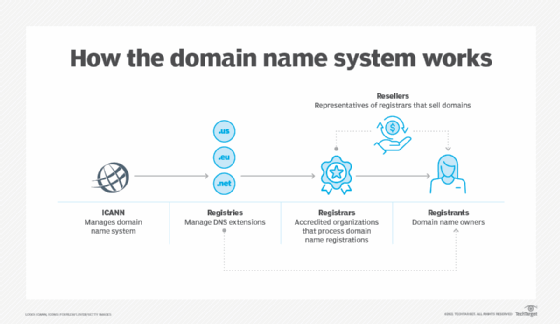
Credit: www.techtarget.com
Choosing The Right Domain Name
A good domain name helps people find your site easily. It builds trust with visitors. Short names are easier to remember. They are also easy to type. Your domain name should match your brand. It is the first thing people see. Make it unique and special.
- Keep it short and simple.
- Use easy-to-spell words.
- Avoid numbers and hyphens.
- Include keywords if possible.
- Make it easy to pronounce.
Choosing a domain name is important. Avoid words that can be misspelled. Do not use hard-to-remember names. Avoid using long phrases. Do not use confusing numbers. Avoid names that are too similar to others. Make sure your domain is not already taken.
Domain Name Registration Process
Choosing a domain name is fun but also important. Check if your favorite name is available. Use tools online for this. They show if someone else owns the name. If not, you can buy it. Some names are popular and can be expensive.
Once you find an available domain name, you can register it. Registration means it’s yours. You need a registrar to help you. They do the paperwork. You pay a fee to own the name for a year or more. Remember to renew it.
Domain extensions are the end part of a website name. Like .com or .org. Each extension has a purpose. .com is for commercial sites. .org is for organizations. Choose one that matches your website type. It helps people understand your site.
Selecting Web Hosting Services
Web hosting comes in different types. Shared hosting is cheap and good for beginners. VPS hosting gives more control and power. Dedicated hosting means you get a whole server. Cloud hosting is flexible and grows with your needs. Each type has its own benefits. Choose based on your website’s needs.
Look for uptime. It shows how often a server is online. Speed is important for loading pages. Customer support should be available 24/7. Check the price and what it includes. Security features keep your site safe. Consider the control panel for ease of use. Make sure the host can scale as your site grows.
| Provider | Features | Price |
|---|---|---|
| Bluehost | Good uptime, 24/7 support | Starts at $3/month |
| HostGator | Unlimited storage, free domain | Starts at $2.75/month |
| SiteGround | Fast servers, free SSL | Starts at $4/month |

Credit: dorik.com
Setting Up Your Domain And Hosting
Choosing a domain and hosting service is essential for your website’s success. Find a unique domain name that reflects your brand. Select a reliable hosting provider to ensure your site runs smoothly and securely.
Connecting Domain To Hosting
First, you need to log into your hosting account. Find the domains section in your dashboard. Select the domain you want to connect. Choose the option to link your domain. Follow the steps provided by your hosting service. This process is usually quick and easy.
Configuring Dns Settings
Visit your domain registrar’s website. Find the DNS settings for your domain. You need to add nameservers provided by your host. This tells the internet where to find your website. Save changes and wait for them to update. This might take a few hours.
Launching Your Website
After connecting and configuring, upload your website files. Use a tool like FTP or the host’s file manager. Test your site by entering your domain in a browser. If it loads, your site is live! Make sure everything works as expected. Fix any errors you find.
Managing Domain And Hosting
It’s crucial to renew your domain and hosting on time. Missing renewal can lead to losing your domain. Many companies send reminders. Keep an eye on these emails. You can set auto-renewal in your account settings. This way, you won’t miss the renewal date. It saves time. It prevents hassle. Check renewal fees to plan your budget. Some services offer discounts for early renewal. Use these offers to save money.
As your website grows, you might need more space. Upgrading hosting plans provides more resources. This includes more storage and bandwidth. Check your current plan limits. Compare with other plans. Choose a plan that suits your needs. Some hosting providers offer easy upgrades. You can upgrade through your control panel. Ensure your website stays fast and reliable.
Sometimes you want to move your domain to another host. Domain transfers can be tricky. You need an authorization code from your current provider. This code is essential for the transfer. Check the transfer policy of your new host. Ensure your domain is unlocked. Keep your contact details updated. The transfer may take a few days. Be patient. Follow instructions carefully to avoid errors.
Troubleshooting Common Issues
Domains may not work because of DNS problems. Check DNS settings first. Ensure they point to the right server. Clear browser cache to see changes. DNS can take time to update. Wait a few hours if needed. If still not working, contact your domain registrar for help.
Websites can go down sometimes. Check your hosting provider first. They might have issues. Restart your server if you can. This might solve the problem. Look for server errors in logs. This can give clues. If nothing works, contact your hosting support for help. They can provide solutions.
Getting help from support can be tricky. Prepare your questions before contacting them. Explain your issue clearly. Provide screenshots if possible. This helps support understand better. Be patient with responses. Support might take time to reply. Follow their instructions carefully. This ensures a quick solution.

Credit: www.webhostinghub.com
Frequently Asked Questions
How Do I Find My Domain Hosting Provider?
Check your email for hosting details from the registration time. Use WHOIS lookup for domain provider information. Log into your domain registrar’s account for hosting details. Your website’s control panel may also show hosting information. Contact customer support if needed.
How Do I Permanently Buy A Domain Name?
You can’t permanently buy a domain name. You can register it for periods up to 10 years. Renew your registration before it expires to maintain ownership. Use domain registrars like GoDaddy or Namecheap for easy management and reminders.
Do I Need Web Hosting If I Have A Domain Name?
Yes, you need web hosting to make your website accessible online. A domain name is only your web address. Hosting stores your site’s files on a server, allowing visitors to access them. Without hosting, your domain won’t display any content.
Consider reliable hosting for optimal performance.
How Do I Get A Website Domain?
Purchase a domain from a registrar like GoDaddy or Namecheap. Search for your desired domain name. Check availability and proceed to checkout. Complete payment and follow the instructions to finalize your purchase.
Conclusion
Choosing the right domain name and web hosting matters. It sets the foundation for your online presence. Start by researching reliable hosting services. Compare features and prices. Make sure the domain name is catchy and relevant. This helps attract visitors.
Remember, a strong online presence boosts credibility. Take time to understand your options. Keep your goals clear. This way, you make informed decisions for your website’s success. Explore various resources and guides. Your journey in web hosting begins with smart choices.
Build your site. Grow your brand.


