
Are you looking to launch your own website but feel overwhelmed by the technical jargon surrounding web hosting? You’re not alone.
Navigating the world of hosted web servers can seem like a daunting task, especially if you’re new to the digital landscape. But here’s the good news: getting a hosted web server doesn’t have to be complicated. In fact, with the right guidance, you can have your website up and running in no time.
Imagine the possibilities—your ideas, your brand, your services—all just a click away for the entire world to see. Ready to demystify the process and take control of your online presence? Let’s dive in and explore the simple steps to getting your very own hosted web server.
Choosing The Right Hosting Provider
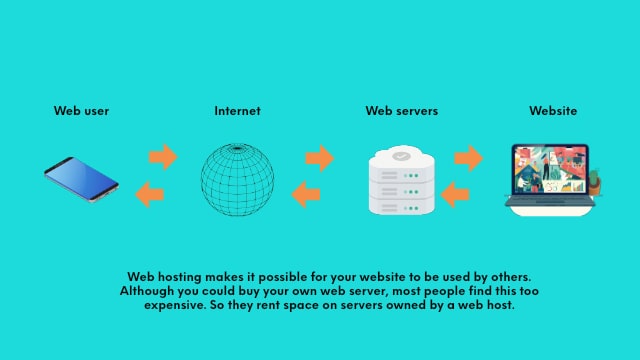
Hosting services come in different types. Shared hosting is the most common. It is cheap and easy to use. VPS hosting gives more control and better performance. Dedicated hosting is for big websites. It is costly but offers full control. Cloud hosting is flexible and scalable. It is good for growing sites.
Think about your budget first. Choose a hosting that fits it. Performance is very important. Faster sites rank better. Look at support options too. Good support can save time. Security is another key. A secure host protects your data. Scalability helps as your site grows.
Many choose Bluehost for its reliability. HostGator is known for its affordable plans. SiteGround offers great support. A2 Hosting focuses on speed. GoDaddy is a big name with many services. Each offers unique features. Compare them based on your needs.
Credit: www.godaddy.com
Understanding Server Requirements
Your website needs will guide your server choice. Think about the size of your site. A big site needs more storage. Small sites need less. Traffic is also important. More visitors need more bandwidth. Content type matters too. Videos need more resources. Text needs less. Budget is key. Balance needs with costs.
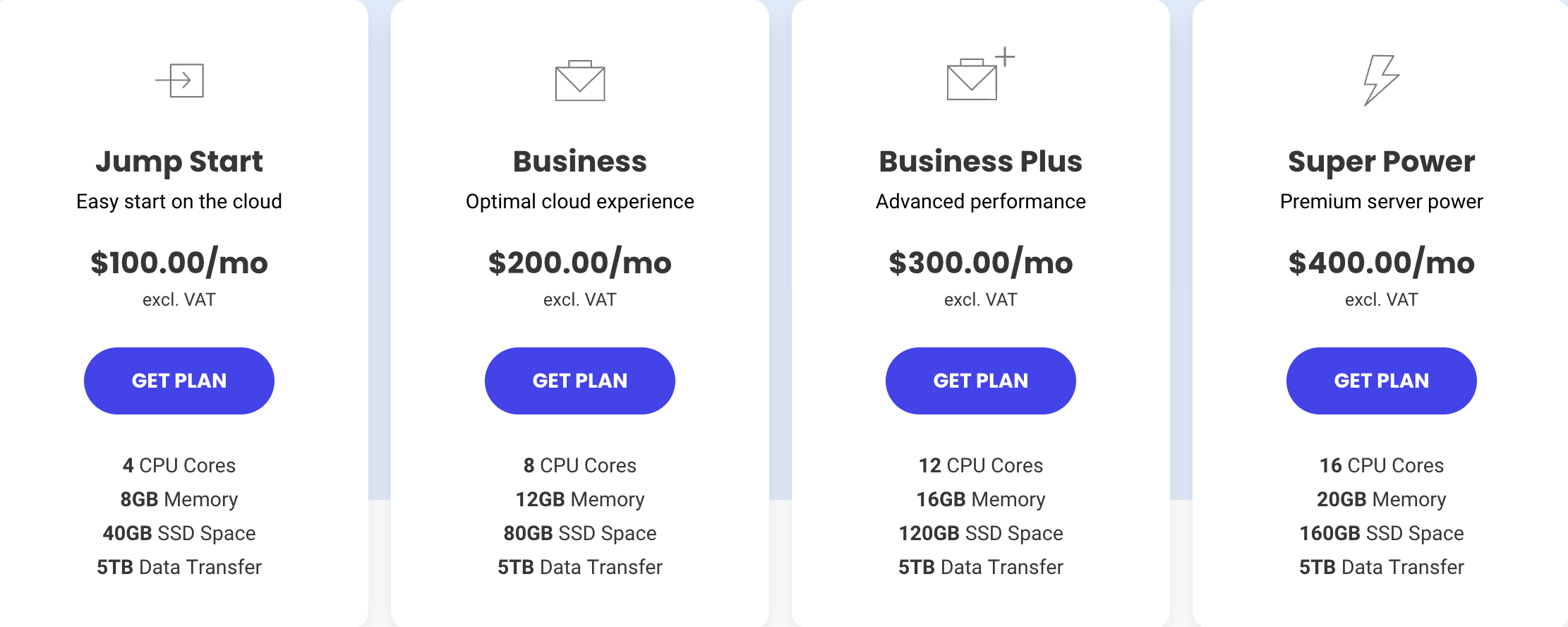
Scalability means growing with ease. Your server should handle more traffic over time. Performance is crucial. Fast loading keeps users happy. Check server speed. Slow servers lose visitors. Resources must be enough. More RAM means faster processes. CPU power is vital for quick tasks.
Security keeps data safe. Look for SSL certificates. They protect information. Firewalls stop bad access. Backup plans are essential. They save data from loss. Updates keep the server safe. Choose hosts with regular security checks. Protect your user data with encryption.
Setting Up Your Domain
Choose a unique name for your website. Use a domain registrar to buy it. Make sure the name is easy to remember. Avoid long names. Short names are better. Check if the name is available. Some names are already taken. If taken, try a different name.
DNS connects your domain to your website. Use a DNS provider. Enter your domain name. Add your server details. This helps people find your site. Keep your DNS settings safe and correct. It is like the address book for the internet.
Your information is linked to your domain. Use privacy protection to hide it. Protects you from spam and scams. This service is often free. Check with your registrar. Keep your details private and secure.
Configuring The Web Server
First, pick the right server software. Common choices are Apache and Nginx. Next, download the installer from their official website. Run the installer on your computer. Follow the steps shown on the screen. Complete the installation.
Go to the server settings. Change the server name to your own. Set the server location. This helps in finding your server. Adjust the security settings. This keeps your site safe. Save all your changes.
Check how much CPU and memory your server uses. Make sure it is not too high. If it is, add more resources. This helps your site run fast. Monitor your server often. This ensures it works well.
Uploading Website Files
FTP and SFTP help move files online. FTP is simple but less secure. SFTP is safer. They both need a client like FileZilla. First, connect to the server using a username and password. Then, drag and drop files to upload them. Always check if files upload correctly.
A neat file structure helps websites work well. Create folders for images, scripts, and styles. Name files clearly, like header.jpg or style.css. Keep similar files together. This makes it easy to find and fix things.
File permissions control who can see or change files. Use read, write, and execute permissions. Set permissions to keep files safe. Only trusted people should have full access. Always double-check permissions after uploading files.
Testing And Launching The Website
Check all links on your website. They should work properly. Look at the images. They must load quickly. Test the contact form. Ensure it sends messages. Make sure your site works on mobile devices. Adjust settings if needed. Verify that your site is secure. Use HTTPS to protect data. Test loading speed. It should be fast for users.
Use tools to check server speed. A fast server keeps users happy. Watch for downtime. Servers should run smoothly. Track traffic on your site. More visitors need more resources. Keep an eye on error logs. Fix issues quickly to keep things running. Monitor security alerts. Protect your site from threats.
Find broken links. Fix them so users can navigate easily. Check for slow pages. Optimize them for better speed. Look for missing images. Ensure they display correctly. Identify server errors. Resolve them to keep your site online. Watch out for outdated software. Update it to avoid vulnerabilities.
Maintaining Your Hosted Server
Backups keep your data safe. Always make copies of important files. Store them in a secure place. Backups help when data loss happens. Use cloud storage for backups. It’s safer and more reliable.
Updating software keeps your server running well. New updates fix bugs. They improve security. Always check for updates regularly. Use automatic updates if possible. This saves time and keeps software up-to-date.
Security audits protect your server from threats. Regular audits find weak spots. They help keep data safe. Use tools to check security. Hire experts for audits if needed. It’s important for server safety.
Credit: www.ryrob.com

Credit: www.crazyegg.com
Frequently Asked Questions
How Much Does It Cost To Host A Website Server?
Hosting a website server costs between $3 to $500+ monthly. Prices vary based on hosting type and features. Shared hosting is cheaper, while dedicated servers cost more. Consider your website needs and budget for the best option.
How To Set Up A Web Hosting Server?
Choose a reliable hosting provider. Install server software like Apache or Nginx. Configure domain settings. Set up security measures. Optimize performance for faster loading times.
Can I Turn My Pc Into A Web Server?
Yes, you can turn your PC into a web server. Install server software like Apache, configure settings, and ensure a stable internet connection. This setup allows hosting websites, accessing files remotely, and running web applications directly from your computer. Ensure security measures are in place to protect your server.
Can I Host My Own Website Server?
Yes, you can host your own website server. You’ll need technical knowledge, hardware, and reliable internet connection. Consider server software like Apache or Nginx. Ensure security measures are in place. A dedicated hosting provider might offer easier management and support.
Evaluate costs and maintenance needs before proceeding.
Conclusion
Choosing a hosted web server can be simple. Research is key. Compare features, costs, and support options. Look for reliable uptime and security. Consider your website’s needs. Small sites might need basic hosting. Larger sites could need advanced plans. Customer reviews offer helpful insights.
Keep future growth in mind. Scalability matters. Support should be responsive. Technical issues can arise anytime. Choose a plan with 24/7 help. Remember, the right choice will enhance your site. A well-hosted server ensures smooth performance. Your website deserves a solid foundation.
Make an informed decision for lasting success.


