
Have you ever wondered who is hosting your domain name? Knowing where your website is hosted is crucial for managing your online presence, troubleshooting issues, and making smart decisions about upgrades or changes.
But finding out this information isn’t always straightforward. If you’re feeling stuck or unsure where to start, don’t worry—you’re not alone. You’ll discover simple, step-by-step ways to find out who’s hosting your domain name quickly and easily. By the end, you’ll have the confidence to take control of your website’s hosting like a pro.
Keep reading to learn how!
Check Domain Whois Records
Checking domain WHOIS records is a simple way to find out who hosts your domain name. These records show details about the domain’s registration and the company managing it. Anyone can access this public information online. This makes WHOIS a useful starting point for domain research.
Understanding WHOIS records helps you identify the hosting provider or the domain owner. It also provides contact information and registration dates. This data can guide you in managing or transferring your domain.
Use Whois Lookup Tools
Many websites offer free WHOIS lookup tools. Enter the domain name in the search box to get the WHOIS report. Popular tools include ICANN WHOIS, Whois.net, and DomainTools.
These tools quickly show the domain registrar and sometimes the hosting provider. They display technical and administrative contacts too. Using these tools requires no special skills and takes only seconds.
Interpret Whois Information
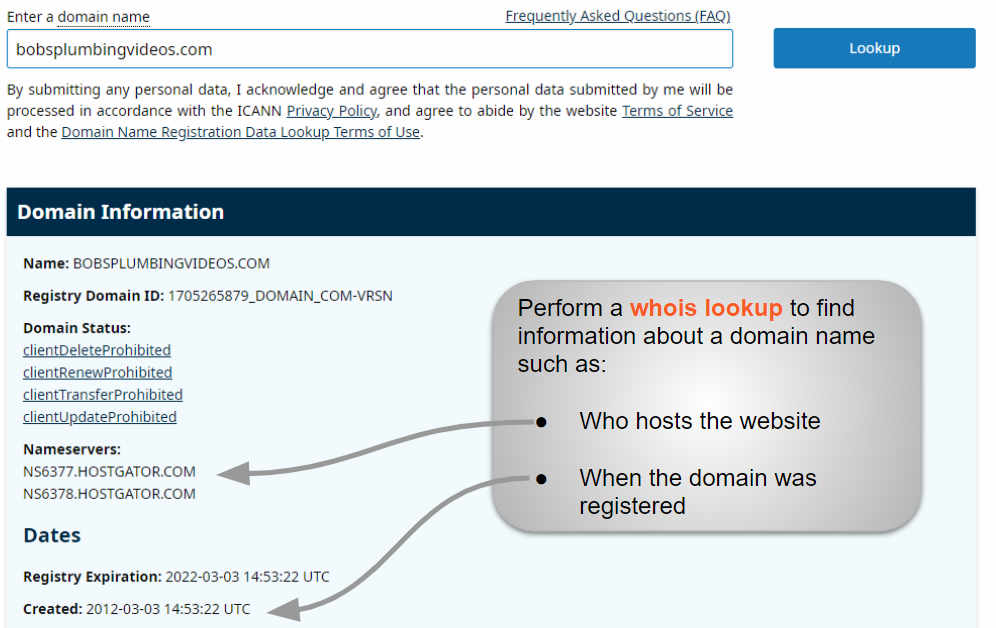
The WHOIS report lists several details. Look for the “Registrar” field to find the company that manages the domain. This company often hosts the domain or controls its settings.
Check the “Name Servers” section. These servers often belong to the hosting company. The domain owner’s contact info appears here unless privacy protection is enabled.
Note the registration and expiry dates. This shows the domain’s validity period. A clear understanding of these details helps in managing your domain effectively.

Credit: support.intermedia.com
Use Dns Lookup Tools
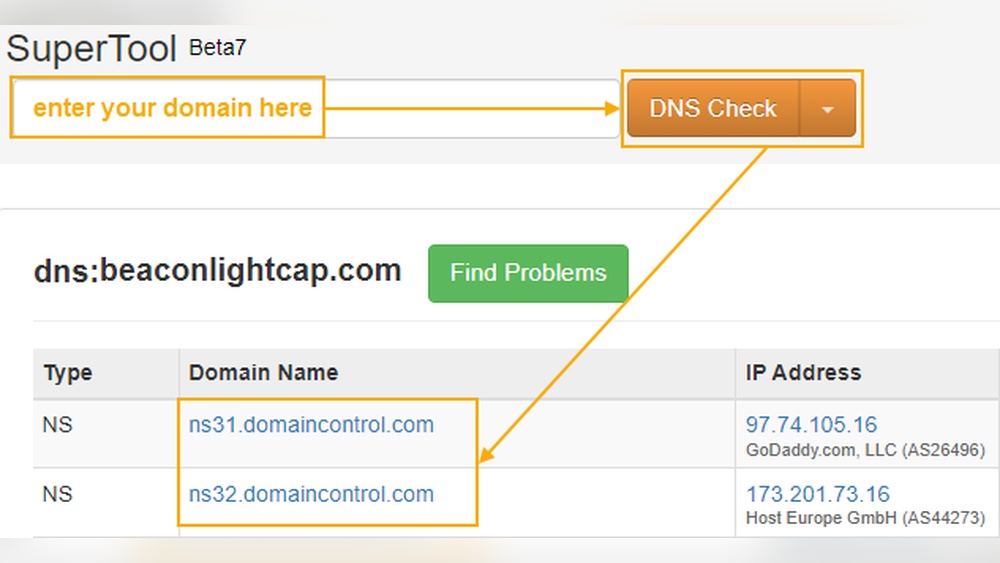
DNS lookup tools help reveal important details about a domain name. They show which servers manage the domain’s information. This data points to the hosting provider. Using these tools is quick and free. Anyone can perform a DNS lookup to find hosting details.
Identify Name Servers
Name servers control where a domain directs its traffic. A DNS lookup shows the domain’s name servers clearly. These servers often belong to the hosting company. Check the name servers listed in the DNS results. The hosting provider’s name usually appears here.
Trace Hosting Provider
DNS lookup tools also trace the IP address linked to the domain. This IP address belongs to the hosting provider’s server. Use the IP to search hosting databases or IP lookup tools. This process reveals the company hosting the website. It confirms the host behind the domain name.
Explore Hosting Checker Websites
Exploring hosting checker websites is a simple way to find out who hosts your domain name. These tools scan the internet and provide clear details about your website’s hosting provider. Anyone can use them, no special skills needed.
Hosting checker websites save time and effort. They show exact information in seconds. This helps you manage your website better and understand where it is hosted.
Popular Hosting Checkers
Several hosting checkers are trusted by many users. Sites like WhoIsHostingThis, HostAdvice, and Site24x7 offer free checks. You just enter your domain name and get results quickly.
These tools also show extra data like server location and IP address. This information can be useful for technical or marketing decisions. They are user-friendly and work on all devices.
How To Read Results
After using a hosting checker, you get a report with key details. Look for the hosting company name first. This tells you who manages your website server.
Next, check the IP address and server location. These details show where your website physically lives on the internet. Some tools also display the type of hosting, like shared or dedicated.
Understanding these results helps you plan upgrades or troubleshoot problems. It also ensures your website is secure and reliable for visitors.

Credit: hostarmada.com
Analyze Website Ip Address
Analyzing a website’s IP address helps identify the hosting provider. The IP address connects the domain to a server on the internet. This server holds the website files and delivers them to visitors. Finding this IP address is the first step in discovering who hosts the domain.
Find Website Ip
Use online tools like “ping” or “nslookup” to find the IP address. Enter the website URL in these tools. They return the website’s IP quickly. For example, open the command prompt and type ping example.com. The IP address appears in the results. This number is key to tracking the hosting server.
Locate Hosting Server
Once you have the IP address, use IP lookup services. These services show details about the server location and owner. Enter the IP in sites like “Whois Lookup” or “IPinfo.” The result reveals the hosting company. It also shows the server’s city and country. This info clarifies who manages the website’s hosting.
Contact Domain Registrar
Contacting your domain registrar is a direct way to find out who hosts your domain name. The registrar manages your domain registration and holds important records. They can provide clear information about your domain’s hosting provider.
Start by identifying the registrar. Then, reach out to their support team. They can confirm the hosting service linked to your domain. This method saves time and avoids confusion.
Get Registrar Details
First, find the domain registrar’s name and contact info. Use a WHOIS lookup tool online. Enter your domain name in the search box.
The results show the registrar’s name, website, and contact details. Note down their email or phone number. This info is public and easy to access.
Request Hosting Info
Next, contact the registrar’s support team. Send a clear message asking about your domain’s hosting provider. Provide your domain name and any account details they need.
Explain you want to know who hosts your website. The registrar will check their records and reply. They may also guide you on next steps if needed.
Consider Privacy And Proxy Services
Finding out who hosts a domain name can be tricky because of privacy and proxy services. These services hide the real owner’s details. They protect personal information from being shown publicly. This makes it harder to see who truly owns or hosts the domain.
Understanding how these services work helps in your search. Some domain owners use privacy protection to keep their data safe. Others use proxy services to mask their identity. Knowing these facts is important when you try to find the hosting provider.
Effect Of Privacy Protection
Privacy protection replaces the owner’s contact details with generic information. This stops spammers and unwanted contacts from reaching the owner. It also hides the domain’s actual registrar and hosting provider. Because of this, Whois lookups often show the privacy service’s details instead of the real owner’s.
This protection is good for security. But it can block your view of who hosts the domain. Many domains use this service today. So, expecting clear information is often unrealistic.
Ways To Bypass Proxy Masks
Some tools and tricks can help bypass proxy masks. Using advanced Whois services might reveal more data. Checking the domain’s DNS records can show hosting details. Look for nameservers or IP addresses linked to the hosting company.
Another method is to use third-party websites that track domain history. They might show past owner details before privacy was applied. Contacting the domain registrar directly can also help. They may provide more information if you have a valid reason.
Verify Hosting With Website Content
Verifying who hosts a domain using website content is a practical step. You can find clues within the website itself. These clues help identify the hosting provider. The process does not need special tools. Just a careful look at the content and structure of the site.
Check For Hosting Footprints
Some websites leave traces of their hosting provider. Look for logos or names in the footer or contact page. Sometimes, the hosting service is mentioned in the website’s source code. Right-click the page and select “View Page Source” to check this. Search for keywords like “hosted by” or “powered by.” These small hints can reveal the hosting company.
Use Online Tools For Analysis
Several free tools scan websites for hosting details. Tools like Whois lookup or hosting checkers provide quick results. Enter the domain name, and the tool shows hosting information. It may also display the IP address and server location. This method confirms clues found in the website content. It helps avoid guesswork and confirms the hosting provider accurately.
Credit: www.boldgrid.com
Use Traceroute For Network Path
Traceroute helps you see the path your internet traffic takes to reach a domain. It shows each point or “hop” your data passes through. This can reveal the hosting provider or network handling your domain. Using traceroute is a simple way to gather clues about where your domain is hosted.
Run Traceroute Commands
Open your computer’s command prompt or terminal. Type tracert yourdomain.com on Windows or traceroute yourdomain.com on Mac/Linux. Press enter to start. The command sends packets to the domain and lists each server they pass. Watch the list as it fills with IP addresses and names.
Interpret Network Hops
Each hop represents a server or router on the path. Look for familiar names or company tags in the results. Hosting providers often have their names in these hops. Note the last few hops; they usually belong to the hosting network. Use these details to identify the company hosting your domain.
Frequently Asked Questions
How Can I Check Who Hosts My Domain Name?
You can use online WHOIS lookup tools to find your domain host. These tools display registrar and hosting details quickly and accurately.
What Information Does A Domain Hosting Lookup Provide?
A hosting lookup reveals your domain registrar, hosting provider, IP address, and DNS server details. This helps identify your domain’s management.
Is It Possible To Find Domain Hosting Without Login Access?
Yes, WHOIS and DNS lookup services let you find hosting info without account access. Just enter your domain name to get details.
Can I Identify My Domain Host Using Ip Address?
Yes, by tracing your website’s IP address with tools like IP lookup, you can find the hosting provider managing your domain.
Conclusion
Finding your domain host is easier than it seems. Use online tools to check the registrar and hosting provider. Keep your domain info updated to avoid future issues. Knowing your host helps with website management and security. Take these simple steps to stay in control of your domain.
Stay informed and keep your site running smoothly.


