
Have you ever wondered why your PHP scripts aren’t performing as expected, or why some features just don’t work? One crucial, yet often overlooked factor, is the PHP handler your web host uses.
Understanding which PHP handler is in play can significantly impact your website’s performance, security, and compatibility. But how do you find out which one your host uses? It might sound technical, but don’t worry—you’re about to discover a straightforward way to identify it.
This guide will walk you through the process step-by-step, ensuring you have the knowledge to optimize your site effectively. Read on to unlock this key piece of the puzzle and take control of your website’s performance!
Importance Of Php Handlers
Discovering the PHP handler your web host uses is vital. It affects site performance and compatibility. Check your host’s control panel or documentation for details.
Role In Server Performance
PHP handlers play a big role in how fast websites load. They manage how PHP scripts run on the server. Fast scripts mean quick websites. Slow scripts can make people leave your site. Choosing the right handler is important. Some handlers make websites faster. Others use less memory. It’s like choosing the right tool for a job. Each tool has its own benefits.
Impact On Security
Security is very important for websites. A good PHP handler can help keep your site safe. It stops bad scripts from running. Some handlers check for harmful code. They block it before it causes trouble. This keeps your data safe. It also protects your users. Always pick a handler that focuses on security. This helps prevent attacks on your site.
Types Of Php Handlers
CGI is a simple PHP handler. It runs each request separately. This can make it slower. But it is safe. Many hosts use CGI for shared hosting. CGI does not use the server’s memory much. This is good for small websites.
FastCGI is like CGI but faster. It keeps PHP processes running. This helps in handling many requests. FastCGI uses a bit more memory than CGI. It’s still good for busy websites. Many web hosts prefer FastCGI for speed.
suPHP is a secure PHP handler. It runs scripts as the user who owns them. This prevents file permission issues. suPHP is slower than FastCGI. But it’s very safe. Good for sites needing extra security.
DSO is the fastest PHP handler. It runs PHP as part of the web server. DSO is not very secure by default. It can handle many requests quickly. Best for large sites needing speed.
Checking Php Handler Via Control Panel
First, log into your cPanel account. Look for the section named Software. There, find the MultiPHP Manager tool. Click to open it. You will see your PHP versions listed here. The handler is usually written next to the PHP version. It’s often suPHP, DSO, or FastCGI.
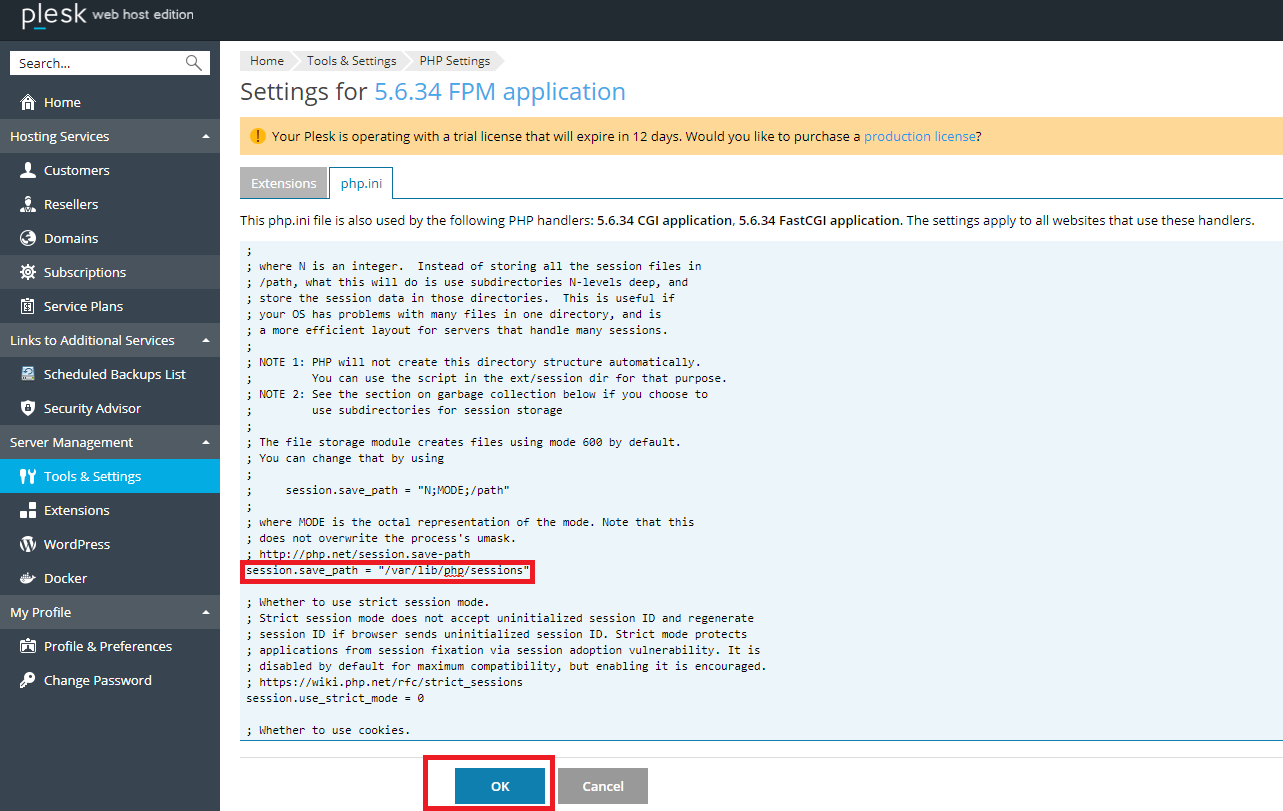
Access your Plesk control panel. Go to Tools & Settings. Find the PHP Settings option. Click on it to view your PHP configurations. The handler type is shown alongside the PHP version. It might be Apache module or FastCGI.
Credit: www.loggly.com
Command Line Methods
SSH lets you connect to your web server. It is a safe way. First, open your command line. Then, type ssh username@yourdomain.com. Enter your password. Now, you are connected. Next, type php -v. This tells you the PHP version. It may also show the PHP handler. If not, ask your host. They can help.
Create a file named phpinfo.php. Inside, add php phpinfo(); ?. Save it. Upload this file to your server. Use an FTP client. Now, open your browser. Type yourdomain.com/phpinfo.php. This will show a page. Look for Server API. It tells you the PHP handler. Remember to delete the file after checking.
Consulting Web Host Support
Discovering your web host’s PHP handler is simple. Check your hosting control panel or contact support for details. Understanding the PHP handler improves website performance and compatibility.
Preparing Relevant Questions
Before contacting support, make a list of questions. Ask about the PHP handler. Clarify if it is Apache or Nginx. Check if it supports FastCGI. Ask about version updates. Confirm any limitations on your hosting plan. This helps in getting clear answers. Be polite and patient. Support teams have lots of queries.
Understanding Host’s Response
Listen carefully to their answers. Take notes on key points. If they mention terms you don’t know, ask them to explain. Knowing your PHP handler helps in managing your website better. It can affect speed and performance. Keep all responses for future reference. You might need them again. Understanding helps in making good choices for your site.
Credit: docs.litespeedtech.com
Benefits Of Knowing Your Php Handler
Choosing the right PHP handler can boost your site speed. Fast websites make visitors happy. They stay longer and click more. This means more traffic for you. Fast sites also use less server resources. This can save you money. The right handler balances speed and resource use well.
A good PHP handler keeps your site safe. It helps block bad scripts. This protects your data and users. Safe sites build trust. Visitors are more likely to return. A secure handler also helps fix bugs fast. This stops problems before they spread.
Credit: www.plesk.com
Frequently Asked Questions
How Do I Know Which Version Of Php I Am Using?
Find your PHP version using the `phpinfo()` function. Create a PHP file, add “, and run it. Alternatively, use `php -v` in the command line for quick results. Ensure your server is configured correctly to execute PHP code.
What Are Php Handlers?
PHP handlers are software modules that manage PHP script execution on web servers. They influence performance, security, and compatibility. Common handlers include CGI, FastCGI, and DSO. Selecting the right handler can optimize server load and enhance site speed. Understanding handlers is crucial for efficient PHP script management.
How To Change Php Handler In Cpanel?
Log into cPanel. Navigate to “Software” section and click “MultiPHP Manager”. Select your domain and choose the desired PHP handler from the dropdown. Click “Apply” to save changes. This method ensures optimal performance for your website.
How To Check Which Php Apache Is Using?
Open your terminal and enter the command: `apachectl -V`. Check the “Server Version” line for PHP details. Alternatively, create a PHP file with “ and access it via your browser for detailed PHP info Apache uses.
Conclusion
Finding your PHP handler is simple with a few steps. Check your web host’s documentation first. This often reveals the PHP handler used. Alternatively, use a PHP info file. Upload it to your server. It displays essential PHP details. Understanding these details helps optimize your website’s performance.
Contact your host’s support if needed. They can provide direct answers. Knowing your PHP handler enhances control over your server environment. Stay informed to make better hosting decisions. Keep your site running smoothly. Now, you’re equipped to manage your PHP settings effectively.


