
Ever scrolled through a beautifully designed WordPress site and wondered how they nailed that perfect look? Maybe you’ve tried tweaking your own site, but you can’t seem to get it just right.
The secret often lies in the CSS rules that your WordPress theme uses. These invisible codes are the architects of your site’s style and layout. But how do you find out exactly which CSS rules are at play? Whether you’re looking to customize a theme or troubleshoot a design issue, knowing how to pinpoint these CSS rules is crucial.
Imagine having the power to transform your website’s appearance with just a few clicks. In this guide, you’ll discover easy steps to uncover the CSS rules your WordPress theme is using, empowering you to make informed decisions and achieve the design of your dreams. So, are you ready to unlock the secrets behind your site’s styling? Let’s dive in and make that design vision a reality!
Credit: www.8theme.com
Inspecting Elements
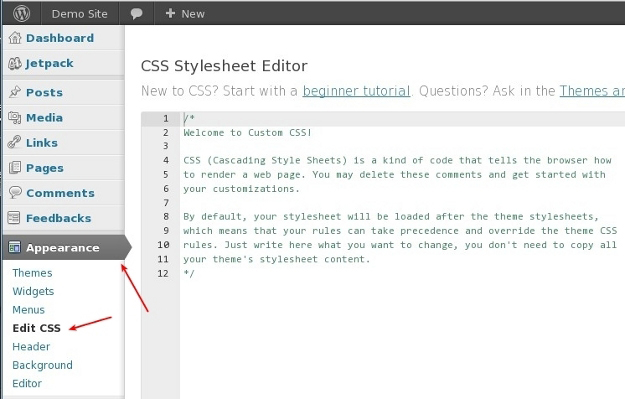
Discovering the CSS rules in a WordPress theme involves using browser tools to inspect elements. Right-click on a web page element and select “Inspect” to view its CSS code. This method reveals the styles applied, helping to understand and modify the site’s design.
Using Browser Developer Tools
Browser developer tools help you see how a web page works. Right-click on any part of the page and select Inspect. This opens a panel where you can explore the page’s code. Click on different elements to see their CSS rules. These rules show you how each part looks. Make sure to explore different tabs. The Styles tab shows the CSS. The Elements tab shows the HTML.
Identifying Css Selectors
CSS selectors help you find the styles for a part of the page. In the Styles tab, notice the names next to the CSS code. These are the selectors. They tell the browser which part of the page to style. Look for classes and IDs. Classes start with a dot (.) and IDs start with a hash (#). These are keys to the styling rules. Practice finding selectors to understand how they work.
Locating Css Files
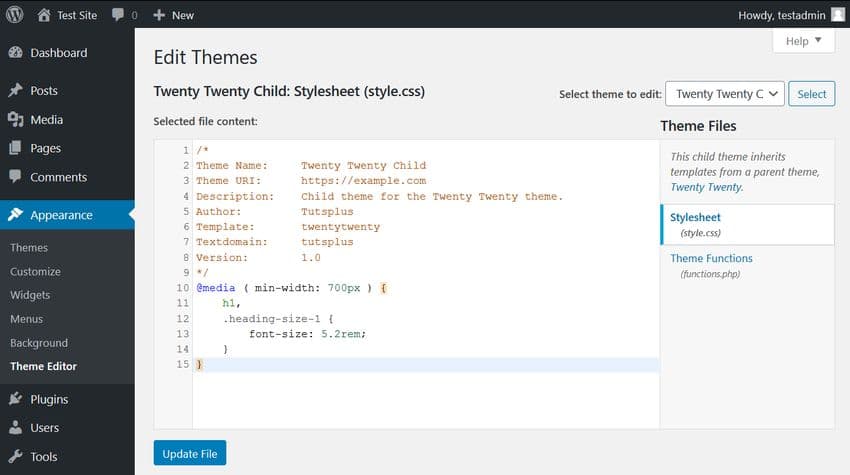
The Theme Editor is a tool in WordPress. It helps to find CSS files. Open your WordPress dashboard. Go to Appearance and click on Theme Editor. You will see a list of files on the right. Look for files named style.css. These files contain CSS rules. You can view and edit them. But be careful! Changes can affect your site. Always make a backup first.
WordPress theme files are in folders. Each theme has its own folder. Use an FTP client or cPanel to access these. Navigate to wp-content/themes. Choose your theme folder. Open the folder to find CSS files. Look for files with a .css extension. These are your CSS files. You can download and view them. Editing requires care. Always ensure you have a backup.
Analyzing Css Rules
Specificity helps to decide which CSS rule wins. It’s like a ranking system. Selectors play a big role. ID selectors have the highest rank. Next come class selectors. Then, element selectors have the lowest rank. The more specific a rule, the stronger it is. Remember, inline styles are even stronger.
Sometimes styles need changing. Important keyword can override any rule. Use it wisely. It breaks normal rules. Adding more specific selectors can help too. Make sure new rules are stronger. Check CSS files for rules. Browser tools can show what’s applied. Inspect elements to see active rules.

Credit: learn.wordpress.org
Using Plugins
CSS Customization Tools are important for WordPress themes. These tools help change the look of your site. They allow you to tweak colors, fonts, and layouts. Many plugins offer easy ways to do this. You don’t need coding skills.
Some plugins offer simple interfaces. They let you see changes instantly. You can experiment with different styles. This helps make your website unique.
| Plugin Name | Features |
|---|---|
| Elementor | Drag-and-drop design, easy editing |
| Beaver Builder | Live preview, user-friendly interface |
| Customify | Real-time changes, flexible design options |
Plugins make CSS editing simple. They save time and effort. Choose a plugin that fits your needs. Try different ones for the best results.
Online Resources
Community forums are great places to find answers. Many people share their tips and tricks. Users often discuss CSS rules used in WordPress themes. You can ask questions or read past discussions. Look for threads about your specific theme. This can provide insights into how others have solved similar problems.
Tutorial websites offer step-by-step guides. These sites often have detailed articles. They explain how to find and change CSS rules. Some tutorials may include images or videos. This can help you understand better. Many tutorials focus on popular WordPress themes. They can be very helpful for beginners and advanced users alike. Use these resources to learn more about CSS and WordPress.
Credit: elements.envato.com
Frequently Asked Questions
How Can I Inspect Css In WordPress?
To inspect CSS in WordPress, use your browser’s Developer Tools. Right-click on an element and select “Inspect. ” This reveals the CSS rules applied. Navigate through the “Elements” and “Styles” panels to see the exact styles. This helps identify the active CSS rules quickly.
What Tools Help Find WordPress Css Rules?
Tools like Chrome Developer Tools and Firefox Developer Edition are essential for inspecting CSS. They allow you to view and edit CSS in real-time. These tools show you which CSS rules are applied to each element. They are user-friendly and widely used by developers.
How Do I Override WordPress Css Rules?
To override CSS, use the “Additional CSS” option in your WordPress Customizer. You can also edit your theme’s stylesheet. Ensure your new rules are more specific or use the `!important` tag. This ensures your styles take precedence over existing ones.
Can I Edit Css Directly In WordPress?
Yes, you can edit CSS directly through the WordPress Customizer under “Additional CSS. ” For more control, edit the `style. css` file in your theme’s directory. Always back up files before making changes. This prevents data loss and ensures you can revert back if needed.
Conclusion
Finding CSS rules in WordPress themes can be simple. Inspect the element using your browser’s developer tools. Identify the specific CSS rule applied. Modify it as needed for your design. A few clicks make changes possible. The process empowers you to customize your site.
Your website can reflect your style easily. Explore CSS further for enhanced design skills. Small adjustments can make a big impact. Keep experimenting for best results. Happy styling with WordPress themes!


