
Have you ever wondered about the web host behind a domain? Maybe you’re curious about who powers your favorite website or you need to troubleshoot your own site.
Whatever the reason, finding the web host of a domain can seem like a daunting task. But don’t worry, we’ve got you covered. This article will guide you through simple and effective ways to uncover the mystery of web hosting.
Get ready to learn practical tips and tricks that will empower you to take control of your online presence. By the end, you’ll not only know how to find a web host but also gain insights into the technical backbone of the internet. Keep reading, and unlock the secrets hidden behind the URLs you visit every day.
Credit: securitysenses.com
Understanding Web Hosting
A web host stores your website’s files. It makes your site visible online. Every website needs a host. Without a host, your site won’t work. Hosts give you space on their servers. This is where your website lives. They also provide security. This keeps your site safe from hackers. A good host ensures your site runs smoothly. They help with technical issues too. It’s like having a digital home for your site.
There are different types of web hosting. Shared hosting is common. Many sites share one server. It’s good for small sites. VPS hosting offers more control. You get your own space on a server. Dedicated hosting means a whole server for you. It’s best for big sites. Cloud hosting uses many servers. It can handle lots of visitors. Each type has its own benefits.
Importance Of Knowing The Web Host
Safety is crucial online. Web hosts offer different security features. Some have better protection against cyber threats. Knowing your host helps in keeping data safe. Choose a host with strong security measures. This protects your website and users.
A good host ensures your site runs fast. Uptime means your site is always available. Poor hosts have more downtime. This can lose visitors. Check your host’s performance history. A reliable host improves user experience. Faster sites rank better on search engines too.
Reliable support is essential for any website. Problems can happen anytime. A good web host offers 24/7 support. This means help is always available. Quick support fixes issues faster. This keeps your site running smoothly. Happy visitors will return often.
Tools For Identifying Web Hosts
Many websites offer free tools to find a web host. Enter the domain name in these tools. They show the web host details. Websites like Whois and HostAdvice are popular. These tools are easy to use. They provide quick results. Some tools even give extra info about the domain.
Computers have built-in tools to find web hosts. Use the command line to access them. Type nslookup followed by the domain name. This command shows the server info. Another tool is tracert. It traces the path to the server. These tools are fast. They work without internet.
Install extensions in your browser to find web hosts. These extensions are easy to use. Click on the extension icon. It shows the web host info. Wappalyzer and BuiltWith are common extensions. They provide detailed info. These tools help find both web hosts and technologies used.
Credit: www.greengeeks.com
Step-by-step Process
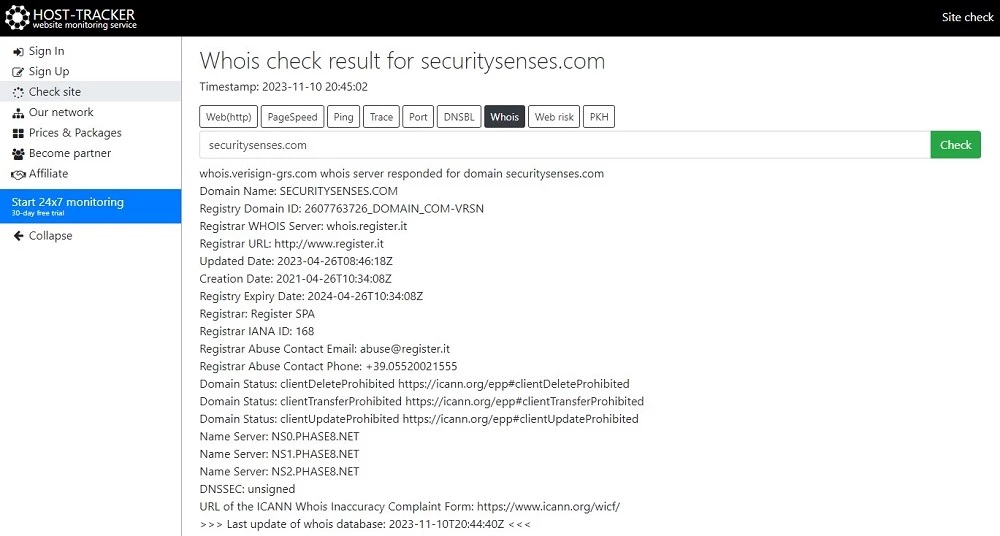
WHOIS Lookup is a great tool. It helps find domain details. Enter the domain name into the WHOIS search tool. You will see information about the domain’s owner and host. This tool is easy to use. It provides quick results. Many websites offer free WHOIS Lookup services. Just type the domain name and click search. The tool shows you the host name and more.
DNS records hold key information. They show which company hosts a domain. Access these records through DNS lookup tools. Several online tools are available for this. Look for the ‘NS’ record. It often reveals the host. DNS records are helpful. They give details about the domain’s network settings. Use them to find out who hosts the domain.
An IP address can show the web host. Use an IP lookup tool. Enter the domain’s IP address. The tool will give you the host’s name. It’s a simple process. Many free IP lookup tools exist. They provide host details fast. Knowing the IP address is useful. It helps track the domain’s hosting service.
Evaluating Hosting Information
WHOIS is a tool to find domain details. It shows owner and host info. The info includes domain name, registrar, and contact details. WHOIS helps in tracking web hosts. You can search for any domain. Results show who owns it. This service is free to use. WHOIS data is public. But some info might be hidden. This happens for privacy reasons. Still, WHOIS gives useful details. It’s a start point in finding hosts.
DNS links domain names to IP addresses. This info shows where a website lives. DNS records help in finding hosts. By checking DNS, you see the server’s IP. Tools like DNS Lookup can help. These tools show DNS records. They reveal hosting details. IP addresses point to specific servers. Knowing the IP helps in tracking hosts. DNS records are essential for website lookup. Understand them to find domain hosts easily.

Credit: www.webhostinghub.com
Common Challenges And Solutions
Finding a web host can be hard with privacy settings. Some websites use privacy protection to hide their details. This means their host info is not easy to see. Services like WHOIS can help but may show limited data. Another way is to look for the host’s IP address. Tools online can help find this. It’s like a special number for each website. Privacy settings make it tricky, but not impossible.
Shared hosting means many sites on one server. It can be hard to find the main host. Each site uses the same IP address. This makes it confusing. Checking for nameservers might help. Nameservers guide web traffic to the right place. They can give clues about the host. Websites like HostingChecker can offer insights. They show possible hosts based on nameservers.
Third-party hosts manage sites for others. Sites might not show who hosts them. They use special settings to hide host names. Using online tools can help find hosting info. These tools scan for details. They check the site’s setup. Look for services that provide hosting lookup. They can give more hints about the web host. It’s like detective work for the web.
Best Practices For Web Host Research
Regularly check your web host for problems. This helps catch issues early. Fixing problems fast can prevent bigger issues. Use tools to monitor your website’s health. Tracking performance ensures your site is always working well. Regular checks can save time and stress later.
Stay informed about new web hosting tools. Technology changes quickly. Learning about updates can improve your site’s performance. New features might help your site work better. Look for news online about web hosting trends. Keeping updated helps you use the best tools.
Ask experts for advice on web hosting. They have valuable knowledge. Experts can suggest good web host options. Their experience can guide you to make smart choices. Consulting experts can clear up confusion. This ensures your site runs smoothly and efficiently.
Frequently Asked Questions
How Do I Find Out Whois Behind A Domain Name?
Use a WHOIS lookup tool like WHOIS. net or ICANN to find domain registration details. Some registrars might mask information due to privacy laws. Consider contacting the registrar for more details if needed.
What Is Your Website Host?
Our website is hosted by Bluehost. They offer reliable hosting services with excellent customer support. Bluehost ensures fast loading times and high uptime. They provide scalable solutions to meet our growing needs. Choosing Bluehost helps us maintain a secure and efficient online presence.
How Do I Know The Web Server Of A Website?
Use online tools like “What’s My DNS” or “Netcraft” to identify a website’s web server. Simply enter the website URL to get the server details. Check HTTP headers using browser extensions like “Wappalyzer” for more information. These methods provide insights into the web server technology used.
How Do I Find Out What Platform A Website Is Hosted On?
Use online tools like BuiltWith or Netcraft to identify a website’s hosting platform. Simply enter the website URL, and these tools provide detailed hosting information. Alternatively, inspect the website’s source code for hints or contact the website owner directly for hosting details.
Conclusion
Finding a web host for a domain is simple. Use online tools. They provide quick answers. Choose a reliable hosting provider. Check customer reviews. Consider your budget. Look for security features. Good support matters. Compare hosting plans. Match them with your needs.
A solid host boosts your site’s performance. Keep your domain safe. Regularly review your hosting service. Make sure it meets your expectations. Understanding hosting basics helps you make informed decisions. Your website deserves the best hosting partner. Make sure it gets it.


