
Are you ready to launch your website but feeling overwhelmed by the sheer number of web hosting options? Choosing the right web host is crucial for your site’s performance, security, and growth.
It’s not just about picking a random service; it’s about finding a reliable partner that matches your specific needs. Imagine having the peace of mind that your website is always available and running smoothly. This guide will walk you through everything you need to know to find the perfect web host for your website.
Let’s eliminate the guesswork and help you make an informed decision. Ready to find your ideal match? Keep reading to discover the steps to success.
Types Of Web Hosting
Shared hosting is cheap. Many websites share one server. Resources are split. Good for small websites. Easy to use. Limited control. May slow down if busy.
VPS stands for Virtual Private Server. It offers more control than shared hosting. You get a part of a server. More stable and faster. Cost is higher than shared hosting. Suits medium-sized websites.
Dedicated hosting gives you a whole server. You have full control. Best for large websites. Very reliable. Higher cost. Requires technical know-how.
Cloud hosting uses many servers. It is very flexible. You pay for what you use. Great for websites with changing traffic. Easy to scale. Cost-effective in the long run.
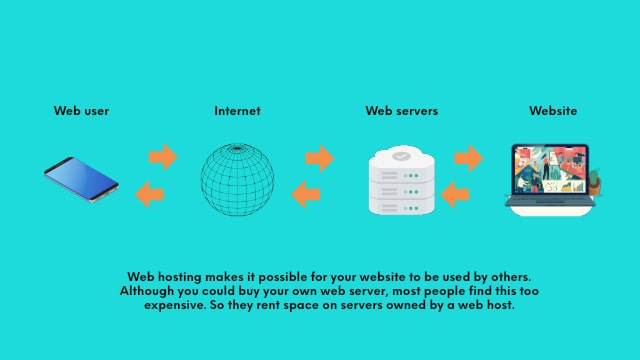
Credit: www.godaddy.com
Important Hosting Features
Having enough storage is important. Your website grows over time. Choose a host with flexible storage options. Bandwidth affects your site’s speed. More bandwidth means faster loading. Don’t settle for low bandwidth. Check if bandwidth is unlimited. Many hosts offer this.
A good uptime guarantee is essential. Your site must be online always. Hosts with 99.9% uptime are reliable. Downtime can hurt your business. Ask for uptime history. Some hosts provide uptime records. Choose hosts with proven uptime.
Customer support is vital. Problems can arise anytime. Look for hosts with 24/7 support. Live chat is helpful. Email support can be slow. Phone support is fast. Check support reviews. Good support solves issues quickly. Avoid hosts with poor support.
Budget Considerations
Selecting a web host depends on budget considerations. Compare hosting plans to find affordable options. Evaluate costs against features offered to ensure value.
Pricing Plans
Most web hosts offer different pricing plans. Some plans are cheap. Others are expensive. Choose a plan that fits your budget. Check if you get enough features. Some plans may have limits. Be sure to read all the details.
Hidden Costs
Sometimes, there are hidden costs. Watch out for extra fees. Setup fees can be a surprise. Some hosts charge for add-ons. Always read the terms. Look for any extra charges.
Value For Money
Look for value for money. A cheap plan may lack features. An expensive plan may offer more. Compare what you get with each plan. Make sure you get good service for the price. Choose a host that offers quality.
Security Aspects
Choosing the right web host is crucial for security. Prioritize hosts with SSL certificates and robust firewalls. Regular software updates and malware protection are essential features. Always check for DDoS protection to guard against attacks.
Ssl Certificates
SSL certificates keep data safe. They encrypt information. This stops hackers. Websites need SSL for trust. Visitors feel secure. Green padlock shows SSL. Choose hosts offering free SSL. It saves money. SSL is a must for e-commerce sites. It protects payment info. SSL also helps with Google rankings. Secure sites rank better. SSL is vital for online safety.
Ddos Protection
DDoS attacks flood servers. This makes websites slow or offline. Hosts offer DDoS protection. Protection stops attacks. It keeps sites online. Hosts with strong DDoS protection are important. They keep data safe. Good hosts have advanced tools. Tools identify and block attacks. DDoS protection is critical for high-traffic sites. It ensures uptime. Keeps businesses running smoothly.
Regular Backups
Backups save website data. They restore lost files. Regular backups are essential. They protect against data loss. Hosts with automatic backups are best. They do it daily or weekly. Backups help after hacks or crashes. Choose hosts with easy restore options. It saves time and stress. Backups provide peace of mind. Protects your hard work online.
Performance Metrics
Website visitors dislike waiting. A slow website can lose users quickly. Aim for a loading speed under three seconds. Faster sites keep visitors happy. They also rank better in search engines. Use tools like Google PageSpeed Insights. These tools help check speed.
The time it takes for a server to respond matters. A fast server response is crucial. It should be under 200 milliseconds. Slow response can frustrate users. It can also hurt your site’s ranking. Choose a host with a good track record. Reliable hosts usually have quick servers. Check reviews before deciding.

Credit: www.nameboy.com
Scalability Options
Web hosts offer many plans for growing websites. Basic plans are good for starting out. As your website grows, you may need more resources. Upgrading is simple. Choose a plan with more storage or bandwidth. Always check if the web host allows easy upgrades. Some hosts make upgrading hard. Others make it simple with a few clicks. Always plan for growth. This way, your website will not face slowdowns. A quick upgrade can solve many issues.
Hosts give different resources based on the plan. More expensive plans often give better performance. Check if your host offers CPU, RAM, and disk space options. These resources help your site run faster. Always ensure you have enough resources. A growing site needs more power and speed. Some hosts let you add resources easily. Others might require a full plan change. Knowing how resources are allocated can help in making the right choice.
User Reviews And Ratings
Reading user reviews helps you know if the host is good. People share their honest opinions about services. They talk about problems they faced. They also share what they liked. Many good reviews mean the host is trustworthy. Bad reviews show problems with the host. Always check different sites for reviews. This gives a better picture. Look for hosts with many positive reviews. Avoid hosts with lots of negative reviews.
A reliable host keeps your site running. It should have less downtime. This means your site stays online. Users want a site that loads fast. A good host helps with this. Check if users say the host is reliable. They will share if their sites were down often. They will also share if the host fixed issues fast. Reliable hosts have good customer support. They help users quickly. Choose hosts with high reliability ratings. This ensures your site works well.
Technical Support Quality
Availability is very important in technical support. A good web host offers 24/7 support. This means help is always there. You can reach them by phone, chat, or email. Fast response times can save you from big problems. Check if support is free or paid. Some hosts charge for extra help. Look for hosts with quick response teams. They fix issues fast. This keeps your website running smoothly.
Expertise means knowing a lot about the web. The support team should be skilled. They should solve problems quickly. Many hosts have tech experts. They know how to fix issues. This is helpful when you have questions. Good expertise makes everything easier. You can trust your host to help you. Always choose a host with good reviews. This shows others trust their expertise too.
Integration Capabilities
CMS Compatibility is crucial for smooth website operation. Ensure your web host supports popular CMS platforms. Look for hosts offering easy installation options for WordPress, Joomla, or Drupal. Some hosts provide one-click installation features. This saves time and effort. Compatibility reduces technical issues. It helps keep your website running smoothly. Choose a host with strong CMS support.
Third-Party Tools are essential for enhancing website functionality. A good host should integrate well with tools like Google Analytics or payment gateways. Check if the host supports plugins or extensions for these tools. Integration simplifies management tasks. It improves user experience on your site. Strong tool integration is vital. It ensures your site can grow and adapt.
Environmental Impact
Green hosting is good for the planet. It uses less energy and helps cut down on pollution. Many web hosts use wind or solar power. These are clean and do not harm the earth. Choosing a green host can make your website more eco-friendly.
Sustainable practices are important for the future. Some web hosts plant trees to balance their carbon use. Others use energy-saving servers to use less power. Picking a host with these practices is a smart choice. It helps keep the earth safe.

Credit: www.godaddy.com
Frequently Asked Questions
How Do I Find The Host Of A Website?
Use online tools like WHOIS to find a website’s host. Enter the website’s URL for hosting details. You can also check the website’s source code for the hosting provider’s name. Some hosting information may be available in the footer or contact page of the website.
What Is Your Website Host?
We use [Your Web Host Name] as our website host. They provide reliable, fast, and secure hosting services. Our hosting ensures optimal website performance and excellent customer support. Choose [Your Web Host Name] for a seamless online experience.
How Do I Know The Web Server Of A Website?
Use online tools like Netcraft or WHOIS to find a website’s web server. Enter the domain name to get server details quickly.
How Do I Find Out What Platform A Website Is Hosted On?
Use online tools like BuiltWith or Wappalyzer to identify a website’s hosting platform. Check for clues in the site’s source code or headers. You can also ask the website owner directly for hosting details.
Conclusion
Choosing the right web host is crucial for your website’s success. Consider your site’s needs. Check reliability and support. Compare pricing and features. Read reviews from other users. Don’t rush your decision. Take time to explore options. A good web host supports growth and security.
Think about future needs. Look for scalability. Ensure your host fits your budget. Remember, the right host can make or break your website. Make a wise choice. Your website’s performance depends on it. Happy hosting!


