
Are you ready to give your WordPress site a fresh new look, but unsure how to get started with themes? Finding and installing the perfect theme can seem daunting, especially with the vast array of options available.
But fear not, because once you master this simple process, you can effortlessly transform your website’s appearance to match your vision and brand. Imagine captivating your visitors with a stunning design that keeps them engaged and eager to explore further.
In this guide, you’ll discover easy steps and insider tips to find, install, and activate the ideal WordPress theme, turning your site into a visual masterpiece. Stay with us, and unlock the secrets to making your WordPress site shine!
Credit: www.theblogstarter.com
Choosing The Right Theme
Identifying Your Needs is the first step in finding the perfect theme. Think about what you want your website to do. Is it a blog, store, or portfolio? Each type needs a different theme. List your must-have features. This helps narrow down your choices.
Considering Design and Functionality is crucial. A theme should look good and work well. Choose a design that fits your brand or style. Make sure the features work smoothly. A pretty design is useless if it doesn’t function right.
Checking Compatibility ensures your theme works with WordPress. Check if the theme updates regularly. Also, see if it supports the latest WordPress version. A theme that is not compatible can cause many problems.
Exploring Theme Sources
The WordPress Theme Directory is a great place to start. It offers many free themes that you can use. Each theme is checked for quality. It makes sure they work well. You can search by style or feature. This way, you find the best theme for your needs.
Many people choose Premium Theme Marketplaces for their themes. These marketplaces have many options. They offer high-quality themes. You may need to pay for them. But they often include extra features and support. Sites like ThemeForest are popular for premium themes.
Some websites need unique looks. In these cases, Custom Theme Developers can help. They create themes just for you. This makes your site special and unique. Custom themes can be expensive. But they match your exact needs and style.
Installing Themes From The WordPress Directory
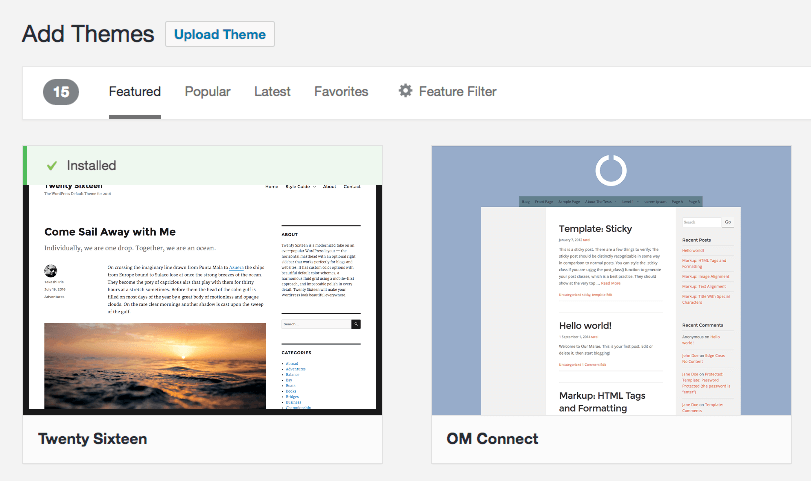
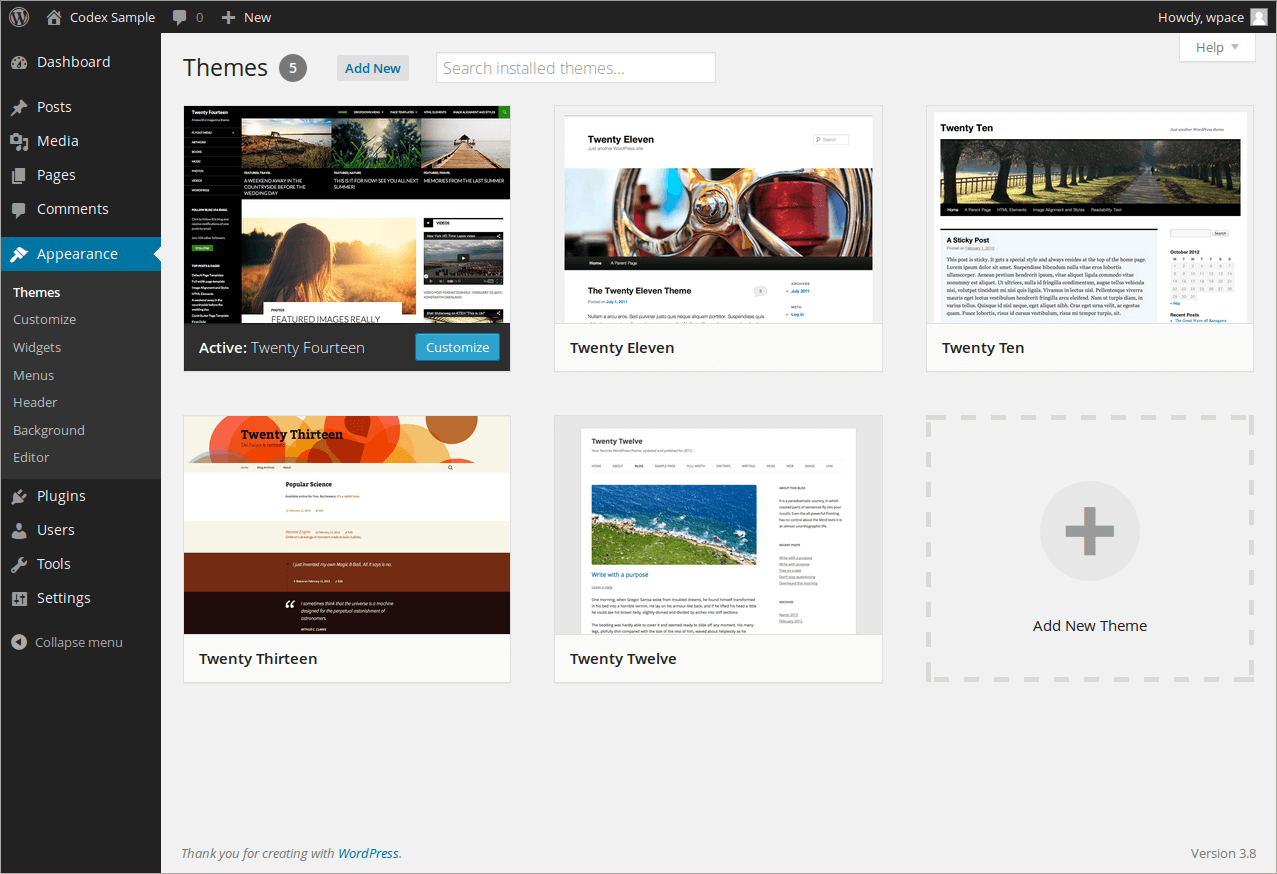
Open your WordPress dashboard. Find the Appearance section. Click on Themes. This opens the theme directory. Here, you can see many themes. They are all ready to use. Each theme has a unique look.
Use the search bar to find themes. Type a keyword like “blog” or “shop”. Filters help to narrow choices. Try filtering by features or layout. This makes finding a theme easier. Choose wisely for your site needs.
Click on any theme to preview it. See how it looks live. If you like it, click Install. Then, activate it to use. This changes your site’s design. Try different themes to find the best.
Credit: www.inmotionhosting.com
Uploading Themes From External Sources
First, find a good theme. Then, go to a trusted website. Download the theme files. They usually come as a .zip file. Save it on your computer. You will need this file later.
Open your WordPress dashboard. Click on Appearance. Then, choose Themes. Look for the Upload Theme button. Click it. A window will open. Select the .zip file you downloaded. Press the Install Now button.
After uploading, you will see an Activate button. Click it to use the new theme. Your website will now have a fresh look. You can always switch back if you want. Explore the theme options to customize it.
Customizing Your Theme
The Customizer Tool helps change your theme’s look. It’s easy to use. Find it under Appearance in your dashboard. You can change colors, fonts, and the header image. Preview changes instantly. This helps see how your site looks before saving.
Theme settings let you adjust many things. You can change the layout. Choose between a full-width or boxed design. Adjust the number of sidebars. Set a static front page or show your latest posts. Save changes to make them live.
Widgets add new features to your site. They can be added to sidebars. Use them to show recent posts or social media links. Menus help visitors find pages. Create a menu under Appearance and Menus. Drag items to change the order. Save when finished.
Troubleshooting Theme Issues
Themes can cause trouble sometimes. A site may load slowly or look wrong. Broken layouts or missing images are common problems. Always check if plugins are causing the issue. Deactivate them one by one to find the culprit.
Going back to default settings can solve many issues. Access the theme settings in WordPress. Look for a reset button or similar option. This will restore the original look. Make sure to backup your site first.
Visit the theme developer’s website for help. They often have a support forum or help section. Check for theme updates as well. Updates can fix bugs or improve security. Keeping your theme up-to-date is important.
Credit: www.hostpapa.com
Frequently Asked Questions
How Do I Find Themes In WordPress?
To find themes in WordPress, navigate to your dashboard. Go to ‘Appearance’ and then ‘Themes’. Click ‘Add New’ to explore a variety of free and premium themes. Use the search bar for specific themes or filter by features to find the perfect fit for your site.
Can I Install Themes Manually In WordPress?
Yes, you can install themes manually. Download the theme’s. zip file from a trusted source. Go to ‘Appearance’ > ‘Themes’ > ‘Add New’ > ‘Upload Theme’ in your WordPress dashboard. Choose the. zip file and click ‘Install Now’. Once installed, activate the theme to apply it.
Where Can I Find Free WordPress Themes?
You can find free WordPress themes in the WordPress theme repository. Access it through your WordPress dashboard under ‘Appearance’ > ‘Themes’ > ‘Add New’. You can also visit wordpress. org/themes for a wide selection. These themes are reviewed for quality and security, ensuring safe options.
What Are The Best Places To Buy WordPress Themes?
There are several reliable places to buy WordPress themes. Popular marketplaces include ThemeForest, Elegant Themes, and StudioPress. These platforms offer a variety of premium themes with extensive support and regular updates. Always check reviews and ratings before purchasing to ensure theme quality and reliability.
Conclusion
Finding and installing themes in WordPress is easy and rewarding. Themes shape your site’s look and feel. Start by exploring the WordPress theme directory. Use keywords to find the perfect theme. Consider design, features, and user reviews before choosing. Install your theme with a few clicks.
Customize it to suit your style and brand. Take your time to explore options. Remember, a good theme enhances user experience. Choose wisely and make your site shine. Enjoy creating your unique WordPress site!


