
Have you ever stumbled upon a website and wondered who’s behind it? Knowing the host of a domain name can unlock valuable information—whether you’re checking a site’s credibility, planning your own website, or just curious.
But finding this info isn’t always straightforward. You’ll discover simple, clear steps to uncover the host of any domain name quickly and easily. By the end, you’ll have the tools to dig deeper and make smarter online decisions. Ready to get started?
Let’s dive in.
What Is Domain Hosting
Domain hosting is a key part of having a website. It means storing your website’s files on a server. This server makes your website visible on the internet.
Without hosting, your domain name is just a name. It cannot show any content or pages to visitors. Hosting links your domain to the internet.
What Does Domain Hosting Do?
Domain hosting stores all website files like images, text, and code. It keeps these files online 24/7. This allows people to visit your site anytime.
Types Of Domain Hosting
There are different kinds of hosting. Shared hosting means many websites share one server. VPS hosting gives more space and control. Dedicated hosting means one server for one website only.
Why Is Domain Hosting Important?
Hosting controls how fast your website loads. It affects website security and uptime. Good hosting keeps your site online and safe from attacks.
Credit: www.boldgrid.com
Why Identify The Host
Knowing the host of a domain name helps in many ways. It gives clear information about where a website is stored. This info is useful for website owners, buyers, and even visitors. Understanding the host can solve problems and improve website management.
What Is The Hosting Provider?
The hosting provider is the company that stores a website’s files. It makes the website visible on the internet. Knowing the host helps check the reliability of the website.
Helps In Website Troubleshooting
When a website has issues, knowing the host speeds up fixing them. You can contact the right support team. It avoids confusion and saves time.
Important For Buying A Domain
If you want to buy a website, knowing its host gives extra information. It shows how the site is managed. This helps in making a better decision.
Improves Website Security
Knowing the host helps check if the website uses good security measures. It can prevent attacks and data loss. This protects both owners and visitors.
Helps Understand Website Speed
The host affects how fast a website loads. Knowing the host lets you choose faster options. This improves user experience and search rankings.
Using Whois Lookup
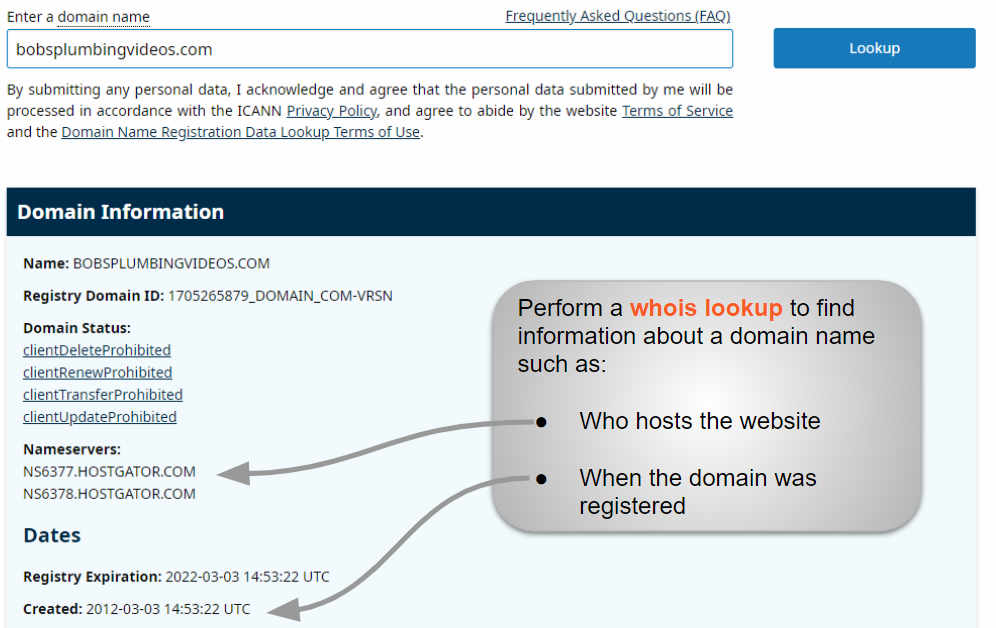
Using WHOIS lookup is a simple way to find the host of a domain name. This tool shows the registered details of a domain. It helps reveal the owner and their hosting provider. You can access WHOIS databases online for free. Just type the domain name, and you get instant results.
Choosing A Whois Service
Pick a reliable WHOIS service for accurate information. Popular sites include ICANN WHOIS, Whois.net, and DomainTools. Some websites offer extra details like hosting and DNS records. Avoid services that require payment or sign-up for basic info. A good WHOIS tool loads fast and shows clear data.
Interpreting Whois Results
WHOIS results can seem confusing at first glance. Look for the “Registrar” or “Name Server” fields. The registrar is the company where the domain is registered. Name servers often point to the hosting provider. Contact info might be hidden due to privacy protection. Focus on technical details to find the host.
Checking Dns Records
Checking DNS records is a key step to find the host of a domain name. DNS records store important details about a domain. They reveal where the website is hosted and other technical info. Knowing how to check these records helps you uncover hosting data quickly.
DNS records include A, MX, NS, and CNAME records. Each type holds different information. Some records point directly to the hosting server’s IP address. Others show nameservers that manage the domain. Studying these records guides you to the hosting provider.
Using Dns Lookup Tools
DNS lookup tools help you read DNS records easily. These tools are available online for free. Enter the domain name and run a search. The tool will display all DNS records linked to that domain.
Popular DNS lookup tools show detailed results. You can see the IP address, nameservers, and mail servers. This data gives clues about the hosting company. Some tools also explain each record’s purpose. This makes it easier to understand the info.
Finding Hosting Information In Dns
Look for the A record first. It usually contains the IP address of the hosting server. Use this IP to identify the hosting provider through IP lookup sites.
Nameservers also provide hosting clues. They often carry the host’s name or brand. For example, nameservers like ns1.bluehost.com hint at Bluehost hosting.
Check MX records to see where email is hosted. This can confirm the domain’s service provider. Combining all DNS data helps you find the domain’s host accurately.
Online Hosting Checker Tools
Online hosting checker tools help you find the web host of any domain name quickly. These tools scan the domain’s server data and show the hosting provider. They save time and effort compared to manual searches.
Most hosting checkers work by querying domain information through public databases. They provide clear results in seconds. Anyone can use them, even without technical skills.
Popular Hosting Checkers
Some hosting checkers are widely used for their ease and accuracy. Examples include HostAdvice, WhoIsHostingThis, and HostingChecker. These sites offer free services and show detailed hosting info.
HostAdvice provides user reviews alongside hosting data. WhoIsHostingThis shows the current host and DNS records. HostingChecker gives hosting provider details and IP address data.
Accuracy And Limitations
Hosting checkers give useful information but are not always perfect. Sometimes they show outdated or incorrect data. This happens if domain owners use privacy services or proxy servers.
Shared hosting or cloud services can also confuse the results. The tool might identify the cloud provider instead of the specific host. Always use multiple checkers for better accuracy.
Using Command Line Tools
Command line tools provide a quick way to find the host of a domain name. These tools work on most computers and require no special software. You can get detailed information about a domain’s hosting by typing simple commands. This method is useful for beginners and experts alike.
Using Nslookup
The nslookup tool helps find the IP address linked to a domain. Open your command prompt or terminal and type nslookup domainname.com. Replace domainname.com with the domain you want to check. The tool shows the domain’s DNS records and its hosting server IP.
This IP address can help identify the hosting provider. Use an IP lookup service online to find the host’s name and location.
Using Dig Command
dig is another command line tool that gives detailed DNS information. It works on Linux, macOS, and some Windows systems. Run dig domainname.com in the terminal. Replace domainname.com with your target domain.
The output shows the domain’s A record, which points to the host IP. You can also add options like dig domainname.com NS to find name servers. This information helps track down the hosting company behind the domain.
Contacting Domain Owner
Contacting the domain owner is a key step when you need information about a website. It helps you ask questions, request permission, or discuss buying the domain. Knowing how to find the right contact details saves time and avoids confusion.
Finding Contact Details
Start by checking the domain’s WHOIS record. This database often shows the owner’s name, email, and phone number. Some owners use privacy protection services, so the info might be hidden. In that case, try the website’s “Contact” or “About” page. Social media profiles linked to the domain can also provide contact options.
When To Reach Out
Reach out only for clear, important reasons. For example, if you want to buy the domain or report a problem. Avoid sending spam or unnecessary messages. Keep your message short and polite. State your purpose clearly and provide your contact information. This increases the chance of a quick, helpful reply.

Credit: support.intermedia.com
Common Challenges And Solutions
Finding the host of a domain name can be tricky. Many obstacles can slow down the search. Knowing common challenges helps you solve them fast. This section explains typical problems and clear solutions.
Understanding Privacy Protection Services
Some domain owners use privacy protection. This service hides their hosting details. It shows proxy information instead of real data. Use specialized tools to bypass this mask. Check the domain registrar for more clues.
Dealing With Incomplete Whois Data
Whois records sometimes lack full hosting info. This happens if the owner hides details or data is outdated. Try multiple Whois lookup services for better results. Cross-check information with DNS records for accuracy.
Interpreting Dns Records Correctly
DNS records hold clues about hosting providers. Reading them can be confusing at first. Focus on A, CNAME, and NS records. These often point to the hosting company’s servers. Use online DNS tools to simplify this task.
Handling Domain Reselling And Multiple Hosts
Some domains use resellers or multiple hosts. This creates mixed information in records. Pinpoint the main hosting provider by tracing IP addresses. Use IP lookup services to identify the actual server location.
Overcoming Technical Jargon
Technical terms can make the process harder. Words like “nameserver” or “IP address” may confuse beginners. Use simple guides and glossaries. Focus on key concepts needed for your search.

Credit: support.intermedia.com
Frequently Asked Questions
What Is The Easiest Way To Find A Domain Host?
The easiest way is to use online WHOIS lookup tools. They provide detailed domain registration and hosting information instantly. These tools show the host, registrar, and contact details for any domain name quickly and accurately.
Can I Find A Domain Host Using The Ip Address?
Yes, you can find the host by tracing the IP address associated with the domain. Use tools like Ping or Traceroute. Then, perform a reverse IP lookup to identify the hosting provider linked to that IP address.
Are Whois Lookup Tools Always Accurate For Domain Hosting?
WHOIS lookup tools are mostly accurate but may have outdated data. Some domain owners hide their details with privacy protection services. For the most precise results, use multiple tools and cross-verify the information.
How Does Dns Help Identify A Domain’s Hosting Provider?
DNS records contain information about where a domain points. Checking A, NS, or MX records can reveal the hosting server’s IP or name. This helps identify the hosting provider associated with the domain.
Conclusion
Finding the host of a domain name is easier than it seems. Use online tools like WHOIS or hosting checker sites. These tools quickly show who runs the website. Knowing the host helps with website issues and trust. Keep this process simple and repeat it anytime.
Understanding domain hosting builds your web knowledge step by step. Stay curious and explore more about websites and hosting.


