
Have you ever wondered who’s behind the curtain, hosting your website? Knowing your web host is crucial for managing your site effectively.
It impacts your site’s speed, security, and reliability. If your website is experiencing frequent downtime or slow loading times, it might be time to find out who’s hosting it. Discovering your web host can empower you to make informed decisions and improve your website’s performance.
You don’t need to be tech-savvy to uncover this information. We’ll guide you through simple steps to identify your web host, ensuring you have the control and understanding you need to optimize your online presence. Stay tuned to learn how this knowledge can benefit your website and your business.
Why Knowing Your Web Host Matters
Choosing a web host is very important. It affects your site’s speed and security. A good host keeps your site safe. It also makes your site fast. People do not like slow websites. They leave if it takes too long. This means you lose visitors.
Support is another reason to know your web host. Problems can happen anytime. Good hosts help you quickly. They offer 24/7 support. This is very helpful. Especially if your site goes down. You need help fast to fix it.
Cost is also important. Some hosts are cheap but have bad service. Others are good but expensive. Knowing who hosts your site helps you decide. You can choose the best host for your needs.

Credit: www.webhostinghub.com
Checking Your Domain Registration
WHOIS Lookup is a tool you can use. It helps find who hosts your website. Type your domain name in the search bar. The tool will show you the registered owner of the domain. It also gives other useful details. This includes the host provider and the registration date.
WHOIS data tells you about your domain. You can see the domain registrar and the server names. Also, it shows the expiry date of your domain. This data helps you know who manages your site. Understanding this is important. It keeps your website in safe hands.
Identifying Hosting Providers Through Ip Address
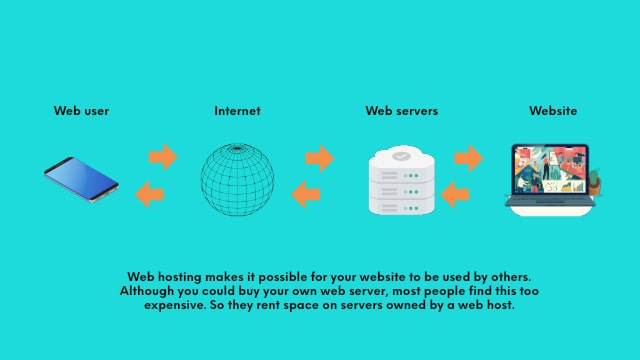
Your website has a unique IP address. This address is like a home address. It helps identify where your site is hosted. To find your website’s IP, check the domain settings. Access the DNS records. The IP address is listed there. It’s often found under the A record. You can ask your domain registrar for help too.
IP lookup tools are easy to use. Type the IP address into the tool. The tool will show who hosts your website. Use websites like whois.net or ipinfo.io. They provide detailed hosting information. You can find the hosting company’s name. Sometimes, you’ll see the server location too. These tools are quick and helpful.
Credit: www.godaddy.com
Exploring Dns Records For Clues
To know your web host, check your DNS records. These records show details about your website. Use online tools to find this information. DNS Lookup is a helpful tool. Enter your website’s name. The tool shows important details.
DNS entries give clues about the web host. Look for the A record. It shows the IP address of the server. The NS record tells you the name servers. These often point to the web host. Find the MX record for mail server details. Check this data carefully.
Utilizing Online Hosting Check Tools
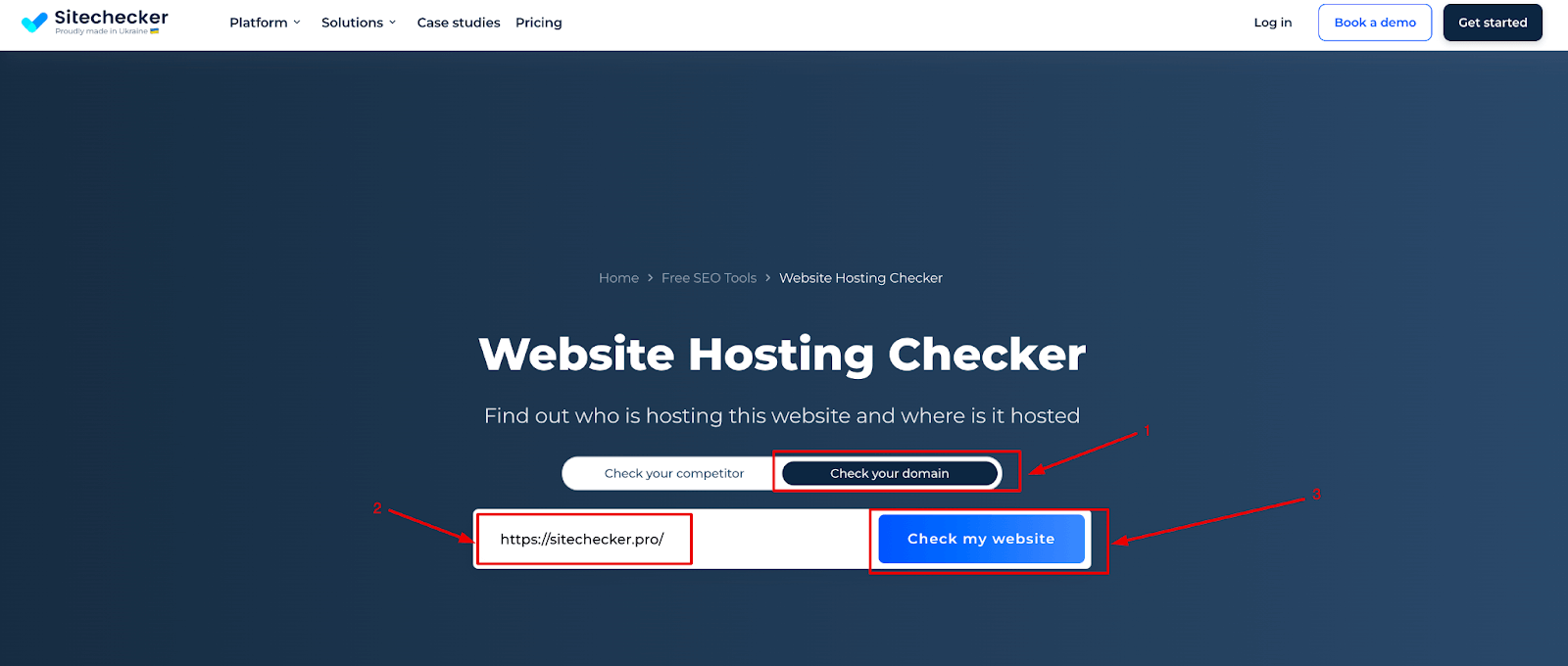
Popular Hosting Checker Services can help you find your website host easily. These tools are often simple and fast. You just need to enter your website URL. They will show the hosting provider in seconds. Some popular tools include WhoIsHostingThis and Site24x7. These tools are free and easy to use. Remember, results might vary from tool to tool. It’s a good idea to try more than one service.
Limitations of Automated Tools exist. Sometimes, tools cannot detect the host accurately. This can happen with sites using advanced setups. These tools might not show the actual server location. Results may be wrong if the site uses Content Delivery Networks. Always double-check results. Knowing the limitations helps avoid confusion.
Contacting Your Web Developer
First, ask your developer, “Who is hosting my website?” This is a basic question. It can help you find answers quickly. Then, inquire about the hosting provider’s contact details. This will be useful if you need help later. Also, ask about the control panel login. It helps manage your website settings. Finally, find out if there are any monthly or yearly hosting costs. This helps you plan your budget.
A web developer builds and maintains websites. They ensure everything works smoothly. Developers know many technical details. They can help solve issues with your site. They are a bridge between you and the hosting company. Understanding their role is important. It helps ensure your site runs well. Always keep in touch with your developer. They are there to help.
Reviewing Your Website’s Control Panel
Start by logging into your website’s control panel. This is often called the cPanel. You’ll need your username and password. Once inside, look for sections labeled “Hosting” or “Server Information”. These areas will help you find host details.
Inside the control panel, search for your hosting provider’s name. It might be listed under “Account Information” or “Details”. Don’t forget to check any billing sections too. They often show who bills you for hosting. If you can’t find it, ask your website administrator for help. They might know where to look.
Credit: sitechecker.pro
Evaluating Third-party Hosting Detection Services
Curious about your website’s hosting provider? Use third-party detection services for easy identification. These tools reveal hosting details swiftly, aiding in management and troubleshooting. Discover insights with a few clicks, enhancing your understanding of web infrastructure.
Pros And Cons Of Third-party Services
Third-party services can help find your web host. They are often easy to use and provide quick results. Many of these services offer a user-friendly interface. This can be helpful for beginners. But there are also some drawbacks. These services might not always be accurate. Some might even miss important details. Also, certain tools may require a fee for full access. It’s important to weigh the pros and cons. Choose a service that fits your needs.
Choosing A Reliable Service
Picking the right service is crucial. Start by checking user reviews. They can tell you a lot about the service. Look for services with a good reputation. A reliable service should have positive feedback. Avoid services with too many negative comments. Check if the service offers support. Good support can be very helpful. This ensures you get the help you need. Always choose a service that you trust.
Securing Your Website’s Hosting Information
Keep records updated to know who hosts your website. Make sure contact details are correct. This helps in case of problems. Write down all important information. Include the hosting company’s name and support email. Save this in a safe place. Update it every year. This keeps your website secure.
Enhancing website security is very important. Use strong passwords for your hosting account. Change passwords regularly. This stops hackers from accessing your site. Enable two-factor authentication if available. This adds an extra layer of security. Always use a trusted network when accessing your hosting account. Avoid using public Wi-Fi for such tasks. These steps help protect your website.
Frequently Asked Questions
How To Check Whois Hosting A Website?
Use WHOIS lookup tools like ICANN or whois. com to check website hosting information. Enter the domain name to find details.
How To Find Out What Platform A Website Is Hosted On?
Use online tools like BuiltWith or Wappalyzer to identify a website’s hosting platform. Check the domain’s WHOIS information for hosting details. Analyze website source code for specific hosting clues.
How To Find Out Who Manages A Website?
Check the website’s contact or “About Us” page for management details. Use WHOIS databases for domain registration info. Visit social media profiles linked to the website. Search online for interviews or articles mentioning the website owner.
How Do I Find Out Whois Behind A Domain Name?
Visit a WHOIS lookup website like Whois. net or ICANN. org. Enter the domain name to view registration details. Access can be limited due to privacy protection services.
Conclusion
Finding your website’s host is simple and essential. Understanding where your site lives helps manage it better. Use tools and methods discussed to identify your host. Keep your website secure and functional. Knowledge about hosting enhances your online strategy. Check regularly to stay updated.
Hosting impacts site speed and reliability. Optimize your site by knowing your host’s capabilities. This leads to a smoother online experience. Stay informed and proactive in maintaining your digital presence. Your website’s success depends on good hosting. Make informed choices for a better online journey.


