
Do you ever wonder where your website really lives on the internet? Knowing who hosts your website domain is key to managing your site smoothly and fixing problems fast.
But finding out your web host can feel confusing if you’re not sure where to look. Don’t worry—this guide will show you simple, clear steps to discover exactly who’s behind your website’s home. Keep reading, and you’ll gain control over your site like never before.

Credit: www.nameboy.com
Check Whois Records
Checking Whois records is a quick way to find out who hosts your website domain. These records contain details about domain registration and hosting. By reviewing this information, you can identify the hosting provider and other key data.
Whois records are public and easy to access. They help you learn about your domain’s owner, registration date, and servers used. This information is useful for managing your website or solving technical issues.
Using Online Whois Lookup Tools
Many websites offer free Whois lookup tools. Enter your domain name to get detailed information. Popular tools include ICANN Lookup, Whois.net, and DomainTools.
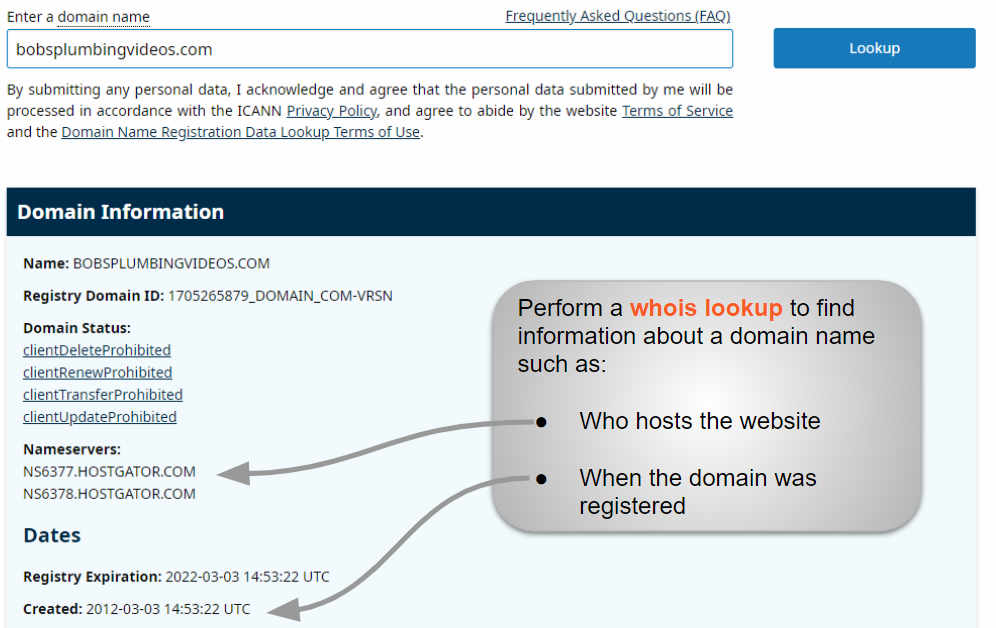
These tools show the registrar, domain status, and contact details. They also list the name servers linked to your domain. Name servers often reveal the hosting company.
Interpreting Whois Information
Focus on the “Name Server” section. It usually shows the hosting provider’s servers. The registrar name indicates who registered your domain.
Contact details may be hidden for privacy, but server info helps find the host. Check for common hosting providers like Bluehost, GoDaddy, or HostGator.
Note the domain creation and expiration dates. They help track your domain’s lifecycle and renewal status.
Credit: www.greengeeks.com
Use Dns Lookup Services
DNS lookup services help find important details about a website’s domain. They show technical data stored in the Domain Name System. This data includes information about the servers that manage the domain. Using these services is a quick way to discover who hosts your website.
These tools are free and easy to use. They work by querying DNS records linked to your domain. This process reveals nameservers and hosting details. Understanding this information helps you manage your site better.
Finding Nameservers
Nameservers direct internet traffic to the correct web host. DNS lookup services list your domain’s nameservers. These nameservers usually reflect the hosting company’s name. For example, names like ns1.bluehost.com suggest Bluehost hosts the site.
To find nameservers, enter your domain into a DNS lookup tool. The tool returns the current nameservers for your domain. These nameservers show which company controls your domain’s DNS settings.
Identifying Hosting Providers
Nameservers alone might not clearly show the hosting provider. Use additional DNS records to get more clues. Look at the A record, which points to the website’s IP address. This IP address helps identify the hosting company.
Use online IP lookup tools to check the owner of the IP address. The tool shows which company manages the server hosting your website. This step confirms the hosting provider behind your domain.
Explore Website Hosting Checkers
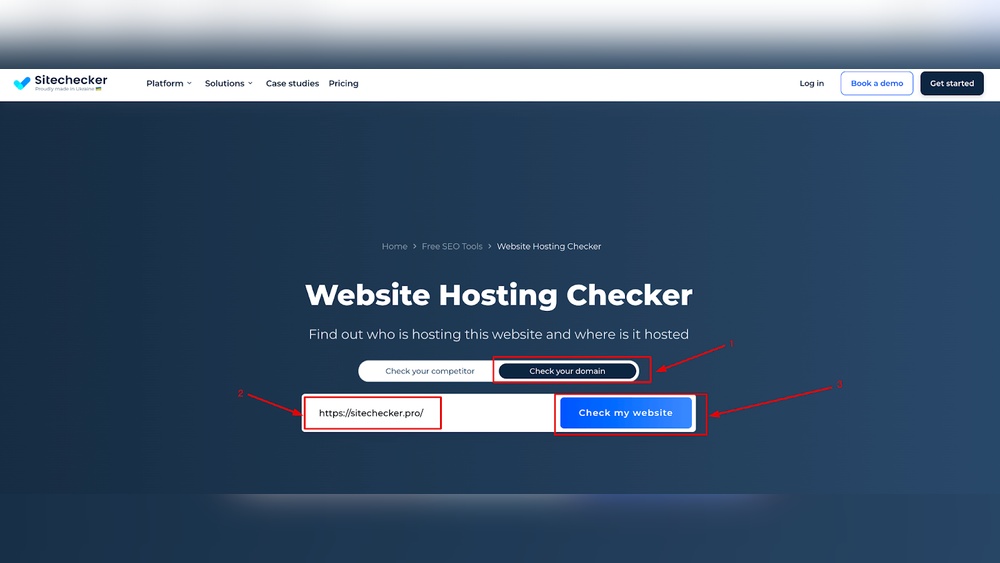
Finding out who hosts your website domain is easier with online tools. Website hosting checkers help reveal the hosting provider behind a website. These tools scan the domain and show useful details about the server. You can use them without technical knowledge. They save time and effort in tracking down hosting information.
Popular Hosting Checker Tools
Several free tools are available online to check website hosting. “WhoIsHostingThis” is simple and user-friendly. It provides quick results and extra info about the domain. “HostAdvice” offers detailed reports including hosting reviews. “Site24x7” checks server location and uptime data. These tools are widely used and reliable for basic hosting info.
Accuracy And Limitations
Hosting checkers give a good starting point to identify hosts. Accuracy depends on the data source and how updated it is. Some websites use content delivery networks (CDNs), which can hide the real host. Also, privacy services may block hosting details. Use multiple tools to cross-check results for better accuracy. Remember, no tool is perfect, but they offer helpful clues.
Credit: www.boldgrid.com
Contact Domain Registrar
Contacting your domain registrar is a key step to find out who hosts your website domain. The registrar is the company where you registered your domain name. They keep records about your domain and can help provide hosting details.
This step is simple and direct. You only need to reach out to the registrar’s support team. They can share useful information about your domain’s hosting provider or guide you on where to check next.
How Registrars Can Help
Domain registrars manage your domain’s registration data. They know the domain’s status and settings. They can tell you if your domain is connected to a hosting service.
Registrars can provide the name of your hosting company. They might also share contact details or control panel access. This helps you manage your website easily.
Requesting Hosting Information
Contact your registrar’s support by email or phone. Ask them directly about your domain’s hosting provider. Provide your domain name and any verification details.
Be clear and polite in your request. Some registrars have specific forms or help sections for this. Follow their process to get the correct information fast.
Look At Website Source And Ip Address
Finding out who hosts a website can start with simple steps. One way is to check the website’s source code and IP address. This method gives clues about the hosting provider without special tools.
Every website has an IP address. This address points to the server where the website lives. Knowing this IP can help trace the hosting service.
Finding Ip Address
Open the website in your browser. Right-click and choose “View Page Source” or “Inspect.”
Look for clues like server tags or comments in the code. These sometimes reveal hosting details.
To find the IP address quickly, use the Command Prompt on Windows or Terminal on Mac.
Type ping website.com and press Enter. Replace “website.com” with the actual domain.
The command shows the IP address linked to the website. Note this number for the next step.
Tracing Hosting Providers Via Ip
Use an IP lookup tool online by entering the IP address found earlier.
The tool reveals the organization that owns the IP. This is often the hosting company.
You can also check the IP’s location and network details. This helps confirm the host.
Some IP ranges belong to big hosting providers like AWS or Bluehost.
Such information narrows down the hosting service behind the website.
Consider Privacy And Proxy Services
Many website owners use privacy and proxy services to protect their domain information. These services hide the real owner’s name and contact details. It can make finding the actual hosting provider tricky. Understanding how these services work helps in discovering who hosts a domain.
Impact On Finding Hosting Details
Privacy services replace real information with fake details in domain records. This hides the owner’s name, email, and phone number. As a result, domain lookup tools show proxy service data instead. This blocks easy access to hosting information. Many domain registrars offer this service for free or a small fee.
Ways To Bypass Privacy Masks
Try using WHOIS history tools that store past domain data. Sometimes, older records show real owner details. Check the website’s IP address using online tools. The IP can reveal the hosting provider even if privacy is enabled. Look for contact info on the website itself. Owners often leave clues in the footer or “About” page.
Tips For Quick And Effective Search
Finding out who hosts your website domain can be quick and simple. Using smart tips helps you avoid confusion and saves time. A clear plan makes the search smooth and effective.
Try combining different methods and tools. This approach gives you better results and speeds up the process.
Combining Multiple Methods
Start with a WHOIS lookup to get domain registration details. Check the nameservers listed there. Nameservers often point to the hosting provider.
Next, use an IP lookup tool to find the server location. This information can hint at the hosting company. Also, visit the website’s DNS records for more clues.
Try a traceroute to see the path your connection takes. It may reveal the hosting network. Combining these methods increases your chance of finding the host fast.
Tools To Keep Handy
Keep several online tools ready. WHOIS lookup sites show domain owner and host details. DNS checker tools display domain records clearly.
IP lookup services reveal server information quickly. Traceroute tools help track network routes. Use these tools together for a complete picture.
Bookmark these resources. They make your search quicker and less frustrating. Knowing where to look saves you effort and confusion.
Frequently Asked Questions
How Can I Check Who Hosts My Website Domain?
You can use online tools like WHOIS lookup or hosting checker websites. These tools reveal your domain’s registrar and hosting provider quickly and easily.
Why Is It Important To Know My Website Host?
Knowing your host helps manage domain settings, renewals, and technical support. It also helps improve website security and performance.
Can I Find My Website Host Using Domain Registrar Info?
Yes, domain registrars often provide hosting details. Checking your domain registration account or WHOIS data helps identify your hosting provider.
What Details Does Whois Reveal About Website Hosting?
WHOIS shows domain owner, registrar, and sometimes hosting provider info. It gives contact details and server locations linked to your domain.
Conclusion
Finding your website’s hosting provider does not have to be hard. Use simple online tools to check your domain details. This helps you manage your site better and solve issues faster. Knowing your host keeps you in control. Take small steps and explore the options.
Soon, you will feel confident about your website’s setup. Keep your information updated and stay safe online. Your website’s health depends on understanding these basics well.


