
Have you ever stumbled upon a website and wondered which company is hosting it? Maybe you’re curious about your competitors’ choices, or perhaps you’re considering switching your own hosting provider.
Understanding where a website is hosted can offer insights into its performance, security, and reliability. In this guide, you’ll discover easy ways to find out which company hosts any website. By the end, you’ll have the knowledge to make informed decisions about your own web hosting needs.
Stick around to unlock the secrets behind the web’s hidden infrastructure, and equip yourself with valuable tools to enhance your online presence.
Credit: www.elegantthemes.com
Identifying The Hosting Provider
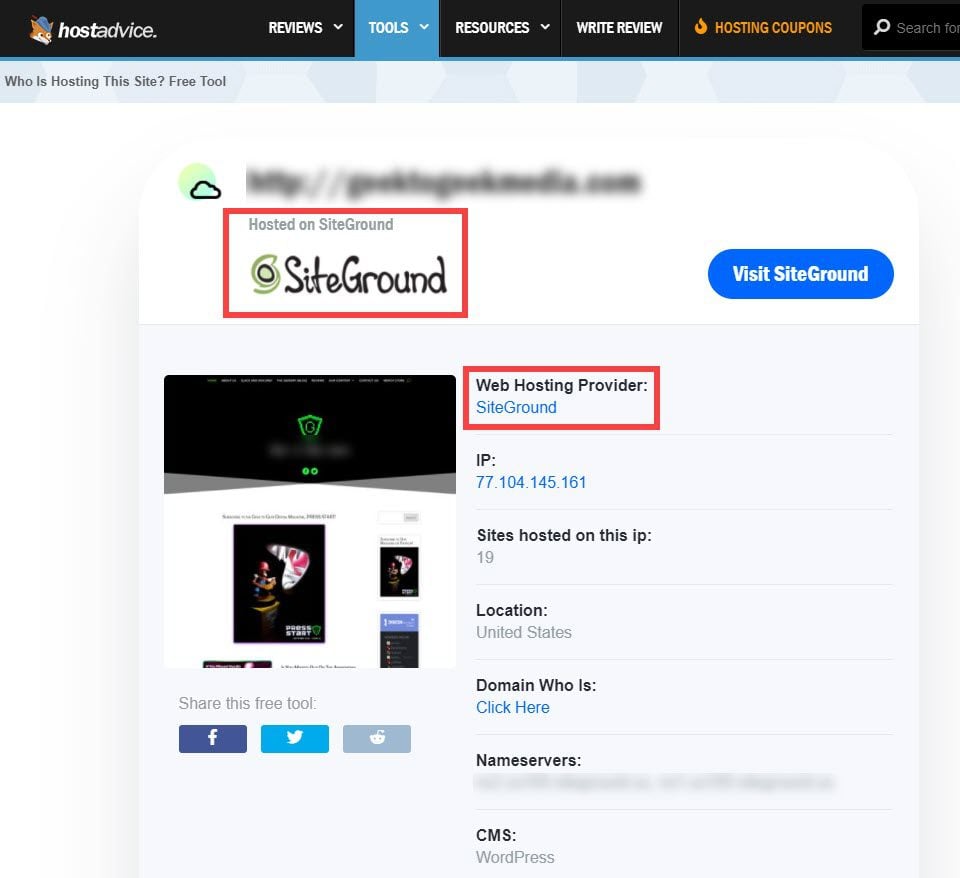
Online tools help find a website’s host easily. Tools like WhoIsHostingThis show the host’s name quickly. Just enter the website’s URL. Another tool is HostAdvice. It works the same way. These tools give fast results. They are simple and free to use. Great for beginners. They provide basic details about the host.
Domain registration info reveals hosting details. Visit a Whois lookup website. Enter the domain name. It shows the registrar’s name. Also shows the server’s details. This info helps track the hosting company. Sometimes, privacy settings hide this data. But usually, it’s available. A good starting point for finding hosts.
Analyzing Website Information
Open the website in your browser. Right-click on the page. Select “View Page Source” or “Inspect”. Look for lines that mention “hosting” or “server”. These lines often give clues about the host. The code might have names or links. Note them down for later use.
Search for a WHOIS lookup tool online. Enter the website’s URL. The tool will show details about the website. Look for information about the hosting company. WHOIS records can reveal the website’s registrar and server details. Sometimes, these records show the owner’s contact info. But not always.
Utilizing Ip Address Data
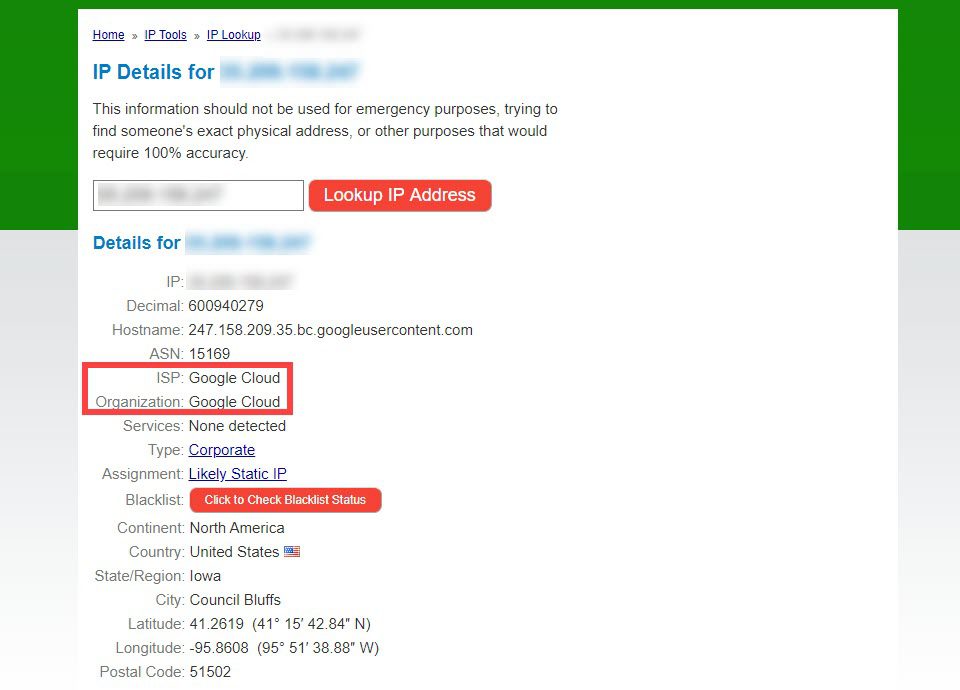
Every website has an IP address. This is like its home address on the internet. To find it, use a tool called Command Prompt. Type ping followed by the website name. You will see numbers. That’s the IP address. Remember, the IP address is key. It helps trace back to the host.
There are tools to find hosting companies. A WHOIS lookup tool is one of them. Enter the IP address you found. The tool gives details about the website’s host. It may show the company name. These tools are easy to use. They provide useful information quickly. They help you learn more about any website.
Exploring Hosting Provider Features
Shared hosting means many sites on one server. It is like an apartment. You share space with others. It is good for small sites. Costs are low. Dedicated hosting is different. You get your own server. It is like a house. You have all the space. It is good for big sites. Costs are higher. Decide based on your needs.
Cloud hosting uses many servers. Not just one. This means more flexibility. If one server fails, others help. Big names like Amazon Web Services, Google Cloud, and Microsoft Azure offer cloud hosting. Check their features. Choose what fits your needs. Cloud hosting can grow with your site.
Leveraging Web Hosting Directories
Hosting review sites list many companies with their services. People share opinions on these sites. You can read what others say. Reviews help you choose a host. Some sites rank hosts. Rankings show which host is best. Compare features and prices. Check how long a company has been around. Long-time hosts are often reliable. Ask questions if unsure. Many sites have chat or forums. People there are happy to help.
Hosting comparison sites are useful tools. They show different hosting options side by side. You can see what each host offers quickly. Compare prices easily. Look at features like speed and space. Some platforms show user ratings. Ratings tell you if people like the host. It’s simple to find the best match for your needs. Check reviews here too. They give more details about hosts. Always choose a host with good feedback.

Credit: www.hosted.com
Contacting Site Administrators
Finding the company that hosts a website is simple. Use online tools like WHOIS lookup services. Enter the site’s domain name to access hosting information, registrar details, and contact information for site administrators.
Requesting Hosting Information
Sometimes, the best way to learn who hosts a website is to ask. Use the site’s contact form to reach out. Write a simple message. Ask them directly for the hosting details. Keep your message short. Be polite and clear. You might get the answer you need.
Communicating Via Contact Forms
Most websites have a contact page. Look for a form there. Fill it out with your request. Include your email address so they can reply. They may ask why you want the info. Be honest but brief. Explain your reason simply. This approach often works well.
Credit: www.elegantthemes.com
Frequently Asked Questions
How To Find Out What Company Is Hosting A Website?
Use a WHOIS lookup tool to identify the hosting company. Search for the domain, then check the hosting provider details. Alternatively, use online tools like Hosting Checker or Site24x7 to find hosting information. These methods help in quickly determining the website’s host.
How To Find Out Who Manages A Website?
Check the website’s “Contact Us” or “About Us” page for management details. Use WHOIS lookup tools for domain registration information. Explore LinkedIn for potential contacts linked to the website. Investigate social media profiles for relevant information. Utilize online tools like Hunter.
io to discover associated email addresses.
Can You Find Out Who Hosts A Domain?
Use WHOIS lookup tools to find a domain’s hosting provider. These tools reveal registration details like hosting company.
How To Trace Where A Website Is Hosted?
Use tools like Whois. net or HostingChecker. com to identify a website’s hosting provider. Enter the site’s URL for results. These tools analyze domain details and server information, revealing hosting data. Access IP address and other hosting specifics quickly and efficiently, ensuring you trace the hosting location accurately.
Conclusion
Finding out who hosts a website is simple and useful. Tools like WHOIS or hosting checkers make it easy. These tools reveal hosting details quickly. Knowing the host helps in many ways. You can contact them for support or business needs.
It also helps in understanding website performance. Keep these tips in mind for future reference. Always have the right tools ready. It saves time and effort. Curious about a website? Use these steps. Discover its host effortlessly. Now you’re ready to explore the web with more knowledge!


