
Ever stumbled upon a website and wondered which web host powers it? Perhaps you’re planning to launch your own site and want to learn from the best.
Or maybe you’re just curious about the secret sauce behind some of your favorite online platforms. Whatever your reason, knowing how to find out what web host a website uses can be incredibly valuable. It can guide your own hosting decisions, help you troubleshoot issues, or even give you a competitive edge.
Stick around, because this article is tailored just for you. We’ll walk you through simple, no-fuss ways to uncover this information, and you might be surprised at how easy it is. Get ready to unlock the mystery and take control of your digital choices.
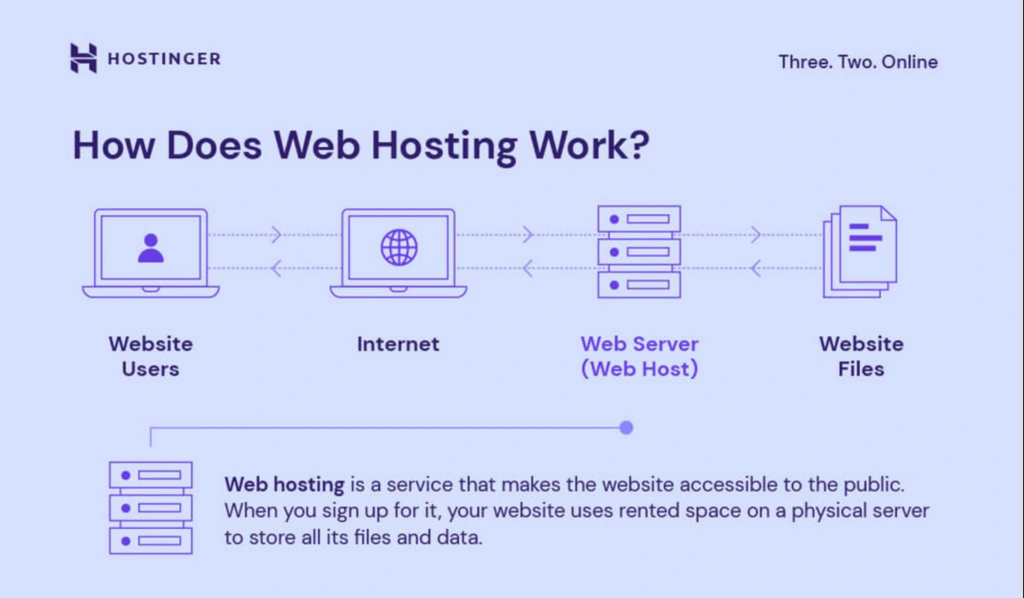
Credit: www.hostinger.com
Identifying Hosting Providers
Many tools can help you find a website’s host. Online tools like WhoIsHostingThis and Hosting Checker are popular. They are easy to use. Just enter the website’s URL. These tools will provide the host’s name. This information helps you learn more about the host.
WHOIS records show details about a website. They can reveal the host’s name. Visit a WHOIS website. Enter the domain name. The results will show the hosting provider. WHOIS records can also show other details. Like the site’s owner. Or the domain’s age. This is valuable information.
Analyzing Website Infrastructure
DNS stands for Domain Name System. It is like a phone book for the web. You can use online tools to check a website’s DNS records. These tools show the web host and other details. Websites like Whois.net or ICANN offer this service. They reveal who runs the website. Also, they show the nameservers used. This helps find the web host.
An IP address is a unique number. It tells where a website is hosted. You can find it using an IP lookup tool. Websites like iplocation.net can help. Enter the website URL. The tool shows the IP address and location. This can hint at the web host. Sometimes, big companies use multiple hosts. So, check carefully.
Exploring Website Elements
Open the website in a browser. Right-click and select “View Page Source”. Look for meta tags. These tags can show the web host. Search for words like “hosting” or “provider”. Sometimes, you might see links to hosting companies. This method is simple but not always perfect. Some websites hide this information. Look for comments in the code too. They might mention the hosting details.
CMS platforms make websites easy to manage. WordPress, Joomla, and Drupal are popular. To find the CMS, check the HTML source. Look for specific files or directories. WordPress sites often have /wp-content/ or /wp-admin/. Joomla might show /administrator/. Drupal sites often have /sites/. Knowing the CMS helps understand the website setup. Some CMS platforms have specific hosting partners. This can give clues about the web host.
Leveraging Third-party Services
Hosting checker tools help find a website’s host. Many tools are free. Enter the website URL to get the host’s name. Some tools give extra info like server location. These tools are easy to use. Kids can use them with help.
Browser extensions can show hosting info. Add them to your browser. Click the extension to see details. They show host names quickly. Extensions are simple and fast. Some need a few clicks to work. They make finding hosts easy for everyone.
Consulting Online Communities
Discovering which web host a site uses can be simple. Tools like Whois or built-in browser features help reveal hosting details. These methods provide valuable insights for comparing web hosting options.
Engaging In Webmaster Forums
Webmaster forums are a great place to ask questions. Many experts hang out there. They love to help newbies. Start a new thread about your hosting query. Be polite and clear about what you need. Many members will respond quickly. They might share their own experiences. This can provide valuable insights.
Seeking Advice From Industry Experts
Industry experts know a lot about web hosting. They often share tips online. Follow them on social media or read their blogs. You can also email them. Ask for advice in a simple way. They might suggest tools to use. This can help you find the information you need.
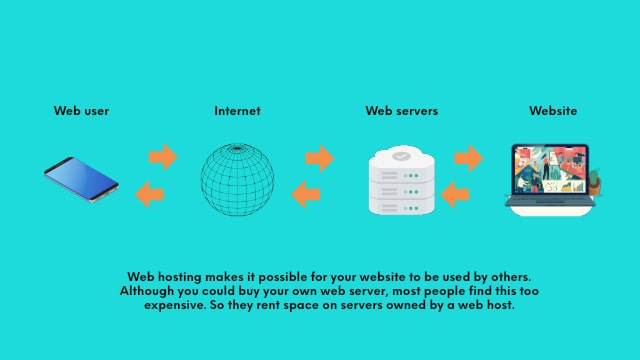
Credit: www.godaddy.com
Considering Legal And Ethical Aspects
Exploring a website’s hosting details requires attention to legal and ethical considerations. Respect privacy and follow applicable laws while using tools to identify the web host. This ensures responsible and lawful information gathering.
Respecting Privacy Regulations
Web hosts keep data about websites. It’s important to respect privacy. Privacy regulations protect user data. These rules can vary by country. Always check these rules before gathering data. Knowing privacy laws helps you stay safe. Websites have privacy policies. Reading them is important. Understand what data you can access legally. Protect others’ privacy while finding web host info. Always be careful with personal data.
Ensuring Compliance With Terms Of Service
Every website has terms of service. These rules are set by the web host. Terms of service tell what you can and cannot do. It’s important to follow these rules. Breaking them can lead to problems. Read these terms carefully. This helps you avoid legal issues. Always act within the rules. Respect the website’s guidelines. This ensures ethical information gathering.

Credit: www.nameboy.com
Frequently Asked Questions
How To Find Out What Web Hosting A Site Is Using?
Use online tools like WhoIsHostingThis or HostingChecker to identify a website’s hosting provider. Inspect the site’s DNS records using services like MXToolbox for hosting clues. Check the website’s footer or “About” page for hosting details, as some sites may disclose their hosting provider there.
How To Find Out What Platform A Website Is Hosted On?
Use online tools like BuiltWith or Netcraft to identify a website’s hosting platform. Check the website’s source code for clues. Alternatively, use browser extensions designed to detect hosting providers. These methods can help you discover the platform a website is hosted on.
How Do I See What Server A Website Is Using?
To identify a website’s server, use online tools like “Whois” or “Netcraft. ” Enter the domain name to view server details. Alternatively, inspect website headers using browser developer tools. These methods reveal server type, IP address, and hosting provider information.
How Do I Find The Dns Host Of A Website?
Use tools like WHOIS or DNSstuff to find a website’s DNS host. Enter the domain, view DNS records.
Conclusion
Finding a website’s web host is simpler than it seems. Use tools like WHOIS lookup or hosting checker sites. These tools provide quick answers. Sometimes, the website itself reveals hosting details. Look for clues in the site’s footer or contact page.
Understanding a website’s host helps in making informed decisions. You can compare services and choose the best for your needs. With this knowledge, you gain more control over your online presence. Remember, a good host is crucial for website performance.
Keep exploring and learning. Your website deserves the best care.


