
Ever stumbled upon a website so sleek and fast that it made you wonder what kind of web host it’s using? You’re not alone.
Understanding what web host a site uses can unlock secrets to improved website performance, security, and reliability. Imagine having the same powerful hosting as your favorite website, ensuring your visitors enjoy a seamless experience. This article will guide you through simple steps to uncover the web hosting provider of any site.
Whether you’re curious or ready to switch your own hosting, this knowledge can empower you to make informed decisions for your online presence. Dive in, and let’s demystify the hosting world together!
Identifying Web Hosting Providers
Online tools help you find web hosting providers. Tools like WhoIsHostingThis and HostAdvice are popular. Enter the site’s URL and see the host. These tools are easy to use and fast. Results come in seconds.
Domain details reveal hosting information. Use Whois lookup to check domain info. Visit Whois websites and type the domain name. Look for the hosting provider in results. Domain details show IP address too. This helps in finding hosts.
Source code sometimes shows hosting details. Open the site and view its source. Look for meta tags or comments. These might contain hosting info. Use the browser’s inspect tool to check. This method needs some tech knowledge.
Using Whois Lookup
WHOIS is like a phone book for the internet. It shows who owns a website. The data includes the website’s registrar and contact details. It also shows the hosting provider. WHOIS data helps find where a website is hosted.
Check the WHOIS data for the nameserver information. Nameservers often point to the host. For example, nameservers ending with “bluehost.com” mean the host is Bluehost. Some sites use privacy services. This hides their real hosting info. Yet, most websites show clear hosting details. WHOIS Lookup can give quick clues about web hosting.
Exploring Dns Records
DNS records tell us about a website’s host. They are like a phone book for the internet. We can use tools to see these records. Websites like Who.is help us find DNS information. Typing a site’s name shows us its DNS details. These details include IP addresses and name servers. It’s easy to read and understand. Knowing DNS helps us find where a site is hosted. It also shows us how the website connects to the internet.
DNS entries hold important data. Each entry has a purpose. One entry shows the main IP address. Another entry lists email server details. Name servers tell us where the domain points. These entries are not hard to decode. They give clues about the web host. Understanding DNS entries is like solving a puzzle. It requires patience and focus. But with practice, it gets easier. We learn more about how websites function.

Credit: www.godaddy.com
Leveraging Online Hosting Services
Finding out a website’s host is easy. Use popular hosting identification websites. These tools are free and simple. Websites like WhoIsHostingThis and Hosting Checker are popular. Type the website URL. The tool shows the hosting details. Simple and quick to use.
Online services can be helpful. Yet, they have limits. Sometimes, they give incomplete information. Some tools can be unreliable. Not all websites reveal their hosts. In such cases, other methods may be needed. Use these tools as a starting point. Always verify the details.
Examining Website Headers
HTTP headers reveal important details. They show the server type and hosting provider. Tools like Chrome DevTools or Firefox Inspector help. Open the site in your browser. Right-click and choose “Inspect” or “Inspect Element”. Navigate to the “Network” tab. Refresh the page to load data. Look for headers like “Server” and “X-Powered-By”. These provide clues about the host.
Recognizing the hosting server is crucial. Examine the HTTP headers carefully. Check for specific names or codes. Find terms like Apache, Nginx, or Cloudflare. Such names indicate the hosting server. Use online tools for deeper analysis. Websites like Whois or HostAdvice can assist. They offer detailed host information. This helps in identifying the hosting server quickly.

Credit: www.nameboy.com
Networking With Web Communities
Engaging in web forums is a great way to learn. People in forums love to help. Ask questions about web hosting. Many users share their experiences. They might know the host you are curious about. These forums often have experts. They can guide you with advice. Always be polite and thankful. This helps in getting more responses. Use forums like Reddit or Quora.
Reaching out to site owners can be helpful. Owners know their web host well. Write a simple email to them. Ask politely about their hosting service. Mention why you want to know. Most owners are friendly and reply back. This direct approach often works. Be respectful and patient while waiting for a reply.
Understanding Hosting Types
Shared hosting is like sharing a room. Many websites use the same server. It’s cheap and easy to start. But it can be slow. If one site gets busy, others may slow down. It’s great for small sites or beginners.
Dedicated hosting is like having your own house. One server for one website. It’s fast and secure. This is good for big websites. But it costs more. You have more control. It’s for those who need reliability.
Cloud hosting is like living in many houses. Websites use many servers. If one server fails, others help. It’s very flexible. You pay for what you use. Good for sites that grow or change a lot. It’s very reliable.
Credit: www.elegantthemes.com
Frequently Asked Questions
How Do I See What Host A Website Uses?
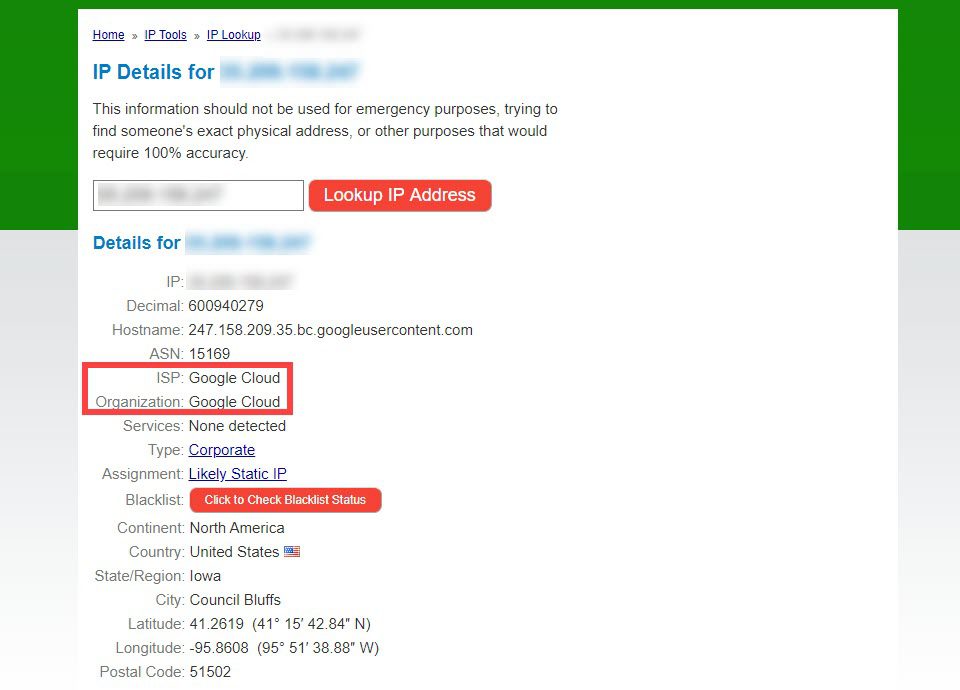
Use tools like Whois. com or hosting checker websites to identify a website’s hosting provider. Simply enter the website’s URL to get the hosting details. You can also use online tools like “WhatIsMyIPAddress” to find the IP address and trace the host.
How To Find The Hosting Provider Of A Website?
Use online tools like WHOIS Lookup or Hosting Checker. Enter the website’s URL to find the hosting provider. Look for registrant information which often includes hosting details. Check the IP address and perform a reverse IP lookup. This can reveal the hosting company.
How To Find Out What Platform A Website Is Hosted On?
Use online tools like WhoIsHostingThis or BuiltWith to identify a website’s hosting platform. Check the website’s DNS records for more details. You can also inspect the site’s source code for clues about its hosting service. These methods are quick and effective for determining hosting platforms.
How Do I See What Server A Website Is Using?
Use online tools like Netcraft or BuiltWith. Enter the website URL to see server details. Alternatively, check HTTP headers using browser developer tools for server information.
Conclusion
Discovering a site’s web host is easier than you think. Use tools like Whois for quick searches. Look for domain records and server details. Check hosting provider websites for extra clues. Try online forums for advice from experienced users. Investigate site elements that hint at hosting services.
Don’t forget, practice makes perfect. Over time, you’ll get better at identifying web hosts. It’s a handy skill for managing your own site or helping others. Keep exploring and learning more. You’ll gain confidence and knowledge in no time. Happy hosting discovery!


