
Have you ever stumbled upon a WordPress site that looks so captivating you wish you could replicate its design for your own website? You’re not alone.
Many of us find ourselves enchanted by the sleek layouts and unique functionalities that some WordPress themes offer. But how do you unravel the mystery of which theme is being used? You’re about to discover the secrets behind identifying WordPress themes effortlessly.
Imagine the possibilities if you could pinpoint the exact theme that sparks your interest. You could leverage its features to enhance your site, attract more visitors, and ultimately achieve your online goals. Whether you’re a seasoned developer or a beginner dipping your toes into the WordPress waters, knowing how to find out what themes a site uses can be an invaluable tool in your web development arsenal. As you delve deeper into this article, you’ll uncover practical tips and tricks that can transform the way you approach theme identification. Get ready to unlock the potential of your website by learning how to identify and utilize the best WordPress themes out there. Let’s dive in!

Credit: www.wpbeginner.com
Identifying WordPress Themes
Check the website’s source code. Right-click and select “View Page Source.” Look for the word “theme” in the code. You may find the theme name there. Another way is using online tools. Many websites offer free tools. They can detect WordPress themes easily. Enter the website URL. The tool will show the theme name. These methods are simple and effective. No technical skills needed. Just follow the steps.
Use browser extensions to find themes. Some extensions are designed for this purpose. Install them in your browser. Visit the website and check the extension. It will display the theme name. Another method is to contact the website owner. Ask them directly about the theme. They might share this information. For developers, use web developer tools. Inspect elements to find theme details. These techniques need some skills. But they provide more accurate results.
Inspecting Source Code
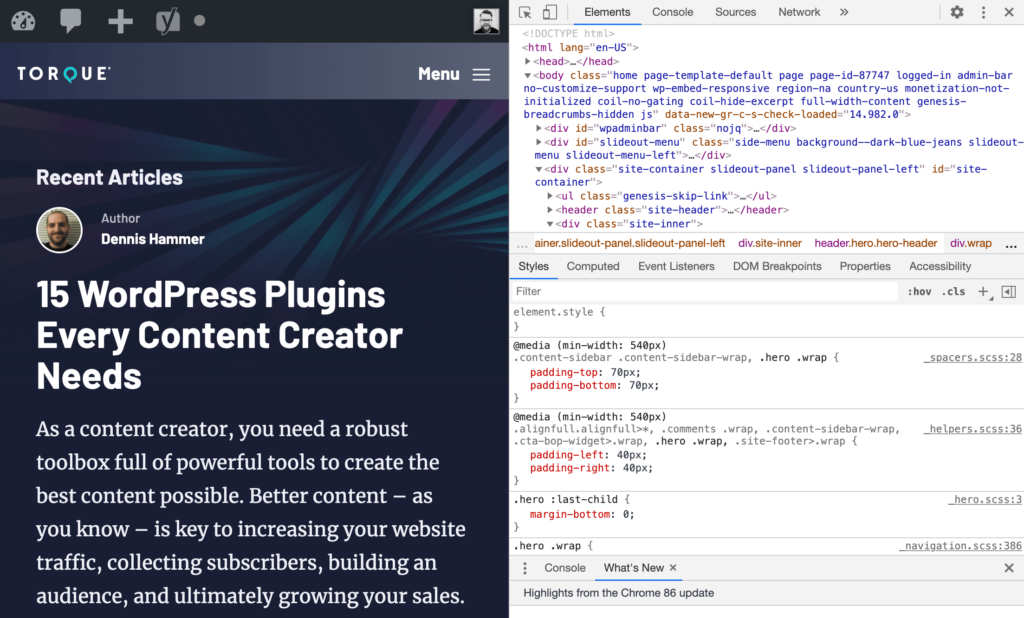
Browser tools help see the code behind web pages. Open the website. Right-click on the page. Choose “Inspect” or “Inspect Element”. This shows the developer tools. Look for “wp-content/themes” in the code. It shows the theme name. The theme name is usually after “/themes/”. Sometimes themes are hidden. Special themes might not show easily. But most sites show them here.
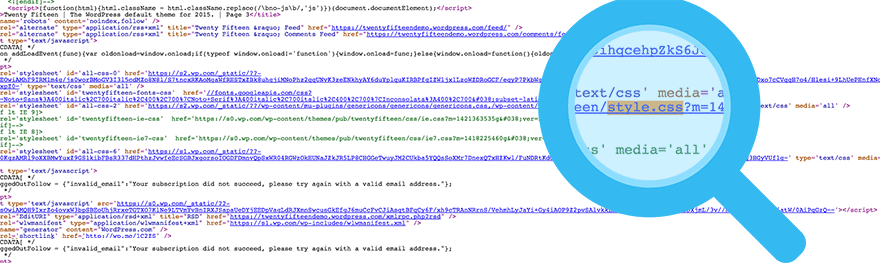
The theme info is often in the style.css file. In developer tools, find the “style.css“. Click it. Look at the top of the file. You might see the theme name and author. This file gives many theme details. But some sites might hide theme details. Check other places in the code if needed.
Online Theme Detectors
Many tools help you find out WordPress themes. These tools are easy to use and quick. Enter the website URL and get results in seconds. You can find the theme name, version, and even the author. This makes it easier to know what themes your favorite sites use.
| Pros | Cons |
|---|---|
| Easy to use. | Not always accurate. |
| Quick results. | Some sites hide their themes. |
| Free tools available. | May not detect custom themes. |
Checking Style Sheets
Style sheets hold the design of a website. They are like the clothes for the web pages. These sheets show what the site looks like. In WordPress, themes use CSS files to style the pages. The CSS files tell where to place colors, fonts, and layouts.
Finding Css Files
First, look in the page source of the website. Right-click on the page and choose “View Page Source.” You will see a lot of code. Search for “.css” in the code. This helps find the CSS files. These files tell you which theme is used.
Interpreting Theme Details
CSS files contain clues. They show theme names and sometimes version numbers. Look for comments in the CSS code. These may say the name of the theme. Some files may also link back to the theme’s website. This provides more details about the theme.
Using WordPress Theme Search
Many sites use themes from theme marketplaces. These marketplaces offer many choices. Themes often come with unique designs. Some themes are very popular. They are seen often.
Theme marketplaces are places to buy themes. They have many options. Some famous ones are ThemeForest and Elegant Themes. Each marketplace has a wide variety. You can find themes for different needs. Some themes are made for blogs. Others are for stores.
Common themes have distinct features. They are easy to spot. Many sites use them. These themes have simple layouts. You might see similar elements often. Recognizing them helps in identifying themes.
Credit: winningwp.com
Contacting The Site Owner
Write a polite email to the owner. Ask about the WordPress theme they use. Be respectful and clear. State why you want the information. Sometimes, they will respond. This can be the easiest way.
Some owners may not reply. They might keep their theme a secret. Respect their choice. They have reasons for not sharing. Always be polite. Avoid asking too many times. It can annoy the site owner.
Ethical Considerations
Understanding ethical considerations is crucial when exploring WordPress themes. Respect privacy and avoid unauthorized access while researching website themes. Always seek permission or use legitimate tools.
Respecting Privacy
Respecting privacy is crucial when exploring WordPress themes. Avoid tools that invade personal data. Users must feel safe when their site is viewed. Always ask for permission if unsure. Respect is key in all interactions. Never share theme details without consent. Keeping privacy intact builds trust.
Avoiding Unauthorized Access
Unauthorized access harms site owners. It breaks trust and legal boundaries. Use only approved methods to check themes. Illegal access can lead to penalties. Explore themes ethically by using public information. Owners appreciate honest approaches. Always respect the site’s security measures.
Credit: torquemag.io
Frequently Asked Questions
How Can I Identify A WordPress Theme?
To identify a WordPress theme, use online tools like WhatTheme or WPThemeDetector. These tools analyze the site and display theme details. Alternatively, inspect the site’s source code for theme-related information. Look for theme names or author details in the HTML code or CSS files.
Are There Tools To Detect WordPress Themes?
Yes, there are several tools to detect WordPress themes. Popular ones include WhatTheme, WPThemeDetector, and ScanWP. These tools scan the website and provide information about the theme. They can help you understand the site’s design elements and functionalities.
Can I Find Out A Theme Using Browser Inspection?
Yes, you can find out a theme using browser inspection. Right-click on the website and select “Inspect” or “View Page Source. ” Look for theme-related information in HTML or CSS files. Search for “wp-content/themes” to identify the theme name and details.
Is It Legal To Find A WordPress Theme?
Yes, it is legal to find out a WordPress theme. Identifying a theme involves publicly available information or using online tools. However, using the theme’s design without permission might violate copyrights. Always ensure compliance with licensing agreements and respect intellectual property rights.
Conclusion
Discovering WordPress themes is simpler than you might think. Use tools like What WordPress Theme Is That. Explore browser extensions for quick insights. Manual methods, like checking the source code, offer more control. Understanding themes helps improve your site design.
You can learn from competitors and enhance your own website. Practice regularly to get better at identifying themes. Share your findings with others to build community. Remember, every theme offers unique design possibilities. Stay curious and keep exploring. Your WordPress journey is just beginning.


