
Are you curious about who hosts your favorite website or want to find out where your own domain is hosted? Knowing how to find out domain hosting can give you control over your online presence and help you make smarter decisions for your website.
Whether you’re troubleshooting issues or planning a move to a better service, this simple skill can save you time and frustration. Keep reading, and you’ll learn easy, step-by-step methods to uncover your domain hosting information quickly—no tech jargon, no confusion.
Ready to take charge of your website? Let’s dive in!
Check Domain Registration Details
Checking domain registration details is a key step to find out domain hosting. These details reveal who owns the domain and where it is registered. This helps identify the hosting provider behind the domain. Domain registration data is public and easy to access.
Knowing how to check these details saves time and avoids confusion. It gives clear information about the domain’s background and hosting service. Here are two simple ways to check domain registration details.
Use Whois Lookup
WHOIS lookup is a common tool to find domain registration data. Enter the domain name in a WHOIS search website. The tool shows the domain owner’s name, contact, and registrar details. It also lists important dates like registration and expiration. This data helps trace the hosting provider.
WHOIS results vary depending on the domain extension. Some domains hide owner info for privacy. Still, registrar and server info often appears. This is useful to learn about hosting companies.
Analyze Registrar Information
The registrar manages domain registrations and records. Its name appears in the WHOIS data. Knowing the registrar helps track hosting providers. Some registrars also offer hosting services. Others only register domains.
Compare the registrar data with hosting records. Sometimes, the hosting company matches the registrar. Other times, the domain points to different hosting servers. This analysis guides you in finding the correct host. Registrar info is a clue to the domain’s hosting environment.

Credit: hostarmada.com
Identify Hosting Provider
Identifying the hosting provider of a domain helps understand where the website is stored. This knowledge can assist with technical support, security checks, and website management. Several methods exist to find out who hosts a domain. Each method offers a different level of detail and ease.
Perform Dns Lookup
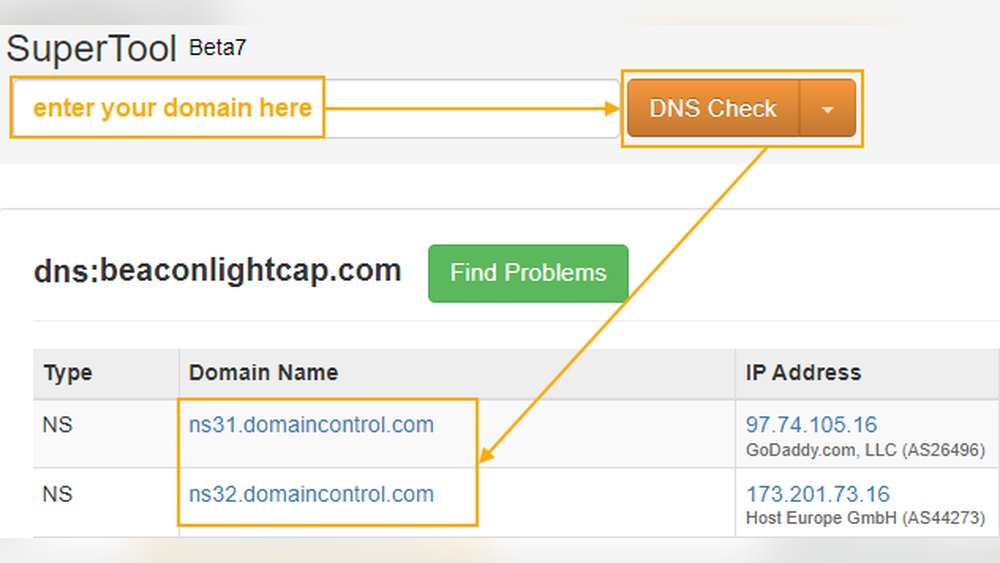
DNS lookup reveals the domain’s server details. Use tools like nslookup or dig to check DNS records. These records often include the IP address of the hosting server. Once you have the IP, you can trace it to find the hosting provider. DNS lookup gives direct information from the domain’s settings.
Trace Ip Address
Tracing the IP address shows the location of the hosting server. Use IP lookup services to find the owner of the IP. This owner is usually the hosting company. The trace provides the company name and sometimes the server’s physical location. This method is simple and effective for quick checks.
Use Online Hosting Checker Tools
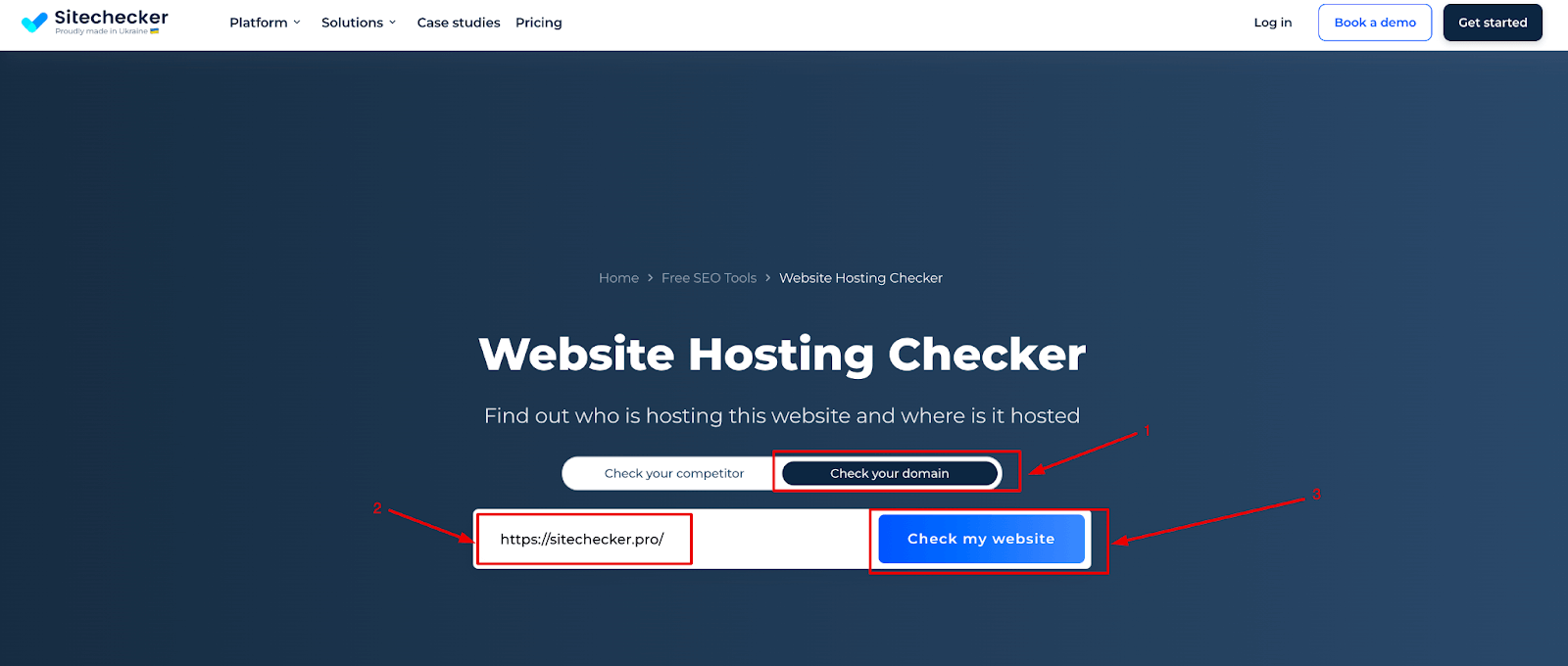
Many websites offer free hosting checker tools. Enter the domain name, and the tool shows the hosting provider. These tools gather data from multiple sources for accuracy. They also display additional info like server type and location. Online tools are user-friendly and ideal for beginners.
Explore Website Backend
Exploring the backend of a website can reveal useful details about its hosting. This process helps you discover where the website is stored and managed. It involves checking parts of the site that are not visible to regular visitors but hold key information.
Check Website Headers
Website headers carry important data sent from the server to your browser. These headers often show the server type or hosting provider. Use browser tools or online services to view these headers. Look for fields like “Server,” “X-Powered-By,” or “Via.”
These fields sometimes name the hosting company or the technology used. This step gives quick clues about the hosting environment. It requires no special software—just a browser and some basic tools.
Review Html Source Code
The HTML source code contains hidden comments and meta tags. Open the page source using your browser’s “View Source” option. Scan for comments or tags mentioning hosting details or CDN providers.
Sometimes developers leave notes or scripts linked to hosting platforms. Scripts from services like Cloudflare or AWS can indicate the host. This method helps uncover hosting info without needing access to the server.

Credit: www.nameboy.com
Contact Domain Owner
Contacting the domain owner is a direct way to learn about domain hosting. The owner holds key information about where the domain is hosted. Reaching out can clear doubts and get accurate details fast.
Find Contact Information
Start by finding the owner’s contact details. Use a WHOIS lookup service to get public information. This service shows the registered owner’s email and phone number. Sometimes, privacy protection blocks this info. In that case, check the website’s “Contact” or “About” pages. Social media profiles linked to the domain can also help.
Send Hosting Inquiry
Write a clear message asking about the domain hosting. Keep it short and polite. Introduce yourself and explain why you want the information. Avoid technical jargon to keep it simple. Wait patiently for a reply; owners may take time to respond. Respect their privacy if they choose not to share details.
Use Command Line Tools
Using command line tools is a quick way to find out domain hosting details. These tools work on most computers and do not need extra software. They give direct information about the domain’s IP and server location. Simple commands can reveal important hosting data.
Ping And Traceroute Commands
The ping command checks if a domain is active by sending small data packets. It shows the response time and IP address of the server hosting the domain. This helps confirm the domain’s server location.
Traceroute tracks the path data takes from your computer to the domain’s server. It lists all the steps or hops along the way. This can help identify the hosting provider or server region by analyzing the route.
Nslookup And Dig Commands
Nslookup queries the Domain Name System (DNS) to find the IP address linked to a domain. It can also show the name servers used by the domain. These details help identify the hosting company.
The dig command provides detailed DNS information. It reveals the domain’s IP, name servers, and mail servers. Dig is useful for deep analysis of domain hosting and DNS setup.
Credit: sitechecker.pro
Consider Privacy And Security
Privacy and security are key when finding out who hosts a domain. Protecting personal information keeps you safe online. Many domain owners use tools to hide their details. This makes it harder to see who controls the domain. Understanding these protections helps you gather accurate data without risking privacy.
Domain Privacy Protection
Domain privacy protection hides the owner’s personal details. Registrars replace real data with generic contact info. This stops spammers and hackers from getting private information. It also keeps the domain owner’s identity secret. Privacy services usually come with a small fee. Without this, anyone can see the owner’s name, address, and phone number.
Limitations Of Public Data
Public domain data can be incomplete or outdated. Privacy tools block much of the important info. Some hosts use proxy services to hide their identity. This makes it hard to know who really owns the domain. Whois databases often show limited information. Use multiple sources to confirm hosting details. Expect some domains to stay hidden for privacy reasons.
Frequently Asked Questions
How Can I Check Who Hosts A Domain?
You can use online tools like WHOIS lookup or hosting checker websites. These tools reveal the hosting provider and server details quickly. Simply enter the domain name to get accurate hosting information.
What Is The Easiest Way To Find Domain Hosting?
The easiest way is to use free online hosting lookup tools. They provide instant details about the web host by scanning DNS records and IP addresses. No technical knowledge is needed for this method.
Can I Find Hosting Info Using Domain Registrar?
Sometimes, yes. The registrar often lists hosting details if they offer hosting services. However, if hosting is separate, you’ll need a hosting checker tool to identify the actual host.
Why Is Knowing Domain Hosting Important?
Knowing domain hosting helps manage your website better. It aids in troubleshooting, transferring, or renewing services. It also ensures you contact the right provider for technical support.
Conclusion
Finding out your domain hosting is easier than it seems. Use online tools or check your domain registrar’s details. Knowing your host helps you manage your website better. It also saves time when you need support or upgrades. Always keep your hosting info handy for quick access.
Simple steps lead to better control of your site. Keep learning and stay confident in managing your online presence.


