
Have you ever wondered who is behind a website or where it’s actually hosted? Knowing a website’s domain host can reveal a lot—whether you’re curious about security, planning your own site, or just want to learn more.
But finding this information isn’t always straightforward. You’ll discover simple, step-by-step ways to uncover a website’s domain host quickly and easily. By the end, you’ll have the tools to dig deeper into any site you visit. Ready to unlock the mystery?
Let’s get started.
Check Domain Registrar
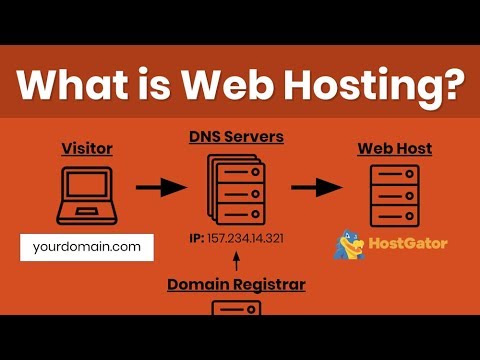
Checking the domain registrar is an important step to find out a website’s domain host. The domain registrar is the company that manages the domain name registration. Knowing this helps you learn who controls the domain and where it is registered. This information is often public and easy to access.
Use Whois Lookup
WHOIS lookup is a simple tool to find domain registration details. Just enter the website’s domain name into a WHOIS search service. The tool then shows the domain owner’s information and the registrar used. Many websites offer free WHOIS lookup services online. This method works for most domains and gives quick results.
Identify Registrar Details
After using WHOIS, check the registrar details carefully. You will see the registrar’s name and contact information. This shows where the domain is registered. Sometimes, the registrar also hosts the domain. Other times, the hosting is separate. Knowing the registrar helps you start the search for the domain host.
Credit: www.youtube.com
Use Online Hosting Checker Tools
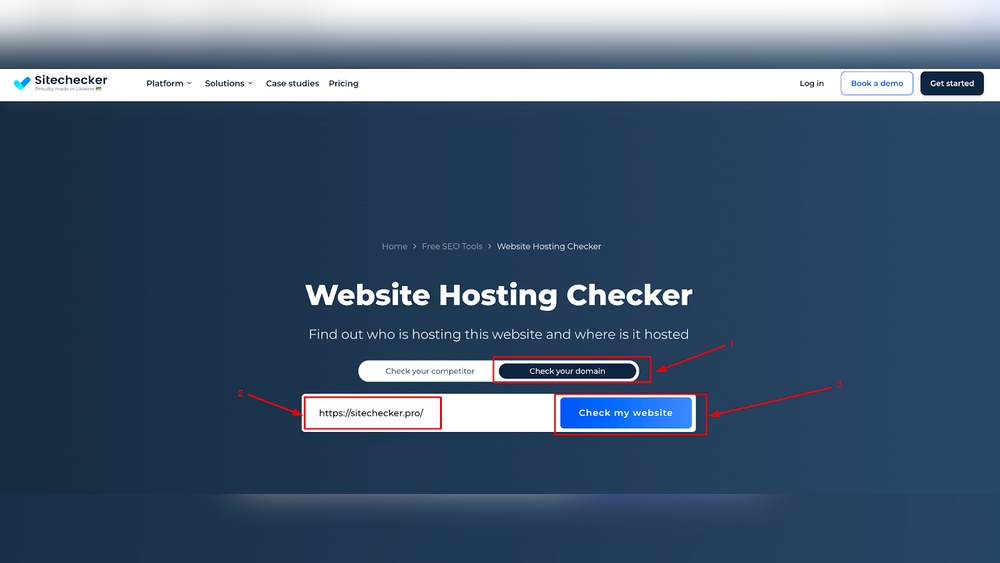
Online hosting checker tools make finding a website’s domain host easy. These tools scan the website and show which company provides the hosting service. No special skills needed. Just enter the website address and get the results quickly.
These tools save time and give accurate information. They help understand where a site is hosted and can guide decisions for your own website.
Popular Hosting Checkers
Many hosting checkers are free and simple to use. Some popular ones include:
- WhoIsHostingThis
- HostAdvice
- Site24x7
- HostingChecker
Each tool has a clear interface. Just type the website URL and click search.
How To Interpret Results
The results usually show the hosting provider’s name first. You might also see the server location and IP address.
Look for the hosting company name or brand. Sometimes the tool shows extra details like the domain registrar.
Use this info to check the host’s reputation or compare services.
Analyze Dns Records
Analyzing DNS records reveals key details about a website’s domain host. DNS records store important information like where the website is hosted and the mail servers used. These records help identify the company managing the hosting service. Understanding DNS records can guide you to the domain host quickly and easily.
Accessing Dns Information
Start by using online DNS lookup tools. Enter the website’s domain name into these tools. They display various DNS records like A, MX, and NS records. The NS (Name Server) records often point to the hosting provider. Checking these records gives you a clear path to find the host.
Finding Hosting Server Details
A records show the IP address linked to the website. Use this IP to trace the hosting server’s location. Online IP lookup services can tell you which company owns that IP. This method helps you confirm the hosting provider behind the website. Knowing the hosting server details gives you a better understanding of the website’s backend.

Credit: www.nameboy.com
Look Up Ip Address
Finding a website’s domain host starts with its IP address. The IP address acts like a phone number for websites. It helps identify where the website lives on the internet. By looking up the IP address, you can trace the hosting provider behind the site.
Finding Website Ip
First, find the website’s IP address. You can do this using a command prompt or online tools. On Windows, open Command Prompt and type ping website.com. The IP address shows in the reply. On Mac or Linux, use the Terminal and type ping website.com as well.
Online tools like “What Is My IP” or “DNS Checker” also help. Enter the website URL and get the IP address instantly. This step is simple and quick. The IP address is a string of numbers, like 192.168.1.1.
Tracing Ip To Hosting Provider
Once you have the IP, find the hosting provider. Use IP lookup services such as ARIN or RIPE. These services show who owns the IP and where it is registered.
Enter the IP address in the lookup tool. It displays the company that hosts the website. You will see the hosting company’s name, address, and contact info. This method reveals the website’s domain host clearly.
Review Website Source Code
Reviewing a website’s source code can reveal important details about its domain host. The source code holds hidden clues that help identify the hosting service. It takes just a few steps to access and analyze this code. This method is free and does not require any special tools or software. Understanding the source code can guide you to the website’s hosting provider.
Identifying Hosting Clues
Open the website and right-click to select “View Page Source” or press Ctrl+U. The source code will appear in a new tab. Look for comments or meta tags that mention the hosting company. Check the URLs of images, scripts, and stylesheets; they sometimes include the host’s name. Pay attention to IP addresses or server names in the code. These details often point directly to the hosting provider.
Checking For Cdn Usage
Many websites use a Content Delivery Network (CDN) to speed up loading times. CDNs can mask the real hosting provider by acting as a middleman. Scan the source code for links to popular CDN services like Cloudflare, Akamai, or Amazon CloudFront. If a CDN is active, the domain host might be hidden behind it. This insight helps you understand if the website uses additional services beyond basic hosting.
Contact Website Owner
Contacting the website owner is a direct way to learn about the site’s domain host. Owners often know their hosting details and can share them quickly. This method saves time and avoids guesswork. It works best when you find clear contact options on the site.
Using Contact Forms
Most websites have a contact form on their page. Fill in your name, email, and question clearly. Ask politely about their hosting provider. Keep your message short and to the point. Wait for a reply, which can come within a day or two. This form keeps your request private and professional.
Requesting Hosting Info
Some website owners may not respond through forms. Try sending an email if you find their address. Write a simple message explaining your need for hosting information. Be respectful and clear about why you ask. Owners often share hosting details if your purpose is honest. This method helps when forms are missing or ignored.
Common Challenges
Finding a website’s domain host can be tricky. Many obstacles can stop you from getting clear information. Understanding these common challenges helps you prepare better. Here are two major issues people face.
Privacy Protection Services
Many websites use privacy protection to hide owner details. This service keeps personal data private. It blocks access to domain registration info. As a result, you see a proxy or company name instead. This makes it hard to find the real host. Some services even hide hosting provider details. This adds another layer of difficulty. You may need special tools or permission to bypass this shield.
Shared Hosting Limitations
Shared hosting means many websites share one server. Hosts often keep server info private for security reasons. You may find the same IP for many sites. This confuses the search for the exact host. Some hosts use load balancing or content delivery networks. These methods spread site data over multiple locations. They make it harder to trace the original domain host. Without technical knowledge, this can feel like a dead end.
Tips For Accurate Results
Finding the domain host of a website can sometimes be tricky. The information may vary depending on the source or the tools used. To get accurate results, follow a few simple tips. These tips help avoid confusion and errors. They save time and give you clear information.
Cross-checking Multiple Sources
Always check more than one source for domain host details. Different websites show different data. Use popular tools like WHOIS, DNS lookup, and hosting checker sites. Compare the information from each source. If all match, you likely have the correct host. If they differ, keep searching until you find consistent results.
Regularly Updating Tools
Website hosting details can change often. Tools and databases must stay up to date to reflect this. Use tools that update their data regularly. Outdated tools may give wrong or old information. Check the last update date on the tool. Choose services with frequent updates for better accuracy.
Credit: www.greengeeks.com
Frequently Asked Questions
What Is A Domain Host And Why Is It Important?
A domain host stores your website files and makes them accessible online. It ensures your site is live and loads quickly. Choosing the right host improves website speed, security, and uptime. It’s essential for a smooth user experience and better search engine rankings.
How Can I Check A Website’s Domain Host Easily?
Use online tools like WHOIS lookup or hosting checker sites. Enter the website URL to see hosting details. These tools provide information about the domain registrar, hosting provider, and server location quickly and accurately. It’s free and requires no technical skills.
Can I Find A Domain Host Using Whois Lookup?
Yes, WHOIS lookup reveals domain registration and hosting details. It shows the domain owner, registrar, and sometimes the hosting provider. However, some hosts use privacy protection, hiding exact hosting info. For detailed hosting data, combine WHOIS with other hosting checker tools.
Why Does Knowing A Website’s Host Matter?
Knowing a website’s host helps in troubleshooting issues and understanding site performance. It’s useful for competitive analysis and security checks. Hosting details can reveal server location and reliability. This insight helps in making informed decisions about partnerships or migrations.
Conclusion
Finding a website’s domain host is easier than it seems. Use simple tools like WHOIS or hosting checker sites. These tools give clear details in just a few clicks. Knowing the host helps with website management and security. Keep these steps handy for quick checks anytime.
Understanding this info improves your online skills. Try it yourself and see how straightforward it is.


