
Are you curious about where a website is actually hosted? Knowing how to find the hosting of a domain can unlock important insights for you.
Whether you want to check your competitor’s hosting service, troubleshoot your own site, or simply satisfy your curiosity, this guide will show you exactly how to do it—step by step. By the end, you’ll have the simple tools and tricks to uncover any domain’s hosting details quickly and easily.
Ready to discover the secrets behind any website’s home? Let’s dive in!
Check Domain Whois Information
Checking the Whois information of a domain is a smart way to find out who owns it. This information often includes details about the hosting provider. It helps you understand where the website is hosted. You can easily access this data using free online tools. These tools show you technical and contact details linked to the domain.
Use Whois Lookup Tools
Many websites offer free Whois lookup services. You just enter the domain name, and the tool shows the registered information. Popular options include Whois.net, ICANN Lookup, and DomainTools. These sites provide quick results with clear data. You can see the domain registrant, creation date, expiry date, and sometimes hosting info. Using these tools is simple and fast.
Identify Hosting Provider Details
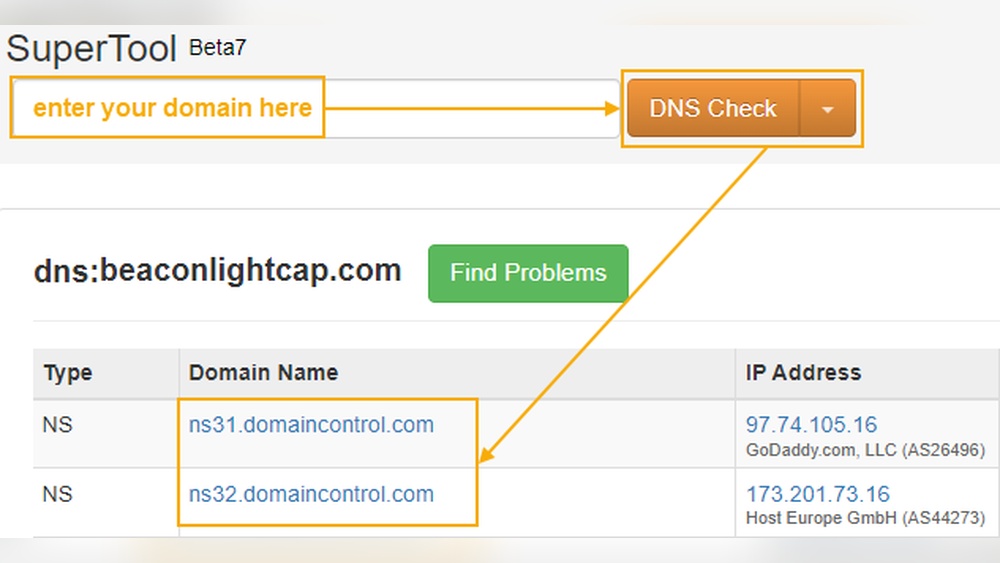
In the Whois data, look for the nameservers or DNS records. These often reveal the hosting provider’s name. Nameservers usually include the host company’s domain. For example, ns1.bluehost.com points to Bluehost hosting. Sometimes, the hosting company’s contact info appears in the administrative or technical fields. This can confirm the hosting provider. Knowing this helps in managing or troubleshooting the domain.

Credit: www.nameboy.com
Use Online Hosting Checker Tools
Online hosting checker tools help find who hosts a website. These tools are easy to use and fast. They provide detailed information about the domain’s hosting provider. Just enter the domain name, and the tool does the rest. This saves time and avoids confusion.
Many tools offer free services. They show hosting company, server location, and IP address. Some tools even provide extra details like DNS records and SSL certificates. Using these tools is a smart way to learn about domain hosting.
Popular Hosting Checker Websites
Several websites are popular for checking hosting details. HostingChecker.com is simple and clear. It shows hosting provider and IP address quickly. Another good choice is WhoIsHostingThis.com. It gives detailed info about hosting and domain registration. Site24x7.com also offers hosting checks with added server health reports. These websites require no sign-up and give instant results. They work well for beginners and experts alike.
Interpreting The Results
Results usually show hosting company name first. This tells who owns the server. Next comes the server’s IP address, which locates the server on the internet. Sometimes, tools show the server location city or country. This helps understand where the site is hosted physically. Other data may include domain registrar and DNS details. Use this info to confirm hosting or plan domain moves. Clear results help avoid errors in domain management.
Analyze Dns Records
Analyzing DNS records is a key step to find the hosting of a domain. DNS records hold important information about where a website is hosted and how it connects to the internet. By studying these records, you can discover the server details behind a domain. This process is simple and does not require special tools. Anyone can do it with some basic instructions.
Accessing Dns Settings
Start by using free online DNS lookup tools. Enter the domain name in the search box. The tool will show you different DNS records. These include A, MX, NS, and CNAME records. The A record shows the IP address of the hosting server. The NS record tells which name servers manage the domain. Sometimes, the hosting provider appears in these records.
You can also use command-line tools like nslookup or dig on your computer. These tools give detailed DNS information. This method helps if you prefer not to use online services.
Spotting Hosting Server Information
Look closely at the A record’s IP address. This IP points to the hosting server location. Use an IP lookup service to find the hosting company. It shows the server’s owner and location. This step reveals who hosts the domain.
Check the NS records for hosting clues. Some providers use branded name servers. For example, names like ns1.bluehost.com hint at Bluehost hosting. If the NS records belong to a web host, it often means they manage the domain’s hosting.
Remember, DNS records change sometimes. So, check the data carefully and confirm with multiple sources.
Ping And Traceroute Commands
Ping and Traceroute commands are useful tools for finding the hosting of a domain. They help check the connection between your computer and the server. These commands show how data travels and how fast it reaches the server. Understanding these can give clues about where the domain is hosted.
Running Ping Tests
Ping sends small packets of data to a domain’s server. It measures the time taken for the server to reply. This test shows if the server is online and how fast it responds. To run a ping test, open the command prompt or terminal. Type “ping” followed by the domain name. Press enter and wait for the results. The reply shows the IP address of the server. This IP can help identify the hosting location.
Using Traceroute For Server Path
Traceroute tracks the path data takes to reach the server. It lists all the stops between your computer and the domain’s server. Each stop is called a “hop.” This helps find the route and any slow points. To use traceroute, open the command prompt or terminal. Type “tracert” on Windows or “traceroute” on Mac/Linux followed by the domain name. Press enter to see the hops and their IP addresses. These IPs can reveal the hosting provider’s network.
Check Ip Address Ownership
Checking the IP address ownership helps reveal the hosting provider behind a domain. Every website connects to an IP address. This address points to the server hosting the site. By finding who owns the IP, you learn about the hosting company.
Finding Ip Address From Domain
Start by finding the domain’s IP address. Use the command prompt or terminal on your device. Type ping domainname.com and press enter. The IP address appears in the response. This method works for most domains.
Alternatively, use online tools to get the IP address. Enter the domain name and get the IP quickly. This step sets the base for checking IP ownership.
Using Ip Lookup Services
Next, use IP lookup services to find ownership details. These services show who controls the IP address. They provide hosting company name and location.
Popular IP lookup sites include ARIN, RIPE, and IPinfo. Enter the IP address in their search bar. The results display owner information and contact details.
This process clarifies which hosting provider runs the server. It helps verify domain hosting clearly and fast.
Leverage Browser Developer Tools
Browser developer tools offer a simple way to learn more about a website’s hosting. These tools are built into modern browsers like Chrome, Firefox, and Edge. They help you see behind the scenes of a website. You can find clues about where a site is hosted by using these tools. No special software is needed. Just open your browser and start exploring.
Inspecting Network Requests
Open developer tools by pressing F12 or right-clicking and selecting “Inspect.” Go to the “Network” tab. Reload the page to see all network requests made by the website. These requests show resources loaded from different servers. Look at the “Domain” or “Host” column. This can reveal the main server’s address. Sometimes, the IP address or hostname hints at the hosting provider.
Detecting Hosting Clues
Check the headers of network requests. Click on a request and view the “Headers” section. Look for server names, IP addresses, or data center info. Some hosting providers add their names here. Notice any CDN or cloud services used, like Cloudflare or Amazon. These often indicate the type of hosting. The presence of these services can narrow down where the site is hosted.
Consult Hosting Provider Directories
Consulting hosting provider directories is a smart way to find the hosting of a domain. These directories list many hosting companies and their details. They help you compare options easily. You can identify which provider hosts a specific domain. This saves time and effort in your search.
Industry Hosting Listings
Industry hosting listings show trusted hosting companies. These lists often come from tech websites or IT groups. They include popular and reliable hosting providers. You can check domain hosting by searching these lists. They provide clear information on services and prices. This helps you spot the right host quickly.
Community Forums And Reviews
Community forums and reviews share real user experiences. People talk about their hosting providers openly here. You can find feedback on speed, support, and uptime. These insights reveal which hosts are good or bad. Reading reviews helps avoid poor hosting services. Forums also allow you to ask questions and get advice.
Credit: www.namecheap.com

Credit: support.intermedia.com
Frequently Asked Questions
How Can I Find The Hosting Provider Of A Domain?
You can find a domain’s hosting provider using online WHOIS lookup tools. These tools reveal the registered hosting details. Alternatively, use hosting checker websites that analyze IP addresses and DNS records to identify the host quickly and accurately.
What Tools Help Identify A Domain’s Hosting Service?
Popular tools like WHOIS lookup, Hosting Checker, and DomainTools help identify hosting services. They provide information about the domain registrar and hosting company. These tools analyze DNS records, IP address, and server details to offer precise hosting information.
Can Hosting Details Be Hidden From Public View?
Yes, many domains use privacy protection services to hide hosting details. This service masks the registrant’s information in WHOIS databases. However, some advanced tools and methods may still reveal hosting providers despite privacy settings.
Why Is It Important To Know A Domain’s Hosting Provider?
Knowing a domain’s hosting provider helps in troubleshooting website issues. It also aids in verifying the site’s authenticity and security. Additionally, it assists businesses in competitor analysis and choosing the right hosting services.
Conclusion
Finding the hosting provider of a domain can be simple. Use tools like Whois or hosting checkers online. These tools show who manages the website’s server. Knowing the host helps with website issues and planning. Always double-check the information you get.
This way, you stay confident about your website’s details. Keep these steps in mind to find hosting easily. It saves time and avoids confusion later. Now, you can find hosting without stress or guesswork.


